
Orange Rocker 15 settings
The Natural channel has a single Volume knob and no EQ, so it is set by that knob and the guitar alone. Gain, Bass, Mid, Treble and Volume belong to the Dirty channel, which goes from clean to distorted depending on where Gain and Volume sit.
⚡ Match a tone on this amp- Natural Volume
- Dirty Gain
- Dirty Bass
- Dirty Mid
- Dirty Treble
- Dirty Volume
How do you dial in a specific tone on an Orange Rocker 15?
A valve amp does not respond to a knob the way a number on a page suggests. Where the Orange Rocker 15 sits in its own gain range changes what every other control does: the same treble setting is bright at low volume and harsh once the power section is working. That is why copying an artist's numbers onto this amp gives the wrong answer, and why the settings here are written against this amp's behaviour rather than the one the record was cut on.
Name the song you are chasing in the tone matcher and Tonelify returns the settings for this exact guitar amp, not the settings the original artist used. Those are two different things: the recording was made on gear most players do not own.
Settings for this amp only ever use controls it actually has, because its front panel is stored in our gear database. You will not be told to set a knob that is not on the amp.
Free download
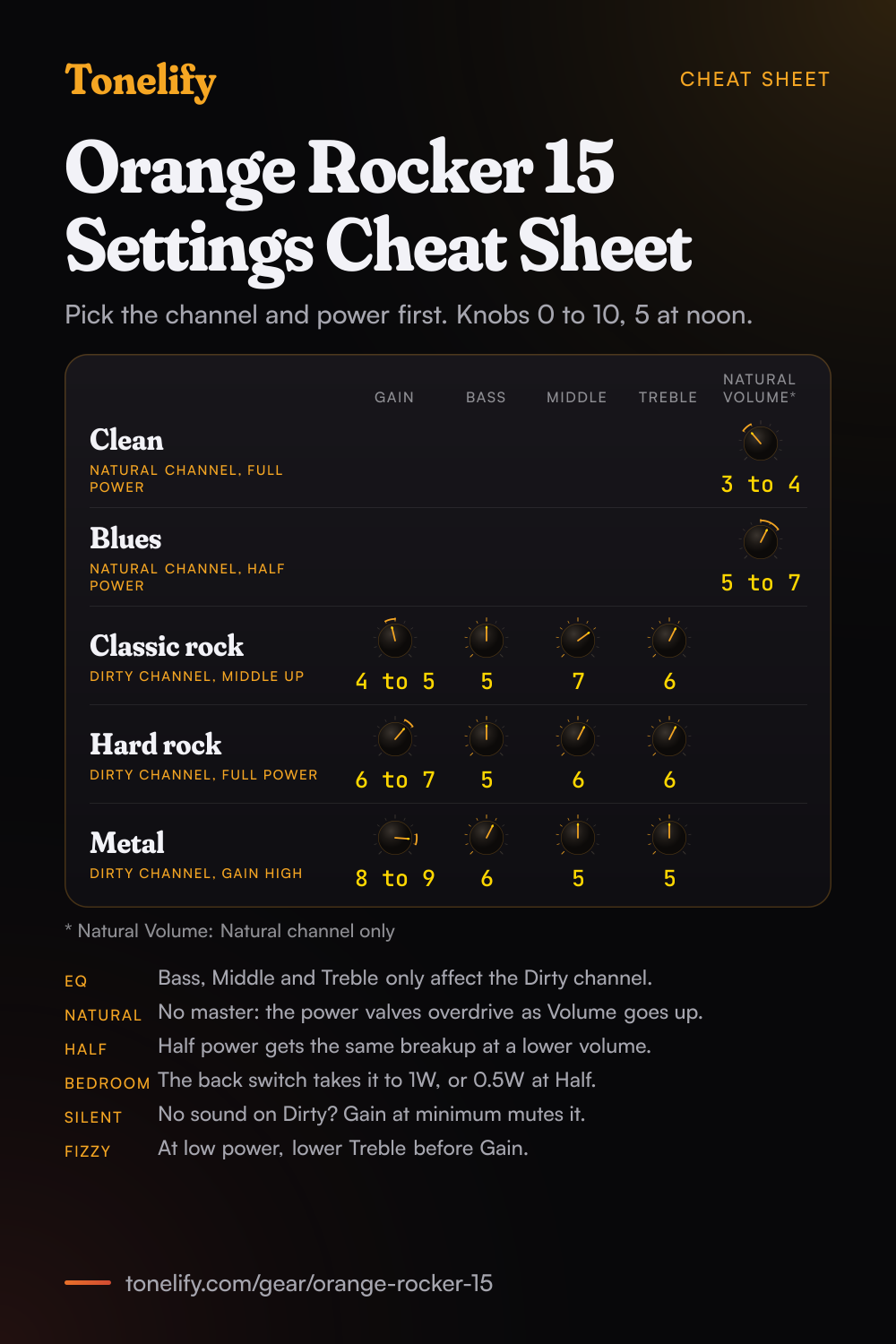
Printable cheat sheet: PDF and PNG
The clean, blues, classic rock, hard rock and metal settings from this page, together on one sheet with short tips. The PDF prints on white; the PNG is the dark version for your phone.
Starting settings on the Orange Rocker 15
Positions on a 0 to 10 scale, with 5 at twelve o'clock. They are where to begin, not Orange's numbers: pick the channel first, then move one control at a time from here.
Clean
Shape this sound with the guitar's tone knob and pickup selector, since the Natural channel has no EQ of its own. Full power on the top switch, Headroom on the back switch, Natural Volume 3 to 4. Orange's manual says the Natural Channel gives the purest route from guitar to speaker with just a single volume control, and that it is voiced to complement your guitar's natural tone. Keep that Volume low for a clean sound: MusicRadar's review heard sparkling clarity at lower volume levels, moving to a thicker, pushed tone as it goes up.
- Natural Volume 3 to 4
No EQ on this channel: use the guitar's tone knob.
Edge of breakup and blues
The Natural channel's overdrive comes from the power valves, so Half power gets you there at a lower volume. Natural Volume 5 to 7, then dig in, or roll back the guitar's volume, to move between clean and crunch. Orange's manual calls it a 'non-master'-style channel whose output valves will begin to saturate into overdrive at high volume settings, and says that in Half power mode output valve overdrive can be achieved at lower output levels. Guitar.com's review found it nicely Stones-y with the volume just past noon, and MusicRadar put the ideal volume level around the halfway mark.
- Natural Volume 5 to 7
Dig in for crunch, roll back the guitar's volume to clean up.
Classic rock
Keep Gain moderate and Middle up: this is the square, mildly driven sound MusicRadar heard as perfect for authentic early 70s pop and rock. Dirty channel, Gain 4 to 5, Bass 5, Middle 7, Treble 6, and set the loudness with the Dirty channel's Volume. Orange's manual says the Dirty Channel can be set clean or distorted by balancing where the gain and volume controls are set, and that increasing the mids creates a fatter sound. If you switch between channels, match the two Volume knobs so neither jumps out.
- Gain 4 to 5
- Bass 5
- Middle 7
- Treble 6
Hard rock
Turn it up at Full power: Guitar.com's review found that at gig levels the Rocker 15 is glorious. Dirty channel, Gain 6 to 7, Bass 5, Middle 6, Treble 6, with the Dirty channel's Volume set for the room. The same review called this channel a fierce British rock tone with a slightly fuzzy texture that is distinctly Orange, tighter and more controlled than the looser overdrive of the Natural channel. A guitar with a strong bridge pickup suits it: the reviewer said it absolutely loves a Gibson with a pokey bridge pickup.
- Gain 6 to 7
- Bass 5
- Middle 6
- Treble 6
Metal
If it fizzes at Half power or in Bedroom mode, lower Treble before Gain: Guitar.com warned that lower-power high-gain settings can get a little fizzy. Dirty channel, Gain 8 to 9, Bass 6, Middle 5, Treble 5. MusicRadar's review says the Dirty channel's gain range runs up to the 'blanket of filth' distortion that's a staple for many heavier bands. Orange's manual says reducing the mids 'scoops' the tone, so keep Middle near 5 rather than at 0, or the guitar disappears under the drums and bass.
- Gain 8 to 9
- Bass 6
- Middle 5
- Treble 5
Fizzy at low power? Lower Treble before Gain.
Playing quietly at home
Set the Headroom/Bedroom switch on the back to Bedroom. Orange's manual says it works with the Full/STBY/Half switch on the top panel to vary the output power: Headroom at Full is 15 Watts, Headroom at Half 7 Watts, Bedroom at Full 1 Watt and Bedroom at Half 0.5 Watt. Guitar.com reported that Orange added the switch because players asked for a one-watt valve amp for home use, and Orange's product page says it lets you push the power amp into natural overdrive even at neighbour-friendly volumes. Use the five settings above as they are, and turn the Volume knobs further up than you would at Headroom.
Chasing one song? Name it and the matcher writes that song's settings for the Orange Rocker 15.
What controls does the Orange Rocker 15 have?
The Orange Rocker 15 has 6 controls on its front panel: Natural Volume, Dirty Gain, Dirty Bass, Dirty Mid, Dirty Treble and Dirty Volume.
Orange Rocker 15 specifications
- Power
- 15W, switchable to 7W, 1W or 0.5W
- Speaker
- 1x10" Orange Voice of the World Gold Label
- Channels
- Natural, Dirty
- Front panel
- Natural Volume, Dirty Gain, Dirty Bass, Dirty Mid, Dirty Treble, Dirty Volume
- Released
- 2017
What the Orange Rocker 15 panel means when you dial it in
15W, switchable to 7W, 1W or 0.5W through a 1x10" Orange Voice of the World Gold Label. At that rating the power section starts working early, so the loudness knob is part of the tone setting rather than separate from it. There is no presence control on this panel, so everything above the treble band has to come from the treble control and the guitar's own tone knob. A setting copied from an amp with presence has to be rebalanced here. Drive and volume have separate knobs, so the amp can sound driven at a volume that is liveable. Where a tone sits between the two is part of the answer, not a detail. 2 channels, Natural and Dirty, and a setting only means something once the channel it belongs to is named.
Orange Rocker 15 questions
What is the difference between the Natural and Dirty channels on the Orange Rocker 15?
The Natural channel has one knob, Volume, and no EQ. Orange's manual says it gives the purest route from guitar to speaker, and that as a 'non-master'-style channel its output valves will begin to saturate into overdrive at high volume settings. The Dirty channel has Gain, Bass, Middle, Treble and Volume, and can be set clean or distorted by balancing where the gain and volume controls are set. Orange's product page calls them two completely separate channels, not just variations on the same preamp.
Why don't the Bass, Middle and Treble knobs change the Natural channel?
They belong to the Dirty channel. Orange's manual notes that the EQ controls only affect the Dirty Channel. On the Natural channel the tone comes from the guitar: Guitar.com's review noted that with no EQ, those oft-neglected controls on your guitar become your most powerful tone-shaping tools.
Why is there no sound from the Dirty channel on my Rocker 15?
Check the Gain knob first. Orange's manual says that when Gain is set to minimum, no sound will be heard, so raise Gain before you raise Volume. Then check the switch on the top panel: its centre position is standby, with Full and Half power either side of it.
What do the Half power and Bedroom switches do on the Rocker 15?
They set the output power together. The Full/STBY/Half switch on the top panel picks full or half power, and the Headroom/Bedroom switch on the back drops the level further. Orange's manual gives the four results: Headroom at Full is 15 Watts, Headroom at Half 7 Watts, Bedroom at Full 1 Watt and Bedroom at Half 0.5 Watt. Orange says that in Half power mode the volume will be reduced and output valve overdrive can be achieved at lower output levels.
How do you switch on an Orange Rocker 15?
Set the volume controls to minimum and make sure a speaker is connected. Before switching the Power switch on, put the Half/STBY/Full switch in STBY, which Orange's manual spells out as Startup Tension Bypass, and leave the amp there for at least 2 minutes. Then switch to Full or Half power to play. Orange suggests going back to STBY during breaks, which helps prolong the life of the valves.
How do you switch channels on the Rocker 15 with a footswitch?
Connect a latching footswitch, such as Orange's FS-1, to the Channel jack on the back to select between the Natural and Dirty channels remotely. Without one, the channel switch on the front panel toggles between the two.
How does the effects loop work on the Rocker 15?
Orange's manual says the loop places external effects between the amplifier's preamplifier section and output section: connect the Send jack to the input of your effects, and their output to the Return jack. Orange's specifications call it a valve buffered loop, and MusicRadar's review describes it as a series effects loop. Delay and reverb usually go in the loop, and drive pedals into the Input on the front.
Is the Rocker 15 good with pedals?
Guitar.com's review of the Rocker 15 and its stereo sibling, the Rocker 32, said that if you get your drive from a pedalboard, setting up the Dirty channel as a second clean base tone works really well: keep Gain low, which Orange's manual says produces cleaner tones, and let the pedals add the distortion. The Natural channel works as a clean base too, as long as its Volume stays below the point where the power valves start to break up.
Can you connect an extension cabinet to the Rocker 15?
Yes. There are three speaker jacks on the back: one marked 1 x 16Ω, which holds the 16-ohm internal speaker, and a pair marked 1 x 8Ω or 2 x 16Ω. To add a cabinet, Orange's manual shows the internal speaker moved into one jack of the pair and a 16-ohm extension cabinet in the other. With the internal speaker disconnected, the pair takes one 8-ohm cabinet or two 16-ohm cabinets. Orange warns never to connect two cabinets of different impedances, and to use unshielded two conductor speaker cable, never an instrument cable.
Can you use headphones or record with the Rocker 15?
There is no headphone socket or line output. Guitar.com's specifications list the connections as the FX send and return, the speaker outputs and a footswitch input, and Orange's manual says the Rocker 15 must be connected to a speaker load at all times during operation, so never run it with the speaker unplugged. To record, put a microphone on the speaker: MusicRadar's review said the half power and attenuator switches, combined with the amp's low noise levels, make it a perfect recording partner.
What valves and speaker does the Rocker 15 have?
Orange's specifications list three ECC83 (12AX7) and one ECC81 (12AT7) in the preamp and two EL84 in the power amp, and the speaker is a 10-inch Voice of the World Gold Label, which Orange says it designed in-house. Orange's manual says output valves should always be replaced with matched sets, and that bias adjustment should only be performed by authorised service personnel. It adds that the fuse labelled HT FUSE will blow in the event of output valve failure.
When did the Orange Rocker 15 come out?
In 2017. Guitar.com's review of 19 January 2017 described the Rocker 15 and the stereo Rocker 32 as Orange's revival of the Rocker 30, launched in the mid-noughties with EL34 valves and discontinued in 2010, reimagined with EL84 power stages. Orange's technical director Adrian Emsley revisited the design. Both Guitar.com and MusicRadar listed the Rocker 15 at GBP 599.
What are the best Orange Rocker 15 settings for metal?
Dirty channel, Gain 8 to 9, Bass 6, Middle 5 and Treble 5, at Full power if the room allows. These are starting points, not Orange's numbers. MusicRadar's review heard the Dirty channel reach the distortion heavier bands use; at Half power or in Bedroom mode, lower Treble first if it gets fizzy.
Is there a printable Orange Rocker 15 settings cheat sheet?
Yes. The cheat sheet on this page puts all five starting settings on one page, from the Natural channel's clean to the Dirty channel's metal, each with its channel and power setting, and short tips under them. Download the PDF to print it on white, or save the PNG to your phone.
Does Tonelify support the Orange Rocker 15?
Yes, and its front panel is stored, so settings only ever reference controls this guitar amp has: Natural Volume, Dirty Gain, Dirty Bass, Dirty Mid, Dirty Treble, Dirty Volume. You will not be told to set a knob that is not there.
Sources
Panel, specifications and dates checked against these on .
- Orange: Rocker 15/32 owner's manual (PDF copy hosted by Kraft Music)
- Orange: Rocker 15 product page and specifications (Internet Archive copy, 15 October 2025)
- Guitar.com: Orange Rocker 15 & 32 review (19 January 2017)
- MusicRadar: Orange Rocker 15 Combo review (22 March 2017)
Orange's own site could not be opened when this page was checked, so the manual and specifications above are Orange's documents as hosted elsewhere. Where Orange's current manual differs, it takes precedence.
More Orange gear
Similar amps from other makers
Settings for the song you are chasing
Name a song and Tonelify reads the documented rig behind the recording, then writes the settings for the controls the Orange Rocker 15 has. A first plan starts with 7 days free, $0 today.