Amp cheat sheets
Fender Frontman settings cheat sheet: 10G, 20G and 25R
Updated 8 min read6 knob panels4 sources
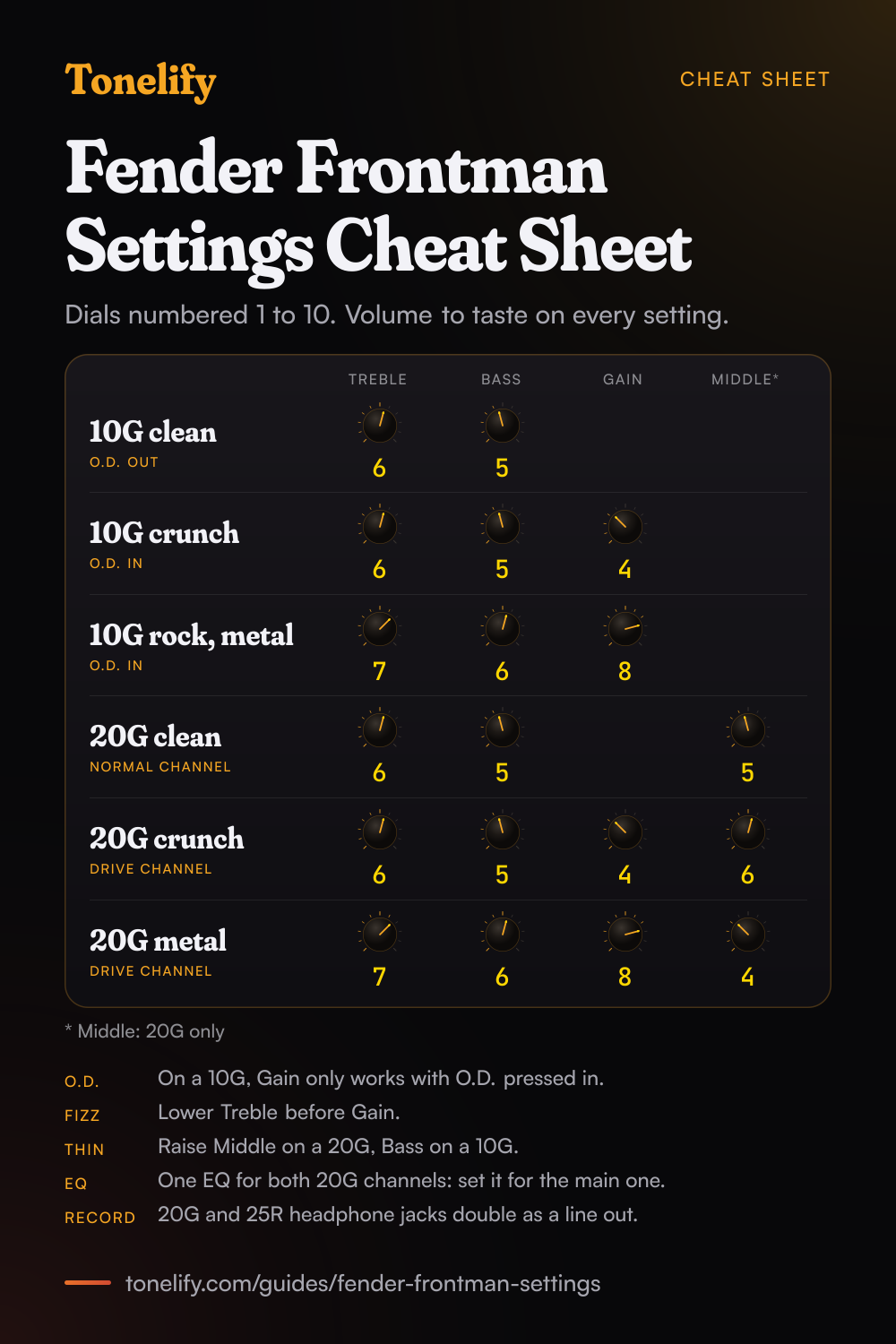
On a Frontman 10G, which has Gain, Volume, Treble and Bass and an O.D. button, start clean with O.D. out, Treble 6 and Bass 5. For crunch, press O.D. in and set Gain 4, Treble 6 and Bass 5. For rock and metal, Gain 8, Treble 7 and Bass 6. Volume sets the loudness either way. On a Frontman 20G, which adds Middle and a drive channel with its own volume, use the same values with Middle 5 for clean, 6 for crunch and 4 for metal.
These are Tonelify's starting points on the 10G's and 20G's dials, which are numbered 1 to 10. Fender's 10G manual says Gain controls the amount of distortion when Overdrive is selected, so on a 10G, Gain does nothing until O.D. is pressed in. The older Frontman 25R comes with four settings of Fender's own, drawn in its manual: Old Faithful on the normal channel, and Barbed Wire, Hard Times and Simply Speaking on the drive channel.
Free download
Printable cheat sheet: PDF and PNG
The 10g clean, 10g crunch, 10g rock, metal, 20g clean, 20g crunch and 20g metal settings from this guide, together on one sheet with short tips. The PDF prints on white; the PNG is the dark version for your phone.
How a Frontman panel works
On a Frontman 10G there is one channel and an O.D. button. Fender's manual says O.D. activates the overdrive circuit, Gain controls the amount of signal distortion when Overdrive is selected, Volume controls the loudness, and Treble and Bass adjust the high and low frequency tone.[1] There is no Middle knob.
The Frontman 20G has two channels. Normal Volume controls the loudness of the normal channel; the Drive Select button activates the drive channel, where Gain adjusts the amount of gain and overdrive and Drive Volume sets the loudness.[2] Treble, Middle and Bass are one set of EQ knobs. The Frontman 25R works the same way, with a Gain Select switch for the drive channel and a Reverb knob that Fender's manual says works on both channels.[3]
Which Frontman do you have?
Fender's current manuals cover the Frontman 10G, at 10 watts RMS into 4 ohms,[1] and the Frontman 20G, at 20 watts through one 8 inch Special Design speaker.[2] The Frontman 25R is an older model: its manual gives 25 watts RMS and one 10 inch Special Design speaker, and adds reverb, a footswitch jack and an external speaker jack.[3]
Fender's catalogue page for the range also lists the Frontman 15G, at 15 watts with one 8 inch speaker, and the Frontman 15R, which adds Fender Reverb.[4] Their manuals were not available to Tonelify, so this guide gives no settings of their own; their knobs share the names used here.
| Model | Power and speaker | Controls | Jacks |
|---|---|---|---|
| Frontman 10G | 10 watts RMS into 4 ohms | Gain, O.D. button, Volume, Treble, Bass | Aux in (3.5mm), headphones |
| Frontman 20G | 20 watts, one 8 inch Special Design | Normal Volume, Gain, Drive Select, Drive Volume, Treble, Middle, Bass | Aux in (1/8 inch), headphones that double as a line out |
| Frontman 25R | 25 watts RMS, one 10 inch Special Design | Normal Volume, Gain, Gain Select, Drive Volume, Treble, Mid, Bass, Reverb | Footswitch, external speaker (8 ohms minimum), headphones that double as a line out |
Best Frontman 10G settings
Clean: leave O.D. out, Treble 6, Bass 5, and Volume to taste. Gain only works with O.D. pressed in, so its position does not matter here.[1] Crunch: press O.D. in, Gain 4, Treble 6, Bass 5, which keeps chords clear enough for blues and classic rock rhythm parts.
Rock and metal: O.D. in, Gain 8, Treble 7, Bass 6. Fender's manual calls the 10G a high-gain analog amplifier,[1] so there is plenty of distortion above 8. With no Middle knob, a sound that is too thin needs Bass up a step, and one that fizzes needs Treble down before Gain.
- Treble 6
- Bass 5
- Gain 4
- Treble 6
- Bass 5
- Gain 8
- Treble 7
- Bass 6
Best Frontman 20G settings
Clean: leave Drive Select out and set Normal Volume to taste, Treble 6, Middle 5, Bass 5. Crunch: press Drive Select, Gain 4, Treble 6, Middle 6, Bass 5, and Drive Volume to match the clean channel. Fender's manual says Gain works in conjunction with Drive Volume,[2] so raise Gain for more distortion and Drive Volume for more level.
Metal: Drive Select in, Gain 8, Treble 7, Middle 4, Bass 6. Stop Middle at about 4: lower than that, the guitar gets thin next to a band. Treble, Middle and Bass are one set of knobs for both channels, so set them for the channel you play most and check that the other still sounds right.
- Treble 6
- Middle 5
- Bass 5
- Gain 4
- Treble 6
- Middle 6
- Bass 5
- Gain 8
- Treble 7
- Middle 4
- Bass 6
Fender's own Frontman 25R sound settings
The Frontman 25R's manual opens with four sound settings of Fender's own, each drawn as the front panel with every knob set, and the pickup to use.[3] These are Fender's settings, read off its drawings on the 25R's 0 to 10 dials, not Tonelify's.
Old Faithful is the clean sound, on the normal channel with any pickup: Volume 3, Treble 4, Mid 3, Bass 5, Reverb 2.[3] Barbed Wire is the drive channel on the bridge pickup with Gain 8. Hard Times turns Gain down to 1 and Drive Volume up to 10, and Simply Speaking sets Gain, Treble, Mid, Bass and Reverb at 10 with Drive Volume at 1.
| Setting | Channel and pickup | Gain | Volume | Treble | Mid | Bass | Reverb |
|---|---|---|---|---|---|---|---|
| Old Faithful | Normal, any pickup | Not used | 3 | 4 | 3 | 5 | 2 |
| Barbed Wire | Drive, bridge | 8 | 3 | 5 | 3 | 2 | 2 |
| Hard Times | Drive, neck | 1 | 10 | 3 | 5 | 5 | 2 |
| Simply Speaking | Drive, bridge | 10 | 1 | 10 | 10 | 10 | 10 |
Headphones, recording and the aux input
Plug headphones into the 10G and Fender's manual says the speaker turns off automatically.[1] On the 20G and 25R, the headphone jack mutes the speaker too, and both manuals say it can also be used as an unbalanced line output,[2][3] which is the way to record a Frontman without a microphone.
The 10G and 20G have an aux input for a phone, CD player or drum machine: set its loudness on the device, as the manuals say.[1][2] The 25R has an external speaker jack that needs a cabinet of at least 8 ohms, and using it disables the internal speaker.[3]
When it sounds wrong
No distortion on a 10G: press O.D. in, since Gain only works with it. No distortion on a 20G: press Drive Select. Fizzy: lower Treble before Gain. Thin: raise Middle on a 20G or 25R, or Bass on a 10G, which has no Middle knob.
The 25R's footswitch does nothing: Fender's manual says the Gain Select switch should be in the out position for the footswitch to work.[3] The speaker is silent: check the headphone and external speaker jacks, since a plug in either turns the internal speaker off.[1][2][3]
Common questions
What are the best amp settings for a Fender Frontman 10G?
Clean: O.D. out, Treble 6, Bass 5, Volume to taste. Crunch: O.D. in, Gain 4, Treble 6, Bass 5. Rock and metal: O.D. in, Gain 8, Treble 7, Bass 6. The 10G has Gain, Volume, Treble and Bass and no Middle knob, and Fender's manual says Gain only controls distortion when Overdrive is selected. These are starting points on the 10G's dials, which are numbered 1 to 10.
How do you get a clean sound on a Fender Frontman?
Leave the overdrive off: O.D. out on a 10G, Drive Select out on a 20G, Gain Select out on a 25R. Then set Treble 6 and Bass 5, with Middle 5 on a 20G, and use Volume or Normal Volume for loudness. Fender's own clean setting for the 25R, called Old Faithful, is Volume 3, Treble 4, Mid 3, Bass 5 and Reverb 2 with any pickup.
What are good Fender Frontman settings for metal?
On a 10G, O.D. in, Gain 8, Treble 7, Bass 6. On a 20G, Drive Select in, Gain 8, Treble 7, Middle 4, Bass 6. Keep Middle at about 4 rather than 0, or the guitar thins out. Fender's own high gain setting for the 25R, Barbed Wire, uses the bridge pickup with Gain 8, Treble 5, Mid 3 and Bass 2.
Does the Fender Frontman 10G have a Mid knob?
No. Fender's manual lists Gain, Volume, Treble and Bass, plus the O.D. button, and says Treble and Bass adjust the high and low frequency tone. For more body, turn Bass up a step; for less fizz, turn Treble down before Gain. The Frontman 20G adds a Middle knob, and the older 25R has one called Mid.
What does the O.D. button do on the Frontman 10G?
It turns on the overdrive. Fender's manual says O.D. activates the overdrive circuit and Gain controls the amount of signal distortion when Overdrive is selected. With O.D. out the amp is clean whatever Gain is set to; with it in, Gain at 4 gives crunch and Gain at 8 gives a rock or metal sound.
What is the difference between Gain and Volume on a Frontman?
Gain sets how much distortion the drive sound has, and Volume sets how loud the amp is. On a 20G, Fender's manual says Gain adjusts the amount of gain and overdrive in the drive channel and works in conjunction with Drive Volume, while Normal Volume sets the clean channel's loudness. The 25R's manual adds that lower gain settings sound cleaner and high ones give more sustain and distortion.
What is the difference between the Frontman 10G and the 20G?
The 10G has 10 watts RMS into 4 ohms, one channel with an O.D. button, and Treble and Bass only. The 20G has 20 watts through one 8 inch Special Design speaker, two channels, Normal and Drive, each with its own volume, and a Middle knob. Both have an aux input and a headphone jack; the 20G's doubles as a line output.
What are Fender's own Frontman 25R sound settings?
The 25R's manual draws four. Old Faithful, normal channel, any pickup: Volume 3, Treble 4, Mid 3, Bass 5, Reverb 2. Barbed Wire, drive channel, bridge: Gain 8, Drive Volume 3, Treble 5, Mid 3, Bass 2, Reverb 2. Hard Times, neck: Gain 1, Drive Volume 10, Treble 3, Mid 5, Bass 5. Simply Speaking, bridge: Gain, Treble, Mid, Bass and Reverb at 10, Drive Volume 1.
Can you use headphones or record with a Fender Frontman?
Yes. Every Frontman here has a headphone jack that turns the speaker off. On the 20G and 25R, Fender's manuals say the same jack can also be used as an unbalanced line output, so a cable from it into an audio interface or mixer records the amp without a microphone. Start with the volume low before plugging in.
Does the Fender Frontman 25R have a footswitch?
It has a jack for an optional single footswitch that switches between the normal and drive channels; the manual lists it as an optional accessory. For the footswitch to work, Fender says the Gain Select switch should be in the out position. The 10G and 20G have no footswitch jack.
Do these settings work on a Frontman 15G or 15R?
As a starting point. Fender's catalogue lists the 15G at 15 watts with one 8 inch speaker, clean and distortion tones, an aux input and a headphone output, and the 15R with Fender Reverb as well. Set the clean and drive sounds with the 20G values on this page, using the knobs your panel has; their own manuals were not available to Tonelify.
Can you connect an external speaker to a Frontman 25R?
Yes. Its manual says the External Speaker jack takes an enclosure with a minimum impedance of 8 ohms and that using it automatically disables the internal speaker. Do not plug headphones into it; they have their own jack. The 10G and 20G have no external speaker jack.
Is there a printable Fender Frontman settings cheat sheet?
Yes. The cheat sheet on this page puts the six starting settings on one page: clean, crunch and rock or metal for the Frontman 10G, and clean, crunch and metal for the Frontman 20G, with tips on O.D., Gain, Middle and the headphone jack. Download the PDF to print it on white, or save the PNG to your phone.
Sources
The numbers in brackets in the text point to this list.
- Fender: Frontman 10G owner's manual, 2025 (PDF, a retailer's copy)
- Fender: Frontman 20G owner's manual (PDF, a retailer's copy)
- Fender: Frontman 25R owner's manual, with the four sound settings (copy on ManualMachine)
- Fender: guitar amplification catalogue page with the Frontman 10G, 15G, 15R and 25R (copy on ManualsDir)
Settings for your own amp
This guide covers what is true of every rig. For a specific song on a specific amp, Tonelify reads the documented chain behind the recording and returns gain, bass, middle, treble and presence values for the controls your amp actually has. A first plan starts with 7 days free, $0 today.