Amp cheat sheets
Yamaha THR settings cheat sheet: THR5, THR10, THR10II and THR30II
Updated 9 min read5 knob panels2 sources
On a THR10II or THR30II Wireless, start clean on the CLEAN amp type with Gain at 10:00, Master 12:00, Bass and Middle 12:00 and Treble 1:00. For classic rock, pick SPECIAL with Gain at 11:00, where Yamaha's manual puts it for classic rock crunch. For metal, pick HI GAIN with Gain at 12:00, Bass 1:00, Middle 11:00 and Treble 1:00: Yamaha's own note on that amp says to tread carefully after 12 o'clock.
Gain sets the preamp distortion and Master the power amp, so set those two for the sound, then use the GUITAR knob for how loud it is. These are Tonelify's starting points in Classic mode, as clock positions with 7:00 fully down and 5:00 fully up. The first THR10 and THR5 use the same Gain and Master idea with different amp types: settings for them are in the table further down.
Free download
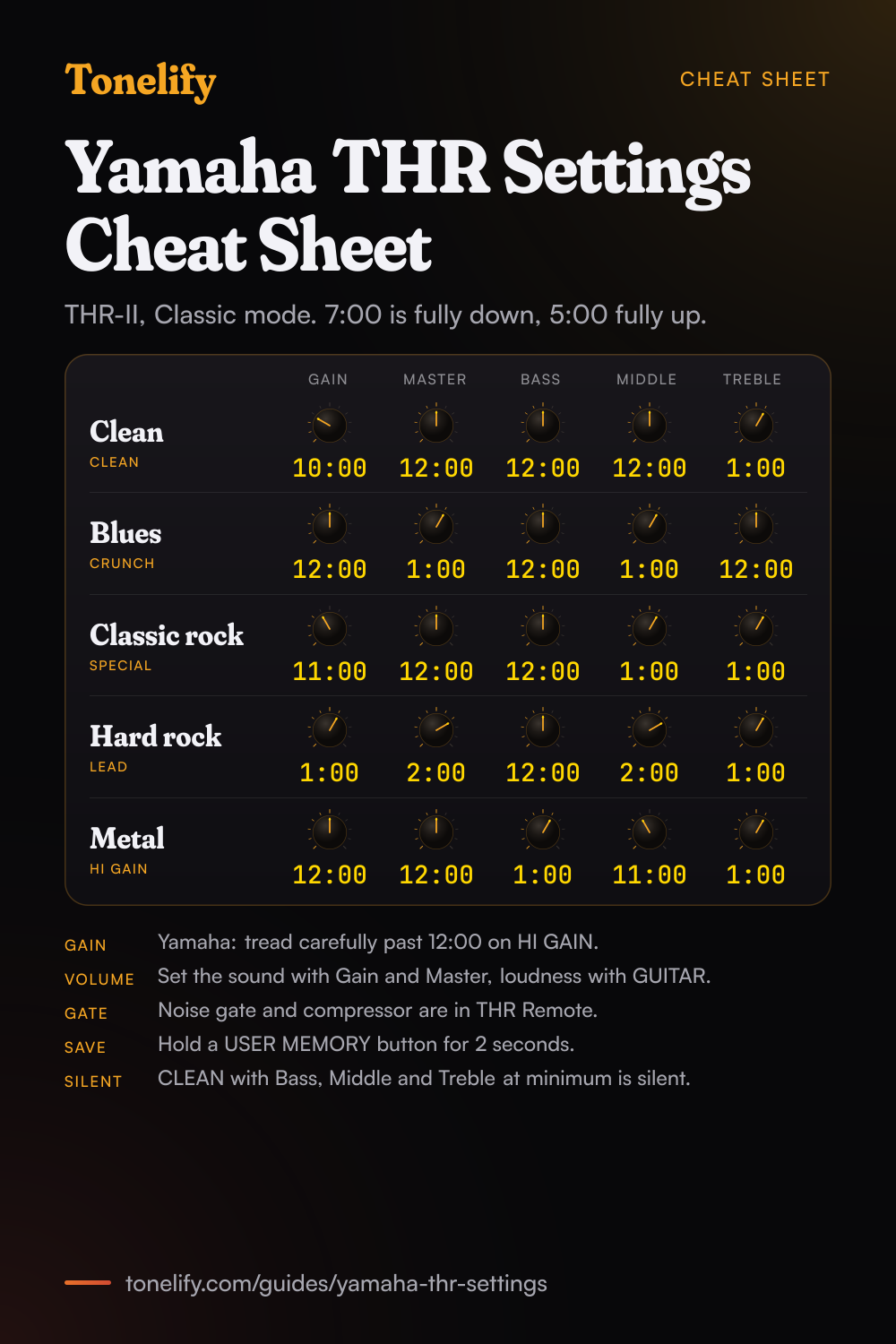
Printable cheat sheet: PDF and PNG
The clean, blues, classic rock, hard rock and metal settings from this guide, together on one sheet with short tips. The PDF prints on white; the PNG is the dark version for your phone.
How Gain, Master and Guitar work on a THR
Yamaha's THR-II manual says Gain adjusts the amount of preamp gain, and Master adjusts the volume for the guitar sound and creates power amp distortion and change in the low-range frequency.[1] Using the two in combination gives broad control over each amp type except ACO and FLAT. Once the sound is right, Yamaha says to use the GUITAR knob for the overall volume.[1]
The first THR series works the same way. Its manual says Gain and Master work in the same way as the preamp and master controls on a tube amp, and that Master affects volume, gain and power amp compression.[2] On BASS, ACO and FLAT, Master only adjusts the volume. The THR5 has one TONE knob in place of Bass, Middle and Treble: clockwise brightens the sound, counterclockwise darkens it.[2]
Which THR do you have?
The THR-II series is the THR10II, the THR10II Wireless and the THR30II Wireless. All three have the same eight amp types on the AMP knob, CLEAN, CRUNCH, LEAD, HI GAIN, SPECIAL, BASS, ACO and FLAT, and each comes in three amp modes: Classic, Boutique and Modern.[1] The THR30II Wireless switches the mode with its AMP switch; on the THR10II and THR10II Wireless the mode is changed in the THR Remote app.[1]
The first THR series is the THR10, THR10C, THR10X, THR5 and THR5A. The THR10 and THR5 share five amp types, CLEAN, CRUNCH, LEAD, BRIT HI and MODERN, and the THR10 adds BASS, ACO and FLAT. The THR10C and THR10X have amp types of their own, and the THR5A is for acoustic guitar.[2]
| Model | Rated output | Tone controls | Power |
|---|---|---|---|
| THR30II Wireless | 30 W (15 W + 15 W) | Gain, Master, Bass, Middle, Treble, AMP switch for the mode | Adaptor or built-in battery (about 5 hours, 15 W maximum) |
| THR10II Wireless | 20 W (10 W + 10 W) | Gain, Master, Bass, Middle, Treble | Adaptor or built-in battery (about 5 hours, 15 W maximum) |
| THR10II | 20 W (10 W + 10 W) | Gain, Master, Bass, Middle, Treble | Adaptor |
| THR10 | 10 W (5 W + 5 W) | Gain, Master, Bass, Middle, Treble | Adaptor or 8 AA batteries |
| THR5 | 10 W (5 W + 5 W) | Gain, Master, Tone | Adaptor or 8 AA batteries |
Best THR-II settings: THR10II and THR30II
Clean: CLEAN, Gain 10:00, Master 12:00, Bass 12:00, Middle 12:00, Treble 1:00. Blues: CRUNCH, Gain 12:00, Master 1:00, Bass 12:00, Middle 1:00, Treble 12:00, for the warm overdrive Yamaha describes on that amp. Classic rock: SPECIAL, Gain 11:00, Master 12:00, Bass 12:00, Middle 1:00, Treble 1:00. Yamaha's manual says to set the gain around 11 o'clock for classic rock crunch, or crank it for saturated rhythm tones.[1]
Hard rock: LEAD, Gain 1:00, Master 2:00, Middle 2:00, Treble 1:00. Yamaha says this amp breaks into classic British overdrive as the master volume is pushed,[1] so Master does more of the work than Gain here. Metal: HI GAIN, Gain 12:00, Master 12:00, Bass 1:00, Middle 11:00, Treble 1:00, and add Gain only in small steps: Yamaha's note on HI GAIN is to tread carefully after 12 o'clock.[1]
All five are for Classic mode. On a THR10II or THR10II Wireless, check the mode in THR Remote; in Boutique or Modern the same amp type is a different amp, so start from these settings and adjust by ear.[1]
- Gain 10:00
- Master 12:00
- Bass 12:00
- Middle 12:00
- Treble 1:00
- Gain 12:00
- Master 1:00
- Bass 12:00
- Middle 1:00
- Treble 12:00
- Gain 11:00
- Master 12:00
- Bass 12:00
- Middle 1:00
- Treble 1:00
- Gain 1:00
- Master 2:00
- Bass 12:00
- Middle 2:00
- Treble 1:00
- Gain 12:00
- Master 12:00
- Bass 1:00
- Middle 11:00
- Treble 1:00
The THR-II's 24 amps: Classic, Boutique and Modern
Each amp type is a different amp in each mode. Yamaha's Amp Modeling List describes all of them, and the table below gives the five guitar amp types from it. Two are worth knowing for heavy music: Modern LEAD is the tone that defined 1980s hard rock and heavy metal, in Yamaha's words, and Modern SPECIAL puts an overdrive before the preamp and is ideal for extended-range guitars.[1]
Modern CLEAN adds fullness and sustain as Master is turned up and suits neck pickups, and Boutique CLEAN thickens up as Gain rises, then pushes into bluesy overdrive.[1] BASS, ACO and FLAT are for bass, acoustic guitar and other instruments.
| Amp type | Classic | Boutique | Modern |
|---|---|---|---|
| CLEAN | Low-gain preamp, 6L6 output, American-style clean | Low-watt EL34, bluesy overdrive with Gain up | Low-watt EL84, fuller as Master goes up |
| CRUNCH | EL84s in Class A, British chime | One 12AX7 and one EL84, no frills | 6550 power tubes, tight bass |
| LEAD | EL34s, British overdrive as Master is pushed | Classic LEAD with more gain, darker, scooped mids | 12AX7s into EL34s, 1980s hard rock and metal |
| HI GAIN | Modern distortion, careful after 12 o'clock | ECC83s into 6L6s, German-inspired | Classic SPECIAL with even more gain |
| SPECIAL | 12AX7 and 6L6, the Brown sound | Four 12AX7s into 6L6s, tight high gain | Overdrive before the preamp, for extended-range guitars |
Best settings for the first THR10 and THR5
The first THR10 and THR5 share their five guitar amp types, so one set of settings covers both. On a THR5, set Gain and Master as the table says and use the TONE column in place of Bass, Middle and Treble. Yamaha's manual describes CLEAN as rich and clean with gentle breakup for jazz, blues and country, LEAD as a low-gain preamp into EL34s, BRIT HI as the same British clarity with a higher gain preamp, and MODERN as ultra high gain.[2]
On a THR10C, start from DELUXE for clean, CLASS A for blues and country and BRIT BLUES for rock. On a THR10X, CLEAN is the clean amp, BROWN I is the American hard rock sound and SOUTHERN HI is the heavy metal one, by Yamaha's descriptions;[2] the Gain, Master and EQ values below work as a first try on both.
| Sound | Amp type | Gain | Master | Bass | Middle | Treble | THR5 Tone |
|---|---|---|---|---|---|---|---|
| Clean | CLEAN | 10:00 | 12:00 | 12:00 | 12:00 | 1:00 | 1:00 |
| Blues | CRUNCH | 12:00 | 1:00 | 12:00 | 1:00 | 12:00 | 12:00 |
| Classic rock | LEAD | 1:00 | 1:00 | 12:00 | 2:00 | 1:00 | 1:00 |
| Hard rock | BRIT HI | 12:00 | 12:00 | 12:00 | 1:00 | 1:00 | 1:00 |
| Metal | MODERN | 12:00 | 12:00 | 1:00 | 11:00 | 1:00 | 12:00 |
Effects, the noise gate and the compressor
The EFFECT knob picks CHORUS, FLANGER, PHASER or TREMOLO and the ECHO/REV knob picks ECHO, ECHO/REV, SPRING or HALL; on both, turning further clockwise adds more, and fully counterclockwise is off.[1][2] With ECHO or ECHO/REV selected, tap the TAP/TUNER button to set the delay time.[1] On the first THR10 and THR5 the second knob is DLY/REV, with DELAY in place of ECHO.
The noise gate and the compressor have no knobs. Yamaha's manuals list both as available only from the THR Remote app on a THR-II, or the THR Editor on the first THR, and THR Remote adds Room and Plate reverbs.[1][2] For metal on HI GAIN, turn the gate on there and save the sound to a user memory.
Saving, headphones and recording
A THR-II and a first THR10 save five user memories of Gain, Master, Bass, Middle, Treble, Effect and Echo/Rev. Hold a USER MEMORY button for about 2 seconds to save, and press it briefly to recall.[1][2] To reset all five to the factory settings, switch the power on while holding USER MEMORY 1, 3 and 5.[1][2] The THR5 has no user memories.
Plugging in headphones mutes the speakers. The THR-II records over USB, and the GUITAR knob has no effect on the USB signal; the THR30II Wireless also has balanced LINE OUT jacks whose level stays the same whatever GUITAR is set to.[1] On the first THR series, Yamaha's manual says the headphone jack can also be used as a line out.[2]
When it sounds wrong
No sound on CLEAN: Yamaha's manuals say that with CLEAN selected and Bass, Middle and Treble all at minimum, there is no guitar sound.[1][2] Turn them up. No sound at all: check that the tuner is off, since it mutes the guitar, that no headphones are plugged in, and that the compressor level in THR Remote is not at 0.[1]
Tap tempo does nothing: select ECHO or ECHO/REV, since tap tempo does not work with SPRING or HALL. A # on the display means Extended Stereo is off; hold TAP/TUNER for three seconds to turn it back on.[1][2] Quieter than usual on battery: a THR-II Wireless gives 15 W at most on its battery, and Yamaha says it also limits the volume when the battery gets hot.[1]
Common questions
What are the best Yamaha THR10II settings?
Clean: CLEAN, Gain 10:00, Master 12:00, Bass and Middle 12:00, Treble 1:00. Blues: CRUNCH, Gain 12:00, Master 1:00, Middle 1:00. Classic rock: SPECIAL with Gain at 11:00. Hard rock: LEAD, Gain 1:00, Master 2:00. Metal: HI GAIN, Gain 12:00, Bass 1:00, Middle 11:00, Treble 1:00. These are Tonelify's starting points in Classic mode; on a THR10II the mode is set in THR Remote.
What are good Yamaha THR30II settings for metal?
Put the AMP switch on Classic and the AMP knob on HI GAIN, then Gain 12:00, Master 12:00, Bass 1:00, Middle 11:00, Treble 1:00. Yamaha's note on that amp is to tread carefully after 12 o'clock, so add Gain in small steps. Turn the noise gate on in THR Remote, since it has no knob. Modern SPECIAL, which Yamaha calls ideal for extended-range guitars, is the next amp to try.
How do you get a clean sound on a Yamaha THR?
Pick CLEAN and set Gain at 10:00, Master 12:00, Bass and Middle 12:00 and Treble 1:00, then use the GUITAR knob for loudness. Do not turn Bass, Middle and Treble all to minimum on CLEAN: Yamaha's manuals say there is then no guitar sound. On a THR-II in Modern mode, CLEAN gets fuller as Master goes up and suits a neck pickup.
What is the difference between Gain, Master and Guitar on a THR?
Gain sets the preamp gain, Master the power amp: Yamaha's manual says Master raises the volume and creates power amp distortion and a change in the low end. The GUITAR knob is the overall volume. Set the sound with Gain and Master, then set how loud it is with GUITAR. GUITAR does not change the signal sent over USB.
What are Classic, Boutique and Modern on the THR-II?
Amp modes. Each of the eight amp types on the AMP knob is a different amp in each mode, so the THR-II has 24 amps. Classic LEAD is EL34 British overdrive, Boutique LEAD is the same circuit with more gain and scooped mids, and Modern LEAD is Yamaha's 1980s hard rock and heavy metal amp. The THR30II Wireless has an AMP switch for the mode; the THR10II and THR10II Wireless change it in THR Remote.
What does the SPECIAL amp type do on a Yamaha THR-II?
In Classic mode it is 12AX7 and 6L6 tubes in pursuit of the Brown sound, and Yamaha's manual says to set the gain around 11 o'clock for classic rock crunch, or crank it for saturated rhythm tones. In Boutique mode it is four 12AX7s into 6L6s for tight high gain, and in Modern mode it adds an overdrive before the preamp, for extended-range guitars.
Does the Yamaha THR have a noise gate?
Yes, but not on the panel. Yamaha's manuals list the noise gate and the compressor as available only from the THR Remote app on the THR-II and the THR Editor on the first THR series. Turn the gate on there for high gain sounds, then save the sound to a USER MEMORY button so it comes back without the app.
How do you save settings on a Yamaha THR?
Hold one of the five USER MEMORY buttons for about 2 seconds; the display shows its number when the save is done. Press the button briefly to recall it. A memory keeps Gain, Master, Bass, Middle, Treble, Effect and Echo/Rev. To reset all five, switch on while holding buttons 1, 3 and 5. The THR5 has no user memories.
What are the best Yamaha THR5 settings?
The THR5 has Gain, Master and one TONE knob. Clean: CLEAN, Gain 10:00, Master 12:00, Tone 1:00. Blues: CRUNCH, Gain 12:00, Master 1:00, Tone 12:00. Classic rock: LEAD, Gain and Master 1:00, Tone 1:00. Metal: MODERN, Gain 12:00, Master 12:00, Tone 12:00. Yamaha's manual says TONE brightens the sound clockwise and darkens it counterclockwise.
What is the difference between the THR10II and the THR30II Wireless?
The THR30II Wireless gives 30 W (15 W + 15 W) against the THR10II's 20 W, has an AMP switch for the three amp modes, balanced LINE OUT jacks and a Bluetooth button, and runs on a built-in battery for about 5 hours. The THR10II runs on its adaptor only, and the THR10II Wireless adds the battery and the wireless receiver. All three share the same amp types and knobs.
Why is my Yamaha THR making no sound?
Check the tuner first: holding TAP/TUNER for a second turns it on and mutes the guitar. Then check for headphones in the PHONES jack, which mute the speakers, Gain, Master and GUITAR above minimum, and on CLEAN, Bass, Middle and Treble not all at minimum. On a THR-II, Yamaha also lists a compressor level of 0 in THR Remote as a cause.
Can you record with a Yamaha THR?
Yes. Every THR here works as an audio interface over USB, and Yamaha includes a download code for Cubase AI. On a THR-II the GUITAR knob does not change the USB signal. The THR30II Wireless also has balanced LINE OUT jacks for a mixer, and on the first THR series the headphone jack doubles as a line out.
What does the # on the Yamaha THR display mean?
Extended Stereo is off. Yamaha's manuals say the # lights when Extended Stereo, which widens the stereo sound, is switched off, and that holding TAP/TUNER for more than three seconds turns it on or off. The setting is kept when the power goes off.
Is there a printable Yamaha THR settings cheat sheet?
Yes. The cheat sheet on this page puts the five THR-II starting settings on one page, clean, blues, classic rock, hard rock and metal in Classic mode, as clock positions, with tips on Gain, Master, the noise gate and saving. Download the PDF to print it on white, or save the PNG to your phone.
Sources
The numbers in brackets in the text point to this list.
Settings for your own amp
This guide covers what is true of every rig. For a specific song on a specific amp, Tonelify reads the documented chain behind the recording and returns gain, bass, middle, treble and presence values for the controls your amp actually has. A first plan starts with 7 days free, $0 today.