
Fender Tone Master Pro presets and settings
Floor modeller with a 7-inch colour touchscreen and ten footswitches that double as rotary controls, each under its own scribble strip. 504 preset slots, up to nine Scenes a preset and four effects loops.
⚡ Match a tone on this gearHow do you dial in a specific tone on a Fender Tone Master Pro?
A multi-effects unit gives you the whole chain in one box, which means the order of the blocks is as much of the answer as the values inside them. Settings for the Fender Tone Master Pro name the amp model, the block order and the parameters together, rather than handing you numbers with no chain to put them in.
Name the song you are chasing in the tone matcher and Tonelify returns the settings for this exact multi-effects unit, not the settings the original artist used. Those are two different things: the recording was made on gear most players do not own.
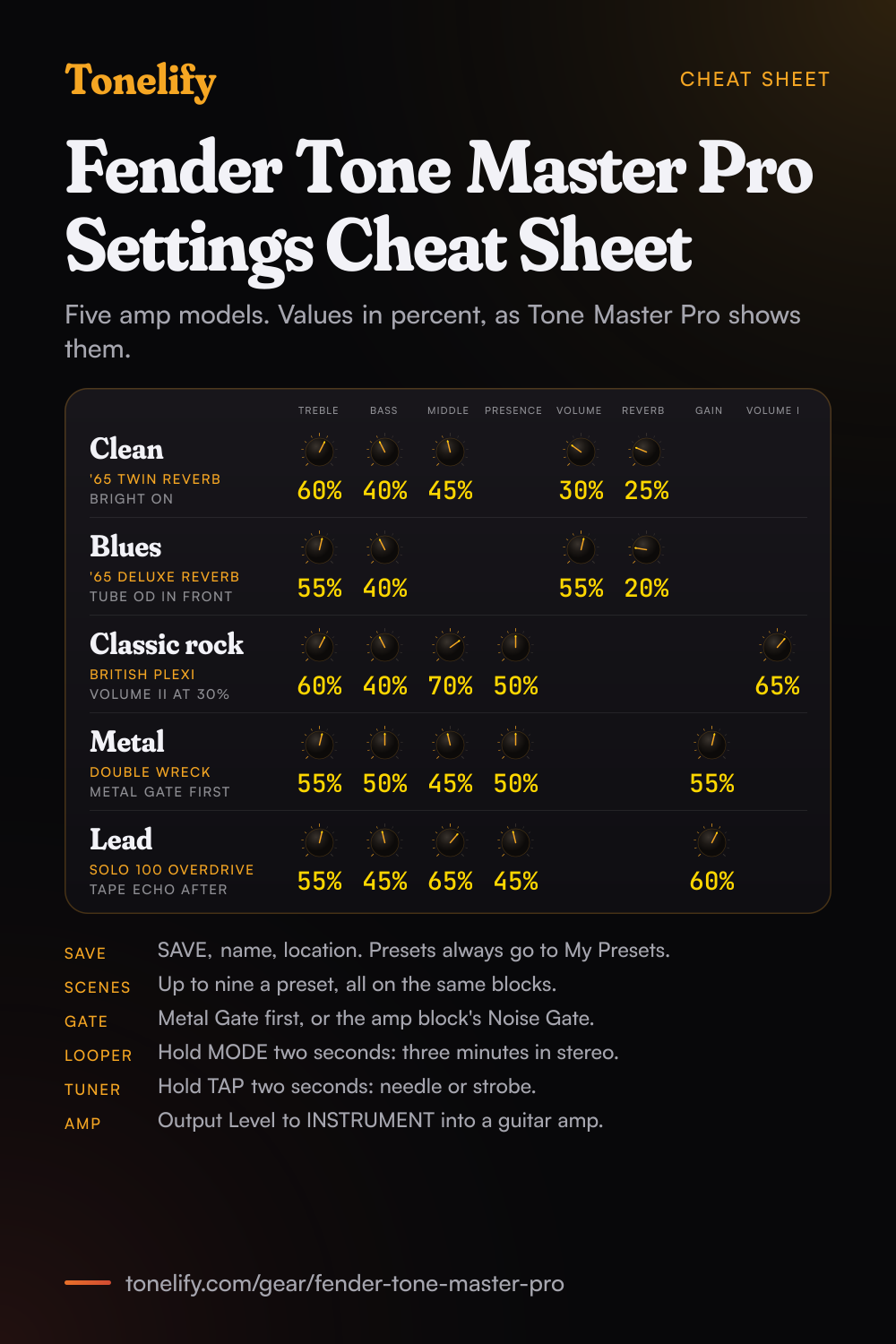
Free download
Printable cheat sheet: PDF and PNG
The clean, blues, classic rock, metal and lead settings from this page, together on one sheet with short tips. The PDF prints on white; the PNG is the dark version for your phone.
Starting settings on the Fender Tone Master Pro
Values as the unit's screen shows them, on its own scale; each drawn knob shows that value's share of the range. They are where to begin, not Fender's numbers: pick the amp model first, then move one control at a time from here.
Clean
'65 Twin Reverb, which Fender's Model Guide calls one of the greats, prized for quintessential Fender clean tone. Bright switch on, Volume 30%, Treble 60%, Middle 45%, Bass 40%, Reverb 25%, with Intensity at 0% so the vibrato stays off. Tone Master Pro gives amp controls in percent: Fender's manual pictures this very amp with each knob at 50%. Keep Volume low for headroom and set the loudness with the amp block's Amp Level, or with Preset Volume in Preset Settings, which runs from 0 to 100% to even out presets. The amp's reverb is a convolution spring reverb, and a preset holds one convolution effect at a time, so a second reverb has to be one of the others. JC Clean, which Fender says is particularly well suited for modulation effects, ambient textures and pristine clean tones, is another clean to try.
- Volume 30%
- Treble 60%
- Middle 45%
- Bass 40%
- Reverb 25%
Bright switch on, vibrato Intensity at 0%.
Edge of breakup and blues
'65 Deluxe Reverb, Fender's mid-'60s classic, which in the guide's words produced great tone whether clean or dirty. Volume 55%, Treble 55%, Bass 40%, Reverb 20%. The model has no Middle and no Master, so Volume alone takes it into breakup: raise it for more grit and lower it for a cleaner rhythm part. For more push, put Tube OD before the amp with its Drive low and its Level up; its Tube switch selects a 12AT7, which Fender says gives slightly more gain and smoother, earlier breakup than the 12AX7. '59 Bassman is the other blues amp to try: Tone Master Pro jumpers its Normal and Bright inputs, so Vol Normal and Vol Bright blend the two channels like a mixer. Input Impedance in Preset Settings simulates how the real amp loads your pickups, and Auto-Impedance, the default, picks it from the first amp or effect in the chain.
- Volume 55%
- Treble 55%
- Bass 40%
- Reverb 20%
Volume sets the breakup, Tube OD in front for more.
Classic rock
British Plexi, which Fender's guide calls a late-'60s British amplifier voice whose blended channels unlock a wide range of classic rock textures. Volume I 65%, Volume II 30%, Treble 60%, Middle 70%, Bass 40%, Presence 50%. Volume I sets the Bright channel and Volume II the Normal channel, so raise Volume II to blend more of the Normal channel in. The Middle stays high because rhythm guitar lives in the mids: cut them and the part disappears under the drums. For more gain, put Greenbox 8 in front with its drive low, which Fender says tightens the low end and pushes an amp into singing sustain, or move to British 800, the guide's master-volume amp of '80s hard rock, with a Gain and a Master control.
- Volume I 65%
- Treble 60%
- Middle 70%
- Bass 40%
- Presence 50%
Volume II at 30%, Greenbox 8 in front for more gain.
Metal
Double Wreck, which Fender's guide calls a high-gain U.S. amplifier voice designed for modern heavy tones while retaining clarity and definition. Gain 55%, Treble 55%, Middle 45%, Bass 50%, Presence 50%, with Master to taste. Put Metal Gate first in the chain and raise its Threshold only until the hiss between chords stops: Fender says it keeps high-gain tones tight and free of unwanted noise between notes. The amp block has a Noise Gate of its own, next to Amp Level. Integrator Boost in front, its Volume up and its Bass low, adds attack and tightens the low end, and Fender calls it particularly effective for pushing high-gain amps into more focused territory. EVH 5150IIIS 6L6 Red is the other metal amp, which Fender calls the perfect sound for over-the-top metal; its knobs are Low, Mid and High, with Resonance for the power amp's low end. Start it at Gain 50%, Low 50%, Mid 45%, High 55%, Presence 45% and Resonance 40%.
- Gain 55%
- Treble 55%
- Middle 45%
- Bass 50%
- Presence 50%
Metal Gate first, Integrator Boost in front.
Lead
Solo 100 Overdrive, a hot-rodded high-gain voice that the guide says is known for fluid sustain, focused mids and responsive attack. Gain 60%, Treble 55%, Middle 65%, Bass 45%, Presence 45%, Depth 40%. Put Tape Echo after the amp with its Mix low and set its Tap Division: delays follow the tempo you tap only when Tap Division is set. Its Spillover switch keeps the repeats going after the delay is bypassed, and Preset Spillover in Preset Settings keeps delay and reverb tails across a preset change. To bring the solo in with one press, give it a Scene, or set a footswitch to Parameter Change, which flips one control between two values, such as Gain, and add an On/Off assignment for the delay: one footswitch takes up to five assignments. British Jubilee Lead, which Fender pitches at melodic lead work and singing solo tones, is the other lead amp.
- Gain 60%
- Treble 55%
- Middle 65%
- Bass 45%
- Presence 45%
Tape Echo after the amp, Tap Division set.
Scenes
A Scene is a variation of a preset: it sets which blocks are on and off, and it can keep its own settings for each block. A preset holds up to nine, eight on footswitches plus the base preset, and all of them share the same blocks in the same order with the same signal path type, so a Scene cannot reorder the chain. To make one, open Footswitch Assign in Preset View and choose Scene as the assignment type. Scene Edit, on by default for every block, keeps a block's changes to the current Scene; switch it off and the block shares the base preset's settings in every Scene. Each Scene can send its own Amp Control and MIDI messages too. SAVE stores the preset with all its Scenes. In Global Settings, under Footswitch, Scene Change Behavior decides what happens when you return to a Scene you have changed: Maintain Changes, the default, brings it back as you left it, and Discard Changes as it was saved. Fender's release notes add Scenes with firmware 1.4.71, of 20 November 2024.
Global settings
The gear symbol at the top right of the screen opens Global Settings, in seven parts: Preferences, I/O, Footswitch, Bluetooth, EQ, Mixer and Tuner. Preferences shows the firmware version and holds the backup to an SD card, up to 25 named backups, the restore, and Factory Reset, which restores every preset and setting. I/O has the -6 dB instrument pad for active pickups and the Output 1 and Output 2 Level: LINE, the default, for an FR cabinet, a PA or recording, and INSTRUMENT for the front of a guitar amp. It also sets stereo or mono outputs, Reamp Mode for USB and the MIDI receive channel. Footswitch picks the layouts for Presets and Effects modes, whether Tap Tempo is saved per preset or set globally, and how Scenes reload. EQ is a 10-band graphic EQ with flat, high cut and low cut profiles and four user slots, for Output 1, Output 2 or both; it returns to flat at power off unless Retain Global EQ is on in Preferences. Mixer has six faders for the output levels, the headphones, Output 1 and Output 2 among them, and sends the Aux and Bluetooth audio to the outputs you pick.
Fender Tone Master Pro amp list
55 amp models in Fender's Model Guide for firmware 1.8: 26 combos, 18 half stacks, 8 bass amps and 3 that come as a head only. Every combo, half stack and bass amp is also included as an amp head with no cabinet, for running two cabinets, effects between amp and cab, or your own IRs. The guide names Fender's own amps; the rest go by names such as British Plexi and Double Wreck, and the guide does not say which real amps they are based on. Fender's notes for firmware 1.8.58 rename the FBE-100 amp to Forge; the guide, printed before that release, still calls it FBE-100.
| Model | Type | Controls |
|---|---|---|
| '57 Champ | Combo | Volume |
| '57 Deluxe | Combo | Mic Vol, Inst Vol, Tone |
| '59 Bassman | Combo | Vol Normal, Vol Bright, Treble, Middle, Bass, Presence |
| '59 Bassman Custom | Combo | Vol Normal, Vol Bright, Treble, Middle, Bass, Presence |
| '62 Princeton | Combo | Volume, Tone, Speed, Intensity |
| '65 Princeton Reverb | Combo | Volume, Treble, Bass, Reverb, Speed, Intensity |
| '65 Deluxe Reverb | Combo | Volume, Treble, Bass, Reverb, Speed, Intensity |
| '65 Deluxe Reverb Blonde NBC | Combo | Volume, Treble, Bass, Reverb, Speed, Intensity |
| '65 Super Reverb | Combo | Bright switch, Volume, Treble, Middle, Bass, Reverb, Speed, Intensity |
| '65 Twin Reverb | Combo | Bright switch, Volume, Treble, Middle, Bass, Reverb, Speed, Intensity |
| '65 Twin Reverb Blonde | Combo | Bright switch, Volume, Treble, Middle, Bass, Reverb, Speed, Intensity |
| '65 Twin Custom 15 | Combo | Bright switch, Volume, Treble, Middle, Bass, Reverb, Speed, Intensity |
| '68 Custom Deluxe Reverb | Combo | Volume, Treble, Bass, Reverb, Speed, Intensity |
| '68 Custom Princeton Reverb | Combo | Volume, Treble, Bass, Reverb, Speed, Intensity |
| Bassbreaker | Combo | Bright switch, Gain, Bass, Middle, Treble, Master |
| Blues Junior | Combo | Fat switch, Volume, Treble, Middle, Bass, Master |
| Blues Junior LTD | Combo | Fat switch, Volume, Treble, Middle, Bass, Master |
| Vibro-King | Combo | Fat switch, Volume, Treble, Bass, Mid |
| Brit Breaker | Combo | Volume I, Volume II, Treble, Middle, Bass, Presence, Speed, Intensity |
| UK 30 Brilliant | Combo | Volume, Treble, Bass, Cut |
| UK 30 Normal | Combo | Volume, Cut |
| Marksman Ch1 | Combo | Volume, Treble, Middle, Bass, Presence, Master, GEQ switch, Bright switch, Treble Shift switch, Bass Shift switch, Deep switch, EQ Faders |
| EVH 5150 III 50W 6L6 Green | Combo | Gain, Volume, Low, Mid, High, Presence, Resonance |
| JC Clean | Combo | Bright switch, Volume, Treble, Middle, Bass |
| EVH 5150 III 50W 6L6 Red | Combo | Gain, Volume, Low, Mid, High, Presence, Resonance |
| EVH 5150 III 50W 6L6 Blue | Combo | Gain, Volume, Low, Mid, High, Presence, Resonance |
| Bassbreaker High | Half stack | Bright switch, Gain, Bass, Middle, Treble, Master |
| British 45 | Half stack | Volume I, Volume II, Treble, Middle, Bass, Presence |
| British Plexi | Half stack | Volume I, Volume II, Treble, Middle, Bass, Presence |
| British 800 | Half stack | Gain, Master, Treble, Middle, Bass, Presence |
| British Jubilee Clean | Half stack | Gain, Master, Treble, Middle, Bass, Presence |
| British Jubilee Rhythm | Half stack | Gain, Master, Treble, Middle, Bass, Presence |
| British Jubilee Lead | Half stack | Gain, Master, Treble, Middle, Bass, Presence |
| Hiway 105 | Half stack | Normal Volume, Bright Volume, Bass, Treble, Middle, Presence, Master |
| FBE-100 | Half stack | Gain, Master, Treble, Middle, Bass, Presence, HBE switch, Fat switch, C45 switch, SAT switch, VCE switch |
| EVH 5150IIIS 6L6 Green | Half stack | Gain, Volume, Low, Mid, High, Presence, Resonance |
| EVH 5150IIIS 6L6 Blue | Half stack | Gain, Volume, Low, Mid, High, Presence, Resonance |
| EVH 5150IIIS 6L6 Red | Half stack | Gain, Volume, Low, Mid, High, Presence, Resonance |
| Solo 100 Overdrive | Half stack | Gain, Master, Bass, Middle, Treble, Presence, Depth |
| Tangerine RV53 | Half stack | Gain, Volume, Treble, Middle, Bass |
| Marksman Ch2 | Half stack | Gain, Treble, Middle, Bass, Presence, Master, GEQ switch, Bright switch, Treble Shift switch, Bass Shift switch, Deep switch, Lead Bright switch, EQ Faders |
| Double Wreck | Half stack | Gain, Master, Treble, Middle, Bass, Presence |
| Petrol | Half stack | Gain, Bass, Middle, Treble, Presence, Master |
| Uber | Half stack | Gain, Volume, Treble, Middle, Bass, Presence |
| Bassman TV | Bass amp | Bright switch, Gain, Bass, Mid, Treble, Volume, Deep switch |
| Rumble 800 | Bass amp | Bright switch, Contour switch, Vintage switch, Overdrive switch, Gain, Drive, Level, Bass, Low Mid, High Mid, Treble, Master |
| Super Bassman Vintage | Bass amp | Volume, Bass, Mid, Treble, Master, Deep, Bright |
| Super Bassman Overdrive | Bass amp | Gain, Blend, Bass, Mid Freq, Mid Level, Treble, Master, Deep, Bright |
| SWR Redhead | Bass amp | Gain, Enhancer, Bass, Mid-Level, Mid-Frequency, Treble, Compressor, Master, Turbo switch, Transparency switch |
| Rampage Blueline | Bass amp | Volume, Treble, Midrange, Bass, Ultra Lo, Mid Freq, Ultra Hi |
| '66 Flip-Top | Bass amp | Volume, Bass, Mid, Treble |
| Rock-Bottom 400 | Bass amp | Volume, Treble, Hi-Mid, Low-Mid, Bass, Master, Lo Cut, Mid Contour, Hi Boost, Boost, Boost switch |
| Acoustasonic | Head only | Gain, Treble, Middle, Bass, String Dynamics, Dynamics Frequency |
| Tube Preamp | Head only | Gain, Treble, Middle, Mid Freq, Bass |
| Studio Preamp | Head only | Gain, Treble, Middle, Bass |
Fender Tone Master Pro cab list
62 cabinets in Fender's Model Guide for firmware 1.8, by speaker layout. Each loads a set of impulse responses captured with seven microphones: Condenser C414, Dynamic MD421, Ribbon R121, Dynamic SM7B, Condenser M23, Dynamic RE20 and Dynamic SM57. Fender's manual puts the mic at one of 32 positions, four spots on the speaker at eight distances, on or off axis, and a second mic or a second cab can be added. Fender's notes for firmware 1.8.58 rename the Freeman cabinets to Forge.
- 1x8 and 1x10
- 1x8 '57 Champ, 1x10 '65 Princeton C10R, 1x10 '68 Princeton, 1x10 '62 Princeton C10R, 1x10 '65 Princeton GB
- 1x12
- 1x12 '57 Deluxe, 1x12 '57 Deluxe Alnico Blue, 1x12 '65 Deluxe C12K, 1x12 '65 Deluxe GB, 1x12 '62 Princeton CS, 1x12 '65 Deluxe Creamback, 1x12 '68 Deluxe, 1x12 Deluxe D120, 1x12 Blues Junior A-Type, 1x12 EVH 5150 G12H, 1x12 Bassbreaker, 1x12 Blues Junior LTD C12N, 1x12 Mega EV
- 1x15
- 1x15 Custom Twin, 1x15 Bassman Pro Neo, 1x15 Bassman TV, 1x15 Rampage Bass
- 2x10 and 2x12
- 2x12 '65 Twin Creamback, 2x12 JC, 2x12 '65 Twin C12K, 2x12 Twin D120, 2x12 British Alnico 100, 2x12 British Greenback, 2x12 UK30 Alnico Blue, 2x12 Vibro-King V30, 2x12 British Jubilee, 2x12 UK30 Greenback, 2x10 SWR Redhead
- 3x10 and 4x10
- 3x10 Vibro-King, 4x10 '59 Bassman, 4x10 '65 Super Reverb, 4x10 '59 Bassman Greenback, 4x10 Rock-Bottom, 4x10 Bassman Pro Neo
- 4x12
- 4x12 Bassbreaker V30, 4x12 British Blackback, 4x12 British Alnico 100, 4x12 British Greenback, 4x12 British G65, 4x12 British G12H, 4x12 British V30, 4x12 British T75, 4x12 British Jubilee V30, 4x12 EVH 5150IIIS, 4x12 Freeman V30, 4x12 Freeman Greenback, 4x12 Hiway, 4x12 Mega V30, 4x12 Mega Shadow, 4x12 Petrol V30, 4x12 Tangerine V30, 4x12 Solo G12H, 4x12 Uber T75, 4x12 Uber V30
- 6x10 and 8x10
- 6x10 Bassman Pro Neo, 8x10 Bassman Pro Neo, 8x10 Rampage Bass
Fender Tone Master Pro effects list
168 effects in nine categories in Fender's Model Guide for firmware 1.8. Fender's manual sums it up as more than 150 effects in nine categories. A preset holds one convolution effect at a time, the guide says, and the six '65 Reverb amps, the Princeton, Deluxe, Deluxe Blonde NBC, Super, Twin and Twin Blonde, each carry a convolution spring reverb; their amp-only versions leave the reverb and tremolo out to save processing.
- Stompbox (38)
- Boost, Integrator Boost, Grunt Boost, Ranger Boost, SDD-Boost, XO Boost, Rockbox 100, Blues Maker, Royal Tone, Enchanter, Greenbox 8, Greenbox 10, Lightyear, Pinions, Runes, Sapphire Drive, Mythic Drive, Mythic Drive II, Nashville Overdrive, Tube OD, Super Drive, Orangebox, Hard-Clip Distortion, Maximus Drive, Pugilist Distortion, CSD (Comic Sans Drive), Namaste Drive, Rocket Man, Rodent, Big Apple Fuzz, Big Green Fuzz, Big Horn Fuzz, Round Fuzz (Germanium), Round Fuzz (Silicon), Vari Fuzz, Octave Fuzz, Octobot, Bass Overdrive
- Modulation (28)
- Analog Chorus, Stereo Analog Chorus, Analog Bass Chorus, Chorus, Chorus Stereo, 3D Chorus, JC Chorus, JC Vibrato, Triple-Double Chorus, Analog Vibrato, Flanger, Flanger Stereo, Electric Flanger, '70s Flanger, Orbit Stereo Panner, Phaser, Phaser 90, Little Rock Phaser, Tremolo, Harmonic Tremolo, Stereo Harmonic Tremolo, Optical Tremolo, Tube Bias Tremolo, Step Tremolo, Uni-Verse Vibe, Rotary Speaker 122, Rotary Speaker 147, Vibratone
- Delay (31)
- Space Delay, Stereo Space Delay, Tape Echo, Stereo Tape Echo, Analog Delay, EchoTank, Memory Delay, Stereo Memory Delay, Digital Delay, Stereo Digital Delay, Digital Hold Delay, Stereo Digital Hold Delay, Studio Delay, Dynamic Delay, Aurora Delay, Echelon Delay, Stereo Echelon Delay, Prime Delay, Stereo Prime Delay, Auto-Swell Delay, Echo Filter, Echo Filter Stereo, Ping Pong Delay, Reverse Delay, Polyhedron Pitch Delay, Prismatic Delay, Step Filter Delay, Glooper, Arctic Sustainer, Antarctic Sustainer, Stereo Doubler
- Reverb (28)
- '63 Spring Reverb, '63 Spring Reverb Convolution, '65 Spring Reverb, '65 Spring Reverb Convolution, Small Room Reverb, Large Room Reverb, Small Hall Reverb, Large Hall Reverb, Modulated Small Hall Reverb, Modulated Large Hall Reverb, Small Plate Reverb, Large Plate Reverb, Cirrostratus Reverb, Cirrostratus Synthverb, Cloud Reverb, Celestial Reverb, Nebula Reverb, Reverse Nebula Reverb, Shimmer Reverb, Spectral Reverb, Atmosphere Convolution Room Reverb, Vast Convolution Chamber Reverb, Ascension Convolution Hall Reverb, Ethereal Convolution Hall Reverb, Imperium Convolution Hall Reverb, Retrograde Convolution Hall Reverb, Alkaline Convolution Plate Reverb, Kinetic Convolution Plate Reverb
- Dynamics (12)
- Dynamic Compressor, Pedal Comp, Seventy Sixer Compressor, Simple Compressor, Studio Compressor, Sustain, Metal Gate, Noise Gate, Simple Gate, Volume Pedal, Auto-Swell Volume, Slow Attack
- EQ (11)
- EQ5 Graphic, EQ7 Graphic, EQ-7B Bass Graphic, EQ-7W Wide-Range Bass Graphic, EQ-10 Graphic, EQ-3 Parametric, EQ-5 Parametric, Low/High Cut Filter, High Cut Filter, Low Cut Filter, Notch Filter
- Filters (6)
- Custom Wah, Teardrop Wah, Vocal Wah, Filtron, Enigma Filter, Step Filter
- Pitch (11)
- Micro Shifter, Chromatic Pitch Shifter, Polygon Octave Shifter, PolyVoice Pitch Shifter, Diatonic Pitch Shifter, Feedback Generator, Pedal Detune, Pedal Shifter, Virtual Capo, Granular Arpeggiator, Pitch Sequencer
- Synth (3)
- Cerberus Polysynth, Aethon Polysynth, Wavemorph
Fender Tone Master Pro specifications
- Released
- 2023
Fender Tone Master Pro questions
What amps are in the Fender Tone Master Pro?
55 in Fender's Model Guide for firmware 1.8: 26 combos, 18 half stacks, 8 bass amps, and the Acoustasonic, Tube Preamp and Studio Preamp, which come as heads only. Every other amp is also there as a head with no cabinet. Fender's own amps run from the '57 Champ and the '59 Bassman to the '65 Twin Reverb, the '65 Deluxe Reverb, the Bassbreaker and the Blues Junior, and the EVH amps cover the 5150 III 50W 6L6 and the 5150IIIS 6L6 in their Green, Blue and Red channels. The rest go by Fender's names, such as British Plexi and Double Wreck, and the guide does not say which real amps they are based on. Firmware 1.8 added eight, among them the '57 Champ, the '68 Custom Deluxe Reverb and the three 5150 III 50W channels. The full list with each amp's controls is below.
How many effects does the Tone Master Pro have?
168 in Fender's Model Guide for firmware 1.8, in nine categories: Stompbox, Modulation, Delay, Reverb, Dynamics, EQ, Filters, Pitch and Synth. Fender's manual puts it at more than 150. Firmware 1.8 added 15, among them Lightyear, Rockbox 100, Step Tremolo, Prismatic Delay, Spectral Reverb and the Seventy Sixer Compressor. There is no fixed number per preset: blocks can be added until the unit runs out of room, at which point models in the Add Block list turn grey. A preset takes one convolution effect at a time and up to two IR blocks.
How many presets does the Tone Master Pro hold?
504 in My Presets, which out of the box holds copies of the factory presets. Factory presets are not numbered and cannot be changed or deleted for good: edit one, then save it to My Presets. Up to 100 Cloud Presets can be downloaded with the Pro Control app and a Fender Connect account. Sound On Sound counted 134 factory presets in its review of January 2024. Songs mode stores up to 200 songs of six presets each, and Setlists mode up to 50 setlists of 99 songs.
How do you download presets for the Tone Master Pro?
With Fender's Pro Control app, for Mac and Windows, and for iOS and Android since firmware 1.3.74 of 3 June 2024. Signed in with a Fender Connect account, it downloads Cloud Presets to the unit, up to 100, listed newest first; edit one and save it to My Presets to keep the changes. Since firmware 1.4.71 the desktop app also exports a preset to a file on a Mac or PC from the preset's menu, and a file dragged back into the app imports it, so single presets can be shared. Fender says the app and the firmware have to be on the same release version to talk to each other.
How do you save a preset on the Tone Master Pro?
Touch SAVE at the top right; the preset number box turns from blue to red once a preset has unsaved changes. Rename it in the Preset Name field, pick a location in My Presets or touch Select Next Empty Preset, then touch the red SAVE button. Presets always save to My Presets, wherever they came from. Fender warns that the unit does not ask before you leave an edited preset, so the changes are lost. While editing a block, holding the PAGE footswitch saves too. A block's own settings can be stored as a Block Preset, up to 500 in all, for use in other presets.
What are the Tone Master Pro global settings?
Settings that apply to every preset, behind the gear symbol at the top right: Preferences, I/O, Footswitch, Bluetooth, EQ, Mixer and Tuner. The ones to check first are Output 1 and Output 2 Level in I/O, LINE for an FR cabinet or a PA and INSTRUMENT for a guitar amp, the -6 dB instrument pad for active pickups, Tap Tempo per preset or global under Footswitch, and the 10-band Global EQ, which goes back to flat at power off unless Retain Global EQ is on. Preferences also holds the SD card backup and Factory Reset, which erases every preset and setting.
How do Scenes work on the Tone Master Pro?
A Scene is a variation of the preset that sets which blocks are on and can keep its own values for each block. A preset holds up to nine, eight on footswitches plus the base preset, and all of them use the same blocks in the same order. Assign a footswitch to Scene in Footswitch Assign; Scene Edit, on by default, keeps a block's changes to that Scene. SAVE stores every Scene with the preset. Scenes came with firmware 1.4.71 in November 2024.
How do you use the Tone Master Pro with a guitar amp?
Into the front of a guitar amp, set Output 1 Level or Output 2 Level to INSTRUMENT in Global Settings > I/O; LINE is the default and suits an FR cabinet, a PA or recording. An amp head model has no cabinet, so the amp's own speaker is the only one in the chain. To drive a guitar cabinet from a solid-state power amp, pick External Cabinet at the bottom of the cabinet list and a Speaker Impedance Curve to suit the cab. The Amp Control jack switches two functions on an amp, such as channel and reverb, with a TRS to dual TS splitter cable, from a footswitch, a preset or a Scene. Loops 1 and 2 sit before the signal is converted, which Fender suggests for vintage fuzz pedals.
How long can the Tone Master Pro looper record?
Stereo loops of up to three minutes at full speed, in every preset. Hold the MODE footswitch for two seconds for Looper mode, where the switches become Record/Overdub, Play/Stop, 1-Shot, Undo, 1/2 Speed and Reverse, and the two at the left set the loop volume in 0.5 dB steps. Half speed plays an octave down. Looper settings are global and the loop keeps playing when you change presets. Hold EXIT to move the looper to the front of the instrument path, and again to put it back at the end.
Can you load IRs into the Tone Master Pro?
Yes: third-party speaker cabinet IRs are loaded with the Tone Master Pro Control desktop app, and a preset takes up to two IR blocks anywhere after Loop 2. An IR block's parameters are the Speaker Impedance Curve, Level, a Low-Cut and a High-Cut filter, and Bypass. The Speaker Impedance Curve changes how the amp model reacts to the IR: pick the option that matches the cab or speaker, make your own with User, or choose by ear.
Can the Tone Master Pro be used as an audio interface?
Yes, as a four-in, four-out USB 2.0 audio interface over its USB-C port, at 44.1, 48, 88.2 or 96 kHz as the recording software sets it. In standard mode USB 1/2 carry the processed stereo sound, USB 3 the dry instrument and USB 4 the dry mic/line input, for re-amping later. Reamp Mode, in Global Settings > I/O > USB, sends dry tracks from the computer back through the presets and mutes the rear inputs; it switches off again at power off. Windows uses Fender's ASIO driver, which Fender's support page lists with each release.
How do the Tone Master Pro footswitches work?
There are ten. The two at the far left bank up and down in groups of six, the middle six load presets or, in Effects mode, turn effects on and off, the top right one switches between the two modes, held for two seconds for the looper, and the bottom right one taps the tempo, held for two seconds for the tuner. The top of each footswitch turns as a rotary control for editing, and the scribble strip above it shows its job. Since firmware 1.8 a preset has two pages of assignments, 16 in all, and one footswitch can take up to five assignments.
How do you use the tuner on the Tone Master Pro?
Hold the TAP/TUNER footswitch for two seconds, or touch Tuner in Global Settings. It has a Needle mode and three Strobe modes, the strobe ones since firmware 1.8; the middle three bars turn green within 3 cents of pitch. The tuner mutes the input being tuned by default, the reference runs from 430 to 450 Hz, 440 by default, and it can tune the instrument input, the mic/line input or both. Select a preset or press EXIT TUNER to leave it.
How do you update the Tone Master Pro firmware?
Fender's support page lists v1.8.58, of 15 July 2026, as the latest. Back up first, since Fender says going back to an older version is not officially supported and may need a factory reset. Connect the unit by USB-C, hold the firmware update button for 10 seconds while switching on, and drag the .img file onto the FENDER_AMP drive that appears; the screen shows Update Complete when it is done. The Pro Control app has to be on the same version to connect.
Does the Tone Master Pro have bass amps?
Eight in the Model Guide for firmware 1.8: Bassman TV, Rumble 800, Super Bassman Vintage, Super Bassman Overdrive, SWR Redhead, Rampage Blueline, '66 Flip-Top and Rock-Bottom 400, with bass cabinets from a 1x15 to an 8x10. The first ones came with firmware 1.4.71 in November 2024, along with a Bass Overdrive effect and the Virtual Capo, and Rumble 800 with firmware 1.8 in June 2026.
What are the best Fender Tone Master Pro settings for metal?
Start with Double Wreck at Gain 55%, Treble 55%, Middle 45%, Bass 50% and Presence 50%, with Metal Gate first in the chain and Integrator Boost in front, its Volume up and its Bass low. These are starting points rather than Fender's numbers. EVH 5150IIIS 6L6 Red is the other amp to try, from Gain 50%, Low 50%, Mid 45%, High 55%, Presence 45% and Resonance 40%.
When did the Fender Tone Master Pro come out?
Fender launched it on 3 October 2023 at $1,699 (£1,649), Guitar.com and Guitar World reported, alongside its first Tone Master FR cabinets, the FR-10 at $499 and the FR-12 at $549.
How do you build a patch on the Fender Tone Master Pro?
Pick the amp model first, then set its controls, then add the blocks in signal-chain order: drive before the amp, time and modulation after it. A patch built the other way around ends up compensating for the wrong stage. Tonelify returns the model, the order and the parameters together.
Does Tonelify support the Fender Tone Master Pro?
Yes. Name it in the tone matcher along with the song you are chasing and the settings come back adapted to it. Gear does not need to be in the catalog for a match to run.
Sources
Panel, specifications and dates checked against these on .
- Fender: Tone Master Pro Owner's Manual, firmware 1.8 (PDF)
- Fender: Tone Master Pro Model Guide, firmware 1.8 (PDF)
- Fender Support: Tone Master Pro Firmware and Pro Control App Updates
- Guitar.com: Fender launches the Tone Master Pro (3 October 2023)
- Guitar World: Fender Tone Master Pro launch (3 October 2023)
- Sound On Sound: Fender Tone Master Pro review (18 January 2024)
Fender's product page did not open from here, so the manual and the Model Guide were read on Fender's own file server, fmicassets.com, and the release notes on Fender's support site.