
Marshall Code 50 settings
⚡ Match a tone on this amp- Gain
- Bass
- Middle
- Treble
- Volume
- Master
- Preset
- Edit
How do you dial in a specific tone on a Marshall Code 50?
The Marshall Code 50 is a modelling amp, so a tone match here has two halves: which model or voicing to select, and where to set the controls once it is selected. Getting the second right on the wrong model gets you nowhere. Tonelify picks the voicing first and writes the knob positions against it, using the front panel this unit actually has.
Name the song you are chasing in the tone matcher and Tonelify returns the settings for this exact guitar amp, not the settings the original artist used. Those are two different things: the recording was made on gear most players do not own.
Settings for this amp only ever use controls it actually has, because its front panel is stored in our gear database. You will not be told to set a knob that is not on the amp.
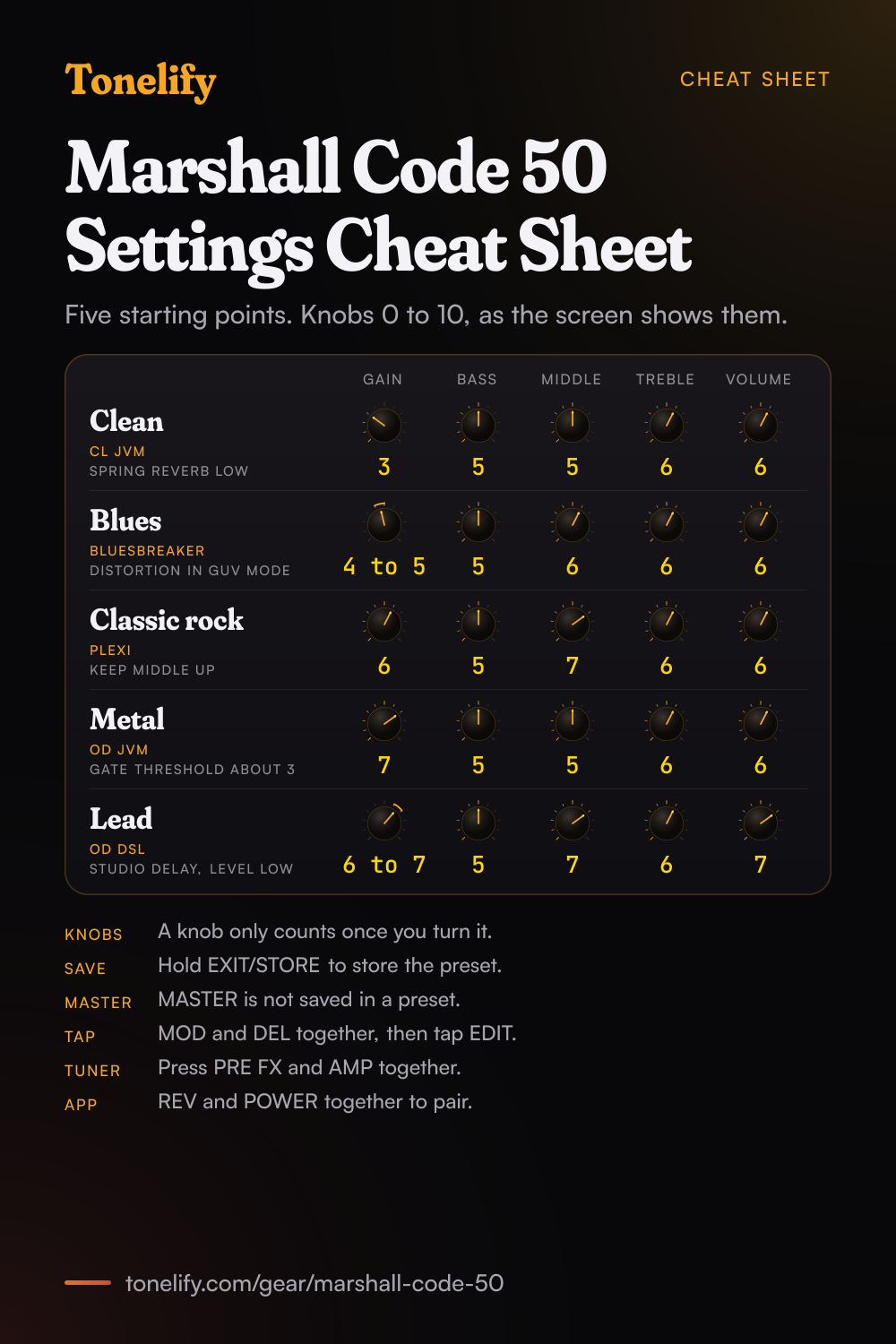
Free download
Printable cheat sheet: PDF and PNG
The clean, blues, classic rock, metal and lead settings from this page, together on one sheet with short tips. The PDF prints on white; the PNG is the dark version for your phone.
Starting settings on the Marshall Code 50
Positions on a 0 to 10 scale, with 5 at twelve o'clock. They are where to begin, not Marshall's numbers: move one control at a time from here.
Clean
CL JVM, which Marshall's manual describes as the JVM410H on the Clean Channel in Green Mode. Gain 3, Bass 5, Middle 5, Treble 6, Volume 6. In POWER, American Class A/B, Marshall's 100 watt model with 6L6 valves, suits a clean, and in CAB the 1936 2x12. Add Spring in REV with its Level low. CL DSL and CL American are the other two cleans to try at the same settings.
- Gain 3
- Bass 5
- Middle 5
- Treble 6
- Volume 6
American Class A/B power amp, 1936 cab, Spring reverb low.
Edge of breakup and blues
Bluesbreaker, Marshall's model of the 1962 Bluesbreaker combo overdriven. Gain 4 to 5, Bass 5, Middle 6, Treble 6, Volume 6. Pair it with Vintage Marshall 30W in POWER and the 1936 2x12 in CAB. Set Gain where hard picking just breaks up, then roll the guitar's volume back for cleaner rhythm. For more push, turn on Distortion in PRE FX in GUV mode, Marshall's Guv'nor, with Drive low and Level high: the manual says the stompbox Distortion is particularly effective with the classic and vintage preamps.
- Gain 4 to 5
- Bass 5
- Middle 6
- Treble 6
- Volume 6
Distortion in GUV mode, Drive low, for more push.
Classic rock
Plexi, Marshall's model of a 1959SLP overdriven. Gain 6, Bass 5, Middle 7, Treble 6, Volume 6. Use Classic Marshall 100W in POWER, the EL34 model, and the 1960AX 4x12 with G12M-25 speakers in CAB. Keep Middle up: rock guitar sits in the mids, and cutting them is the usual reason a preset sounds thin next to a band. JCM800, the 2203 on its high sensitivity input, is the other Crunch preamp to try at the same settings.
- Gain 6
- Bass 5
- Middle 7
- Treble 6
- Volume 6
Classic Marshall 100W power amp, 1960AX cab.
Metal
OD JVM, the JVM410H on its OD1 Channel in Red Mode, or OD Silver Jubilee, the JCM2555's Lead Channel. Gain 7, Bass 5, Middle 5, Treble 6, Volume 6. Use Classic Marshall 100W in POWER and the 1960V 4x12 with Vintage 30 speakers in CAB. Raise the Gate's Threshold in the AMP section to about 3, until the hiss stops between chords. For tighter palm mutes, put Distortion in ODR mode in front with Drive low, and take Gain a step down.
- Gain 7
- Bass 5
- Middle 5
- Treble 6
- Volume 6
Gate Threshold about 3, 1960V cab.
Lead
OD DSL, Marshall's model of the JCM2000 DSL's Lead 2 Channel. Gain 6 to 7, Bass 5, Middle 7, Treble 6, Volume 7, a step of Volume above your rhythm presets so the solo comes forward. Add Studio in DEL with its Level low and set the time by tap tempo: press MOD and DEL together, tap the EDIT selector in time, and press EXIT/STORE to go back. The DEL LED flashes at the delay time.
- Gain 6 to 7
- Bass 5
- Middle 7
- Treble 6
- Volume 7
Studio delay, Level low, timed by tap tempo.
Saving the five to presets
Each of the 100 presets stores the preamp, power amp, cab, their settings and the effects, everything but MASTER. Build a sound, then press and hold EXIT/STORE to store it over the current preset. To keep the preset you started from, hold EXIT/STORE briefly until the name starts to scroll, turn PRESET to another slot and hold EXIT/STORE again until STORED shows. Worth knowing: GAIN, BASS, MIDDLE, TREBLE and VOLUME are stored too, so the manual says a knob's position means nothing until you turn it, and once you do the screen shows its current and stored setting.
Marshall Code 50 amp list
The AMP section has 14 MST preamps in three groups, Clean, Crunch and Overdrive, plus Natural, which Marshall made for external effects: it gives the EQ and the Gate without the colour of a modelled preamp. Each row gives Marshall's own line for the model. GAIN, BASS, MIDDLE, TREBLE and VOLUME set it, and Marshall's official presets show them from 0 to 10.
| Preamp | Group | Marshall's description |
|---|---|---|
| JTM45 | Clean | JTM45 2245 on a clean setting |
| CL DSL | Clean | DSL100H on the Classic Gain Channel, Clean setting |
| CL American | Clean | Classic American pure-valve sound |
| CL JVM | Clean | JVM410H on the Clean Channel in Green Mode |
| Acoustic Simulator | Clean | Simulates the sound of an electro-acoustic guitar |
| Bluesbreaker | Crunch | 1962 Bluesbreaker combo overdriven |
| Plexi | Crunch | 1959SLP overdriven |
| CR American | Crunch | Classic American valve overdrive |
| JCM800 | Crunch | JCM800 2203 overdriven (high sensitivity input) |
| '50s British | Crunch | Classic British valve combo overdrive |
| OD JVM | Overdrive | JVM410H on OD1 Channel in Red Mode |
| OD DSL | Overdrive | JCM2000 DSL Lead 2 Channel |
| OD American | Overdrive | Classic American higher gain overdrive |
| OD Silver Jubilee | Overdrive | JCM2555 Silver Jubilee Lead Channel |
Marshall Code 50 power amp list
The POWER section models four valve power amps. Each has two controls, Presence for high end and Resonance for low end thud, both from 0 to 10.
| Power amp | Marshall's description |
|---|---|
| Classic Marshall 100W | Class A/B, 100 watts, EL34 valves |
| Vintage Marshall 30W | Class A/B, 30 watts, 5881 valves |
| British Class A | Class A, 30 watts, EL84 valves |
| American Class A/B | Class A/B, 100 watts, 6L6 valves |
Marshall Code 50 cabinet list
The CAB section has eight Marshall cabinets: four 4x12s, two 2x12s and two 1x12s. You choose one per preset; the manual says the cabinet models have no settings to edit.
| Cabinet | Speakers |
|---|---|
| 1960 | 4x12, Celestion G12-T75 |
| 1960V | 4x12, Celestion Vintage 30 |
| 1960AX | 4x12, Celestion G12M-25 |
| 1960HW | 4x12, Celestion G12H-30 |
| 1936 | 2x12, Celestion G12-T75 |
| 1936V | 2x12, Celestion Vintage 30 |
| 1912 | 1x12, Celestion G12-B150 |
| 1974CX | 1x12, G12M-20, handwired |
Marshall Code 50 effects list
Marshall counts 24 effects. Counting each mode as one, the manual's tables give 24: 7 in PRE FX, 8 in MOD, 4 in DEL, 4 in REV and the Gate. Including the Gate, up to five run at once, one from each section. Delay time runs from 0 to 4000 ms and nearly every other setting from 0 to 10.
- PRE FX (7)
- Compressor, Distortion GUV (Marshall Guv'nor), Distortion ODR (classic overdrive pedal), Distortion DIS (classic distortion pedal), Auto Wah ENV (envelope filter), Auto Wah LFO, Pitch Shifter
- MOD (8)
- Chorus CLS (classic chorus), Chorus VIB (vibrato), Flanger JET, Flanger MET (metallic), Phaser CLS (classic phaser), Phaser VBE (vibe), Tremolo VLV (valve), Tremolo SQR (square wave)
- DEL (4)
- Studio, Vintage (analogue), Multi (four tap patterns), Reverse
- REV (4)
- Room, Hall, Spring, Stadium
- Gate (1)
- Noise Gate, in the AMP section, Threshold 0 to 10
What controls does the Marshall Code 50 have?
The Marshall Code 50 has 8 controls on its front panel: Gain, Bass, Middle, Treble, Volume, Master, Preset and Edit.
Marshall Code 50 specifications
- Power
- 50W
- Speaker
- 1x12" custom voiced
- Front panel
- Gain, Bass, Middle, Treble, Volume, Master, Preset, Edit
- Released
- 2016
What the Marshall Code 50 panel means when you dial it in
50W through a 1x12" custom voiced. There is enough headroom to hold a clean setting at band volume, so the gain control does the driving rather than the master. There is no presence control on this panel, so everything above the treble band has to come from the treble control and the guitar's own tone knob. A setting copied from an amp with presence has to be rebalanced here. Gain and master volume are separate, so the preamp can be driven hard at a volume that is liveable. Where a tone sits between the two is part of the answer, not a detail.
Marshall Code 50 questions
What amps are in the Marshall Code 50?
14 MST preamps, which Marshall modelled with Softube, in three groups. Clean: JTM45 (a JTM45 2245 on a clean setting), CL DSL (the DSL100H's Classic Gain Channel), CL American, CL JVM (the JVM410H's Clean Channel in Green Mode) and Acoustic Simulator. Crunch: Bluesbreaker (the 1962 Bluesbreaker combo), Plexi (a 1959SLP), CR American, JCM800 (the 2203 on its high sensitivity input) and '50s British. Overdrive: OD JVM (OD1 in Red Mode), OD DSL (the JCM2000 DSL's Lead 2), OD American and OD Silver Jubilee (the JCM2555's Lead Channel). Natural adds EQ and the Gate with no modelled preamp. The American models and '50s British name no amp in Marshall's manual.
What power amps and cabinets does the Code 50 have?
Four power amps: Classic Marshall 100W (EL34), Vintage Marshall 30W (5881), British Class A (30 watts, EL84) and American Class A/B (100 watts, 6L6), each with Presence and Resonance. Eight cabinets: the 1960, 1960V, 1960AX and 1960HW 4x12s, the 1936 and 1936V 2x12s, the 1912 1x12 and the handwired 1974CX 1x12. A preset can put any preamp with any power amp and cab, and Marshall's own presets mix them, such as the JTM45 into American Class A/B and the 1974CX.
How many effects does the Code 50 have?
24, Marshall says, and up to five at once including the Gate. PRE FX has the Compressor, the Distortion in GUV (Marshall Guv'nor), ODR and DIS modes, Auto Wah and Pitch Shifter. MOD has Chorus, Flanger, Phaser and Tremolo, two modes each. DEL has Studio, Vintage, Multi and Reverse, from 0 to 4000 ms. REV has Room, Hall, Spring and Stadium. The Gate sits in the AMP section.
Why don't the Code 50's knobs match the preset?
Because GAIN, BASS, MIDDLE, TREBLE and VOLUME are stored in each preset, and Marshall's manual says the knobs only become active when you turn them: until then their position has nothing to do with the preset's setting. Once you turn one, it takes over and the screen shows its current and stored setting, and the EXIT/STORE LED flashes red to show the preset has changed. Push the EDIT selector to see the stored values without touching a knob. MASTER is not stored in a preset.
How do you save a preset on the Code 50?
Press and hold EXIT/STORE from any screen to store over the current preset. To save to another slot, hold it briefly until the name scrolls, turn PRESET to the slot and hold EXIT/STORE until STORED shows; the preset in that slot is overwritten. To rename, hold EXIT/STORE again while the name scrolls, until arrows mark the first letter: EDIT changes the letter and PRESET moves along. The section switches are naming shortcuts, from Clear on PRE FX to Space on REV and Backspace on POWER.
What presets come on the Code 50?
100, all of them editable, and turning PRESET steps through them. Marshall's manual does not list them. MusicRadar's review singles out EL34 Heaven, Plexi Classic for the Super Lead and NWOBHM for the JCM800 voice. A factory reset brings back the presets as they were when new.
Where can you download Marshall Code presets?
From Marshall's Code Presets site, which has official presets made by Marshall's in-house guitarists, 100 when we read it on 21 October 2026, and community presets from players around the world, many inspired by artists. Your own presets sync to it through the Gateway app, which Marshall recommends before a firmware update.
How do you use tap tempo on the Code 50?
Press MOD and DEL together. The screen shows the delay time in milliseconds: turn the EDIT selector to set it, or tap EDIT in time with the music, then press EXIT/STORE to go back to the preset. The DEL LED flashes at the delay time, and a button on the optional footcontroller can tap it too.
How do you use the tuner on the Code 50?
Press PRE FX and AMP together. Pluck a string and the screen shows the note: the bar moves left when it is flat and right when it is sharp, and the string is in tune when the bar is dead centre. Press EXIT/STORE to leave the tuner.
How do you connect the Code 50 to the Gateway app?
Press REV and POWER together: the blue LED on EXIT/STORE flashes while the Code is pairing. Pair it in your phone's Bluetooth settings first, then open Marshall Gateway, for iOS and Android, and connect; Gateway only connects to a Code it is already paired with for audio. Pairing mode clears any earlier pairing on the amp. Music streamed over Bluetooth bypasses the panel, all but MASTER.
Can you record with the Code 50 over USB?
Yes. Connected over USB, the Code 50 works as an audio interface: choose it as the input in your computer and DAW to record, or as the output to play music through it, with MASTER setting the level. The same port takes firmware updates and sends and receives MIDI for the front panel controls.
Does the Code 50 have a headphone output?
Yes, a mini-jack on the front panel for silent practice, which Marshall's manual says also works as a line out. A second mini-jack takes an MP3 player to play along with.
Does the Code 50 have a footswitch?
Not in the box. Marshall's PEDL-91009, sold separately, is a four-way programmable footcontroller that plugs into the F/C jack: it recalls presets and can tap the delay time from an assigned button. MusicRadar's review calls it essential for live use, at an extra £39 then.
Is the Marshall Code 50 a valve amp?
No. It is a digital modelling amp: Marshall and Softube modelled valve preamps, power amps and cabinets, and Guitar Interactive's review puts its light weight down to the digital front end and the solid state power section. Marshall's manual gives 50 watts into one 12 inch speaker, 13 kg, and 530 by 440 by 280 mm.
How do you factory reset the Code 50?
Switch it off, hold the AMP section switch and switch it on. The screen warns that the amp is about to go back to its factory settings: hold EXIT/STORE to confirm, or press any other switch to cancel and start as normal. It overwrites all your presets, so sync them to Code Presets through Gateway first.
When did the Marshall Code 50 come out?
In 2016. Marshall's declaration of conformity for the CODE25 and CODE50 is dated 2 May 2016, and MusicRadar reviewed the CODE50 on 30 May 2016, describing a range from a 25 watt 1x10 combo up to a 100 watt 2x12 combo and a head.
What are the best Marshall Code 50 settings for metal?
Start with OD JVM at Gain 7, Bass 5, Middle 5, Treble 6 and Volume 6, into Classic Marshall 100W and the 1960V cab, with the Gate's Threshold at about 3. These are starting points rather than Marshall's numbers. For tighter palm mutes, put Distortion in ODR mode in front with Drive low, and take Gain a step down.
Does Tonelify support the Marshall Code 50?
Yes, and its front panel is stored, so settings only ever reference controls this guitar amp has: Gain, Bass, Middle, Treble, Volume, Master, Preset, Edit. You will not be told to set a knob that is not there.
Sources
Panel, specifications and dates checked against these on .
- Marshall: CODE50 owner's manual (PDF)
- Marshall: Support for CODE50 Combo
- Marshall: CODE50 Combo, using the app
- Marshall: CODE50 Combo, firmware update
- Marshall: Code Presets, official and community presets
- MusicRadar: Marshall CODE50 review (30 May 2016)
- Guitar Interactive: Marshall Code 50 Combo review (28 July 2016)
The manual is the file Marshall's CODE50 support page links as its User Manual. Marshall's official presets were read on Code Presets on 21 October 2026 for the range their values use.