Amp cheat sheets
Line 6 Spider settings cheat sheet: Spider III, IV and V
Updated 11 min read7 knob panels9 sources
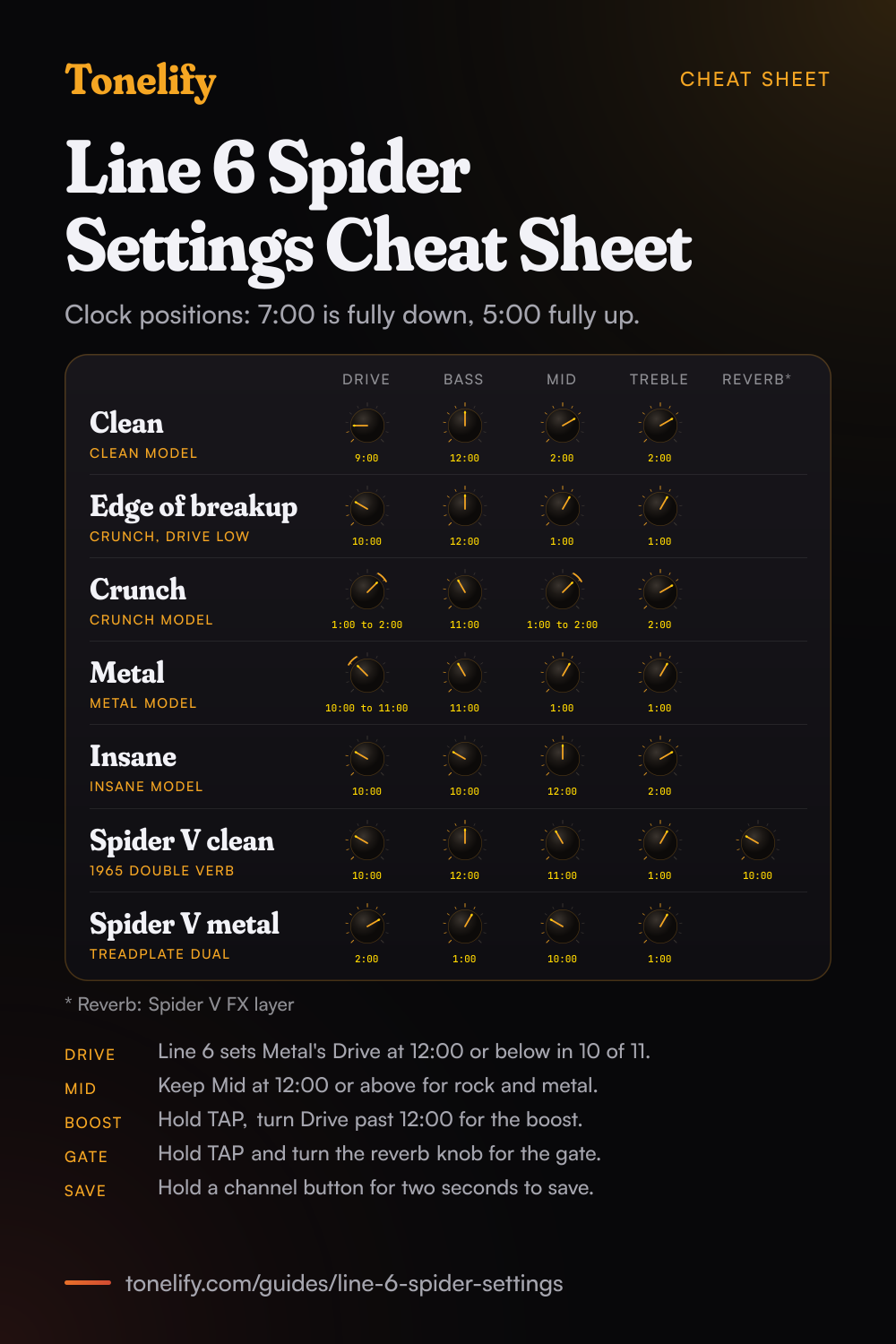
Pick the amp model first, then set the four tone knobs. Clean: Clean model, Drive 9:00, Bass 12:00, Mid 2:00, Treble 2:00. Crunch: Crunch model, Drive 1:00 to 2:00, Bass 11:00, Mid 1:00 to 2:00, Treble 2:00. Metal: Metal model, Drive 10:00 to 11:00, Bass 11:00, Mid 1:00, Treble 1:00. Keep Drive low on Metal: in Line 6's own 35 song settings for the Spider IV 15, the Metal model's Drive sits at 12:00 or below in 10 of 11.
The positions are on a clock, 7:00 fully down and 5:00 fully up, because Line 6's setting sheets draw each knob with a dot and no numbers. They are Tonelify's starting points for the Spider III 15, 30 and HD75 and the Spider IV 15, which share the Clean, Crunch, Metal and Insane models. On a Spider IV 30, pick the red or green version of the same style. On a Spider V, which has 78 amp models, the Spider V section names the model to load.
Free download
Printable cheat sheet: PDF and PNG
The clean, edge of breakup, crunch, metal, insane, spider v clean and spider v metal settings from this guide, together on one sheet with short tips. The PDF prints on white; the PNG is the dark version for your phone.
How a Line 6 Spider panel works
A Spider is set model first, knobs second. Line 6's manuals describe Drive as like the volume or gain knob on other amps: it controls how much dirt or distortion you get.[1][2][3] Bass, Mid and Treble are customized for each amp model,[1][2][7] so the same clock position sounds different on Clean and on Metal. Master Volume sets the overall volume without affecting your tone,[1][2][3] and Chan Vol balances the channels you have stored.
When you select an amp model, the Spider sets its tone controls and effects to match it, so a model change also moves the effects.[1][2][3] To store your own sound on a Spider III or Spider IV 15, press and hold one of the four channel buttons for two seconds; the light flashes when the save is complete.[1][3] On a Spider IV 30, hold A, B, C or D for two seconds.[2]
Which Line 6 Spider do you have?
The Spider III 15, 30 and HD75 and the Spider IV 15 have four amp models, Clean, Crunch, Metal and Insane, one to each channel button. Line 6's Spider III manual says its Crunch is based on a '68 Marshall Plexi 100 watt with a Variac and jumpered input channels, and its Metal on the Mesa Dual Rectifier.[3] Line 6's knowledge base says the Spider IV 15's models were revoiced, and that it adds a jack for the FBV2 or FBV Express pedal.[4]
The Spider IV 30 expanded the models from 4 to 12, a red and a green version of Clean, Twang, Blues, Crunch, Metal and Insane,[5] and models get heavier and more distorted as you turn its model knob clockwise.[2] The Spider V lists 78 guitar amp models, 24 speaker cabinets and 101 effects.[7]
| Model | Amp models | Tone knobs | Effects |
|---|---|---|---|
| Spider III 15, 30, HD75 | 4: Clean, Crunch, Metal, Insane | Drive, Bass, Mid, Treble, Chan Vol | Two Smart FX knobs: chorus/flange, phaser or tremolo; tape echo, sweep echo or reverb |
| Spider IV 15 | 4: Clean, Crunch, Metal, Insane | Drive, Bass, Mid, Treble, Chan Vol | Two Smart FX knobs: chorus/flange, phaser or tremolo; sweep echo, tape echo or reverb |
| Spider IV 30 | 12: red and green Clean, Twang, Blues, Crunch, Metal, Insane | Drive, Bass, Mid, Treble, Reverb | Two Smart FX knobs: chorus/flange, phaser or tremolo; delay, tape echo or sweep echo |
| Spider V and V MkII | 78 | Drive, Bass, Mid, Treble, Volume | 101 effects, up to 8 at once |
Clean settings
Press Clean. Drive 9:00, Bass 12:00, Mid 2:00, Treble 2:00, and Chan Vol to match your other channels. Line 6's manual describes the Spider III's Clean as crisp clean tones and warm jazz tones, and suggests a little chorus and delay for the ultimate clean sound:[3] knob A just past off for chorus, knob B low for echo.
Line 6's own clean settings for the Spider IV 15 keep Drive low: across its four Clean settings, Drive stays at about 9:00 or below.[6] If a clean chord starts to break up, lower Drive before Chan Vol.
- Drive 9:00
- Bass 12:00
- Mid 2:00
- Treble 2:00
Blues and edge-of-breakup settings
Press Crunch and keep Drive low: Drive 10:00, Bass 12:00, Mid 1:00, Treble 1:00. That gives a sound that is clean when you play softly and breaks up when you dig in. Mid a little past noon keeps single notes from sounding thin.
On a Spider IV 30, turn the model knob to Blues instead. Line 6 bases Blues Red on three helpings of a '65 Marshall JTM-45 with a '58 Fender Bassman, a '63 Fender Vibroverb and a Supro,[5] and Blues Green on a fawn Vox AC-30.[5] Twang Red, based on mid 60s Fender amps,[5] is the cleaner choice.
- Drive 10:00
- Bass 12:00
- Mid 1:00
- Treble 1:00
Crunch and classic rock settings
Press Crunch: Drive 1:00 to 2:00, Bass 11:00, Mid 1:00 to 2:00, Treble 2:00. Line 6 bases the Spider III's Crunch on a '68 Marshall Plexi and says it gives the infamous brown sound,[3] so it is the model for classic rock rhythm parts; Line 6's own sheet uses it for Back in Black and Smoke on the Water.
Crunch is Line 6's most used model on the Spider IV 15: 15 of its 35 song settings use it, with Drive at about 2:00 in the middle of them and Mid at 12:00 or above in 12.[6] Keep Mid up for rock: scooping it is the usual reason a Spider sounds thin next to a band.
- Drive 1:00 to 2:00
- Bass 11:00
- Mid 1:00 to 2:00
- Treble 2:00
Metal settings
Press Metal: Drive 10:00 to 11:00, Bass 11:00, Mid 1:00, Treble 1:00. That is less Drive than most people expect, and it is what Line 6 does: on the Metal model, its Spider IV 15 song settings put Drive at 12:00 or below in 10 of 11, never past about 2:00, and Mid at 12:00 or above in 8 of 11.[6] Master of Puppets, for one, is Drive 10:30 and Bass 11:00.[6]
Line 6 bases the Spider III's Metal on the Mesa Dual Rectifier and describes a tight bottom end.[3] Too much Drive loosens it. For a tighter sound, add the boost instead of more Drive: hold TAP and turn Drive past 12:00, as the boost section explains. The noise gate is on by default on every Spider IV model except Crunch.[1][2]
- Drive 10:00 to 11:00
- Bass 11:00
- Mid 1:00
- Treble 1:00
Insane and lead settings
Press Insane: Drive 10:00, Bass 10:00, Mid 12:00, Treble 2:00. Line 6's goal with Insane was as much input gain distortion as possible short of complete meltdown,[3] so it needs even less Drive than Metal: Line 6's five Insane song settings sit at 10:00 in the middle, the same as this panel.[6]
For solos, add echo with knob B and tap TAP in time with the song; Line 6's manuals say tapping it a few times sets the tempo of the delay.[1][2] On a Spider IV 30, Insane Red is Line 6's version of the Mesa Dual Rectifier red channel dialled in for shredding.[5]
- Drive 10:00
- Bass 10:00
- Mid 12:00
- Treble 2:00
Spider IV 30: which red or green model to use
The Spider IV 30 has a red and a green version of each style, and the settings above work on either: set the knob positions for the style, then try both colours. Line 6's knowledge base says what each one is based on.[5]
The Spider IV 30 has its own Reverb knob, so knob B there is for delay, tape echo and sweep echo only.
| Model | Based on, per Line 6 | Use it for |
|---|---|---|
| Clean Red | Crisp clean tones | Clean |
| Clean Green | A 1973 Hiwatt Custom 100 | Clean with more headroom |
| Twang Red | Mid 60s Fender amps | Clean to edge of breakup |
| Twang Green | Vintage tweed amps such as a '53 Fender Tweed Deluxe | Edge of breakup |
| Blues Red | A '65 Marshall JTM-45, a '58 Fender Bassman, a '63 Fender Vibroverb and a Supro | Blues |
| Blues Green | A fawn Vox AC-30 | Blues and chimey rock |
| Crunch Red | A '68 Marshall Plexi 50 watt head | Classic rock |
| Crunch Green | A '68 Marshall Plexi 100 watt with a Variac and jumpered inputs | Hard rock |
| Metal Red | The Mesa Dual Rectifier, with enhancements | Metal |
| Metal Green | A high gain model whose Mid knob sweeps the tone | Metal, shaped with Mid |
| Insane Red | The Mesa Dual Rectifier red channel, dialled in for shredding | Lead |
| Insane Green | As much distortion as possible with definition | High gain |
Spider V settings
The Spider V has 78 models, so load one by name. Clean: 1965 Double Verb, which Line 6 bases on the classic blackface Fender Twin Reverb,[8] with Drive 10:00, Bass 12:00, Mid 11:00, Treble 1:00 and Reverb 10:00 on the FX layer. Metal: 2001 Treadplate Dual, based on Channel 3 of a Mesa/Boogie Dual Rectifier Solo head,[8] with Drive 2:00, Bass 1:00, Mid 10:00 and Treble 1:00.
Each Spider V preset also has a speaker mode: Line 6 says Classic gives a more traditional combo amplifier playing experience,[7] and these settings assume it. The Spider V 30 gear page has the blues, rock and lead settings, all 78 models and the factory presets.
- Drive 10:00
- Bass 12:00
- Mid 11:00
- Treble 1:00
- Reverb 10:00
Reverb is on the FX layer: press FX.
- Drive 2:00
- Bass 1:00
- Mid 10:00
- Treble 1:00
Line 6's own song settings for the Spider IV 15
Line 6 published song settings for the Spider IV 15 as drawings of its panel, with a dot on each knob and the chosen model's button filled in.[6] Tonelify measured the angle of each dot on the first sheet of 35 songs and gives it below to the nearest half hour. These are Line 6's settings, not Tonelify's.
They work on a Spider III 15, 30 or HD75 too, which has the same four models, though Line 6 revoiced the models for the Spider IV.[4] The sheet uses Crunch for 15 songs, Metal for 11, Insane for 5 and Clean for 4.[6]
| Song | Model | Drive | Bass | Mid | Treble |
|---|---|---|---|---|---|
| Back in Black | Crunch | 2:00 | 9:00 | 4:30 | 2:00 |
| Smoke on the Water | Crunch | 4:30 | 12:00 | 12:00 | 3:00 |
| Iron Man | Crunch | 5:00 | 1:30 | 4:00 | 4:00 |
| Purple Haze | Crunch | 2:00 | 12:00 | 1:00 | 3:00 |
| Seven Nation Army | Crunch | 2:00 | 1:30 | 12:00 | 3:00 |
| Welcome To The Jungle | Crunch | 5:00 | 9:30 | 4:30 | 4:30 |
| Master of Puppets | Metal | 10:30 | 11:00 | 10:30 | 1:30 |
| Smells Like Teen Spirit | Metal | 9:30 | 9:30 | 1:30 | 1:00 |
| Everlong | Metal | 9:30 | 12:00 | 3:00 | 12:00 |
| American Idiot | Metal | 11:00 | 11:00 | 1:00 | 1:00 |
| Crazy Train | Insane | 10:00 | 9:00 | 4:00 | 1:30 |
| Say It Ain't So | Clean | 9:00 | 11:00 | 3:00 | 5:00 |
Boost, noise gate and tuner
The boost: hold TAP and turn Drive past 12:00. Line 6 says it gives the extra dirt of a distortion pedal with its distortion low and its output high, hitting the model harder.[1][2][3] The Clean light comes on to show it on a Spider IV 15 and a Spider III, and the A light on a Spider IV 30.[1][2][3]
The noise gate: hold TAP and turn knob B into the Reverb section on a Spider IV 15, the Reverb knob on a Spider IV 30, or the echo and reverb knob past 12:00 on a Spider III.[1][2][3] The tuner on a Spider IV: hold TAP for a few seconds, then tune until the two middle lights, Crunch and Metal, are lit together.[1][4]
Headphones, recording and footswitches
The Phones/Record Out jack takes stereo headphones and mutes the speaker, and Line 6 says it doubles as a record output: use a stereo 1/4 inch TRS cable to a mixer or recording device.[1][2] The CD/MP3 input takes a phone or player to play along with.
On a Spider IV 15, Line 6 says an FBV2 switches between clean and overdriven sounds, and an FBV Express MkII adds channel switching, tap tempo, wah and volume and the tuner.[1] On the Spider III, the FBV jack is on the 30 and HD75 only.[3] Line 6's knowledge base says there is no effects loop on the Spider IV 15 or 30,[4][5] so pedals go in front of the guitar input.
When it sounds wrong
The effects change when you pick a model: that is the Spider setting effects to match the model. Line 6 says you can turn the auto FX off, but not the tone control auto selection, by powering up with the Insane button held on a Spider IV 15 or Spider III, or Channel D on a Spider IV 30.[1][2][3]
Fizzy: lower Treble before Drive. Thin on Metal: raise Mid, as Line 6's own metal settings do. Too much hiss: turn on the noise gate. To start again, hold the Clean button on a Spider IV 15 or Spider III, or A on a Spider IV 30, while you turn the power on; Line 6 warns that a factory reset erases all your custom sounds.[1][2][3]
Songs from Line 6's sheet
 Back in BlackAC/DC
 Smoke on the WaterDeep Purple
 Iron ManBlack Sabbath
 Purple HazeJimi Hendrix
 Seven Nation ArmyThe White Stripes
 Welcome To The JungleGuns N' Roses
 Master of PuppetsMetallica
 Smells Like Teen SpiritNirvana
 EverlongFoo Fighters
 American IdiotGreen Day
 Crazy TrainOzzy Osbourne
 Say It Ain't SoWeezer
Common questions
What are the best Line 6 Spider settings for metal?
On a Spider III or Spider IV 15, press Metal and set Drive 10:00 to 11:00, Bass 11:00, Mid 1:00 and Treble 1:00. Keep Drive lower than feels natural: in Line 6's own Spider IV 15 song settings, the Metal model's Drive is at 12:00 or below in 10 of 11, and Mid is at 12:00 or above in 8. For a tighter sound, use the boost: hold TAP and turn Drive past 12:00.
What are good clean settings on a Line 6 Spider?
Press Clean and set Drive 9:00, Bass 12:00, Mid 2:00 and Treble 2:00, with Chan Vol matched to your other channels. Line 6's manual suggests a little chorus and delay for the ultimate clean sound, so turn knob A just past off and knob B low. On a Spider V, load 1965 Double Verb with Drive 10:00, Bass 12:00, Mid 11:00, Treble 1:00 and Reverb 10:00.
What are good Spider IV 15 settings?
Clean: Clean model, Drive 9:00, Bass 12:00, Mid 2:00, Treble 2:00. Crunch: Crunch model, Drive 1:00 to 2:00, Mid 1:00 to 2:00. Metal: Metal model, Drive 10:00 to 11:00, Bass 11:00, Mid 1:00, Treble 1:00. Insane: Drive 10:00, Bass 10:00, Mid 12:00, Treble 2:00. Line 6 also published 35 song settings for the Spider IV 15, and this page gives twelve of them.
What amp models are on the Spider IV 30?
Twelve: a red and a green version of Clean, Twang, Blues, Crunch, Metal and Insane. Line 6's knowledge base bases Clean Green on a 1973 Hiwatt Custom 100, Twang Red on mid 60s Fender amps, Blues Green on a fawn Vox AC-30, Crunch Red on a '68 Marshall Plexi 50 watt head and Metal Red on the Mesa Dual Rectifier. Models get heavier as you turn the model knob clockwise.
What is the difference between the Spider III and the Spider IV?
Line 6's knowledge base says the Spider IV 15's models were revoiced, its back is now a 3/4 style, and it adds a jack for the FBV2 or FBV Express pedal, which the Spider III 15 lacks. The Spider IV 30 goes further: its models expanded from 4 to 12. The controls and the four model names on the Spider III 15 and Spider IV 15 are the same, so the settings carry over.
How do you turn on the boost on a Line 6 Spider?
Hold TAP and turn Drive past 12:00. Line 6's manuals say it gives the extra dirt of a distortion pedal with its distortion set low and its output set high, boosting the guitar before it reaches the amp model. The Clean light comes on to show it on a Spider IV 15 or Spider III, and the A light on a Spider IV 30.
How do you turn on the noise gate on a Spider IV?
On a Spider IV 15, hold TAP and turn knob B into the Reverb section; the Insane light comes on when the gate is on. On a Spider IV 30, hold TAP and turn the Reverb knob; the A light shows it. Line 6 says the gate is on by default for every amp model except Crunch. On a Spider III, hold the Tap Delay Time button and turn the echo and reverb knob past 12:00.
How do you save a setting on a Line 6 Spider?
On a Spider III or Spider IV 15, press and hold one of the four channel buttons for two seconds; the light flashes when the save is complete. The save stores every tone and effect knob position except Master Volume. On a Spider IV 30, hold A, B, C or D for two seconds. Saving replaces the factory preset on that button.
How do you factory reset a Line 6 Spider IV?
On a Spider IV 15, hold the Clean button while you turn the power on; on a Spider IV 30, hold A. Line 6's knowledge base says to hold it for 5 to 8 seconds. On a Spider III, hold Clean while you power up. Line 6 warns that a reset erases all your custom sounds, so note any settings you want to keep first.
How do you use the tuner on a Spider IV 15?
Hold TAP for a few seconds. The volume is muted while you tune, and the four model lights show the pitch: Clean lit means well flat, Crunch slightly flat, Crunch and Metal together in tune, Metal slightly sharp and Insane well sharp. Press any button to leave the tuner. The Spider IV 30's tuner reads the same way through its channel lights.
Does the Line 6 Spider have an effects loop?
No. Line 6's knowledge base says there is no effects loop on the Spider IV 15 or the Spider IV 30, and none on the Spider V either. Put pedals between the guitar and the input. The Spider's own Smart FX knobs cover chorus, flange, phaser, tremolo, echo and, on most models, reverb.
Can you use headphones or record with a Line 6 Spider?
Yes. The Phones/Record Out jack takes stereo headphones and mutes the speaker, and Line 6 says it doubles as a record output: use a stereo 1/4 inch TRS cable to a mixer or recording device. Line 6's knowledge base adds that it can feed a PA or stereo system too. The CD/MP3 input lets you play along with a phone or player.
Where are Line 6's song settings for the Spider IV?
On Line 6's knowledge base, as PDF sheets that draw the panel with a dot on each knob. The Spider IV 15 sheets cover about 90 songs in three parts, and the Spider IV 30 has its own. This page measured the dots on the first Spider IV 15 sheet and gives twelve songs as clock positions, such as Back in Black on Crunch with Drive 2:00.
Why do the knobs and effects change when I pick a different amp model?
Because the Spider sets its tone controls and effects to match each model when you select it. Line 6's manuals say you can turn off the auto FX selection, though not the tone control auto selection, by powering up with the Insane button held on a Spider IV 15 or Spider III, or Channel D on a Spider IV 30.
Is there a printable Line 6 Spider settings cheat sheet?
Yes. The cheat sheet on this page puts all seven starting settings on one page: clean, edge of breakup, crunch, metal and Insane for the Spider III and Spider IV 15, and clean and metal for the Spider V, with short tips on Drive, Mid, the boost and the noise gate. Download the PDF to print it on white, or save the PNG to your phone.
Sources
The numbers in brackets in the text point to this list.
- Line 6: Spider IV 15 Pilot's Guide, Rev F (PDF)
- Line 6: Spider IV 30 Pilot's Guide, Rev G (PDF)
- Line 6: Spider III 15/30/HD75 User Manual, Rev A (PDF)
- Line 6 Knowledge Base: Spider IV 15 FAQs and Application
- Line 6 Knowledge Base: Spider IV 30 FAQs
- Line 6 Knowledge Base: Spider IV 15 Song Settings (Part 1 PDF)
- Line 6: Spider V Pilot's Guide, Rev C (PDF)
- Line 6: Spider V Series Model List
- Line 6: Spider V 20/30/60/120/240/240HC FAQ
Gear in this guide
Settings for your own amp
This guide covers what is true of every rig. For a specific song on a specific amp, Tonelify reads the documented chain behind the recording and returns gain, bass, middle, treble and presence values for the controls your amp actually has. A first plan starts with 7 days free, $0 today.