Amp cheat sheets
Marshall DSL settings cheat sheet: DSL1, DSL5, DSL20, DSL40 and DSL100
Updated 9 min read4 knob panels5 sources
On a DSL40CR or DSL100HR, start clean on the Classic Gain channel in Clean mode with Gain 3 to 4, Treble 6, Middle 5, Bass 5 and Presence 5. For crunch, switch to Crunch mode with Gain 5 to 7 and Middle 6 to 7. For hard rock, use the Ultra Gain channel in OD1 with Gain 5 to 6, and for metal, OD2 with Tone Shift on, Gain 6 to 7, Middle 5 and Bass 6. Set the loudness with the channel Volume and the Master, not with Gain.
These are Tonelify's starting points, the same as on our DSL40CR and DSL20CR pages: Marshall's quick start guides explain every control but give no settings. The smaller DSLs work the same way with fewer controls. The DSL20 has no clean and crunch modes, the DSL5 has a Deep switch in place of Presence and Resonance, and the DSL1's Classic Gain channel has a Volume knob and no Gain knob.
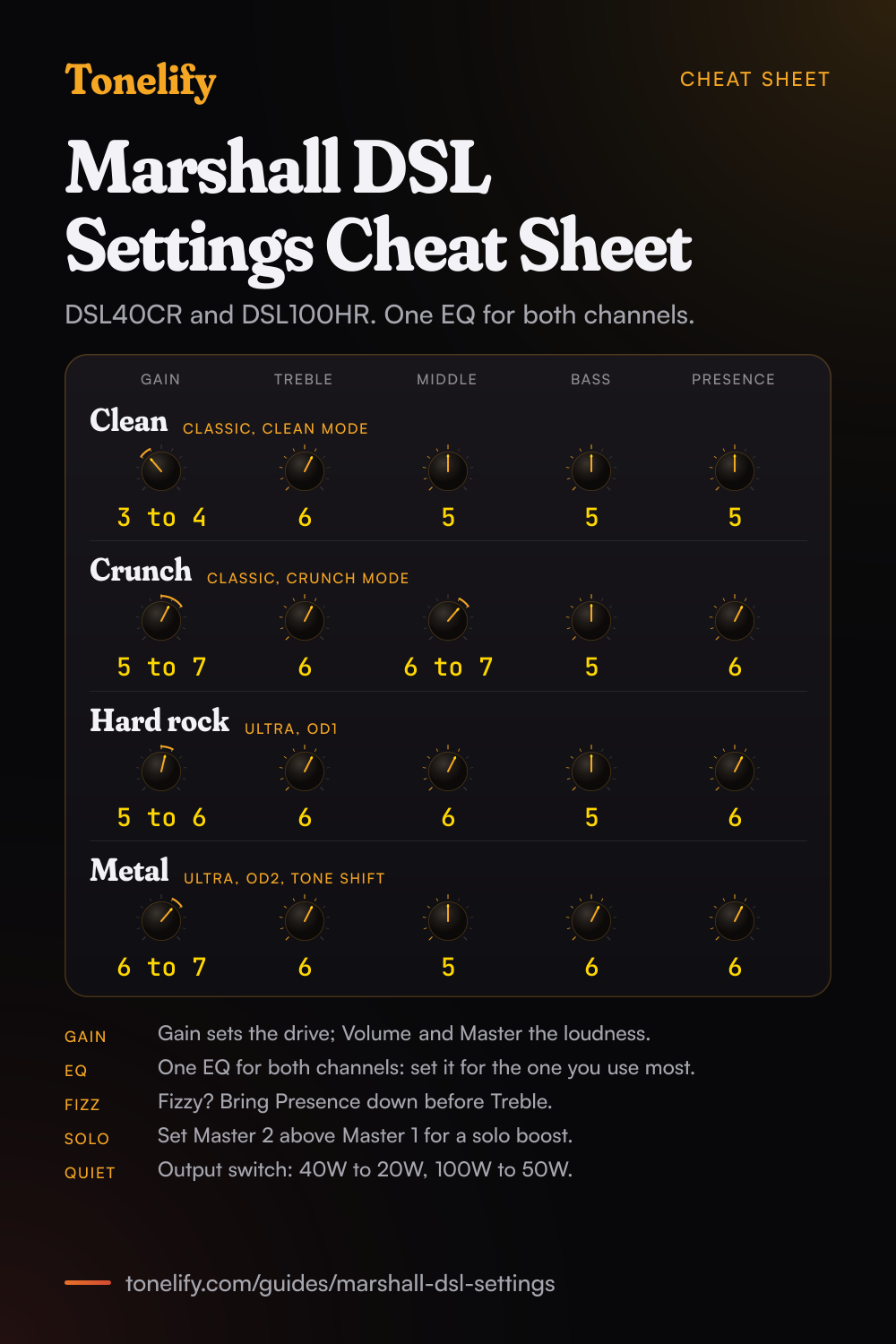
Free download
Printable cheat sheet: PDF and PNG
The clean, crunch, hard rock and metal settings from this guide, together on one sheet with short tips. The PDF prints on white; the PNG is the dark version for your phone.
How the DSL controls work
Every DSL has two channels, Classic Gain and Ultra Gain. Marshall's guides say Gain adjusts the amount of input gain sent into the preamp stage, and that running a higher gain setting increases the level of distortion;[1][2][3][4] Volume sets that channel's level. On the DSL40CR and DSL100HR each channel also has two modes: Marshall says the Classic Gain channel's modes take the sound from clean to overdriven, and the Ultra Gain channel's from distorted to heavy gain.[4]
Treble, Middle and Bass are one EQ for both channels, and Marshall notes that the EQ controls are linked, so altering one changes the way the others behave.[1][2][3][4] Tone Shift reconfigures the preamp EQ: highs and lows are accentuated and the mids are cut.[1][2][3][4] Presence and Resonance, on the DSL20, DSL40 and DSL100, adjust the power amp EQ, Presence for top end and Resonance for low end.[3][4] The DSL40CR and DSL100HR add Master 1 and Master 2, two overall volumes with a Master Select switch between them.[4]
Which DSL do you have?
All five are all-valve amps with a digital reverb, a series effects loop and an Emulated Out with cabinet emulation by Softube, and each has a power reduction switch.[1][2][3][4] They differ in power, valves and how many controls they have. The CR models are combos and the HR models heads; Marshall covers the DSL1CR and DSL1HR in one guide, the DSL20CR and DSL20HR in another, and the DSL40CR and DSL100HR in a third, each with one set of controls for the pair.[1][3][4]
| Model | Power | Valves | Controls | Speaker |
|---|---|---|---|---|
| DSL1CR, DSL1HR | 1W, or 0.1W | 2 x ECC83, 1 x ECC82 | Classic Volume; Ultra Gain and Volume; Tone Shift, Treble, Middle, Bass, Reverb | 8 inch Celestion Eight-15 in the combo |
| DSL5CR | 5W, or 0.5W | 2 x ECC83, 1 x 12BH7 | Gain and Volume per channel; Tone Shift, Treble, Middle, Bass, Deep, Reverb | 10 inch Celestion Ten-30 |
| DSL20CR, DSL20HR | 20W, or 10W | 3 x ECC83, 2 x EL34 | Gain and Volume per channel; Tone Shift, Treble, Middle, Bass, Presence, Resonance, Reverb | 12 inch Celestion Seventy 80 in the combo |
| DSL40CR | 40W, or 20W | 4 x ECC83, 2 x EL34 | Gain, Volume and two modes per channel; Treble, Middle, Bass, Tone Shift, Presence, Resonance; a reverb per channel; Master 1 and 2 | 12 inch Celestion V-Type |
| DSL100HR | 100W, or 50W | 4 x ECC83, 4 x EL34 | The same as the DSL40CR | None: a head |
Best DSL40CR and DSL100HR settings
Clean: Classic Gain channel in Clean mode, LED green. Gain 3 to 4, Treble 6, Middle 5, Bass 5, Presence 5, Classic Reverb about 3. Crunch and classic rock: Crunch mode, LED red. Gain 5 to 7, Treble 6, Middle 6 to 7, Bass 5, Presence 6, Classic Reverb about 2. Keep Middle up for rock rhythm parts: Marshall's guide says turning Middle anticlockwise scoops the sound.[4]
Hard rock and lead: Ultra Gain channel in OD1, LED green. Gain 5 to 6, Treble 6, Middle 6, Bass 5, Presence 6, Ultra Reverb about 2. Metal: OD2, LED red, with Tone Shift on. Gain 6 to 7, Treble 6, Middle 5, Bass 6, Presence 6, Resonance 5, Ultra Reverb off or 1. Tone Shift accentuates the scoop from Middle, so leave Middle near 5 rather than at 0.[4]
The EQ is shared, so switch Tone Shift off again before going back to a clean sound with mids. For solos, set Master 2 a little above Master 1 and press Master Select when the solo starts. The DSL100HR takes the same settings: Marshall gives the two amps one set of controls, and the head has 100W, or 50W with the Output switch.[4]
- Gain 3 to 4
- Treble 6
- Middle 5
- Bass 5
- Presence 5
- Gain 5 to 7
- Treble 6
- Middle 6 to 7
- Bass 5
- Presence 6
- Gain 5 to 6
- Treble 6
- Middle 6
- Bass 5
- Presence 6
- Gain 6 to 7
- Treble 6
- Middle 5
- Bass 6
- Presence 6
Resonance 5. Tone Shift already cuts the mids, so Middle stays near the middle.
Best DSL20CR and DSL20HR settings
The DSL20 has the two channels without the modes, so the Classic Gain channel covers clean and crunch and the Ultra Gain channel covers hard rock and metal. For crunch, turn Classic Gain past the middle, to 7 to 8. The Ultra Gain channel starts where Classic Gain ends, so it needs less Gain than you expect: 4 to 5 for hard rock.
Reverb is one knob for both channels. For playing at home, put the Output switch on 10W and use the Ultra Gain channel at Gain 4 with its Volume at 1 to 2; Marshall's guide says the switch reduces the power level from 20W down to 10W, or places the amp in standby.[3]
| Sound | Channel | Gain | Treble | Middle | Bass | Presence | Also |
|---|---|---|---|---|---|---|---|
| Clean | Classic Gain | 3 to 4 | 6 | 5 | 5 | 5 | Volume 5, Reverb 3 |
| Crunch | Classic Gain | 7 to 8 | 6 | 6 to 7 | 5 | 6 | Volume 4, Reverb 2 |
| Hard rock | Ultra Gain | 4 to 5 | 6 | 6 | 5 | 6 | Volume 4, Reverb 2 |
| Metal | Ultra Gain | 6 to 7 | 6 | 5 | 6 | 6 | Tone Shift on, Volume 4, Resonance 6 |
| Low volume | Ultra Gain | 4 | 5 | 6 | 6 | 4 | Output 10W, Volume 1 to 2, Resonance 6 |
Best DSL1 and DSL5 settings
The DSL5CR has Gain and Volume on both channels, like the DSL20, but no Presence or Resonance. In their place is Deep, which Marshall says adjusts the power amp EQ: with it engaged, lower frequencies are enhanced to fill out the bottom end.[2] Use it for metal and leave it off for clean sounds.
On the DSL1CR and DSL1HR, Marshall's guide gives the Classic Gain channel a Volume control and no Gain control, so its drive is fixed.[1] Use it for clean and light crunch, and roll the guitar's volume back for a cleaner sound. The Ultra Gain channel has Gain and Volume, and a low Gain on it gives the crunch the Classic channel cannot. On both amps, one Reverb knob controls the overall reverb level.[1][2]
| Sound | DSL1 | DSL5 | Treble | Middle | Bass |
|---|---|---|---|---|---|
| Clean | Classic Gain channel, Volume only | Classic Gain, Gain 3 to 4 | 6 | 5 | 5 |
| Crunch | Ultra Gain, Gain 2 to 3 | Classic Gain, Gain 7 to 8 | 6 | 6 to 7 | 5 |
| Hard rock | Ultra Gain, Gain 4 to 5 | Ultra Gain, Gain 4 to 5 | 6 | 6 | 5 |
| Metal | Ultra Gain, Gain 6 to 7, Tone Shift on | Ultra Gain, Gain 6 to 7, Tone Shift and Deep on | 6 | 5 | 6 |
Playing quietly, headphones and recording
Every DSL has a power reduction switch: 1W to 0.1W on the DSL1, 5W to 0.5W on the DSL5, 20W to 10W on the DSL20, 40W to 20W on the DSL40CR and 100W to 50W on the DSL100HR.[1][2][3][4] On the DSL20, DSL40CR and DSL100HR the same Output switch also puts the amp in standby.
For headphones and recording, Marshall describes the Emulated Out as a frequency-compensated line level output for headphones with cabinet emulation by Softube, so the sound includes a simulated speaker and cabinet.[1][2][3][4] It is a 3.5mm jack on the DSL1, DSL5 and DSL20 and a quarter inch jack on the DSL40CR and DSL100HR.[1][2][3][4] Audio In takes a phone or music player to practise along with. On the DSL1HR and DSL20HR heads, Marshall says to disconnect the speaker cabinet only while the amp is switched off.[1][3]
Pedals, the effects loop and footswitches
Drive pedals and wahs go into the front Input. Delay, chorus and extra reverb go in the effects loop on the back, which Marshall lists as a series send and return loop on every DSL: Send goes to the input of the pedal and Return takes its output.[1][2][3][4] The DSL40CR and DSL100HR add a Loop On/Off switch with a status LED.[4]
Each DSL comes with a channel footswitch: the PEDL-90011 for the DSL1 and the PEDL-90012 for the DSL5, DSL20, DSL40CR and DSL100HR.[1][2][3][4] The DSL40CR and DSL100HR also take Marshall's optional PEDL-91016 and have a MIDI In socket.[4] Marshall's DSL20 support page says the footswitch must be plugged in for the effects loop to work.[5]
When it sounds wrong
Thin or fizzy: bring Presence down before Treble, and check that Tone Shift is off unless you want the scooped sound. Changing one EQ knob changed the others: Marshall says the EQ controls are linked,[1][2][3][4] so set them in the order Bass, Middle, Treble, then go round once more. A clean sound that breaks up: lower Gain and raise the channel Volume or the Master instead.
The effects loop is silent on a DSL20: plug in the footswitch, as Marshall's support page says.[5] One channel far louder than the other: balance them with the two channel Volume knobs, since Gain changes the distortion as well as the level. Never connect more speaker cabinets than Marshall rates the outputs for: the guides warn that any other configuration may stress or damage the amp.[1][2][3][4]
Common questions
What are the best Marshall DSL settings?
On a DSL40CR or DSL100HR: clean on Classic Gain in Clean mode, Gain 3 to 4, Treble 6, Middle 5, Bass 5, Presence 5. Crunch in Crunch mode, Gain 5 to 7, Middle 6 to 7. Hard rock on Ultra Gain in OD1, Gain 5 to 6. Metal in OD2 with Tone Shift on, Gain 6 to 7, Middle 5, Bass 6. These are Tonelify's starting points; Marshall's guides give none of their own.
What are the best Marshall DSL40CR settings for metal?
Ultra Gain channel in OD2, LED red, with Tone Shift on: Gain 6 to 7, Treble 6, Middle 5, Bass 6, Presence 6, Resonance 5, and little or no Ultra Reverb. Tone Shift already cuts the mids, so leave Middle near 5. Get the low end tight before adding Gain, and if the sound fizzes, bring Presence down before Treble.
What does Tone Shift do on a Marshall DSL?
Marshall's guides say Tone Shift reconfigures the preamp EQ for a distinctly different sound: high and low frequencies are accentuated and mid frequencies are cut. Turning Middle down scoops the sound as well, and Tone Shift accentuates that. It suits modern metal rhythm parts. Because the EQ is shared by both channels, it also changes the clean channel, so switch it off for clean sounds.
What is the difference between the Classic Gain and Ultra Gain channels?
Classic Gain is the lower gain channel, for clean and crunch sounds, and Ultra Gain is the higher gain one, for hard rock, lead and metal. On the DSL40CR and DSL100HR each has two modes: Clean and Crunch on Classic Gain, OD1 and OD2 on Ultra Gain. Both channels share one EQ; each has its own Volume.
What do Presence and Resonance do on a Marshall DSL?
Both adjust the power amp EQ. Marshall says Presence adds treble, bringing out the top end of the sound, and Resonance adds body, bringing out the low end. They are on the DSL20, DSL40CR and DSL100HR. The DSL5 has a Deep switch for the low end instead, and the DSL1 has neither.
What does the Deep switch do on the DSL5CR?
Marshall's DSL5CR guide says Deep adjusts the power amp EQ to add body to the sound: with deep EQ shift engaged, lower frequencies are enhanced to fill out the bottom end. Switch it on for metal, together with Tone Shift, and leave it off for clean sounds. It is the DSL5's only power amp EQ control, as the amp has no Presence or Resonance knobs.
Why does the DSL1 have no Gain knob on the Classic channel?
Marshall's DSL1CR and DSL1HR guide lists only a Volume control for the Classic Gain channel; Gain and Volume are both on the Ultra Gain channel. The drive of the Classic channel is fixed, so use it for clean and light crunch and roll the guitar's volume back for a cleaner sound. For more crunch, use the Ultra Gain channel with Gain at 2 to 3.
How do you play a Marshall DSL quietly?
Use the power reduction switch: the DSL1 goes from 1W to 0.1W, the DSL5 from 5W to 0.5W, the DSL20 from 20W to 10W, the DSL40CR from 40W to 20W and the DSL100HR from 100W to 50W. Keep the drive in the Gain knob and the loudness low on the channel Volume or Master. For silent practice, use headphones on the Emulated Out.
Can you use headphones with a Marshall DSL?
Yes. Every DSL has an Emulated Out, which Marshall describes as a frequency-compensated line level output for headphones with cabinet emulation by Softube. It is a 3.5mm jack on the DSL1, DSL5 and DSL20 and a quarter inch jack on the DSL40CR and DSL100HR. On a head, Marshall says to disconnect the speaker cabinet only with the amp switched off.
What is the difference between the DSL40CR and the DSL100HR?
Marshall covers both in one guide with the same controls. The DSL40CR is a 40W combo, or 20W, with 4 x ECC83 and 2 x EL34 valves and a 12 inch Celestion V-Type. The DSL100HR is a 100W head, or 50W, with 4 x ECC83 and 4 x EL34 valves and no speaker. The settings on this page work on both.
Why is the effects loop on my Marshall DSL not working?
Marshall's support page for the DSL20 Combo says the footswitch must be plugged in for the effects loop to work. On a DSL40CR or DSL100HR, also check that the Loop LED is lit, since the Loop On/Off switch turns the loop off. Then check that Send goes to the pedal's input and Return comes from its output.
Which footswitch does a Marshall DSL use?
Each DSL comes with a channel footswitch: Marshall's guides name the PEDL-90011 for the DSL1CR and DSL1HR and the PEDL-90012 for the DSL5CR, DSL20, DSL40CR and DSL100HR. The DSL40CR and DSL100HR also take the optional PEDL-91016 and have a MIDI In socket for MIDI equipment.
Is the DSL20 or the DSL40CR better for these settings?
The settings work on both, with one difference: the DSL20 has no Clean and Crunch or OD1 and OD2 modes, so its Classic Gain channel goes from clean to crunch on the Gain knob alone, at about 7 to 8 for crunch. The DSL40CR adds the modes, a reverb control per channel and two Master volumes for a solo boost.
Is there a printable Marshall DSL settings cheat sheet?
Yes. The cheat sheet on this page puts the four DSL40CR and DSL100HR starting settings on one page, clean, crunch, hard rock and metal, with the channel and mode for each and tips on Gain, the shared EQ and the Masters. Download the PDF to print it on white, or save the PNG to your phone.
Sources
The numbers in brackets in the text point to this list.
Gear in this guide
Settings for your own amp
This guide covers what is true of every rig. For a specific song on a specific amp, Tonelify reads the documented chain behind the recording and returns gain, bass, middle, treble and presence values for the controls your amp actually has. A first plan starts with 7 days free, $0 today.