Amp cheat sheets
Orange Crush settings cheat sheet: Crush 12, 20, 20RT and 35RT
Updated 12 min read7 knob panels10 sources
Set the channel first, then the EQ. For clean, use the clean channel with Bass 5, Middle 5, Treble 6 and Reverb about 3, and keep Clean Volume below the point where it breaks up. For crunch, use the dirty channel with Gain 4 to 5, Bass 5, Middle 6 to 7 and Treble 6. For metal, raise Gain to 7 to 8, set Bass 6 and Middle 4 to 5, and turn Reverb off or down to 1. On a Crush 12, Overdrive does the work: 0 for clean, 3 to 4 for crunch and 7 to 8 for metal.
These are Tonelify's starting points, read on a 0 to 10 sweep with 5 straight up, since the knobs in Orange's panel photo carry a white dot rather than numbers. They work on the Crush 20, 20RT and 35RT, which have the same two channels and one EQ for both; the Crush 20 has no Reverb knob to set. The RT models add reverb and a tuner, and the 35RT adds an effects loop. The Crush 12 has one channel and adds an Overdrive knob.
Free download
Printable cheat sheet: PDF and PNG
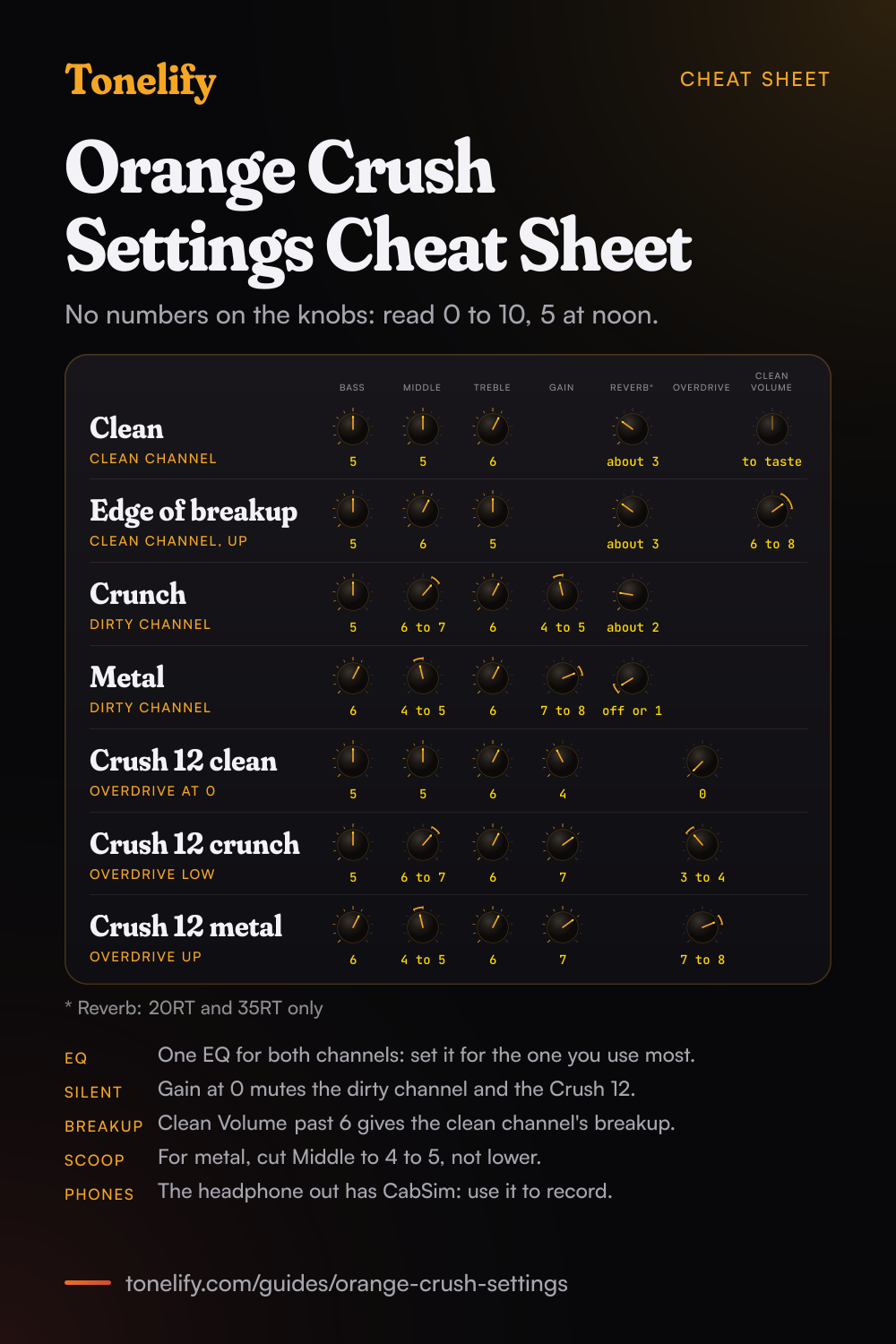
The clean, edge of breakup, crunch, metal, crush 12 clean, crush 12 crunch and crush 12 metal settings from this guide, together on one sheet with short tips. The PDF prints on white; the PNG is the dark version for your phone.
How an Orange Crush panel works
An Orange Crush is set channel first, then EQ. On the Crush 20, 20RT and 35RT, the clean channel has one knob of its own, Clean Volume, which sets its level, and Orange's manuals say higher settings on it produce natural overdrive and breakup.[2][3][4] The dirty channel has Gain, for the amount of distortion, and Dirty Volume, for its level. Bass, Middle and Treble are shared by both channels, and so is Reverb on the RT models.[3][4]
The knobs carry no numbers. The panel photo in Orange's earlier 20RT manual shows each knob's name over a symbol, and a white dot on each knob to show where it points,[5] so this guide reads them on a 0 to 10 sweep with 5 straight up. The 2025 manuals pair each control with its symbol: a loudspeaker for each volume, a treble clef with an up arrow for Treble, two arrows pointing in at a dot for Middle, a bass clef with a down arrow for Bass, a zigzag with an arrow for Gain, a coil for Reverb and a fish for the tuner.[3][4]
Which Orange Crush do you have?
Orange announced the Crush 12, Crush 20, Crush 20RT and Crush 35RT together for the NAMM show in January 2015,[6] and its 2025 manuals cover all four.[1][2][3][4] Each has Gain, a three-band EQ and a headphone output with cabinet simulation. The Crush 20, 20RT and 35RT have two channels, clean and dirty, which a footswitch can change; the Crush 12 has one channel, with an Overdrive knob as well as Gain.
The RT models add reverb and a tuner: Orange's release says the RT versions feature onboard reverb and an integrated chromatic tuner.[6] The 35RT is the largest, at 35 watts with a 10 inch speaker, and the only one with an effects loop.[4][10] The settings below work on the Crush 20, 20RT and 35RT, leaving out Reverb on the Crush 20; the Crush 12 has its own section.
| Model | Power and speaker | Channels | Reverb and tuner | Extras | Footswitch |
|---|---|---|---|---|---|
| Crush 12 | 12 watts, one 6 inch | One, with Gain and Overdrive | No | Headphone out with CabSim | None |
| Crush 20 | 20 watts, one 8 inch | Two, clean and dirty | No | Aux in, headphone out with CabSim | Latching, such as the FS-1, not included |
| Crush 20RT | 20 watts, one 8 inch | Two, clean and dirty | Yes | Aux in, headphone out with CabSim | Latching, such as the FS-1, not included |
| Crush 35RT | 35 watts, one 10 inch | Two, clean and dirty | Yes | Effects loop, aux in, headphone out with CabSim | Latching, such as the FS-1, not included |
Clean settings
Set the channel switch to clean. Bass 5, Middle 5, Treble 6, Reverb about 3, and Clean Volume to taste: on the clean channel that one knob sets the loudness, and Orange's manuals say higher settings produce natural overdrive and breakup.[2][3][4] For a sound that stays clean, keep it below the point where it starts to break up.
One EQ serves both channels, so a Treble or Middle change made for the dirty channel changes the clean one too; if you play clean most, set the EQ here first. The Crush 20 has no Reverb knob, so leave reverb out or use a pedal. On a Crush 12, the clean setting is in its own section below.
- Clean Volume to taste
- Bass 5
- Middle 5
- Treble 6
- Reverb about 3
Crush 20: no Reverb knob.
Blues and edge-of-breakup settings
Stay on the clean channel and turn it up: Clean Volume 6 to 8, Bass 5, Middle 6, Treble 5, Reverb about 3. This is the breakup Orange's manuals describe on the clean channel.[2][3][4] Set it so the amp is clean when you play softly and breaks up when you dig in.
Because Clean Volume is also the clean channel's loudness, this setting gets loud. At home, try the dirty channel with Gain low and Dirty Volume low instead, or use the headphone output. Middle a step above 5 keeps single notes from sounding thin. The Crush 20 has no Reverb knob, so skip that part.
- Clean Volume 6 to 8
- Bass 5
- Middle 6
- Treble 5
- Reverb about 3
Crush 20: no Reverb knob.
Crunch and classic rock settings
Switch to the dirty channel: Gain 4 to 5, Bass 5, Middle 6 to 7, Treble 6, Reverb about 2, and Dirty Volume for loudness. Gain sets the distortion and Dirty Volume only the level, so raise Gain for more crunch and Dirty Volume for more volume. Orange's manuals say more Middle gives a fatter sound,[2][3][4] and rock rhythm parts sit in the mids. On a Crush 20, which has no Reverb knob, skip the reverb.
There is plenty of gain left above 5. Orange's 2015 release says the series took on the high gain, four stage preamp design of its Crush Pro range, capturing the Dirty channel of its Rockerverb in solid state form, and lists that preamp for the Crush 20, 20RT and 35RT.[6] For crunch, keep Gain lower than feels natural, so chords stay clear.
- Gain 4 to 5
- Bass 5
- Middle 6 to 7
- Treble 6
- Reverb about 2
Crush 20: no Reverb knob.
Metal settings
Dirty channel: Gain 7 to 8, Bass 6, Middle 4 to 5, Treble 6, Reverb off or 1. Orange's manuals say to reduce the mid-range frequencies with higher overdrive settings for a more scooped, modern tone.[1][2][3][4] Stop around 4: with less Middle than that, the guitar gets thinner in a band mix.
Keep the reverb low for rhythm parts, where it blurs palm mutes. If the low strings smear, lower Gain a step before you touch Bass; if it fizzes, lower Treble before Gain. Orange's earlier 20RT manual says higher Gain settings add more distortion and saturation,[5] so go past 8 only when a part needs it.
- Gain 7 to 8
- Bass 6
- Middle 4 to 5
- Treble 6
- Reverb off or 1
Orange Crush 12 settings
The Crush 12 has one channel and two drive knobs: Gain sets the input level and Overdrive adds the distortion. Clean: Gain 4, Overdrive 0, Bass 5, Middle 5, Treble 6, and Volume for loudness; Orange's manual says to set the overdrive to zero for cleaner tones.[1] Crunch: Gain 7, Overdrive 3 to 4, Bass 5, Middle 6 to 7, Treble 6, the high gain and low overdrive the manual calls a classic vintage crunch.[1]
Metal: turn Overdrive up. Gain 7, Overdrive 7 to 8, Bass 6, Middle 4 to 5, Treble 6. Balance Gain against Volume for the level, as the manual puts it, and keep Gain above 0: with the gain at zero, no sound is heard. The 12 has no reverb, tuner, aux input or footswitch jack.[1][7]
- Gain 4
- Overdrive 0
- Bass 5
- Middle 5
- Treble 6
- Gain 7
- Overdrive 3 to 4
- Bass 5
- Middle 6 to 7
- Treble 6
- Gain 7
- Overdrive 7 to 8
- Bass 6
- Middle 4 to 5
- Treble 6
Lead settings
For solos, use the dirty channel with a little more Gain than the crunch setting: Gain 6, Bass 5, Middle 6, Treble 6, Reverb about 2. Middle at 6 keeps single notes full, and a delay adds repeats behind them.
On a 35RT, put the delay in the effects loop. Orange's manual says the loop connects external effects between the amp's preamp and output stages, with Send to the effect's input and Return to its output.[4] That puts the repeats after the distortion, where they stay clear. On the other models, put the delay between the guitar and the input, and keep its mix low.
Headphones, recording, the tuner and the footswitch
Every Crush has a headphone socket for a 6.35mm stereo jack, and Orange's 2025 manuals say its output features cabinet simulation and can also be used to connect the amp to a mixer or recording console.[1][2][3][4] Orange's 2015 release says this CabSim circuit emulates an Orange 4x12 cabinet.[6] The Crush 20, 20RT and 35RT also have an aux input for an MP3 player or a laptop, on a 3.5mm cable, summed to mono.[2][3][4]
The RT models' tuner turns on with its On/Off button: tune until the green OK light comes on, and set the volume to zero to tune silently.[3][4] The two-channel models have a rear jack for a latching footswitch such as Orange's FS-1, sold separately, and the manuals say the front panel channel switch is disengaged while one is plugged in.[2][3][4][8]
Matching a song on an Orange Crush
Each of Tonelify's song pages reports the amp used on the recording. Two of the songs below had an Orange amp in the rig, and the rest were recorded through Fender, Marshall, Mesa/Boogie or Dumble amps. Set the channel and the knobs for the style as above; the table says how close each match is.
When you want one song set up on the Crush you own, Tonelify adapts that song's settings to its knobs.
| Song | Amp on the record | Crush setting | How close |
|---|---|---|---|
| Sultans of Swing | Fender Twin | Clean, Clean Volume low | A clean stand-in; the Twin is a far louder valve amp |
| Pride and Joy | Dumble and two Fender Vibroverbs | Edge of breakup, Clean Volume 6 to 8 | A stand-in; accounts of the record's amps differ |
| Back in Black | Marshall Super Lead, Super Bass | Crunch, Gain 4 to 5 | A stand-in for Marshall valve heads |
| Don't Look Back in Anger | Vox AC30, Marshall combos, WEM and Orange | Crunch, Gain 4 to 5 | Partly the same maker: an Orange was one of several amps on the album |
| Everlong | Mesa/Boogie Rectifier | Metal, Gain 7 to 8, Middle 5 | A stand-in; the song is in drop D |
| Master of Puppets | Mesa/Boogie Mark IIC+ into Marshall heads | Metal, Gain 7 to 8, Middle 4 | A stand-in, with the mids scooped as the song page describes |
| Psychosocial | Orange Rockerverb 100 blended with a Diezel Herbert | Metal, Gain 7 to 8 | Same maker: Orange's release says the Crush preamp captures the Rockerverb's Dirty channel; drop B tuning |
When it sounds wrong
No sound on the dirty channel, or from a Crush 12: turn Gain up from 0, since Orange's manuals say no sound is heard with the gain at zero.[1][2][3][4] The channel switch does nothing: check for a footswitch in the rear jack, since a connected footswitch disengages the panel switch.[2][3][4]
Fizzy: lower Treble before Gain. Thin: raise Middle before you add Gain, since Orange's manuals say more Middle gives a fatter sound. The clean channel breaks up: lower Clean Volume, since higher settings produce the breakup. And before switching on, turn the volumes to zero, as each manual asks.[1][2][3][4]
Songs from the table





Common questions
What are good Orange Crush 20 settings?
Clean: clean channel, Bass 5, Middle 5, Treble 6, with Clean Volume set below the point where it breaks up. Crunch: dirty channel, Gain 4 to 5, Bass 5, Middle 6 to 7, Treble 6, with Dirty Volume for loudness. Metal: Gain 7 to 8, Bass 6, Middle 4 to 5, Treble 6. The Crush 20 has the same channels and EQ as the 20RT, so these work on both; on the 20RT, add Reverb about 2 to 3.
What are the best Orange Crush settings for metal?
Dirty channel, Gain 7 to 8, Bass 6, Middle 4 to 5, Treble 6, and Reverb off or at 1. On a Crush 12, use Gain 7 and Overdrive 7 to 8 with the same EQ. Orange's manuals say to reduce the mid-range with higher overdrive settings for a more scooped, modern tone, but stop near 4, or the guitar thins out. If it fizzes, lower Treble before Gain. These are starting points rather than Orange's numbers.
What are good Orange Crush 12 settings?
The Crush 12 has one channel, so Overdrive sets the style. Clean: Gain 4, Overdrive 0, Bass 5, Middle 5, Treble 6. Crunch: Gain 7, Overdrive 3 to 4, Middle 6 to 7. Metal: Gain 7, Overdrive 7 to 8, Bass 6, Middle 4 to 5. Volume sets the loudness, and Orange's manual says the gain must be above zero for any sound. The 12 has no reverb, so add a pedal if you want one.
How do you get a clean sound on an Orange Crush?
Use the clean channel, with Bass 5, Middle 5, Treble 6 and, on an RT model, Reverb about 3. Clean Volume sets the clean channel's loudness, and Orange's manuals say higher settings produce natural overdrive and breakup, so keep it below the point where it starts to break up. On a Crush 12, set Overdrive to 0 and Gain to about 4, and use Volume for loudness.
What is the difference between the Orange Crush 20 and the Crush 20RT?
Reverb and a tuner. Orange's 2025 manuals give both 20 watts, two channels, the same three-band EQ, an aux input and a CabSim headphone output; the 20RT adds a Reverb knob, which works on both channels, and a tuner. Thomann lists both with one 8 inch speaker. The settings on this page work on both; on the 20RT, add Reverb about 2 to 3.
What is the difference between Gain and Overdrive on the Crush 12?
Gain sets the input level and Overdrive the amount of overdrive, in the words of Orange's manual. Set Overdrive to zero for cleaner tones; higher overdrive settings add greater levels of distortion. The manual's tip for a classic vintage crunch is Gain higher with Overdrive lower, which is this guide's Gain 7 and Overdrive 3 to 4. With Gain at zero the Crush 12 makes no sound.
Why is my Orange Crush not making any sound?
Check Gain first. Orange's manuals say no sound is heard with the gain at zero, on the dirty channel of the Crush 20, 20RT and 35RT and on the Crush 12. Then check the volume for the channel you are on: Clean Volume or Dirty Volume, or Volume on the 12. On the two-channel models, also check which channel the panel switch or a footswitch has selected.
Does each channel on an Orange Crush have its own EQ?
No. The Crush 20, 20RT and 35RT have one Bass, one Middle and one Treble, shared by both channels, and the RT manuals say Reverb works on both channels too. Set the EQ for the channel you use most, then check that the other still sounds right; each channel keeps its own volume.
What do the symbols on an Orange Crush mean?
Each one shows a control's job, and the panel prints it under the control's name. Orange's 2025 manuals pair a loudspeaker with each volume, a treble clef and an up arrow with Treble, two arrows pointing in at a dot with Middle, a bass clef and a down arrow with Bass, a zigzag with an arrow with Gain, a coil with Reverb and a fish with the tuner. In the earlier 20RT manual's panel photo, a square wave marks the dirty channel's knobs and a sine wave the clean one.
Can you use headphones or record with an Orange Crush?
Yes. Every Crush has a headphone socket for a 6.35mm stereo jack, and Orange's manuals say its output features cabinet simulation and can also be used to connect the amp to a mixer or recording console. Orange's 2015 release says the CabSim circuit emulates an Orange 4x12 cabinet, so the signal can be recorded without a microphone.
What footswitch works with an Orange Crush?
A latching footswitch, such as Orange's FS-1, on the Crush 20, 20RT or 35RT; the Crush 12 has no footswitch jack. It switches between the clean and dirty channels, and Orange's manuals say the FS-1's LED lights when the clean channel is selected and the front panel switch is disengaged while it is connected. Thomann lists the footswitch as not included with any of the three.
Is the Orange Crush a tube amp?
No, it is solid state. Orange's 2015 release describes the Crush preamp as capturing the Dirty channel of its Rockerverb in solid state form, lists an analogue signal path among the key features and calls the range a genuine alternative to digital modelling. So there are no valves to warm up or replace, and no amp models to choose from: the sound comes from the channels and the knobs.
Which Orange Crush has an effects loop?
Only the Crush 35RT. Orange's 2015 release says it includes a fully buffered low-impedance effects loop, and its manual says to connect the Send socket to the input of external effects and the Return socket to their outputs, which places them between the preamp and the output stage. That is the place for a delay pedal. The Crush 12, 20 and 20RT have no loop.
What does RT mean on an Orange Crush?
Orange's manuals do not spell it out, but the RT models are the ones with reverb and a tuner: Orange's 2015 release says the RT versions feature onboard reverb and an integrated chromatic tuner, and the Crush 20RT and 35RT manuals list Reverb and Tuner among the controls. The Crush 12 and Crush 20 have neither.
Is there a printable Orange Crush settings cheat sheet?
Yes. The cheat sheet on this page puts all seven starting settings on one page: clean, edge of breakup, crunch and metal for the two-channel Crush models, and clean, crunch and metal for the Crush 12, with short tips on the shared EQ, Gain at zero and the headphone output. Download the PDF to print it on white, or save the PNG to your phone.
Sources
The numbers in brackets in the text point to this list.
- Orange: Crush 12 product manual, version 1.0, August 2025 (PDF, a retailer's copy)
- Orange: Crush 20 product manual, version 1.0, August 2025 (PDF, a retailer's copy)
- Orange: Crush 20RT product manual, version 1.0, August 2025 (PDF, a retailer's copy)
- Orange: Crush 35RT product manual, version 1.0, August 2025 (PDF)
- Orange: Crush 20RT manual, V1.0, the earlier edition with the panel photo (PDF copy)
- Guitar.com: NAMM 2015, Orange launch new Crush amplifiers (19 January 2015)
- Thomann: Orange Crush 12 listing and specifications
- Thomann: Orange Crush 20 listing and specifications
- Thomann: Orange Crush 20 RT listing and specifications
- Thomann: Orange Crush 35 RT listing and specifications
Gear in this guide
Settings for your own amp
This guide covers what is true of every rig. For a specific song on a specific amp, Tonelify reads the documented chain behind the recording and returns gain, bass, middle, treble and presence values for the controls your amp actually has. A first plan starts with 7 days free, $0 today.