Amp cheat sheets
Peavey amp settings: Bandit 112, Vypyr VIP and 6505+
Updated 12 min read6 knob panels3 sources
On a Peavey Bandit 112, start clean on the Clean channel with the voicing switch on Classic, Clean Low 8, Clean Mid 3 and Clean High 6. For metal, use the Lead channel on Modern with Pre Gain 9, Lead Low 9, Lead Mid 1 and Lead High 7. Both sit inside the ranges Peavey prints in the Bandit 112 manual. On a 6505+, metal rhythm is the Lead channel at Pre 6, Low 6, Mid 4, High 6. On a Vypyr VIP, pick the 6505+ model's high gain channel with Pre Gain 6, Low 6, Mid 4 and High 6.
Every Peavey here uses the same two gain controls: Pre Gain sets the distortion and Post Gain sets the loudness. Peavey's Bandit ranges are its own; the single numbers, the 6505+ settings and the Vypyr settings are Tonelify's starting points, because the 6505+ manual gives only Pre Gain ranges and the Vypyr manual gives no settings at all.
Free download
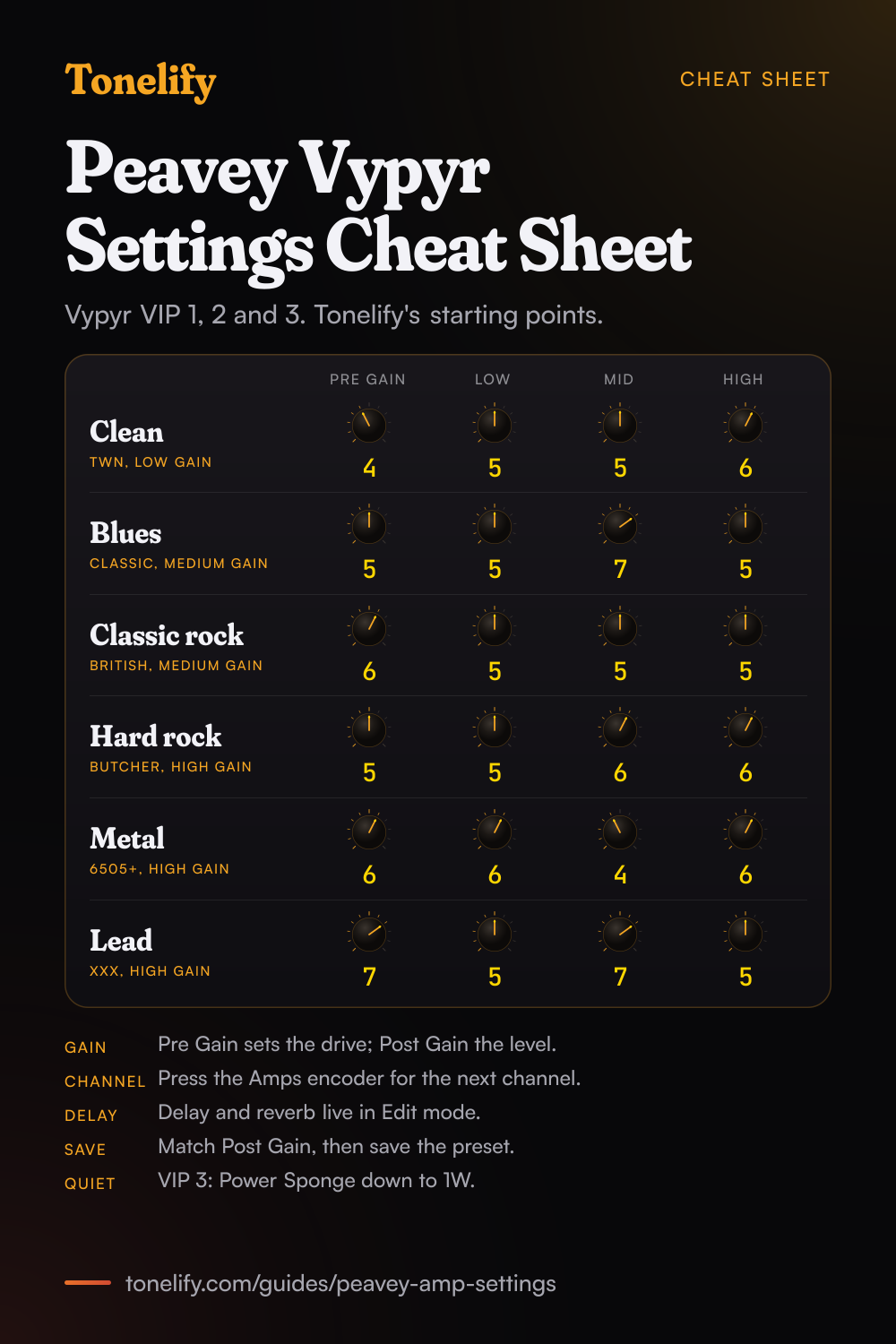
Printable cheat sheet: PDF and PNG
The clean, blues, classic rock, hard rock, metal and lead settings from this guide, together on one sheet with short tips. The PDF prints on white; the PNG is the dark version for your phone.
Pre Gain and Post Gain on a Peavey
Peavey names the two gain controls the same way across its amps. On the Bandit 112, Peavey says the Pre Gain controls the input volume level of the Lead channel and Post Gain sets the overall level of the Lead channel once your tone has been achieved.[1] The 6505+ manual tells you to set the Rhythm channel's Pre Gain at the lower, cleaner settings, 0 to 4, the Lead channel's at the mid to upper settings, 5 to 10, and the Post Gain for overall volume on both.[2]
The Vypyr VIP works the same way: Peavey calls Pre Gain how much distortion you want out of the amplifier and Post Gain the individual preset volume, with a Master Volume above both that goes to 13.[3] So on all three, set the distortion first with Pre Gain, then match the loudness with Post Gain. Turning Pre Gain up to get louder only adds distortion.
Which Peavey amp do you have?
The Bandit 112 is a solid state combo built on Peavey's TransTube circuitry, with two channels that each have their own EQ and voicing switch.[1] The 6505+ is a valve head with two channels that each have their own EQ, Resonance and Presence.[2] The Vypyr VIP 1, VIP 2 and VIP 3 are modelling combos: Peavey's manual lists 36 on board amp models, 6 of them bass amps and 6 acoustic amps, and each model has a low, medium and high gain channel.[3]
| Amp | Type | Power | Gain controls | Extras |
|---|---|---|---|---|
| Bandit 112 | Solid state combo, 12 inch Blue Marvel | 100W, 80W into the internal speaker | Clean Volume; Lead Pre Gain and Post Gain | Voicing switch per channel, Boost, Power Level 25, 50 or 100%, Damping |
| 6505+ | Valve head, 6 x 12AX7 and 4 x 6L6GC | 120W RMS | Pre Gain and Post Gain per channel | Crunch and Bright on the Rhythm channel, Resonance and Presence per channel |
| Vypyr VIP 1 | Modelling combo | 20W RMS | Pre Gain and Post Gain per preset | 16 presets in 4 banks |
| Vypyr VIP 2 | Modelling combo, 12 inch speaker | 40W RMS | Pre Gain and Post Gain per preset | 16 presets in 4 banks, 12 stompbox models |
| Vypyr VIP 3 | Modelling combo, 12 inch speaker | 100W RMS | Pre Gain and Post Gain per preset | Over 400 presets, LCD, Power Sponge from 100W to 1W |
Best Peavey Bandit 112 settings
Peavey's Bandit 112 manual has a Suggested Settings page with six settings, given as ranges: Clean, Jazz, Clean Blues, Dirty Blues, Moderate Distortion and Metal. The table puts Tonelify's single starting point beside each range, the same values as on our Bandit 112 page; the lead row is Tonelify's own. Peavey notes the Bandit 112 is used for demonstration and that the same settings apply to the Envoy 110.[1]
The Lead channel's voicing switch matters as much as the knobs. Peavey says Classic emulates overdriven tube sounds of the past, Modern increases the overall gain and notches the mids for a tone often associated with hard rock and metal, and High Gain creates a tighter response at lower Pre Gain settings.[1] Peavey's table prints the metal switch position as Moderate, which is not a position on the panel; Modern is the one Peavey ties to metal. The Clean channel's EQ is passive, and its Classic position maintains a standard voicing.[1]
| Sound | Channel, switch | Volume or Pre Gain | Low | Mid | High | Reverb | Peavey's range |
|---|---|---|---|---|---|---|---|
| Clean | Clean, Classic | 5 | 8 | 3 | 6 | 3 | Low 7 to 9, Mid 2 to 4, High 5 to 7 |
| Jazz | Clean, Classic | 5 | 8 | 7 | 3 | 2 | Low 7 to 9, Mid 6 to 8, High 3 to 4 |
| Clean blues | Clean, Classic | 9 | 6 | 8 | 4 | 3 | Volume 8 to 10, Low 5 to 7, Mid 7 to 9, High 3 to 5 |
| Dirty blues | Lead, Classic | 4 | 6 | 8 | 3 | 2 | Pre Gain 3 to 5, Low 5 to 7, Mid 7 to 9, High 2 to 4 |
| Rock | Lead, High Gain | 4 | 8 | 5 | 6 | 2 | Pre Gain 3 to 5, Low 7 to 9, Mid 4 to 6, High 5 to 7 |
| Metal | Lead, Modern | 9 | 9 | 1 | 7 | To taste | Pre Gain 8 to 10, Low 8 to 10, Mid 0 to 2, High 6 to 8 |
| Lead | Lead, Classic or Modern | 7 | 6 | 7 | 6 | 2 | Tonelify's own, footswitch boost for the solo |
Best Peavey 6505+ settings
The Rhythm channel covers clean and crunch, and Peavey says the Crunch switch converts it to a medium distortion channel, more closely matching the pre gain of the two channels.[2] The Bright switch adds a preset treble boost of 6 dB at 2 kHz and affects only the Rhythm channel.[2] The Lead channel has more pregain than the Rhythm channel to begin with, so metal needs less Pre than you might expect: 6 keeps palm mutes tight.
Each channel has its own Resonance and Presence in the power amp. Peavey says Resonance boosts the low frequencies at the resonance point of the speaker cabinet, like a low EQ, and Presence does the same for the highs, and leaves the setting to experimentation with your cabinet.[2] These are Tonelify's starting points, the same as on our 6505+ page. Peavey's manual draws two recommended settings, Southern Rock/Country and HP's Signature Setting, as pictures without numbers in its text.[2]
| Sound | Channel | Pre | Low | Mid | High | Resonance | Presence | Also |
|---|---|---|---|---|---|---|---|---|
| Clean | Rhythm, Crunch out | 3 | 5 | 5 | 6 | 4 | 4 | Bright in |
| Crunch | Rhythm, Crunch in | 6 | 5 | 6 | 6 | 4 | 5 | Bright to taste |
| Metal rhythm | Lead | 6 | 6 | 4 | 6 | 5 | 5 | Post Gain for the volume |
| Lead | Lead | 7 | 5 | 7 | 5 | 4 | 5 | Lead Post a little above the rhythm level |
Which Vypyr amp model to use
Peavey's Vypyr VIP manual describes each electric amp model in a line or two. Turn the Amps encoder to pick a model, then press it to change between the low, medium and high gain channel; on the VIP 1 and VIP 2 the LED is green, yellow or red.[3] Peavey says it modelled each amp's EQ too, so the EQ acts differently from model to model: the XXX has active EQ on the lead channel, and on the British model the tone controls have limited response, because the tone stack on Brian May's amplifier was shorted.[3]
| Model | What Peavey says it is | Use it for |
|---|---|---|
| TWN | Classic California clean, with stompbox distortion added in front on the higher channels | Clean, and country with the TSC stompbox |
| Classic | The Peavey Classic 50, with a responsive gain structure and warm, punchy tone | Blues and country |
| British | The classic sound of Queen and many British bands from the 60s on | Classic rock |
| Butcher | A modern take on a classic British stack, from clean to hot rodded | Hard rock |
| Budda | Budda Amplification's hand-wired amps | Blues and rock leads |
| XXX | The Peavey XXX: an ultra-clean clean channel, a modified British rhythm channel and a lead channel with over-the-top gain | Leads |
| 6505+ | The 6505 Series, the relaunch of the 5150 amps Peavey designed with Edward Van Halen | Metal |
| 6534+ | The 6505+ head with an EL34 power section, which adds bark to the midrange | Metal with more mids |
Best Peavey Vypyr settings
Clean: TWN on the low gain channel, Pre Gain 4, Low 5, Mid 5, High 6. Peavey suggests trying the TSC stompbox, a classic overdrive with a touch of mid boost, in front of a clean TWN for starters.[3] Blues: Classic on the medium gain channel, Pre Gain 5, Low 5, Mid 7, High 5. Classic rock: British on the medium gain channel, Pre Gain 6, Low 5, Mid 5, High 5; its EQ does little, so shape the sound with Pre Gain and the guitar's tone knob.
Hard rock: Butcher on the high gain channel, Pre Gain 5, Low 5, Mid 6, High 6. Metal: 6505+ on the high gain channel, Pre Gain 6, Low 6, Mid 4, High 6, the same numbers as the real 6505+ above; try 6534+ for more mids. Lead: XXX on the high gain channel, Pre Gain 7, Low 5, Mid 7, High 5. The XXX's lead channel EQ is active, so move it in small steps. Set Post Gain last so every preset plays at the same level, then save it.
Delay and reverb sit behind Edit mode: Peavey says that any time you want the delay or reverb you need to enter Edit mode, where Post Gain becomes the reverb level and High the delay level.[3] These are Tonelify's starting points, since Peavey's manual gives no settings.
- Pre Gain 4
- Low 5
- Mid 5
- High 6
TSC stompbox in front for a light drive.
- Pre Gain 5
- Low 5
- Mid 7
- High 5
- Pre Gain 6
- Low 5
- Mid 5
- High 5
The British model's EQ has limited response.
- Pre Gain 5
- Low 5
- Mid 6
- High 6
- Pre Gain 6
- Low 6
- Mid 4
- High 6
6534+ for more mids.
- Pre Gain 7
- Low 5
- Mid 7
- High 5
Active EQ on this channel: small moves.
Playing quietly, headphones and recording
On the Bandit 112, the Power Level switch on the back gives 25%, 50% or 100% power; Peavey calls it a tube power amplifier simulator that squashes the signal and suggests 25% for an apartment.[1] The Bandit has no headphone jack, but its Speaker Simulated Direct Output, with its own level knob, can be used for direct recordings or sent to a mixer or PA system.[1] The 6505+ has a Preamp Out on the back, and Peavey says patching from it does not affect the normal operation of the amp.[2]
On the Vypyr VIP 3, Power Sponge adjusts the maximum output of the power amp from 100 watts down to 1 watt, for a cranked sound at bedroom levels.[3] Every VIP has a headphone jack, and with headphones in, the speaker is muted and Master Volume sets the headphone level.[3] The USB port works as an audio interface with no drivers; Peavey says its output is microphone and cabinet simulated, and the speaker is muted while USB output is in use.[3]
When it sounds wrong
The Bandit footswitch does nothing: Peavey says the front Channel Select switch must be in the LEAD position for the footswitch to work.[1] The 6505+ footswitch will not change channels: press the Channel Select switch in first.[2] A 6505+ that hums or hisses: Peavey says its high gain makes a premium shielded instrument cable imperative, and the Ground Switch on the back can be moved to plus or minus, though not on 220/240 volt models.[2]
A Vypyr with no delay: tap tempo sets the time, but the level lives in Edit mode, so enter Edit mode and turn the delay level up. Only bass or acoustic models on a Vypyr VIP 1 or VIP 2: banks C and D limit the amp models to their instrument, and Peavey says holding buttons B and D during power on opens up all amp models to any preset.[3] An active pickup that distorts a clean Vypyr preset: Peavey says the VIP amps are designed for passive electronics, so turn the guitar's volume down.[3]
Common questions
What are the best Peavey amp settings?
On a Bandit 112: clean on the Clean channel, Classic, Clean Low 8, Mid 3, High 6, and metal on the Lead channel, Modern, Pre Gain 9, Low 9, Mid 1, High 7, inside Peavey's own ranges. On a 6505+: metal rhythm on the Lead channel at Pre 6, Low 6, Mid 4, High 6. On a Vypyr VIP: the 6505+ model's high gain channel at Pre Gain 6, Low 6, Mid 4, High 6.
What are the best Peavey Bandit 112 settings?
Peavey's manual gives six suggested settings as ranges. Tonelify's picks inside them: clean on Classic with Clean Volume 5, Low 8, Mid 3, High 6; dirty blues on the Lead channel, Classic, Pre Gain 4, Low 6, Mid 8, High 3; rock on High Gain with Pre Gain 4, Low 8, Mid 5, High 6; metal on Modern with Pre Gain 9, Low 9, Mid 1, High 7.
What are good Peavey Bandit settings for metal?
Lead channel with the voicing switch on Modern, Pre Gain 9, Lead Low 9, Lead Mid 1 and Lead High 7, inside Peavey's suggested Metal ranges of Pre Gain 8 to 10, Low 8 to 10, Mid 0 to 2 and High 6 to 8. Peavey's table prints the switch as Moderate, which is not on the panel; Modern is the metal voicing. In a band, raise Lead Mid toward 4.
What are the best Peavey Vypyr settings?
Clean: TWN, low gain channel, Pre Gain 4, Low 5, Mid 5, High 6. Blues: Classic, medium gain, Pre Gain 5, Mid 7. Classic rock: British, medium gain, Pre Gain 6. Metal: 6505+, high gain, Pre Gain 6, Low 6, Mid 4, High 6. Lead: XXX, high gain, Pre Gain 7, Mid 7. These are Tonelify's starting points; Peavey's Vypyr VIP manual gives none.
What are good Peavey Vypyr settings for metal?
Pick the 6505+ model and press the Amps encoder until you are on the high gain channel, the red LED on a VIP 1 or VIP 2. Set Pre Gain 6, Low 6, Mid 4 and High 6. Peavey's manual calls the 6505 the sound of metal the world over. For more midrange, try the 6534+, which Peavey describes as the 6505+ with an EL34 power section.
What are the best Peavey 6505+ settings?
Clean: Rhythm channel, Crunch out, Bright in, Pre 3, Low 5, Mid 5, High 6. Crunch: Crunch in, Pre 6, Mid 6. Metal rhythm: Lead channel, Pre 6, Low 6, Mid 4, High 6, Resonance 5, Presence 5. Lead: Pre 7, Mid 7, High 5. Peavey's manual sets the Lead Pre Gain range at 5 to 10 and the Rhythm at 0 to 4.
What is the difference between Pre Gain and Post Gain?
Pre Gain sets how hard the preamp is driven, so it controls the distortion. Post Gain sets the channel's loudness after that. Peavey's Bandit manual says to use Post Gain to set the Lead channel's level once your tone has been achieved, and the Vypyr manual calls Post Gain the individual preset volume.
What do the Vypyr channel colours mean?
Each Vypyr amp model has three channels. On the VIP 1 and VIP 2, a green LED is the low gain channel, yellow medium gain and red high gain. The VIP 3 shows them on its screen instead: no icon for clean, a square for medium gain and a star for high gain. Press the Amps encoder to step through them.
Why does the EQ do so little on the Vypyr British model?
Peavey modelled the EQ of each amp as well as its sound. Its manual says the tone stack on Brian May's amplifier was shorted, so on the British model the tone controls have limited response. Shape that sound with Pre Gain and your guitar's tone knob instead, or use another model if you need more EQ.
How do you get delay and reverb on a Vypyr?
Enter Edit mode. Peavey's manual says that any time you want the delay or reverb, you need Edit mode, where the five amp knobs switch to their second jobs: Mid sets delay feedback, High the delay level and Post Gain the reverb level. Tap Tempo sets the delay time. Press the same encoder again to leave Edit mode.
What does Power Sponge do on the Vypyr VIP 3?
Peavey says it reduces the power the amp can produce, from 100 watts all the way down to 1 watt, and warns not to confuse it with the Master Volume. It lets you get a cranked sound at bedroom levels. The VIP 1 and VIP 2 do not have it.
What does the Power Level switch do on the Bandit 112?
It sets 25%, 50% or 100% power. Peavey calls it a patented tube power amplifier simulator that squashes the signal, and suggests 25% for an apartment and 100% for playing live big. Use it, rather than a lower Post Gain, to keep the distortion while playing quietly.
Can you use headphones with a Peavey amp?
On the Vypyr VIP, yes: with headphones in, the speaker is muted and Master Volume sets the headphone level. The Bandit 112 has no headphone jack; Peavey lists one for the Envoy 110 only. The Bandit's Speaker Simulated Direct Output can feed a recorder or a mixer instead. The 6505+ is a valve head with a Preamp Out and no headphone jack.
Can you record a Vypyr over USB?
Yes. Peavey says the USB Record Out needs no extra drivers: plug in a USB 2.0 cable and the computer sees an audio device. The output is microphone and cabinet simulated. The speaker is muted while USB output is in use, though the headphone output stays on for monitoring.
Is there a printable Peavey Vypyr settings cheat sheet?
Yes. The cheat sheet on this page puts the six Vypyr starting settings on one page, clean, blues, classic rock, hard rock, metal and lead, with the amp model and channel for each. Download the PDF to print it on white, or save the PNG to your phone. The Bandit 112 and 6505+ each have their own sheet on their gear pages.
Sources
The numbers in brackets in the text point to this list.
Gear in this guide
Settings for your own amp
This guide covers what is true of every rig. For a specific song on a specific amp, Tonelify reads the documented chain behind the recording and returns gain, bass, middle, treble and presence values for the controls your amp actually has. A first plan starts with 7 days free, $0 today.