
Peavey Bandit 112 settings
The Clean and Lead channels each have their own Low, Mid and High, which are passive, and their own voicing switch: Vintage, Classic or Warm on Clean, Classic, Modern or High Gain on Lead. Boost works as a limited master volume without the footswitch, and the Power Level switch on the back sets 25%, 50% or 100% power.
⚡ Match a tone on this amp- Clean Volume
- Clean Voicing
- Clean Low
- Clean Mid
- Clean High
- Channel Select
- Pre Gain
- Lead Voicing
- Lead Low
- Lead Mid
- Lead High
- Post Gain
- Reverb
- Boost
- Power Level
- Damping
How do you dial in a specific tone on a Peavey Bandit 112?
Solid-state amps hold their voicing steady across the volume range, which makes the Peavey Bandit 112 far more predictable to dial in than a valve amp and is exactly why some of the most aggressive rhythm tones ever recorded came off solid-state heads. The trade is headroom before the EQ starts to sound brittle, so on this amp the treble control does more damage than the gain control does.
Name the song you are chasing in the tone matcher and Tonelify returns the settings for this exact guitar amp, not the settings the original artist used. Those are two different things: the recording was made on gear most players do not own.
Settings for this amp only ever use controls it actually has, because its front panel is stored in our gear database. You will not be told to set a knob that is not on the amp.
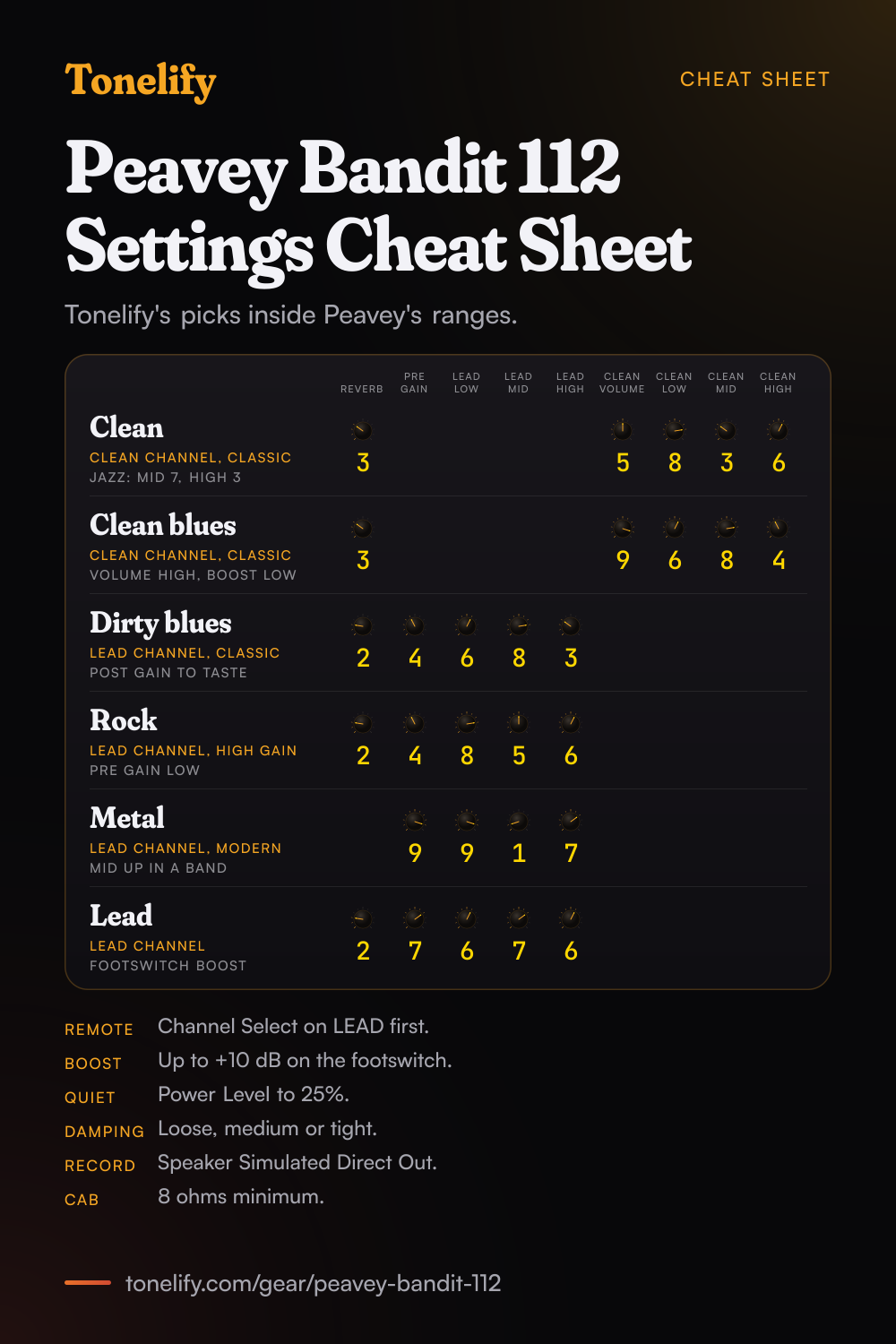
Free download
Printable cheat sheet: PDF and PNG
The clean, clean blues, dirty blues, rock, metal and lead settings from this page, together on one sheet with short tips. The PDF prints on white; the PNG is the dark version for your phone.
Starting settings on the Peavey Bandit 112
Positions on a 0 to 10 scale, with 5 at twelve o'clock. They are where to begin, not Peavey's numbers: pick the channel first, then move one control at a time from here.
Clean
Clean channel, Channel Select on CLEAN, voicing switch on Classic. Clean Volume 5, Clean Low 8, Clean Mid 3, Clean High 6, Reverb 3. These are Tonelify's starting points, inside the ranges of Peavey's suggested Clean setting in the Bandit 112 manual: Classic, Low 7 to 9, Mid 2 to 4, High 5 to 7, with Volume as desired. Peavey says Classic keeps a standard voicing, Vintage changes the overall function of the EQ and adds a hint of brightness to emulate classic amp designs, and Warm reconfigures the EQ for darker sounds.
- Clean Volume 5
- Clean Low 8
- Clean Mid 3
- Clean High 6
- Reverb 3
Inside Peavey's suggested Clean ranges.
Jazz
Clean channel, Classic. Clean Volume 5, Clean Low 8, Clean Mid 7, Clean High 3, Reverb 2. Inside Peavey's suggested Jazz setting: Classic, Low 7 to 9, Mid 6 to 8, High 3 to 4. Against the clean setting, Mid comes up and High comes down, which rounds off the pick attack on a neck pickup. If it is still too bright, try the Warm position, which Peavey says is provided for darker sounds.
Clean blues
Clean channel, Classic, with the volume high. Clean Volume 9, Clean Low 6, Clean Mid 8, Clean High 4, Reverb 3. Peavey's suggested Clean Blues setting is the only one of its six that gives the clean Volume a number, 8 to 10, with Classic, Low 5 to 7, Mid 7 to 9 and High 3 to 5. With Clean Volume that high, keep the room level down with Boost, which Peavey's manual says works as a limited master volume without the footswitch, or with the Power Level switch on the back.
- Clean Volume 9
- Clean Low 6
- Clean Mid 8
- Clean High 4
- Reverb 3
Inside Peavey's suggested Clean Blues ranges.
Dirty blues
Lead channel, Channel Select on LEAD, voicing switch on Classic. Pre Gain 4, Lead Low 6, Lead Mid 8, Lead High 3, Reverb 2, and Post Gain for the volume. Inside Peavey's suggested Dirty Blues setting: Pre Gain 3 to 5, Classic, Low 5 to 7, Mid 7 to 9, High 2 to 4. Peavey says the Classic position emulates overdriven tube sounds of the past. With Pre Gain this low the breakup follows your picking, so dig in for grit and play softly to clean it up.
- Pre Gain 4
- Lead Low 6
- Lead Mid 8
- Lead High 3
- Reverb 2
Inside Peavey's suggested Dirty Blues ranges.
Rock, moderate distortion
Lead channel, voicing switch on High Gain. Pre Gain 4, Lead Low 8, Lead Mid 5, Lead High 6, Reverb 2, and Post Gain for the volume. Inside Peavey's suggested Moderate Distortion setting: Pre Gain 3 to 5 with the switch on High Gain, Low 7 to 9, Mid 4 to 6, High 5 to 7. Peavey says High Gain raises the overall gain and changes the EQ, creating a tighter response at lower Pre Gain settings or an over the top sound at higher ones, which is why Pre Gain stays low here for rock rhythm.
- Pre Gain 4
- Lead Low 8
- Lead Mid 5
- Lead High 6
- Reverb 2
Inside Peavey's suggested Moderate Distortion ranges.
Metal
Lead channel, voicing switch on Modern. Pre Gain 9, Lead Low 9, Lead Mid 1, Lead High 7, and Post Gain for the volume. Inside Peavey's suggested Metal setting: Pre Gain 8 to 10, Low 8 to 10, Mid 0 to 2, High 6 to 8. That table prints the switch position as Moderate, which is not one of the three positions on the panel; Modern is the one Peavey describes as a modern tone often associated with hard rock and metal, raising the overall gain and notching the mids. Mid 1 is a deep scoop that suits playing alone. In a band, bring Lead Mid up toward 4 so the guitar is not lost.
- Pre Gain 9
- Lead Low 9
- Lead Mid 1
- Lead High 7
Inside Peavey's suggested Metal ranges.
Lead and solos
Lead channel, Classic or Modern. Pre Gain 7, Lead Low 6, Lead Mid 7, Lead High 6, Reverb 2. This one is Tonelify's setting, not one of Peavey's six: more Pre Gain than the rock setting for sustain and Lead Mid up so single notes carry. Set your rhythm level with Post Gain, then use the footswitch for the solo. Peavey's manual says the footswitch boosts the volume by 0 to 10 dB for solos and loud passages, and its specs give a 10 dB boost with Boost at 10, so start Boost around halfway and raise it until the solo sits above the band.
- Pre Gain 7
- Lead Low 6
- Lead Mid 7
- Lead High 6
- Reverb 2
Footswitch boost for the solo.
Power Level and Damping
Two switches on the back change how the power section behaves. Power Level gives 25%, 50% or 100% power; Peavey calls the circuit a patented tube power amplifier simulator that squashes the signal, and suggests 25% for an apartment and 100% to play live big. Damping has three positions, loose, medium and tight, and the manual says no more about it, so try tight with the metal setting if palm mutes blur and loose with the blues ones, and keep what sounds best in your room.
Chasing one song? Name it and the matcher writes that song's settings for the Peavey Bandit 112.
What controls does the Peavey Bandit 112 have?
The Peavey Bandit 112 has 16 controls on its front panel: Clean Volume, Clean Voicing switch, Clean Low, Clean Mid, Clean High, Channel Select switch, Pre Gain, Lead Voicing switch, Lead Low, Lead Mid, Lead High, Post Gain, Reverb, Boost, Power Level switch and Damping switch.
Peavey Bandit 112 specifications
- Power
- 100W, 80W into the internal speaker
- Speaker
- 1x12" Blue Marvel
- Channels
- Clean, Lead
- Front panel
- Clean Volume, Clean Voicing switch, Clean Low, Clean Mid, Clean High, Channel Select switch, Pre Gain, Lead Voicing switch, Lead Low, Lead Mid, Lead High, Post Gain, Reverb, Boost, Power Level switch, Damping switch
What the Peavey Bandit 112 panel means when you dial it in
100W, 80W into the internal speaker through a 1x12" Blue Marvel. There is enough headroom to hold a clean setting at band volume, so the gain control does the driving rather than the master. There is no presence control on this panel, so everything above the treble band has to come from the treble control and the guitar's own tone knob. A setting copied from an amp with presence has to be rebalanced here. Drive and volume have separate knobs, so the amp can sound driven at a volume that is liveable. Where a tone sits between the two is part of the answer, not a detail. Reverb is onboard, so a tone that needs it does not need a pedal in the chain. 2 channels, Clean and Lead, and a setting only means something once the channel it belongs to is named.
Peavey Bandit 112 questions
What do the voicing switches on the Bandit 112 do?
Each channel has one. On the Clean channel, Classic maintains a standard voicing, Vintage changes the overall function of the EQ and adds a hint of brightness to emulate classic amp designs, and Warm reconfigures the EQ for darker sounds. On the Lead channel the switch changes both gain and voicing: Classic emulates overdriven tube sounds of the past, Modern increases the gain and notches the mids for a tone Peavey associates with hard rock and metal, and High Gain increases the gain and changes the EQ, tighter at lower Pre Gain settings and over the top at higher ones.
What does the Boost knob do on the Bandit 112?
Peavey's manual says it works as a limited master volume control without the footswitch, and with the footswitch it boosts the volume by 0 to 10 dB for solos and loud passages. The specs give a 10 dB boost with the knob at 10.
Why does the Bandit 112 footswitch not switch channels?
The front panel Channel Select switch must be in the LEAD position for the footswitch to work. The remote footswitch then selects between the Clean and Lead channels and turns the volume boost on and off.
What does the Power Level switch do?
It sets 25%, 50% or 100% power. Peavey calls the circuit a patented tube power amplifier simulator that squashes the signal, and suggests 25% for an apartment and 100% for playing live big. Peavey's power ratings are measured at 100%.
Does the Bandit 112 have a headphone jack?
No. Peavey's manual for the Envoy 110 and Bandit 112 lists the headphone jack for the Envoy 110 only. The Bandit 112 has a Speaker Simulated Direct Output on the back, voiced to simulate a speaker cabinet, with its own level knob, for recording or for sending to a mixer or PA system.
Is the Peavey Bandit 112 a tube amp?
No, it is solid state, built on Peavey's patented TransTube circuitry, which the manual says has moved into its third generation. Peavey claims no other solid-state amp more closely replicates the characteristics of a tube amp, and calls the Power Level circuit a patented tube power amplifier simulator.
How powerful is the Bandit 112?
Peavey rates the power amp at 100 watts, 80 watts into the internal speaker: 80 W RMS into 8 ohms and 100 W RMS into 4 ohms, measured at Power Level 100%. The speaker is a 12 inch Blue Marvel. The combo measures 20.875 by 23.25 by 11.25 inches, height by width by depth, and weighs 40.9 lbs (18.55 kg).
Can you add an extension cabinet to the Bandit 112?
Yes, through the External Speaker Jack on the back. Peavey gives the minimum external speaker impedance as 8 ohms.
How does the Bandit 112 effects loop work?
The rear loop is a pair of mono jacks, Send and Return, for the preamp signal. Connect Send to the input of an external low-level effects unit and its output to Return. Peavey does not say which effects to use; delay and reverb usually go in the loop, and drive pedals in front of the input.
Which input should I use on the Bandit 112?
The High Gain Input for most electric guitars; Peavey says it is 6 dB louder than the Low Gain Input. Use Low Gain for instruments with extremely high outputs that overdrive the High Gain Input. If both inputs are used at once, both are Low Gain.
Does Peavey publish settings for the Bandit 112?
Yes. The manual's Suggested Settings page gives six, as ranges: Clean, Metal, Jazz, Moderate Distortion, Clean Blues and Dirty Blues. Peavey notes the Bandit 112 is used for demonstration and the same settings apply to the Envoy 110. The numbers on this page are Tonelify's single starting points inside those ranges, and the lead setting is Tonelify's own.
Do these settings work on the Envoy 110?
Peavey says its suggested settings apply to the Envoy 110 as well. The Envoy 110 is the 40 watt model with a 10 inch Blue Marvel speaker, a headphone jack and a preamp output, and the manual marks Power Level, Damping, the effects loop and the external speaker jack as Bandit 112 only.
My Bandit 112 has a Thrash switch and a T Dynamics knob. Is this page for it?
That is the 1995 Bandit 112 TransTube Series, an older panel. Its manual lists a Bright switch with a preset 6 dB treble boost, a Thrash switch that notches the mid range about 20 dB, a Gain switch that boosts the overall system gain, a Resonance switch, a Presence knob and a T Dynamics control that sets the power from 10 percent to 100 percent. It also has passive Low, Mid and High on each channel, so the EQ numbers here are a fair start, and Thrash is the closest thing it has to the Modern position's mid cut.
What are good Peavey Bandit 112 settings for metal?
Start on the Lead channel with the voicing switch on Modern, Pre Gain 9, Lead Low 9, Lead Mid 1 and Lead High 7. These are Tonelify's starting points inside Peavey's own suggested Metal ranges. If the sound gets lost in a band mix, raise Lead Mid before adding gain.
Does Tonelify support the Peavey Bandit 112?
Yes, and its front panel is stored, so settings only ever reference controls this guitar amp has: Clean Volume, Clean Voicing switch, Clean Low, Clean Mid, Clean High, Channel Select switch, Pre Gain, Lead Voicing switch, Lead Low, Lead Mid, Lead High, Post Gain, Reverb, Boost, Power Level switch, Damping switch. You will not be told to set a knob that is not there.
Sources
Panel, specifications and dates checked against these on .
- Peavey: Envoy 110 and Bandit 112 operating manual (PDF)
- Peavey: Bandit 112 TransTube Series manual, 1995 (PDF)
- Peavey: manual search, listing the Bandit manuals
The current manual is the file Peavey's manual search returns for the Bandit 112, dated 2012, read on 13 November 2026. Peavey's ranges are its Suggested Settings page; the single numbers are Tonelify's.
More Peavey gear
Similar amps from other makers
Settings for the song you are chasing
Name a song and Tonelify reads the documented rig behind the recording, then writes the settings for the controls the Peavey Bandit 112 has. A first plan starts with 7 days free, $0 today.