
DigiTech RP500 presets and settings
RP500: DigiTech's owner's manual 18-0710-A (2008): 52 amps, 10 effects at once, 100+100 presets, Gain 0-99, Bass/Middle/Treble 1.0-10, XLR outs, no looper in the manual.
⚡ Match a tone on this unitHow do you dial in a specific tone on a DigiTech RP500?
A multi-effects unit gives you the whole chain in one box, which means the order of the blocks is as much of the answer as the values inside them. Settings for the DigiTech RP500 name the amp model, the block order and the parameters together, rather than handing you numbers with no chain to put them in.
Name the song you are chasing in the tone matcher and Tonelify returns the settings for this exact multi-effects unit, not the settings the original artist used. Those are two different things: the recording was made on gear most players do not own.
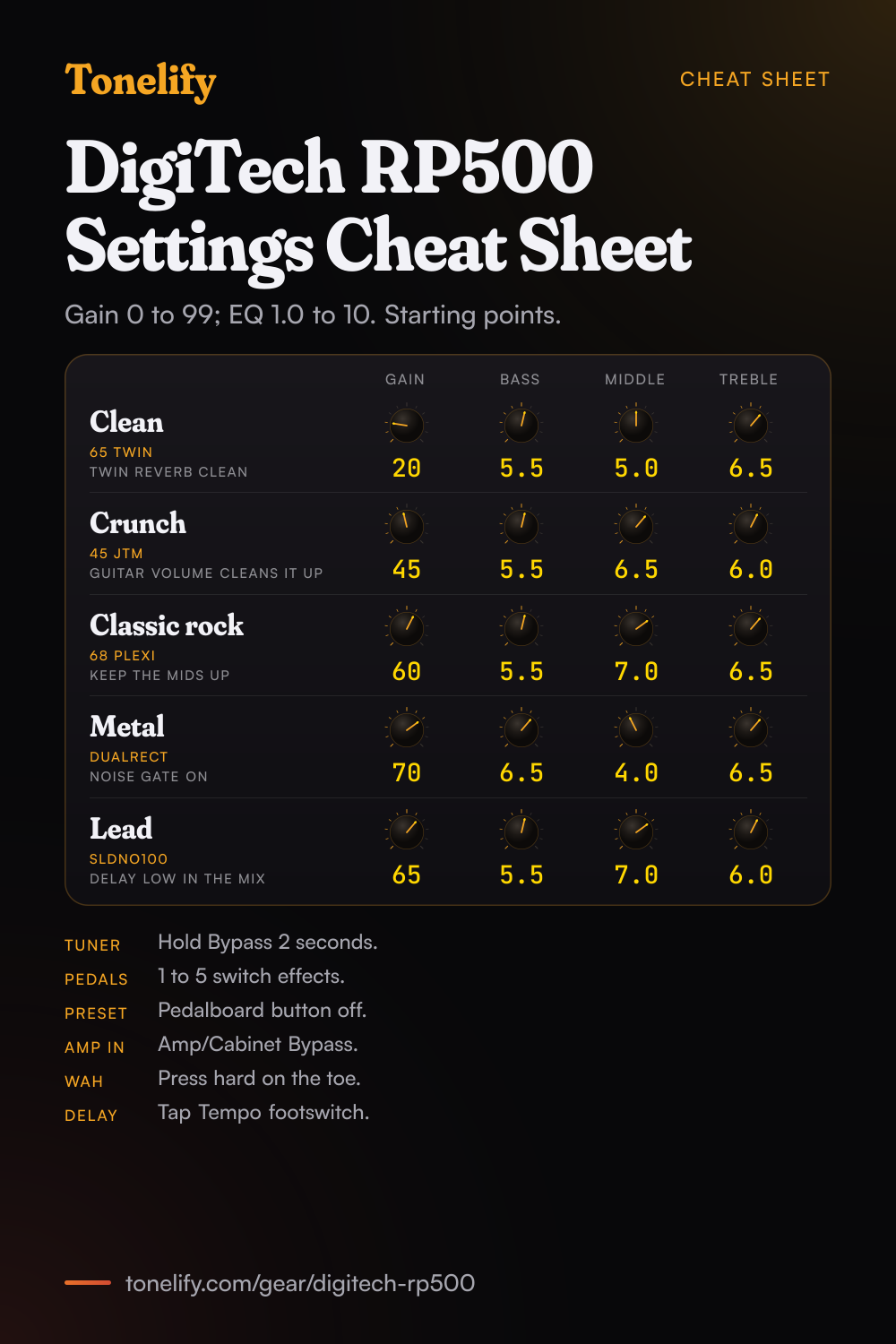
Free download
Printable cheat sheet: PDF and PNG
The clean, crunch, classic rock, metal and lead settings from this page, together on one sheet with short tips. The PDF prints on white; the PNG is the dark version for your phone.
Starting settings on the DigiTech RP500
Values as the unit's screen shows them, on its own scale; each drawn knob shows that value's share of the range. They are where to begin, not DigiTech's numbers: pick the amp model first, then move one control at a time from here.
Clean
65 twin, DigiTech's model of a '65 Fender Blackface Twin Reverb. Gain 20, Bass 5.5, Middle 5.0, Treble 6.5 in the Amp/Cabinet row: Gain runs from 0 to 99, and Bass, Middle and Treble from 1.0 to 10. jazz 120, based on a Roland JC120, and digclean, DigiTech's sparkle clean, are the other cleans.
- Gain 20
- Bass 5.5
- Middle 5.0
- Treble 6.5
Crunch and blues
45 jtm, based on a '65 Marshall JTM-45. Gain 45, Bass 5.5, Middle 6.5, Treble 6.0. Roll the guitar's volume back to clean it up. AC30 tb, the '63 Vox AC30 Top Boost, gives a brighter crunch, and digblues is DigiTech's tube combo at the sweet spot.
- Gain 45
- Bass 5.5
- Middle 6.5
- Treble 6.0
Classic rock
68 plexi, based on a '68 Marshall 100 Watt Super Lead. Gain 60, Bass 5.5, Middle 7.0, Treble 6.5. Keep the mids up: rock guitar sits in the midrange. jumppanl is the '68 Marshall Jump Panel, and 800 jcm the '83 JCM800.
- Gain 60
- Bass 5.5
- Middle 7.0
- Treble 6.5
Metal
dualrect, based on an '01 Mesa Boogie Dual Rectifier. Gain 70, Bass 6.5, Middle 4.0, Treble 6.5, with the noise gate on: in the Noise Gate/Auto Swell row choose gate and set Threshold, from 0, which opens easily, to 99. PV 5150, digmnstr and digdkmtl are the other high gain choices.
- Gain 70
- Bass 6.5
- Middle 4.0
- Treble 6.5
Noise gate on.
Lead
sldno100, based on an '88 Soldano SLO-100. Gain 65, Bass 5.5, Middle 7.0, Treble 6.0, with a delay kept low behind the notes. Tap the Tap Tempo footswitch in time with the song and the delay repeats follow it. dig solo is DigiTech's 80s shred voice.
- Gain 65
- Bass 5.5
- Middle 7.0
- Treble 6.0
Chasing one song? Name it and the matcher writes that song's settings for the DigiTech RP500.
DigiTech RP500 amp models
The 52 amp types in DigiTech's manual, as the display names them, plus direct, which turns the amp off. In the Amp/Cabinet row, Gain and Amp Level run from 0 to 99 and Bass, Middle and Treble from 1.0 to 10.
| Display name | Based on or described as |
|---|---|
| 57 champ | '57 Fender Tweed Champ |
| 57deluxe | '57 Fender Tweed Deluxe |
| 59BassMN | '59 Fender Tweed Bassman |
| 62BAssmn | '62 Fender Brown Bassman |
| 65 twin | '65 Fender Blackface Twin Reverb |
| 65dluxrv | '65 Fender Blackface Deluxe Reverb |
| 45 jtm | '65 Marshall JTM-45 |
| 68 plexi | '68 Marshall 100 Watt Super Lead (plexi) |
| jumppanl | '68 Marshall Jump Panel |
| mastrvol | '77 Marshall Master Volume |
| 800 jcm | '83 Marshall JCM800 |
| 900 jcm | '93 Marshall JCM900 |
| 2000 jcm | '01 Marshall JCM2000 |
| ac15 | '62 Vox AC15 |
| AC30 tb | '63 Vox AC30 Top Boost |
| hiwattag | '69 Hiwatt Custom 100 DR103 |
| mark iic | '81 Mesa Boogie Mark II C |
| mark iv | '94 Mesa Boogie Mark IV |
| dualrect | '01 Mesa Boogie Dual Rectifier |
| triprect | '04 Mesa Boogie Triple Rectifier |
| 99legacy | '99 Legacy VL-100 |
| matchc30 | '96 Matchless HC30 |
| sldno100 | '88 Soldano SLO-100 |
| supergrp | Laney Supergroup |
| ga-40 | Gibson GA-40 |
| or-120 | Orange, printed in the manual as OJ120 |
| PV 5150 | Peavey 5150 II |
| RG100 | Randall RG100 |
| jazz 120 | Roland JC120 |
| solar100 | Sunn Solar 100S |
| dig solo | DigiTech: 80s shred guitar |
| digmetal | DigiTech: heavy |
| digbrght | DigiTech: sparkle clean |
| digchunk | DigiTech: beefy high gain with tight bottom end |
| digclean | DigiTech: sparkle clean |
| dig gain | DigiTech: punchy high gain that cleans up |
| digblues | DigiTech: tube combo at the sweet spot |
| dig fuzz | DigiTech: Fuzz Face plus Orange amp |
| digspank | DigiTech: rhythm tone with spanky top end |
| 2101 Cln | DigiTech 2101 Clean Tube |
| 2101 saT | DigiTech 2101 Saturated Tube |
| digcrnch | DigiTech: a modified Plexi |
| digmnstr | DigiTech: maxed out gain |
| digtweed | DigiTech: Tweed front, Blackface power hybrid |
| digblack | DigiTech: '65 Blackface into a '58 Bassman |
| digstonr | DigiTech stoner rock |
| digdkmtl | DigiTech dark metal |
| digtrans | DigiTech: a transistor amp, "Deacy" from Brian May |
| digbrown | DigiTech: brown sound |
| dig mosh | DigiTech mosh |
| dread AC | Dreadnought acoustic simulation |
| jumbo ac | Jumbo acoustic simulation |
DigiTech RP500 specifications
The manual's general specifications.
| RP500 | |
|---|---|
| Effects at once | 10 |
| Presets | 100 user (1 to 00) and 100 factory (F1 to F00) |
| Processing | AudioDNA2 DSP, 24 bit, 44.1 kHz |
| Inputs | 1/4 inch guitar, 500 kΩ; 1/8 inch CD/MP3 in |
| Outputs | Left and right 1/4 inch, +10 dBu max; left and right balanced XLR, +16 dBu max; 1/8 inch headphones |
| USB | Type B, USB 1.1, 44.1 kHz, 16 or 24 bit |
| Power | PS0913B adapter for the local mains voltage |
| Size | 19.5 x 8.625 x 2.75 inches |
| Weight | 6.6 lb |
DigiTech RP500 specifications
- Released
- 2008
DigiTech RP500 questions
What is the DigiTech RP500?
A floor effects switching system with 5 effect footswitches, Up and Down footswitches, Bypass and Tap Tempo footswitches and an expression pedal, built on DigiTech's AudioDNA2 DSP. It runs 10 effects at once and holds 100 user and 100 factory presets. MusicRadar reviewed it on 28 August 2008 and counted 18 distortion types and 52 amp models, including a couple of acoustic simulators.
What amps are in the RP500?
52 amp types: 30 based on amps from Fender, Marshall, Vox, Hiwatt, Mesa Boogie, Legacy, Matchless, Soldano, Laney, Gibson, Orange, Peavey, Randall, Roland and Sunn, 20 DigiTech designs, including two from the 2101 preamp, and 2 acoustic simulations. The display shows short names such as 65 twin or dualrect.
What is Pedalboard mode on the RP500?
The default mode: footswitches 1 to 5 turn the Compressor, Distortion, Chorus/FX, Delay and Reverb on and off, and the Up and Down footswitches change presets. Turn the Pedalboard button off for Preset mode, where footswitches 1 to 5 pick the five presets in a bank and Up and Down change banks.
What is Amp/Cabinet Bypass on the RP500?
A button that turns amp and cabinet modelling off in every preset at once, for playing into a real amp. Distortion and overdrive stompboxes then do the dirt. For a single amp, set the 1/4 inch Amp/Mixer switch to Amp; DigiTech says this setup usually uses Amp/Cabinet Bypass.
How do you use the RP500 tuner?
Press and hold the Bypass footswitch for 2 seconds. The output is muted while tuning, but the expression pedal still controls the volume. Knob 1 sets the reference from A=427 to A=453 Hz or picks dropped tunings; 440 Hz is the default. Press any footswitch to exit.
Does the RP500 have a looper?
No looper is described in DigiTech's RP500 manual. It has a Tap Tempo footswitch for the delay, a CD/MP3 input for playing along with recordings, two LFOs and an expression pedal.
What do the Tone Library and Effects Library knobs do?
Knob 1, the Tone Library, sets the Compressor, Distortion, Amp/Cabinet, EQ and Noise Gate for a genre in one click, from Blues to Metal to Country. Knob 2, the Effects Library, sets the Chorus/FX, Delay and Reverb chain. Each leaves the other's part of the preset alone, so you can mix them.
What does the RP500 expression pedal do?
It can control the Volume, Wah, Whammy, YaYa or almost any parameter, with a heel and toe value stored in each preset. Press hard on the toe to work the V-switch, which swaps between the linked parameter and the wah.
Does the RP500 have XLR outputs?
Yes: balanced left and right XLR outputs, always with speaker compensation on, for a mixer or recording device, with a Ground Lift switch for hum. The 1/4 inch outputs have an Amp/Mixer switch.
Can the RP500 record to a computer?
Yes, over USB Type B: four channels of audio, two to the computer and two back, at 44.1 kHz and 16 or 24 bit. The same connection runs DigiTech's X-Edit editor and librarian. The manual's system requirements are for Windows XP or Vista and Mac OS 10.4 or 10.5.
How do you factory reset the RP500?
Hold the Store button while powering up. When FACt RST appears, release it, then hold the flashing Store button for 3 seconds until ReSTOReD appears. This erases all user presets, and the expression pedal calibration starts afterwards.
How do you build a patch on the DigiTech RP500?
Pick the amp model first, then set its controls, then add the blocks in signal-chain order: drive before the amp, time and modulation after it. A patch built the other way around ends up compensating for the wrong stage. Tonelify returns the model, the order and the parameters together.
Does Tonelify support the DigiTech RP500?
Yes. Name it in the tone matcher along with the song you are chasing and the settings come back adapted to it. Gear does not need to be in the catalog for a match to run.
Sources
Panel, specifications and dates checked against these on .
More DigiTech gear
Similar multi-effects units from other makers
Settings for the song you are chasing
Name a song and Tonelify reads the documented rig behind the recording, then writes the settings for a rig with the DigiTech RP500 in it. A first plan starts with 7 days free, $0 today.