
DigiTech RP360 / RP360 XP presets and settings
RP360 / RP360 XP: DigiTech's owner's manual 5041674-B: 54 amps, 26 cabs, 85 stompboxes, 10 at once, 99+99 presets, 40 s looper, 60 drum patterns, Gain 0-99, EQ 1.0-10.0 (5.5 flat), 9 V 300 mA centre ground.
⚡ Match a tone on this unitHow do you dial in a specific tone on a DigiTech RP360 / RP360 XP?
A multi-effects unit gives you the whole chain in one box, which means the order of the blocks is as much of the answer as the values inside them. Settings for the DigiTech RP360 / RP360 XP name the amp model, the block order and the parameters together, rather than handing you numbers with no chain to put them in.
Name the song you are chasing in the tone matcher and Tonelify returns the settings for this exact multi-effects unit, not the settings the original artist used. Those are two different things: the recording was made on gear most players do not own.
Free download
Printable cheat sheet: PDF and PNG
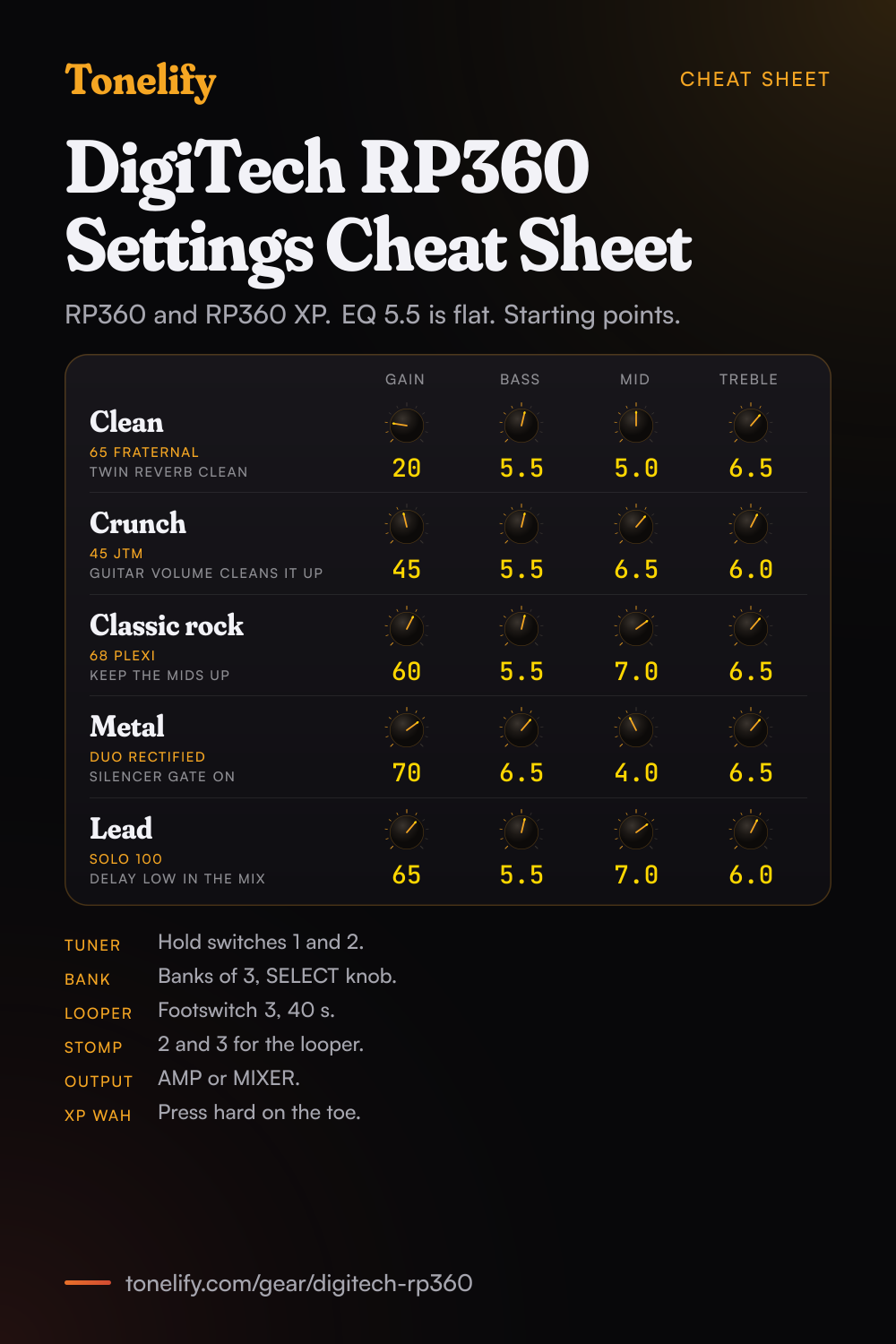
The clean, crunch, classic rock, metal and lead settings from this page, together on one sheet with short tips. The PDF prints on white; the PNG is the dark version for your phone.
Starting settings on the DigiTech RP360 / RP360 XP
Values as the unit's screen shows them, on its own scale; each drawn knob shows that value's share of the range. They are where to begin, not DigiTech's numbers: pick the amp model first, then move one control at a time from here.
Clean
65 Fraternal, DigiTech's model of a '65 Fender Blackface Twin Reverb. Gain 20, Bass 5.5, Mid 5.0, Treble 6.5. Gain runs from 0 to 99; Bass, Mid and Treble run from 1.0 to 10.0, and 5.5 is flat. Jazz 120, the '84 Roland JC-120, is the other big clean.
- Gain 20
- Bass 5.5
- Mid 5.0
- Treble 6.5
Crunch and blues
45 JTM, based on a '65 Marshall JTM-45. Gain 45, Bass 5.5, Mid 6.5, Treble 6.0. Roll the guitar's volume back to clean it up. British 30, the '63 Vox AC30 Top Boost, gives a brighter, chimier crunch with the same controls.
- Gain 45
- Bass 5.5
- Mid 6.5
- Treble 6.0
Classic rock
68 Plexi, based on a '68 Marshall 100 Watt Super Lead. Gain 60, Bass 5.5, Mid 7.0, Treble 6.5. Keep the mids above the flat 5.5: rock guitar sits in the midrange. Jump Panel is the same plexi with channel 1 jumped into channel 2, for a little more push.
- Gain 60
- Bass 5.5
- Mid 7.0
- Treble 6.5
Metal
Duo Rectified, based on an '01 Mesa/Boogie Dual Rectifier. Gain 70, Bass 6.5, Mid 4.0, Treble 6.5, with the Silencer Gate in the noise gate slot. PV 5150, the '99 Peavey 5150 II, and DigiTech's own Monster and DarkMetal are the other high gain choices.
- Gain 70
- Bass 6.5
- Mid 4.0
- Treble 6.5
Silencer Gate in the gate slot.
Lead
Solo 100, based on an '88 Soldano SLO100. Gain 65, Bass 5.5, Mid 7.0, Treble 6.0, with a delay kept low behind the notes. DigiTech's own Solo model is voiced for leads too; the manual suggests adding a bit of delay and reverb to it.
- Gain 65
- Bass 5.5
- Mid 7.0
- Treble 6.0
Chasing one song? Name it and the matcher writes that song's settings for the DigiTech RP360 / RP360 XP.
DigiTech RP360 and RP360 XP amp models
The 54 amp models in DigiTech's manual, plus Direct, which passes the signal with no amp model while the cabinet models stay available. Every model has the same controls: Gain and Amp Level from 0 to 99, and Bass, Mid and Treble from 1.0 to 10.0, with 5.5 flat.
| Model | Based on |
|---|---|
| 57 Champion | '57 Fender Tweed Champ |
| 57 D-Luxe | '57 Fender Tweed Deluxe |
| 59 Bass Man | '59 Fender Tweed Bassman |
| 62 Bass Man | '62 Fender Brownface Bassman |
| 65 Fraternal | '65 Fender Blackface Twin Reverb |
| 65 D-Luxe Reverb | '65 Fender Blackface Deluxe Reverb |
| 45 JTM | '65 Marshall JTM-45 |
| 68 Plexi | '68 Marshall 100 Watt Super Lead (plexi) |
| Jump Panel | '68 Marshall Jump Panel |
| Master Volume | '77 Marshall Master Volume |
| 800 JCM | '83 Marshall JCM800 |
| 900 JCM | '93 Marshall JCM900 |
| 2000 JCM | '01 Marshall JCM2000 (Solo Channel) |
| British 15 | '62 Vox AC15 |
| British 30 | '63 Vox AC30 Top Boost |
| Hi Wattage | '69 Hiwatt Custom 100 DR103 |
| Mark IIC | '81 Mesa/Boogie Mark II C |
| Mark 4 | '94 Mesa/Boogie Mark IV |
| Duo Rectified | '01 Mesa/Boogie Dual Rectifier |
| Tri Rectified | '04 Mesa/Boogie Triple Rectifier |
| Caliber 22 | '86 Mesa/Boogie .22 Caliber |
| Heritage | '99 Carvin Legacy VL-100 |
| Matched 30 | '96 Matchless HC30 |
| Chief | '95 Matchless Chieftain |
| Solo 100 | '88 Soldano SLO100 |
| Super Group | '69 Laney Supergroup |
| GA-40 | '59 Gibson GA-40 |
| Citris 120 | '74 Orange OR 120 |
| PV 5150 | '99 Peavey 5150 II |
| RG100 | '88 Randall RG-100 |
| Jazz 120 | '84 Roland JC-120 |
| Solar 100 | '67 Sunn 100S |
| Tweedface | A Tweed preamp with a Blackface power amp |
| Black Bass | A '65 Blackface preamp with a Bassman power amp |
| Brown Sound | A hot-rodded '80s stack tone |
| Solo | DigiTech original |
| Metal | DigiTech original |
| Bright Combo | DigiTech original |
| Chunk | DigiTech original |
| Clean Tube | DigiTech original |
| High Gain | DigiTech original |
| Blues | DigiTech original |
| Fuzz | DigiTech original |
| Spank | DigiTech original |
| 2101 Clean | The DigiTech GSP2101 preamp |
| 2101 Saturated | The DigiTech GSP2101 preamp |
| Crunch | DigiTech original |
| Monster | DigiTech original |
| Stoner Rock | DigiTech original |
| DarkMetal | DigiTech original |
| Transistor | DigiTech original, a lo-fi solid state amp |
| Mosh | DigiTech original |
| Dread Acoustic | Acoustic simulator; no cabinet models with it |
| Jumbo Acoustic | Acoustic simulator; no cabinet models with it |
RP360 and RP360 XP specifications
The two units share the same effects and specifications; the RP360 XP adds a built-in expression pedal and is longer and heavier.
| RP360 | RP360 XP | |
|---|---|---|
| Effects | 85 stompboxes, 54 amps, 26 cabinets | Same |
| At once | 10 effects, in any order | Same |
| Presets | 99 user and 99 factory | Same |
| Looper | 40 seconds | Same |
| Drum machine | 60 patterns, 40 to 240 BPM | Same |
| Expression pedal | External, on CONTROL IN | Built in, with V-Switch for the wah |
| Inputs | 1/4 inch guitar, 1 MΩ; 1/8 inch AUX in | Same |
| Outputs | Left and right 1/4 inch; 1/8 inch headphones | Same |
| USB | Type B, USB 1.1 audio, 44.1 kHz, 16 or 24 bit | Same |
| Power | 9 V DC, 300 mA, centre pin ground | Same |
| Size | 7.5 x 8.5 x 2 inches | 11.5 x 8.5 x 2 inches |
| Weight | 2.84 lb | 4.12 lb |
DigiTech RP360 / RP360 XP specifications
- Released
- 2014
DigiTech RP360 / RP360 XP questions
What is the DigiTech RP360?
A floor multi-effects processor with three footswitches, an LCD display and a USB audio connection. DigiTech's manual gives it 85 stompbox pedals, 54 amp models and 26 cabinet models, up to 10 effects at once in any order, 99 user and 99 factory presets, a 40 second looper and a drum machine. MusicRadar reviewed the RP360 XP on 9 May 2014 and counted 162 effects, with 82 stompboxes.
What is the difference between the RP360 and the RP360 XP?
The RP360 XP has a built-in expression pedal with a V-Switch that turns the wah on and off when you press hard on the toe. Otherwise they share the same effects and manual. The RP360 takes an external expression or volume pedal on its CONTROL IN jack. The XP is 11.5 inches long and weighs 4.12 lb; the RP360 is 7.5 inches and 2.84 lb.
What amps are in the RP360?
54 models: 35 based on real amps or combinations of them, from Fender, Marshall, Vox, Hiwatt, Mesa/Boogie, Carvin, Matchless, Soldano, Laney, Gibson, Orange, Peavey, Randall, Roland and Sunn, 17 DigiTech originals, including two from the GSP2101 preamp, and two acoustic simulators. Direct switches the amp model off while keeping the cabinet.
How do you use the tuner on the RP360?
In Preset or Stomp mode, press and hold footswitches 1 and 2 together for about 2 seconds. In Bank mode, hold the active preset's footswitch. TUNER REF sets A from 427 to 453 Hz,, or A=G♭, A=G or A=A♭; 440 Hz is the default. Press any footswitch to exit.
How do you use the RP360 looper?
In Preset mode, footswitch 3 runs the 40 second looper: press to arm it, play to start recording, press again to close the loop, then press once to start and end each overdub. Press it twice quickly to stop and hold it for 2 seconds to clear. In Stomp or Bank mode, press footswitches 2 and 3 together first. The looper and drum machine cannot run at the same time.
What are the RP360 footswitch modes?
Preset mode, the default, uses footswitches 1 and 2 for preset down and up and 3 for the looper. Stomp mode turns up to three effects in a preset on and off. Bank mode works in banks of 3 presets, 33 user and 33 factory banks chosen with the SELECT knob: press a preset's footswitch again to bypass it. In Preset and Stomp modes, pressing footswitches 1 and 2 together bypasses all effects in the preset.
What is Sound Check on the RP360?
A setting that puts the looper at the start of the effects chain, so you record a dry guitar loop and hear it through the effects while you edit. Set PHRASE SAMPLER to SOUND CHECK in the System Settings menu.
Does the RP360 have a drum machine?
Yes, with 60 drum and metronome patterns and a tempo from 40 to 240 BPM, opened with the DRUMS button. Clear any recorded loop first, because the looper and drum machine cannot be used together.
Should the RP360 output be set to AMP or MIXER?
AMP when the 1/4 inch outputs go to a guitar amp; it is the default when you plug into LEFT OUT or RIGHT OUT. MIXER when they go to a mixer or recording interface, or when recording over USB, so the outputs suit full range speakers. Headphones and USB get the MIXER setting automatically when nothing is plugged into the 1/4 inch outputs.
Can the RP360 be used as an audio interface?
Yes. Its USB Type B port streams two channels to and from a computer at 44.1 kHz, 16 or 24 bit depending on the recording software, and works with DigiTech's free Nexus editor and librarian software for Mac and PC.
What power supply does the RP360 need?
9 V DC at 300 mA with the centre pin ground and the outer sleeve positive, as DigiTech's PS0913DC adapter supplies. The adapter is included.
What are the best RP360 settings for metal?
Start with Duo Rectified: Gain 70, Bass 6.5, Mid 4.0, Treble 6.5, with the Silencer Gate. These are starting points rather than DigiTech's numbers; if it fizzes, lower Gain before Treble.
How do you build a patch on the DigiTech RP360 / RP360 XP?
Pick the amp model first, then set its controls, then add the blocks in signal-chain order: drive before the amp, time and modulation after it. A patch built the other way around ends up compensating for the wrong stage. Tonelify returns the model, the order and the parameters together.
Does Tonelify support the DigiTech RP360 / RP360 XP?
Yes. Name it in the tone matcher along with the song you are chasing and the settings come back adapted to it. Gear does not need to be in the catalog for a match to run.
Sources
Panel, specifications and dates checked against these on .
More DigiTech gear
Similar multi-effects units from other makers
Settings for the song you are chasing
Name a song and Tonelify reads the documented rig behind the recording, then writes the settings for a rig with the DigiTech RP360 / RP360 XP in it. A first plan starts with 7 days free, $0 today.