
DigiTech Whammy 5 settings
The selector knob picks a Whammy, Harmony or Detune effect. The Classic/Chords switch chooses between the classic algorithm, best for single notes, and one made for bending full chords.
⚡ Match a tone on this pedal- Treadle
- Selector knob
- Classic/Chords
How do you dial in a specific tone on a DigiTech Whammy 5?
The DigiTech Whammy 5 works on the note as the guitar plays it, so it usually goes at the front of the chain, before any drive. Fed an already distorted signal, a pitch effect can lose track of the note it is shifting. Settings here come with that position as well as the knob values.
Name the song you are chasing in the tone matcher and Tonelify returns the settings for this exact pedal, not the settings the original artist used. Those are two different things: the recording was made on gear most players do not own.
Settings for this unit only ever use controls it actually has, because its front panel is stored in our gear database. You will not be told to set a knob that is not on the unit.
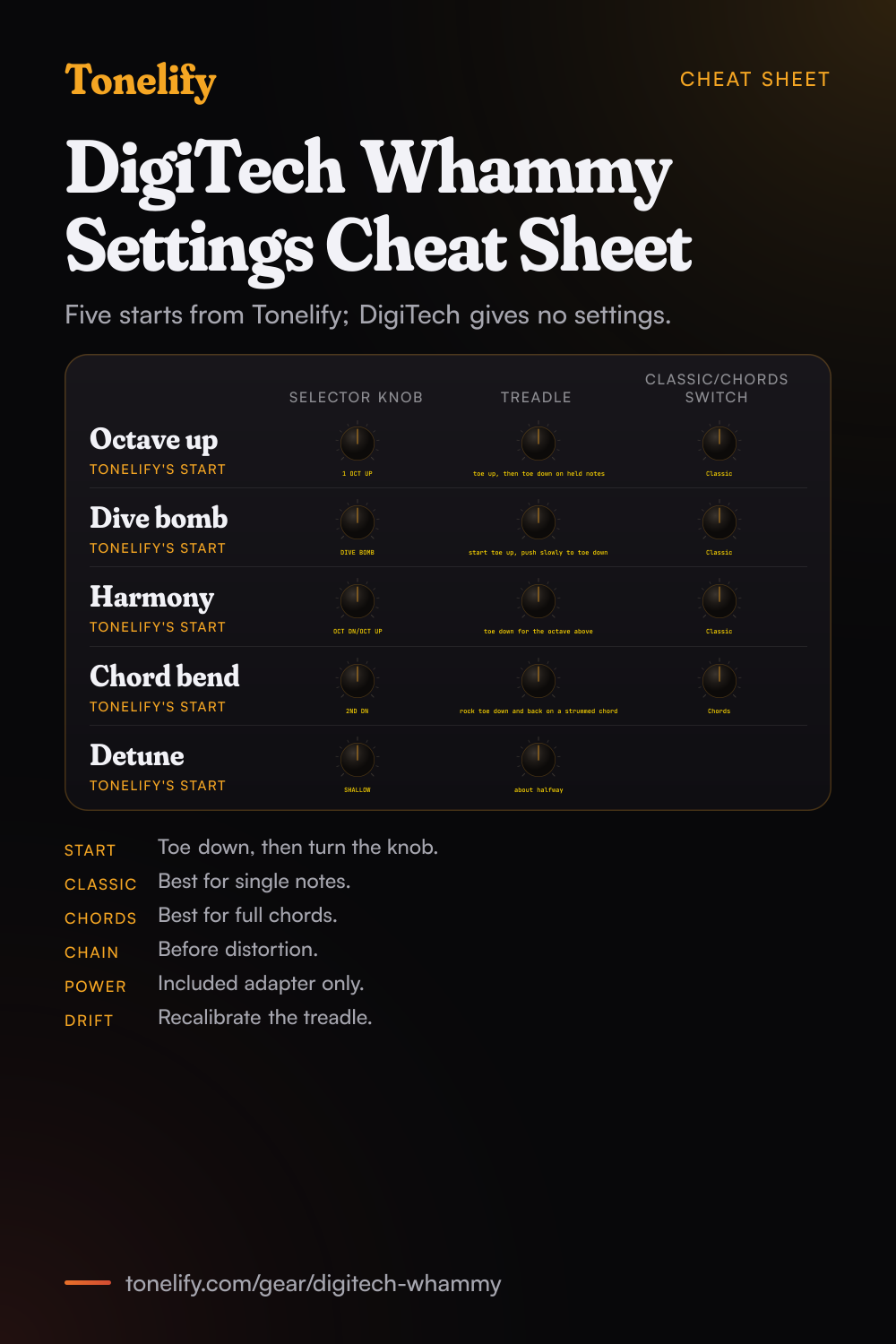
Free download
Printable cheat sheet: PDF and PNG
The octave up, dive bomb, harmony, chord bend and detune settings from this page, together on one sheet with short tips. The PDF prints on white; the PNG is the dark version for your phone.
Starting settings on the DigiTech Whammy 5
Positions as clock times, since the knobs carry no numbers: 12:00 is the middle of the travel. They are where to begin, not DigiTech's numbers: move one control at a time from here.
Octave up lead
Selector knob 1 OCT UP, Classic/Chords switch Classic, Treadle toe up, then toe down on held notes. This one is Tonelify's, not DigiTech's. DigiTech's manual says Whammy effects bend from the original input pitch at toe up to the pitch of the selected setting at toe down, and that Classic is ideal for single note play. Hold a note, rock the treadle forward and it rises a full octave.
- Selector knob 1 OCT UP
- Classic/Chords switch Classic
- Treadle toe up, then toe down on held notes
Tonelify's starting point, not DigiTech's.
Dive bomb
Selector knob DIVE BOMB, Classic/Chords switch Classic, Treadle start toe up, push slowly to toe down. This one is Tonelify's, not DigiTech's. DigiTech's manual says DIVE BOMB bends your input note three octaves down, and Whammy effects carry no dry signal, so the whole note falls. Pick hard, then push the treadle forward over a beat or two for the classic falling growl.
- Selector knob DIVE BOMB
- Classic/Chords switch Classic
- Treadle start toe up, push slowly to toe down
Tonelify's starting point, not DigiTech's.
Octave harmony
Selector knob OCT DN/OCT UP, Classic/Chords switch Classic, Treadle toe down for the octave above. This one is Tonelify's, not DigiTech's. DigiTech's manual says this setting bends the harmony between one octave below at toe up and one octave above at toe down, and Harmony effects keep your dry note. Park the treadle at either end for a thick octave riff, or sweep it for a wild swoop.
- Selector knob OCT DN/OCT UP
- Classic/Chords switch Classic
- Treadle toe down for the octave above
Tonelify's starting point, not DigiTech's.
Chord bend
Selector knob 2ND DN, Classic/Chords switch Chords, Treadle rock toe down and back on a strummed chord. This one is Tonelify's, not DigiTech's. DigiTech's manual says 2ND DN bends the input note 2 semitones down, and the Chords setting is best suited for bending of full chords. Rocking the treadle on a big open chord drops the whole chord a whole step and brings it back.
- Selector knob 2ND DN
- Classic/Chords switch Chords
- Treadle rock toe down and back on a strummed chord
Tonelify's starting point, not DigiTech's.
Detune thickener
Selector knob SHALLOW, Treadle about halfway. This one is Tonelify's, not DigiTech's. DigiTech's manual says the Detune effects mix a pitch shifted copy with the original, and that at toe up only the dry signal is heard; rocking forward adds more of the detuned copy. SHALLOW detunes it slightly, which thickens clean chords a bit like a chorus. DEEP is the stronger version.
- Selector knob SHALLOW
- Treadle about halfway
Tonelify's starting point, not DigiTech's.
Chasing one song? Name it and the matcher writes that song's settings for the DigiTech Whammy 5.
Every Whammy setting
The Selector Knob picks one of 21 settings in three groups. The descriptions are DigiTech's, from the 5th generation Whammy manual.
| Setting | Group | What DigiTech's manual says |
|---|---|---|
| 2 OCT UP | Whammy | Bends the note two octaves up |
| 1 OCT UP | Whammy | Bends the note one octave up |
| 5TH UP | Whammy | Bends the note 7 semitones up |
| 4TH UP | Whammy | Bends the note 5 semitones up |
| 2ND DN | Whammy | Bends the note 2 semitones down |
| 4TH DN | Whammy | Bends the note 5 semitones down |
| 5TH DN | Whammy | Bends the note 7 semitones down |
| 1 OCT DN | Whammy | Bends the note one octave down |
| 2 OCT DN | Whammy | Bends the note two octaves down |
| DIVE BOMB | Whammy | Bends the note three octaves down |
| OCT DN/OCT UP | Harmony | From an octave below to an octave above |
| 5TH DN/4TH DN | Harmony | From a fifth to a fourth below |
| 4TH DN/3RD DN | Harmony | From a fourth to a minor third below |
| 5TH UP/7TH UP | Harmony | From a fifth to a dominant seventh above |
| 5TH UP/6TH UP | Harmony | From a fifth to a sixth above |
| 4TH UP/5TH UP | Harmony | From a fourth to a fifth above |
| 3RD UP/4TH UP | Harmony | From a third to a fourth above |
| MIN 3RD UP/3RD UP | Harmony | From a minor third to a major third above |
| 2ND UP/3RD UP | Harmony | From a second to a third above |
| SHALLOW | Detune | Copy slightly detuned from the original |
| DEEP | Detune | Copy substantially detuned from the original |
What controls does the DigiTech Whammy 5 have?
The DigiTech Whammy 5 has 3 controls on its front panel: Treadle, Selector knob and Classic/Chords switch.
DigiTech Whammy 5 specifications
- Front panel
- Treadle, Selector knob, Classic/Chords switch
What the DigiTech Whammy 5 panel means when you dial it in
Its controls are Treadle, Selector knob and Classic/Chords switch, and settings for this pedal are written against those names rather than a generic level, tone and gain.
DigiTech Whammy 5 questions
How do you use a DigiTech Whammy?
Turn the effect on with the footswitch, push the treadle fully forward (toe down), then turn the Selector Knob to pick an effect. That is the order DigiTech's manual gives. Then rock the treadle back and forth while you play: toe down increases the pitch bend and toe up decreases it.
What is the difference between Classic and Chords on the Whammy?
DigiTech's manual says the switch toggles between the classic Whammy algorithm (Classic) and the modern algorithm from the Whammy DT (Chords). The Classic setting is ideal for single note play, while the Chords setting is best suited for bending full chords.
What effects does the Whammy have?
Three groups. Whammy effects bend the note up or down with no dry signal added; Harmony effects add a second, bending note next to your dry signal; Detune effects mix a slightly or strongly detuned copy with your dry signal. The table below lists every setting with DigiTech's description.
How do you do a dive bomb on the Whammy?
Turn the Selector Knob to DIVE BOMB, start toe up and push the treadle forward. DigiTech's manual says DIVE BOMB bends your input note three octaves down at toe down. The Dive bomb panel above has Tonelify's start.
How do you calibrate the Whammy treadle?
DigiTech's manual: disconnect the power, then hold the footswitch while reconnecting it, and release when a Whammy LED starts flashing. Rock the treadle fully forward and fully back at least two times, then press the footswitch again to exit. Do this if notes stop bending or returning to the right pitch.
Where does the Whammy go in the pedal chain?
Before distortion. DigiTech's manual says to connect the Whammy's output to your favorite distortion pedal or to your amplifier, so the Whammy comes first and the drive comes after it.
What power supply does the Whammy need?
The adapter in the box. DigiTech's manual says do not use any power supply other than the included power supply, a PS0913DC 9 VDC adapter, and lists power consumption as 2.4 Watts (under 265 mA at 9 VDC).
Can you control the Whammy with MIDI?
Yes. DigiTech's manual says the MIDI input takes Program Change messages to select an effect and CC11 to move the treadle, with 0 as toe up and 127 as toe down. To set the MIDI channel, hold the footswitch while powering up and turn the Selector Knob.
Is the Whammy true bypass, and does it work on bass?
Yes to both. DigiTech's manual says the 5th generation Whammy offers true bypass operation for both guitar and bass.
Which Whammy is this?
The 5th generation Whammy, DigiTech's current one. Its manual says it keeps the legacy Whammy pitch bending options and adds some pitch bend settings from the Whammy DT, plus the Classic/Chords switch.
Who uses the DigiTech Whammy?
DigiTech's product page says Whammy artists have won over 60 Grammys using its pitch shifting sound. DigiTech's history page says the Whammy series were the first ever to bend pitch digitally.
What are the Whammy's specs?
Input impedance 1 M ohm, output impedance 1 k ohm, 44.1 kHz sample rate with 24 bit conversion, and 6.5 x 7.75 x 2.5 inches, per DigiTech's manual.
Where does the DigiTech Whammy 5 go in the signal chain?
Usually first, or close to it: straight after the guitar and before any drive pedal. It reads the note as the guitar plays it, and it does that most reliably on the plain guitar signal. The drive then shapes what this pedal has already done, rather than the other way round.
Does Tonelify support the DigiTech Whammy 5?
Yes, and its front panel is stored, so settings only ever reference controls this pedal has: Treadle, Selector knob, Classic/Chords switch. You will not be told to set a knob that is not there.
Sources
Panel, specifications and dates checked against these on .
The controls, effects, setup order, calibration, MIDI, power and specs are from DigiTech's manual; the Grammy line is from DigiTech's product page; the first digital pitch bend line is from DigiTech's history page. Every panel is Tonelify's, not DigiTech's.
Similar pedals from other makers
Settings for the song you are chasing
Name a song and Tonelify reads the documented rig behind the recording, then writes the settings for a rig with the DigiTech Whammy 5 in it. A first plan starts with 7 days free, $0 today.