
Hartke HD75 settings
⚡ Match a tone on this amp- Volume
- Bass
- Mid
- Treble
- 7-band graphic EQ
How do you dial in a specific tone on a Hartke HD75?
A bass amp's EQ points sit where a guitar amp's do not, so a bass tone written against guitar advice fights the cabinet. Settings for the Hartke HD75 use this amp's own controls and the frequency ranges they actually cover.
Name the song you are chasing in the tone matcher and Tonelify returns the settings for this exact bass amp, not the settings the original artist used. Those are two different things: the recording was made on gear most players do not own.
Settings for this amp only ever use controls it actually has, because its front panel is stored in our gear database. You will not be told to set a knob that is not on the amp.
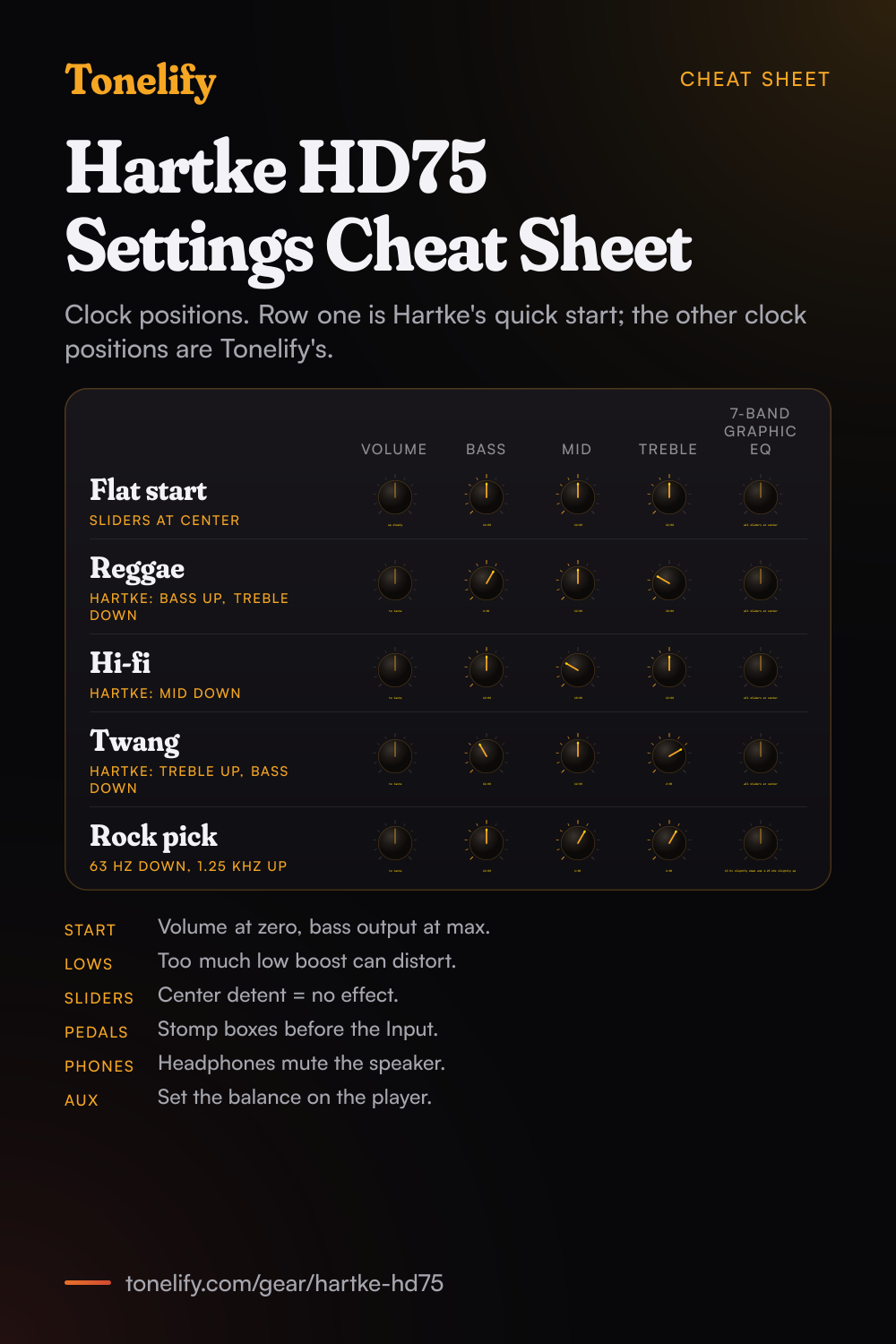
Free download
Printable cheat sheet: PDF and PNG
The flat start, reggae, hi-fi, twang and rock pick settings from this page, together on one sheet with short tips. The PDF prints on white; the PNG is the dark version for your phone.
Starting settings on the Hartke HD75
Positions as clock times, since the knobs carry no numbers: 12:00 is the middle of the travel. They are where to begin, not Hartke's numbers: move one control at a time from here.
Hartke's starting point
Volume at minimum, then up slowly, Bass 12:00, Mid 12:00, Treble 12:00, 7-band graphic EQ all sliders at center. This is Hartke's own quick start: the manual says to turn the Volume fully counterclockwise, set all EQ knobs to their twelve o'clock position and the graphic EQ sliders to the center, set the output of your bass to maximum and then slowly turn the Volume up while playing. At center the sliders do nothing: Hartke says a slider in its 0, center detent position has no effect.
- Volume up slowly
- Bass 12:00
- Mid 12:00
- Treble 12:00
- 7-band graphic EQ all sliders at center
Hartke's own starting point. Bass output at maximum.
Reggae and Motown
Bass 1:00, Mid 12:00, Treble 10:00, 7-band graphic EQ all sliders at center, Volume to taste. Hartke's manual gives the direction: for a reggae or Motown sound, boost the Bass EQ slightly while attenuating the Treble EQ. Play with the fingers over the neck end of the pickups and roll the bass's own tone back a little. The clock positions are Tonelify's.
- Volume to taste
- Bass 1:00
- Mid 12:00
- Treble 10:00
- 7-band graphic EQ all sliders at center
Bass up a little, Treble down.
Hi-fi, less boxy
Bass 12:00, Mid 10:00, Treble 12:00, 7-band graphic EQ all sliders at center, Volume to taste. Hartke's manual says that to remove boxiness and make your instrument sound more hi-fi, you attenuate the Mid EQ control. Hartke's spec sheet puts the Mid at 700 Hz, a peaking control, so this cut hollows out the middle while the lows and highs stay. The clock positions are Tonelify's.
- Volume to taste
- Bass 12:00
- Mid 10:00
- Treble 12:00
- 7-band graphic EQ all sliders at center
Mid down for less box.
Twangy and cutting
Bass 11:00, Mid 12:00, Treble 2:00, 7-band graphic EQ all sliders at center, Volume to taste. Hartke's manual says for a twangy sound that cuts, try boosting the Treble and slightly rolling off the Bass. Hartke's Treble is a shelving control centered at 10 kHz, so this brings out string noise and pick attack. The clock positions are Tonelify's.
- Volume to taste
- Bass 11:00
- Mid 12:00
- Treble 2:00
- 7-band graphic EQ all sliders at center
Treble up, Bass down a little.
Rock with a pick
Bass 12:00, Mid 1:00, Treble 1:00, 7-band graphic EQ 63 Hz slightly down and 1.25 kHz slightly up, Volume to taste. The Mid and the 1.25 kHz slider push the note forward in a loud band, and the 63 Hz cut keeps the lowest notes from swamping a small room. Hartke warns that too much Low EQ boost can cause overload distortion or even harm the speaker, which is why the low end is cut here, not boosted. This setting is Tonelify's, not Hartke's.
- Volume to taste
- Bass 12:00
- Mid 1:00
- Treble 1:00
- 7-band graphic EQ 63 Hz slightly down and 1.25 kHz slightly up
Cut lows, don't boost them.
Pedals, the aux input and headphones
Stomp boxes go between the bass and the Input, not in the loop: Hartke's manual says pedals made for low signal levels should not be connected to the Effect Send and Return, which are for outboard processors. Plug a phone or MP3 player into the 1/8" aux input to play along and set the balance with the player's own volume. Plugging headphones into the Phones jack disconnects the speaker, so the HD75 works as a silent practice amp.
Chasing one song? Name it and the matcher writes that song's settings for the Hartke HD75.
What controls does the Hartke HD75 have?
The Hartke HD75 has 5 controls on its front panel: Volume, Bass, Mid, Treble and 7-band graphic EQ.
Hartke HD75 specifications
- Power
- 75W
- Speaker
- 1x12" HyDrive with tweeter
- Front panel
- Volume, Bass, Mid, Treble, 7-band graphic EQ
What the Hartke HD75 panel means when you dial it in
75W through a 1x12" HyDrive with tweeter. There is enough headroom to hold a clean setting at band volume, so the gain control does the driving rather than the master. There is no presence control on this panel, so everything above the treble band has to come from the treble control and the guitar's own tone knob. A setting copied from an amp with presence has to be rebalanced here. There is no master volume: how loud the amp is and how driven it sounds move together, which is the main thing to plan around when a setting written for a master-volume amp is carried over.
Hartke HD75 questions
How powerful is the Hartke HD75?
75 watts, rated at 1 kHz into 16 ohms, per Hartke's specifications, into a 12" HyDrive speaker and a 1" tweeter. Hartke says it has enough power for any rehearsal room or small venue.
What is a HyDrive speaker?
Hartke's hybrid cone: half paper, half aluminum. Hartke's manual says the outside paper cone gives deep, warm lows and the inside aluminum cone mids that cut, yet are still sweet.
What frequencies do the Bass, Mid and Treble knobs on the HD75 work at?
Bass at 50 Hz, Mid at 700 Hz and Treble at 10 kHz, per Hartke's specifications. Hartke's manual says Bass and Treble are shelving EQs that boost clockwise from the center and cut counterclockwise, and Mid is a peaking EQ.
How does the 7-band graphic EQ on the HD75 work?
Seven sliders at 63 Hz, 125 Hz, 250 Hz, 500 Hz, 1.25 kHz, 2.5 kHz and 5 kHz, per Hartke. Its manual says a slider in its 0, center detent position has no effect; above center it boosts that band and below center it cuts it. Hartke suggests thinking first about which bands to cut rather than which to boost.
Why does my HD75 distort when I boost the bass?
Hartke's manual warns that boosting a band also raises the overall signal, and that too much Low EQ boost can cause overload distortion or even harm the speaker. Bring the Bass knob or the 63 Hz slider back down, or cut the lows and raise the Volume instead. The HD75 also has a built-in limiter that Hartke says protects the speaker and amp from overload.
Can I use an active bass with the HD75?
Yes. Hartke says the 1/4" input takes both active and passive basses. For the best signal-to-noise ratio, Hartke's manual says to keep the output of your bass at or near maximum and set the level with the amp's Volume.
Does the HD75 have a direct out?
No. Hartke's manual lists the balanced XLR direct out on the HD150 only. On the HD75, the manual says you can use the Effect Send jack to route the signal to an external mixing console or amplifier with an input sensitivity of +4 dB.
Can I put pedals in the HD75 effects loop?
Not stomp boxes. Hartke's manual says in-line effects intended for low signal levels should be placed between the bass and the amplifier input, not in the Effect Send and Return, which are line level jacks for outboard effects processors.
Can I practice silently with headphones on the HD75?
Yes. Hartke's manual says that when a plug is inserted in the headphone jack, the speaker output is disconnected, so you can use the HD75 as a practice amp. Turn the Volume down before plugging in and raise it slowly.
Can I play along with music on the HD75?
Yes, through the 1/8" aux input. Hartke's manual says any line level signal works there, including a keyboard or drum machine, and that you set the balance with the volume of the device you plug in: start with it all the way down and bring it up.
How heavy is the Hartke HD75?
Hartke's specifications give 48.2 lb (24.7 kg) and 19.9" x 18.6" x 13.9" (506 x 472 x 353 mm), with a molded strap carry handle.
Can I use the HD75 in another country?
There is a voltage selection switch on the rear panel. Hartke's manual says to set it to the correct voltage for your country before use and to fit the properly rated fuse when you change the operating voltage.
Is there a printable HD75 settings cheat sheet?
Yes. The cheat sheet on this page puts all five settings on one page, from Hartke's own flat start to the rock setting, with short tips under them. Download the PDF to print it, or save the PNG to your phone.
Does Tonelify support the Hartke HD75?
Yes, and its front panel is stored, so settings only ever reference controls this bass amp has: Volume, Bass, Mid, Treble, 7-band graphic EQ. You will not be told to set a knob that is not there.
Sources
Panel, specifications and dates checked against these on .
Similar bass amps from other makers
Settings for the song you are chasing
Name a song and Tonelify reads the documented rig behind the recording, then writes the settings for the controls the Hartke HD75 has. A first plan starts with 7 days free, $0 today.