
IK Multimedia TONEX ONE presets and settings
Mini pedal: a main knob and three micro knobs set Volume, Bass, Mid and Treble, and under ALT Gain, noise gate, compressor and reverb. It stores 20 presets and plays three of them from its one footswitch.
⚡ Match a tone on this gear- Volume
- Bass
- Mid
- Treble
- Gain
- Gate
- Comp
- Reverb
How do you dial in a specific tone on an IK Multimedia TONEX ONE?
The IK Multimedia TONEX ONE plays Tone Models, and every Tone Model is a different amp or pedal, so a tone match here has two halves: which kind of Tone Model to load, and where to set the knobs once it is loaded. The Tone Model sets the character and Gain sets how hard it is driven, which is why the settings for the IK Multimedia TONEX ONE name the Tone Model first and write the knob values against it.
Name the song you are chasing in the tone matcher and Tonelify returns the settings for this exact multi-effects unit, not the settings the original artist used. Those are two different things: the recording was made on gear most players do not own.
Settings for this unit only ever use controls it actually has, because its front panel is stored in our gear database. You will not be told to set a knob that is not on the unit.
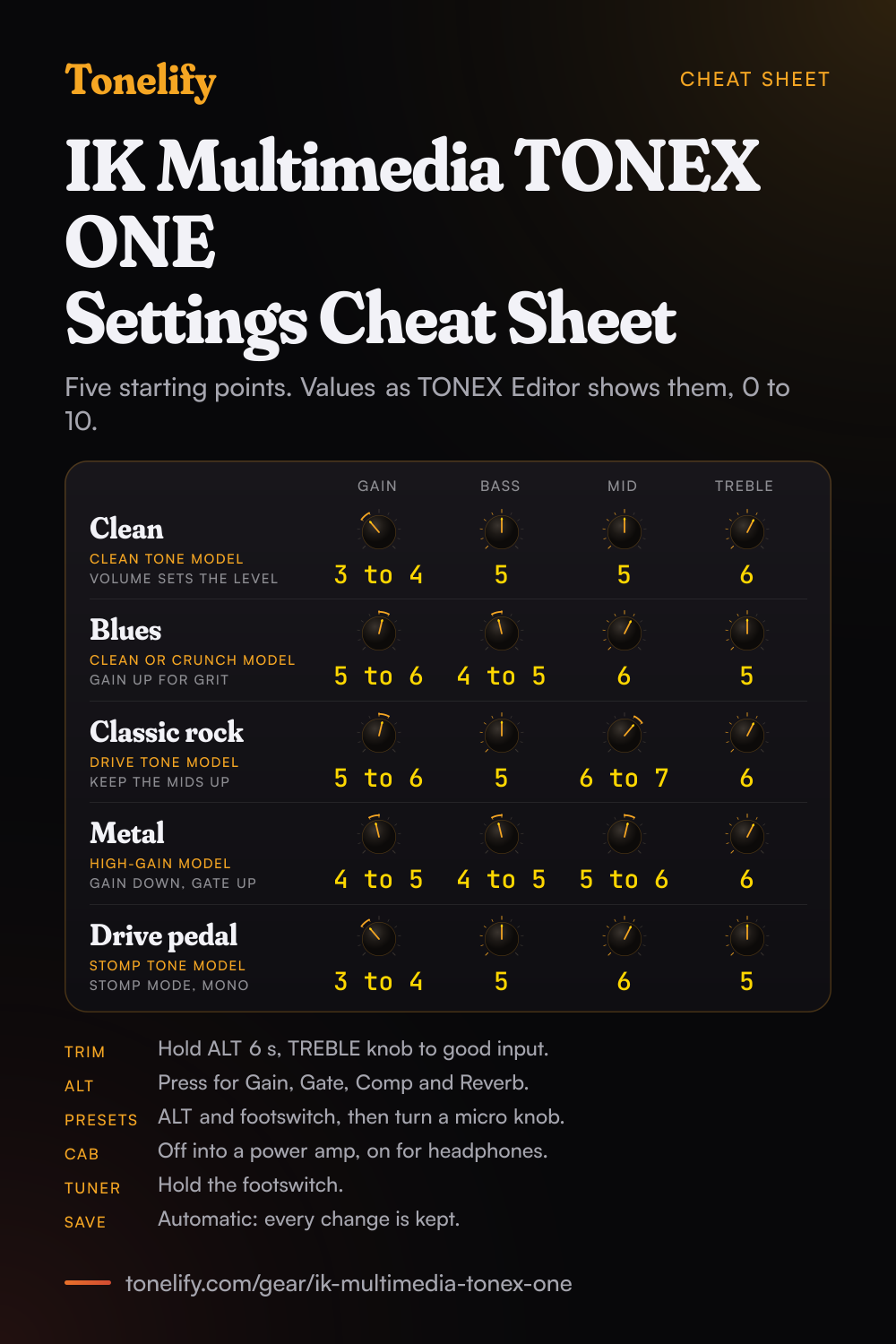
Free download
Printable cheat sheet: PDF and PNG
The clean, blues, classic rock, metal and drive pedal settings from this page, together on one sheet with short tips. The PDF prints on white; the PNG is the dark version for your phone.
Starting settings on the IK Multimedia TONEX ONE
Values as the TONEX Editor app shows them, on the unit's own scale; each drawn knob shows that value's share of the range. They are where to begin, not IK Multimedia's numbers: pick the amp model first, then move one control at a time from here.
Set the input trim first
Before any tone settings, set the level going into the pedal, since every Tone Model reacts to how hard it is hit. Hold ALT for 6 seconds until its LED turns blue: that is setup mode. Play as hard as you will in the song and turn the TREBLE micro knob, which raises or lowers the input trim there, using its LED as a meter: IK's four readings are no input, low input, good input and clip. Stop at good input. In the same mode the BASS micro knob picks dual or stomp mode, the MID micro knob turns the cab on or off for every preset, and the main knob sets the global volume. TONEX Editor has the same Input trim in its global setup.
Clean
Load a clean Tone Model and start at Gain 3 to 4, Bass 5, Mid 5, Treble 6, values as TONEX Editor shows them on its 0 to 10 scale. Gain sits under ALT on the main knob: IK describes it as the Tone Model's input gain, used to saturate the model more or less, so on a clean amp it decides where the breakup starts. Set the loudness with the main knob's Volume instead. IK makes Bass and Treble shelf EQs and Mid a bell EQ, so small moves go a long way. For room, press ALT and turn the TREBLE micro knob, which then sets the reverb's mix; the reverb type, Spring 1 to 4, Room or Plate, is picked in TONEX Editor.
- Gain 3 to 4
- Bass 5
- Mid 5
- Treble 6
Edge of breakup and blues
A clean or crunch Tone Model pushed harder: Gain 5 to 6, Bass 4 to 5, Mid 6, Treble 5. The grit comes from Gain, which drives the model, not from Volume, which only sets the level. For a little squeeze on the front of each note, press ALT and turn the MID micro knob up a touch: under ALT it sets the compressor's threshold. If the ALT LED turns red, the output stage is clipping, and IK's fix is to lower the TONEX ONE's volume.
- Gain 5 to 6
- Bass 4 to 5
- Mid 6
- Treble 5
Classic rock
A drive Tone Model, Gain 5 to 6, Bass 5, Mid 6 to 7, Treble 6. Keep Mid up: rock rhythm guitar sits in the midrange, and a scooped preset disappears behind the drums. TONEX Editor also gives every preset a Presence control, a high shelf at 1.6 kHz, and a Depth control, a peak at 80 Hz, both 0 to 10, which the pedal's own knobs do not reach. Reach for Presence when the sound needs bite, before you add Treble.
- Gain 5 to 6
- Bass 5
- Mid 6 to 7
- Treble 6
Metal
A high-gain Tone Model, Gain 4 to 5, Bass 4 to 5, Mid 5 to 6, Treble 6, with the reverb low. A high-gain capture already has its distortion in it, and backing the input gain off keeps palm mutes tight where more would only add fizz. Press ALT and turn the BASS micro knob, the noise gate's threshold under ALT, until the hiss between chords stops and no further, or the ends of held notes get cut off.
- Gain 4 to 5
- Bass 4 to 5
- Mid 5 to 6
- Treble 6
Gate up under ALT until the hiss between chords stops.
As a drive pedal in front of an amp
Put the pedal in stomp mode, so the footswitch turns the preset on and off, and load a Tone Model of a drive pedal: IK's Tone Models can be a stomp on its own, a stomp with an amp, or an amp with or without its cab. IK's manual says that by connecting it in mono you can use TONEX ONE as your overdrive, distortion or fuzz pedal before your amplifier, and a regular instrument cable does that. Start at Gain 3 to 4, Bass 5, Mid 6, Treble 5, with Volume a little louder than the pedal bypassed, and let the amp do the rest. IK notes that a stomp can't be a time-based or phase-based pedal, and that some vintage fuzzes and overdrives with parallel paths inside can't be modeled.
- Gain 3 to 4
- Bass 5
- Mid 6
- Treble 5
Stomp mode, into the amp's input in mono.
Where to plug it in: cab on or off
Into headphones, an FRFR or powered cabinet, or a PA through a DI box, keep the cab section on, as IK's manual says for each of them. Into a power amp with your own cabinet, or into the return of an amp's effects loop to skip its preamp, bypass the cab to avoid what IK calls unwanted double cab filtering. The global switch is the MID micro knob in setup mode: counter-clockwise until it turns green for the cab on every preset, clockwise until it turns red to bypass it, and while the cab is bypassed the ALT LED blinks every 5 seconds in normal use. The output is a TRS jack: a Y cable gives a stereo pair, and a regular cable a mono feed.
Dual mode, stomp mode and the 20 presets
TONEX ONE stores 20 presets and plays three of them: preset A and preset B in dual mode, where the footswitch flips between the two and there is no bypass, and one in stomp mode, where the footswitch turns it on and off. To change which presets those slots hold, press ALT and the footswitch together: the ALT LED turns purple, and the BASS, MID and TREBLE micro knobs stand for preset A, preset B and the stomp slot. Press the footswitch to pick a slot, turn its micro knob through the 20 presets, then press ALT and the footswitch together again to confirm. IK's tip for three sounds on stage is to leave browsing mode on and let the footswitch cycle the three slots. There is no save step: the pedal saves every change to the current preset as you make it.
IK Multimedia TONEX ONE effects list
15 effects in five blocks around the Tone Model: a noise gate, a compressor, 5 modulations, 2 delays and 6 reverbs, as IK's TONEX ONE manual counts them. A preset holds one of each block. On the pedal, ALT reaches the gate threshold, the compressor threshold and the reverb mix; everything else in the table is set in TONEX Editor or TONEX for Mac/PC.
| Effect | Block | Parameters in TONEX Editor |
|---|---|---|
| Noise Gate | Noise gate | Threshold (-100 dB to 0 dB), Release (5 to 500 ms), Depth (-20 dB to -100 dB), First or Post |
| Compressor | Compressor | Threshold (0 dB to -40 dB), Gain (-30 dB to 10 dB), Attack (1 to 51 ms), Pre or Post |
| Chorus | Modulation | Rate (0 to 10), Depth (0 to 100), Level, Sync, Pre or Post |
| Tremolo | Modulation | Rate (0 to 10), Shape (triangle at 0, square at 10), Spread, Level, Sync, Pre or Post |
| Phaser | Modulation | Rate (0 to 10), Depth (0 to 100), Level, Sync, Pre or Post |
| Flanger | Modulation | Rate (0 to 10), Depth (0 to 100), Feedback, Level, Sync, Pre or Post |
| Rotary | Modulation | Speed (0 to 10), Radius (0 to 300), Spread, Level, Sync, Pre or Post |
| Digital | Delay | Time (0 to 1000 ms), Feedback, Mix (0 to 100%), Normal or Ping-pong, Sync, Pre or Post |
| Tape | Delay | Time (0 to 1000 ms), Feedback, Mix (0 to 100%), Normal or Ping-pong, Sync, Pre or Post |
| Spring 1 | Reverb | Time (0 to 10), Pre-delay, Color (-10 darker to +10 brighter), Mix (0 to 100%) |
| Spring 2 | Reverb | Time (0 to 10), Pre-delay, Color (-10 darker to +10 brighter), Mix (0 to 100%) |
| Spring 3 | Reverb | Time (0 to 10), Pre-delay, Color (-10 darker to +10 brighter), Mix (0 to 100%) |
| Spring 4 | Reverb | Time (0 to 10), Pre-delay, Color (-10 darker to +10 brighter), Mix (0 to 100%) |
| Room | Reverb | Time (0 to 10), Pre-delay, Color (-10 darker to +10 brighter), Mix (0 to 100%) |
| Plate | Reverb | Time (0 to 10), Pre-delay, Color (-10 darker to +10 brighter), Mix (0 to 100%) |
IK Multimedia TONEX ONE VIR cabinets
VIR is the third cab choice in a preset, after the Tone Model's own captured cab and a custom IR: a virtual cabinet with two microphones you place yourself, a Condenser 414, a Dynamic 57 or a Ribbon 121, plus Blend and Resonance. IK lists 40 cabinets, each with the real cab it is based on.
| VIR cab | Based on |
|---|---|
| 16 DK | The cab section of the KAT Deacy |
| 18 CHAMP | Fender '57 Champ 1x8 open back |
| 110 TONE | Fender '65 Princeton 1x10 open back |
| 112 DLX | Fender '65 Deluxe Reverb 1x12 open back, Jensen C12K speaker |
| 112 MARK | MESA/Boogie Mark III combo |
| 112 CALI | MESA/Boogie 2x12 California Tweed |
| 112 MAZ | Dr. Z MAZ 18 Jr. 1x12 |
| 112 TINY | Orange Tiny Terror 1x12 combo |
| 115 BMAN | Fender '53 Bassman 1x15 |
| 212 TWIN | Fender '65 Twin Reverb 2x12 open back, Jensen C12K speakers |
| 212 BLUE | Vox AC30 with Celestion Alnico Blue speakers |
| 212 H70 | Vox AC30 with Celestion G12H Anniversary speakers |
| 212 JAZZ | Roland JC-120 2x12 |
| 212 OPEN | Sears Silvertone 2x12 |
| 212 PPC | Orange PPC 212 2x12 closed back |
| 212 REHO | MESA/Boogie 2x12 Recto horizontal closed |
| 212 DZ | Dr. Z Z Wreck 2x12 |
| 412 1960 | Marshall 1960AV |
| 412 B30 | Marshall 1960A Lead Vintage 4x12 slanted, V30 |
| 412 B8000 | Marshall 1960 Lead Vintage 4x12 slanted, G12-80 |
| 412 B9000 | Marshall 1960A Lead Vintage 4x12 slanted, T75 |
| 412 BS | Marshall 2551A 4x12 slanted, T75 |
| 412 BDAG | Randall 412 JB 4x12 |
| 412 HW | Hiwatt 4x12 |
| 412 F1 | Fender 4x12 MH |
| 412 T1 | MESA/Boogie 4x12 Rectifier |
| 412 V1 | Peavey 5150 4x12 |
| 412 M1 | Marshall JCM800 4x12 |
| 412 PPC | Orange PPC 412 4x12 |
| 412 RETS | MESA/Boogie 4x12 Recto Traditional slant closed |
| 412 RKB | MESA/Boogie 4x12 Road King slanted, Electro-Voice EVM-12L speakers |
| 412 RKV | MESA/Boogie 4x12 Road King slanted, Celestion V30 speakers |
| 412 PIG | Marshall Major 4x12 slanted, T75 |
| 412 GRN | Marshall 4x12 with 20 W Celestion Greenbacks |
| 412 XXL | ENGL 4x12 XXL Pro straight, E412XXLB |
| 412 STD | ENGL 4x12 Standard slanted, E412SSB |
| 410 SVX | Ampeg BXT-410H 4x10 |
| 115 SVX | Ampeg Heritage B-15N 1x15 |
| 810 SVX | Ampeg SVT-810 AV 8x10 |
| 810 OBC | Orange OBC 810 8x10 |
What controls does the IK Multimedia TONEX ONE have?
The IK Multimedia TONEX ONE has 8 controls on its front panel: Volume, Bass, Mid, Treble, Gain, Gate, Comp and Reverb.
IK Multimedia TONEX ONE specifications
- Front panel
- Volume, Bass, Mid, Treble, Gain, Gate, Comp, Reverb
- Released
- 2024
What the IK Multimedia TONEX ONE panel means when you dial it in
Its controls are Volume, Bass, Mid, Treble, Gain, Gate, Comp and Reverb, and settings for this multi-effects unit are written against those names rather than a generic level, tone and gain.
IK Multimedia TONEX ONE questions
What do the knobs on the TONEX ONE do?
The main knob sets the preset's Volume and the three micro knobs set Bass, Mid and Treble. Press ALT and the same four become Gain, the noise gate threshold, the compressor threshold and the reverb mix; the ALT LED and the micro knobs blink while that layer is active. IK says Volume works on the Tone Model's volume when the compressor is set to pre and on the compressor's makeup gain when it is set to post. Bass and Treble are shelf EQs and Mid a bell EQ.
How do you change presets on the TONEX ONE?
Press ALT and the footswitch together to enter browsing mode, where the ALT LED turns purple. The BASS micro knob stands for preset A, MID for preset B and TREBLE for the stomp slot: press the footswitch to pick a slot, turn its micro knob to choose one of the 20 presets, and press ALT and the footswitch together again to confirm. On stage, dual mode flips between A and B on the footswitch.
How do you save a preset on the TONEX ONE?
You don't have to. IK says TONEX ONE automatically saves any changes applied to the current preset in real time, with no save button, and TONEX Editor works the same way: drag a preset to an active slot to edit it, and every change is saved as you make it. To keep a sound before you experiment, copy it to another of the 20 presets in TONEX Editor, or drag it into the software library as a backup.
How do you set the input trim on the TONEX ONE?
Hold ALT for 6 seconds until its LED turns blue, then turn the TREBLE micro knob while you play: its LED reads no input, low input, good input or clip. Aim for good input when you play hardest. TONEX Editor's global setup has the same Input trim.
What is the difference between dual mode and stomp mode on the TONEX ONE?
Dual mode, the default, flips between preset A and preset B on the footswitch, with no bypass, and lights the ALT LED green. Stomp mode turns one preset on and off like an ordinary pedal and lights it amber; IK suggests it for using TONEX ONE as a boost, overdrive, distortion or fuzz pedal. Switch between them in setup mode, ALT held for 6 seconds, with the BASS micro knob: fully counter-clockwise for dual mode, fully clockwise for stomp mode.
When should you bypass the cab on the TONEX ONE?
When the pedal feeds a real speaker cabinet: into a power amp, or into the return of an amp's effects loop. IK says to bypass the cab section there to avoid unwanted double cab filtering. Keep it on for headphones, an FRFR or powered cabinet, a PA and recording. In setup mode, the MID micro knob turned clockwise until it is red bypasses the cab on every preset; for one preset only, switch the cab block off in TONEX Editor.
How do you use the tuner on the TONEX ONE?
Hold the footswitch: the ALT LED blinks shell pink. Press ALT to switch between Mute, which silences the output while you tune, and Thru, which lets the signal pass. In the same mode, tap the footswitch to set the tempo of any effect synced to BPM, and hold it again to leave. TONEX Editor sets the reference pitch, from 415 Hz to 465 Hz, 440 Hz by default.
How do you lock the knobs on the TONEX ONE?
Hold ALT for 3 seconds until the micro knobs blink. IK calls it safe mode: the front panel is locked against unwanted parameter changes while the footswitch still works with the presets. Hold ALT for 3 seconds again to unlock it.
What do the LED colours on the TONEX ONE mean?
The ALT LED shows the mode: green for dual mode, amber for stomp mode, blue for setup, shell pink for the tuner and tap tempo, and purple for preset browsing. Red means the output stage is clipping, and IK's fix is to lower the TONEX ONE's volume. The micro knobs' colour shows which preset is selected, and IK makes those colours customisable.
What effects does the TONEX ONE have?
IK lists a noise gate, a compressor, 5 modulations, 2 delays and 6 reverbs, around the Tone Model and its tone EQ. On the pedal you reach the gate threshold, the compressor threshold and the reverb mix; modulation, delay and the other parameters are set in TONEX Editor or TONEX for Mac/PC and kept in the preset on the pedal. The full list with each effect's parameters is below.
Can you use headphones with the TONEX ONE?
Yes, in the output jack: IK lists headphones next to amps, pedals, FRFR cabinets and studio monitors for it, and its announcement gives the TRS output as stereo, dual mono or headphones. Keep the cab section on for headphones, as IK's manual says for silent practice.
Can you record with the TONEX ONE over USB?
Yes. Over USB-C it is a 24-bit, 44.1 kHz audio interface for a Mac or PC. Record Inputs 1 and 2 for the processed stereo sound. For a dry DI track to re-amp later, select stomp mode, bypass the pedal with the footswitch and record Input 1 or 2. If you monitor through your recording software, turn direct monitoring off in TONEX Editor to avoid hearing yourself twice. The USB-C cable also powers the pedal, so no adapter is needed at the computer.
What power supply does the TONEX ONE need?
9 V DC, center negative, at 120 mA, the usual pedalboard supply. It can also run from its USB-C port, 5 V at 260 mA, for example when it is connected to a computer.
Can you load IRs into the TONEX ONE?
Yes. In TONEX Editor, choose Custom IR in the preset's cab section; IK's editor converts imported IRs to 2048 samples at 44.1 kHz and 24-bit, and a preset with a custom IR brings it along when it is imported into the pedal. The third choice is VIR, IK's adjustable cab, with 40 cabinets and two microphones you can move; the list is below.
How do you get new sounds on the TONEX ONE?
From ToneNET, IK's free sharing platform: IK's quick start guide says TONEX for Mac/PC lets you browse more than 25,000 free Tone Models and Premium Collections to transfer to TONEX ONE, which TONEX Editor does by drag and drop. A Tone Model dropped into the hardware library becomes a preset. With TONEX for Mac/PC you can also capture your own amps and pedals as Tone Models.
What is the difference between the TONEX ONE and the TONEX ONE+?
The ONE+ adds a MIDI input and output on a 1/8-inch TRS Type A jack, Bluetooth for IK's TONEX Control app and for streaming music to play along with, and MIDI over its USB-C port as well; MIDI Program Change messages 0 to 19 load its presets 1 to 20. Both are 48 by 94 by 53 mm and weigh 160 grams, with the same knobs and 20 presets. IK announced the ONE+ on 7 May 2026 at $249.99, against $179.99 for the TONEX ONE at its launch.
What is the difference between the TONEX ONE and the TONEX Pedal?
Mostly size and how many presets are under your feet. TONEX Editor organises the TONEX Pedal's library in 50 banks with three slots each, where TONEX ONE has 20 presets with three in play. Both run the same Tone Models, and IK's manual shows a TONEX ONE used as a stomp in front of a TONEX Pedal used as the amplifier.
Can you use the TONEX ONE for bass?
Yes. IK's feature list calls it suitable for both guitar and bass, and the VIR cabinets in TONEX Editor include bass cabs, from the Ampeg SVT-810 AV 8x10 to the Orange OBC 810.
What do the numbers on this page mean?
They are values on TONEX Editor's scale, where IK gives Gain, Bass, Mid and Treble a range of 0 to 10. These are starting points, not IK's numbers, and every Tone Model is a different amp or pedal, so move one control at a time from here and trust your ears over the figure.
What are the best TONEX ONE settings for metal?
Load a high-gain Tone Model and start at Gain 4 to 5, Bass 4 to 5, Mid 5 to 6 and Treble 6, with the reverb low and the noise gate raised under ALT on the BASS micro knob until the hiss between chords stops. These are starting points, not IK's numbers. The Tone Model sets the character and Gain sets how hard it is driven, so lower Gain for tighter palm mutes before you look for more.
When did the TONEX ONE come out and how much was it?
IK announced it on 25 April 2024, with pre-orders at $179.99 and units shipping in mid-May. The announcement listed up to 20 presets with over 200 Premium Tone Models included, and TONEX SE and AmpliTube 5 SE software with the pedal.
How do you build a patch on the IK Multimedia TONEX ONE?
Pick the amp model first, then set its controls, then add the blocks in signal-chain order: drive before the amp, time and modulation after it. A patch built the other way around ends up compensating for the wrong stage. Tonelify returns the model, the order and the parameters together.
Does Tonelify support the IK Multimedia TONEX ONE?
Yes, and its front panel is stored, so settings only ever reference controls this multi-effects unit has: Volume, Bass, Mid, Treble, Gain, Gate, Comp, Reverb. You will not be told to set a knob that is not there.
Sources
Panel, specifications and dates checked against these on .
- IK Multimedia: TONEX ONE User Manual, version 1.3.0 (PDF)
- IK Multimedia: TONEX ONE Quick Start Guide (PDF)
- IK Multimedia: TONEX Editor User Manual (PDF)
- IK Multimedia: TONEX ONE+ User Manual (PDF)
- Sonicstate: IK Multimedia Releases TONEX ONE, with IK's announcement of 25 April 2024
- Rekkerd: IK Multimedia announces TONEX ONE+ with wireless mobile control (7 May 2026)
The manuals are the files IK Multimedia's downloads page lists for TONEX ONE and TONEX ONE+, read on 7 November 2026. IK's product page turned away requests that day, so the prices come from IK's two announcements as the news sites print them.