
IK Multimedia TONEX Pedal presets and settings
Five knobs do two jobs each. Normally they set Gain, Bass, Mid, Treble and the pedal's master Volume; holding the Parameter encoder switches them to Reverb, Compressor, Noise Gate, Presence and Depth. Three footswitches select and bypass presets.
⚡ Match a tone on this unit- Gain
- Bass
- Mid
- Treble
- Volume
- Reverb
- Compressor
- Noise Gate
- Presence
- Depth
How do you dial in a specific tone on an IK Multimedia TONEX Pedal?
The IK Multimedia TONEX Pedal plays Tone Models, and every Tone Model is a different amp or pedal, so a tone match here has two halves: which kind of Tone Model to load, and where to set the knobs once it is loaded. The Tone Model sets the character and Gain sets how hard it is driven, which is why the settings for the IK Multimedia TONEX Pedal name the Tone Model first and write the knob values against it.
Name the song you are chasing in the tone matcher and Tonelify returns the settings for this exact multi-effects unit, not the settings the original artist used. Those are two different things: the recording was made on gear most players do not own.
Settings for this unit only ever use controls it actually has, because its front panel is stored in our gear database. You will not be told to set a knob that is not on the unit.
Free download
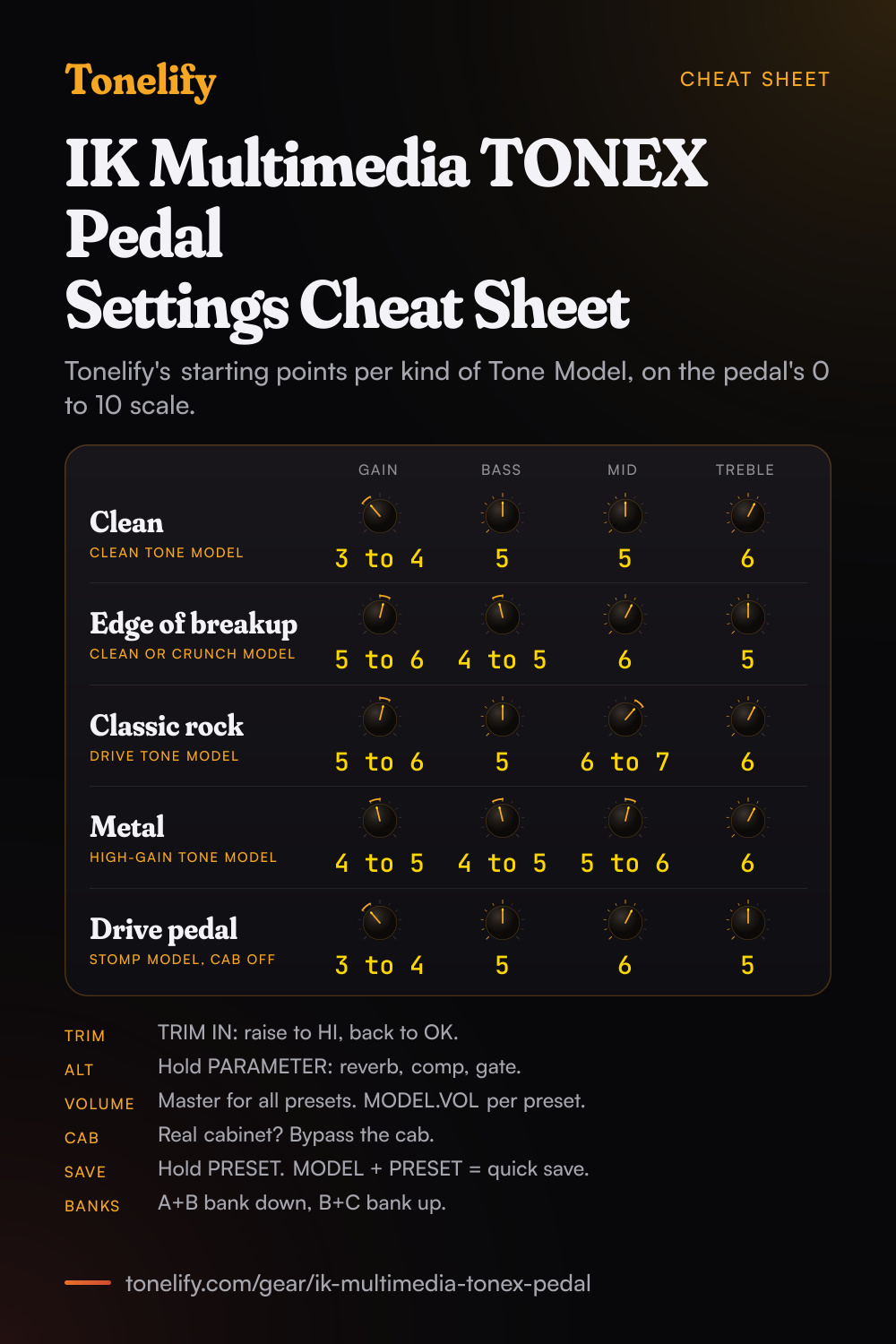
Printable cheat sheet: PDF and PNG
The clean, edge of breakup, classic rock, metal and drive pedal settings from this page, together on one sheet with short tips. The PDF prints on white; the PNG is the dark version for your phone.
Starting settings on the IK Multimedia TONEX Pedal
Values as the unit's screen shows them, on its own scale; each drawn knob shows that value's share of the range. They are where to begin, not IK Multimedia's numbers: pick the amp model first, then move one control at a time from here.
Set the input trim first
Before any tone settings, set the level going into the pedal, since every Tone Model reacts to how hard it is hit. Hold the MODEL encoder to open the setup menus and find TRIM IN under GLOBAL SETUP, VOLUME. IK ships it at +8.5 dB, which its manual calls the ideal gain for typical single coil passive pickups, and says to consider lowering it to near 0 dB for humbuckers or active pickups. The display shows LOW, OK or HI beside the value: strum hard, raise TRIM IN until the peaks show HI, then turn it down a bit so loud strums show OK.
Clean
Load a clean Tone Model and start at Gain 3 to 4, Bass 5, Mid 5, Treble 6, on the pedal's own 0 to 10 scale. IK's manual says Gain adjusts the Tone Model's input gain and is there to saturate the model more or less, so on a clean amp it decides where the breakup starts. Bass and Treble are shelf EQs and Mid is a bell. Hold the PARAMETER encoder until the ALT label lights and the same five knobs reach the reverb mix: about 15 to 20 percent of a spring reverb is enough for a clean sound.
- Gain 3 to 4
- Bass 5
- Mid 5
- Treble 6
Edge of breakup and blues
A clean or crunch Tone Model pushed harder: Gain 5 to 6, Bass 4 to 5, Mid 6, Treble 5. The grit comes from Gain, which drives the model, not from Volume: IK's manual says Volume is the pedal's master volume and stays the same across all presets. For a little squeeze on the front of each note, hold the PARAMETER encoder for the ALT layer and bring the compressor threshold down a touch. If the display shows CLIP, the output stage is clipping, and IK's fix is to lower TONEX's volume.
- Gain 5 to 6
- Bass 4 to 5
- Mid 6
- Treble 5
Classic rock
A drive Tone Model, Gain 5 to 6, Bass 5, Mid 6 to 7, Treble 6. Keep Mid up: rock rhythm guitar sits in the midrange, and a scooped preset disappears behind the drums. The ALT layer also has Presence, which IK says adjusts the high-frequency content, and Depth, which adjusts the low-frequency content. Reach for Presence when the sound needs bite before you add Treble, and for Depth when a small speaker sounds thin.
- Gain 5 to 6
- Bass 5
- Mid 6 to 7
- Treble 6
Metal
A high-gain Tone Model, Gain 4 to 5, Bass 4 to 5, Mid 5 to 6, Treble 6, with the reverb mix low. A high-gain capture already has its distortion in it, and backing the input gain off keeps palm mutes tight where more would only add fizz. On the ALT layer, raise the noise gate threshold until the hiss between chords stops and no further, or the ends of held notes get cut. The gate's Release, Depth and position are in the GATE menu under the PARAMETER encoder.
- Gain 4 to 5
- Bass 4 to 5
- Mid 5 to 6
- Treble 6
Gate threshold up on the ALT layer until the hiss stops.
As a drive pedal in front of an amp
A Tone Model can be a stomp on its own: IK says the software captures distortion, overdrive, fuzz, boost and EQ pedals as well as amps and cabs, and the pedal's sub-display shows the AMP label in blue when the loaded model is a stomp. Load one, bypass the cab, and run the left output into your amp's input. Start at Gain 3 to 4, Bass 5, Mid 6, Treble 5 and set the level with MODEL.VOL in the MODEL menu, so the pedal is a little louder than bypassed. Low Gain and the amp doing the rest is the classic way to push a tube amp.
- Gain 3 to 4
- Bass 5
- Mid 6
- Treble 5
Left output into the amp's input, in mono.
Where to plug it in: cab on or off
Into headphones, an FRFR or powered cabinet, or a PA through a DI box, IK's manual says to activate the CAB section of your presets. Into a power amp with your own cabinet, bypass the CAB section to avoid what IK calls unwanted double cab filtering; IK's pro tip is that plugging the pedal into the return of an amp's FX loop uses that amp's power amp the same way. There are two switches for it. CAB under PRESET SETUP turns the cab on or off for one preset, and CAB under GLOBAL SETUP, GENERAL bypasses it on all presets at once, which is the one to use when the whole gig runs into a real cabinet. Use only the left output for a mono setup.
Banks, presets and the three footswitches
The pedal holds 50 banks of three presets, A, B and C, for 150 preset slots, and each footswitch loads its preset; pressing the footswitch of the preset already on bypasses it. Press A and B together to move a bank down, B and C together to move a bank up. To keep a change, hold the PRESET encoder, name the preset, pick its bank and slot and confirm: the display shows SAVED. Pressing the MODEL and PRESET encoders together is the quick save, same name and same place. IK's quick start guide gives the footswitch LEDs as green for a preset that is active and saved, amber for active but not saved, and blinking for bypassed.
Chasing one song? Name it and the matcher writes that song's settings for the IK Multimedia TONEX Pedal.
IK Multimedia TONEX Pedal effects list
15 effects in five blocks around the Tone Model: a noise gate, a compressor, 5 modulations, 2 delays and 6 reverbs, as IK's TONEX Pedal manual counts them. A preset holds one of each block. The ALT layer of the five knobs reaches the reverb mix, the compressor threshold and the gate threshold; the rest is in the menus under the PARAMETER encoder.
| Effect | Block | Parameters on the pedal |
|---|---|---|
| Noise gate | GATE | Threshold (-100 dB to 0 dB), Release (5 to 500 ms), Depth (-20 dB to -100 dB), First or Post amp |
| Compressor | COMP | Threshold (0 dB to -40 dB), Gain (-30 dB to +10 dB), Attack (1 to 51 ms), Pre amp or Post amp |
| Chorus | MOD | Rate (0.10 to 10.0 Hz), Depth (0 to 100%), Level (0 to 10), Sync, Pre amp or Post amp |
| Tremolo | MOD | Rate (0.10 to 10.0 Hz), Shape (triangle at 0, square at 10), Spread (0 to 100%), Level, Sync |
| Phaser | MOD | Rate (0.10 to 10.0 Hz), Depth (0 to 100%), Level (0 to 10), Sync |
| Flanger | MOD | Rate (0.10 to 10.0 Hz), Depth (0 to 100%), Feedback (0 to 100%), Level, Sync |
| Rotary | MOD | Speed (0 to 400 RPM), Radius (0 to 300 mm), Spread (0 to 100%), Level, Sync |
| Digital | DELAY | Time (0 to 1000 ms), Feedback (0 to 100%), Mix (0 to 100%), Normal or Ping pong, Sync, Pre amp or Post amp |
| Tape | DELAY | Time (0 to 1000 ms), Feedback (0 to 100%), Mix (0 to 100%), Normal or Ping pong, Sync, Pre amp or Post amp |
| Spring 1 | REVERB | Time (0 to 10), Pre-delay (0 to 500 ms), Color (-10 darker to +10 brighter), Mix (0 to 100%) |
| Spring 2 | REVERB | Time (0 to 10), Pre-delay (0 to 500 ms), Color (-10 darker to +10 brighter), Mix (0 to 100%) |
| Spring 3 | REVERB | Time (0 to 10), Pre-delay (0 to 500 ms), Color (-10 darker to +10 brighter), Mix (0 to 100%) |
| Spring 4 | REVERB | Time (0 to 10), Pre-delay (0 to 500 ms), Color (-10 darker to +10 brighter), Mix (0 to 100%) |
| Room | REVERB | Time (0 to 10), Pre-delay (0 to 500 ms), Color (-10 darker to +10 brighter), Mix (0 to 100%) |
| Plate | REVERB | Time (0 to 10), Pre-delay (0 to 500 ms), Color (-10 darker to +10 brighter), Mix (0 to 100%) |
What controls does the IK Multimedia TONEX Pedal have?
The IK Multimedia TONEX Pedal has 10 controls on its front panel: Gain, Bass, Mid, Treble, Volume, Reverb, Compressor, Noise Gate, Presence and Depth.
IK Multimedia TONEX Pedal specifications
- Front panel
- Gain, Bass, Mid, Treble, Volume, Reverb, Compressor, Noise Gate, Presence, Depth
What the IK Multimedia TONEX Pedal panel means when you dial it in
Its controls are Gain, Bass, Mid, Treble, Volume, Reverb, Compressor, Noise Gate, Presence and Depth, and settings for this multi-effects unit are written against those names rather than a generic level, tone and gain.
IK Multimedia TONEX Pedal questions
What do the knobs on the TONEX Pedal do?
The five main knobs set Gain, Bass, Mid, Treble and Volume. Hold the PARAMETER encoder until the green ALT label appears and they set the alternative parameters instead: the reverb mix, the compressor threshold, the noise gate threshold, Presence and Depth. Everything else, from the delay to the cab microphones, is in the menus you open by pressing the PARAMETER encoder.
How do you change presets and banks on the TONEX Pedal?
Press footswitch A, B or C to load that slot of the current bank, or rotate the PRESET encoder to browse. Press A and B together to move a bank down, B and C together to move a bank up, and A and C together to show the current bank. IK's manual counts 50 banks with three preset slots each, for up to 150 presets.
How do you save a preset on the TONEX Pedal?
Hold the PRESET encoder to enter save mode. Rotate it to change each character of the name and rotate the MODEL encoder to move the cursor, press to confirm, choose the bank and slot, and press again: the display shows SAVED. To save with the same name in the same location, press the MODEL and PRESET encoders at the same time.
How do you set the input trim on the TONEX Pedal?
Hold the MODEL encoder, open GLOBAL SETUP, then VOLUME, then TRIM IN, which runs from -15 dB to +15 dB. IK sets it to +8.5 dB by default for typical single coil passive pickups and suggests near 0 dB for humbuckers or active pickups. Strum hard and raise it until the indicator shows HI, then back it off until loud strums show OK.
Why does the Volume knob on the TONEX Pedal change every preset?
Because it is a master. IK's manual says Volume adjusts the master volume of the pedal and is persistent across all the presets. To make one preset louder or quieter than the others, use the Tone Model's own volume, MODEL.VOL, in the MODEL menu, or the compressor's gain if the compressor is set to post.
When should you bypass the cab on the TONEX Pedal?
When the pedal feeds a real guitar cabinet: into a power amp, or into the return of an amp's FX loop. IK says to bypass the CAB section there to avoid unwanted double cab filtering, and to activate it for headphones, an FRFR or powered cabinet and a PA. CAB in PRESET SETUP switches it for one preset, and CAB in GLOBAL SETUP, GENERAL bypasses it on all presets.
How do you use the tuner and tap tempo on the TONEX Pedal?
Hold down the footswitch of the preset that is already selected. The display becomes a chromatic tuner and footswitch C taps the tempo; press A or B to leave. In GLOBAL SETUP, TUNER you choose whether tuning mutes the output or lets it pass through, and set the reference pitch from 415 Hz to 465 Hz. On the tuner, a dot after the note means a sharp, so D. is D sharp.
How do you lock the TONEX Pedal on stage?
Press the PRESET and PARAMETER encoders at the same time. The display shows LOCKED and every knob and encoder is disabled, while the footswitches still move among presets and banks. Press the same two encoders again to unlock.
What do the AMP and CAB colours on the TONEX Pedal's display mean?
They show what the loaded Tone Model is made of. AMP in amber is an amp Tone Model, green is a stomp plus amp, blue is a stomp alone, and unlit means the amp is bypassed. CAB in amber is a captured cab, green is a VIR cabinet, blue is a custom IR, white means the cab is globally bypassed, and unlit means it is bypassed or empty on that preset.
What effects does the TONEX Pedal have?
IK lists a noise gate, a compressor, 5 modulations, 2 delays and 6 reverbs, around the Tone Model and its tone EQ. The modulations are chorus, tremolo, phaser, flanger and rotary, the delays are digital and tape, and the reverbs are four springs, a room and a plate. A preset holds one of each kind. The full list with every parameter's range is below.
Can you use headphones with the TONEX Pedal?
Yes. There is a headphones output on the back, which IK's manual describes as a copy of the main output for silent monitoring. Keep the CAB section of the preset active for headphones, as IK says for silent playing.
Can you record with the TONEX Pedal over USB?
Yes, it works as an audio interface. Set OPERATION MODE to INTERFACE in GLOBAL SETUP, which mutes the direct monitoring so you hear yourself through the computer only. USB OUT set to STEREO sends the processed stereo signal; set to DUAL it sends the processed signal on output 1 and the dry DI signal on output 2, for re-amping later. On Windows, IK says Windows 10 or later and its ASIO drivers are required.
Can you connect an expression pedal or a footswitch to the TONEX Pedal?
Yes, to the EXT. CONTROL socket. GLOBAL SETUP has the type: a TRS or RTS expression pedal, or a single or double switch, normally open or normally closed. An expression pedal can control any parameter or a macro of several; a double switch can step presets or banks, or open the tuner on one switch and tap the tempo on the other.
Does the TONEX Pedal have MIDI?
Yes, with MIDI ports on the back and MIDI over USB. Presets answer to program changes in bank order, so 00A is program 0, 00B is program 1 and 00C is program 2. The parameters have control change numbers, and the pedal can send or follow MIDI clock for the tempo of its time effects.
What does CLIP mean on the TONEX Pedal?
IK's manual says the display shows CLIP when the signal is too hot and is clipping the pedal's output stage, and that the fix is to lower TONEX's volume. If it happens on one loud preset only, lower that preset's MODEL.VOL instead of the master.
How many Tone Models can the TONEX Pedal hold?
Up to 300, across its 150 preset slots. IK's manual says that when the memory is full and you send new Tone Models from TONEX Editor, the oldest or unused ones in the pedal are removed automatically to make room.
What power supply does the TONEX Pedal need?
IK's manual gives the power socket as 9V DC, center negative, 320 mA. That is the common pedal polarity, but check that the supply output can deliver 320 mA: many pedalboard outputs are rated for 100 mA.
How big is the TONEX Pedal?
IK gives 176 mm wide, 142 mm deep and 55 mm high, and 906 grams, in an anodized aluminum chassis.
Does the TONEX Pedal work for bass?
Yes. IK's manual lists it as suitable for both guitar and bass, and its connection drawings show a guitar or bass cabinet. Load a Tone Model captured from a bass amp, and raise Depth on the ALT layer if the low end needs more weight.
What is the difference between the TONEX Pedal and the TONEX ONE?
Size and control. The TONEX Pedal has a display, three footswitches, five knobs with a second layer, 150 preset slots, a headphones output, MIDI ports and an expression pedal input. The TONEX ONE is a mini pedal with one footswitch, no display and 20 presets. Both play the same Tone Models and are edited with the same TONEX software.
Is there a printable TONEX Pedal settings cheat sheet?
Yes. The cheat sheet on this page puts the five starting settings on one page, from clean to using the pedal as a drive, with short setup tips under them. Download the PDF to print it on white, or save the PNG to your phone.
How do you build a patch on the IK Multimedia TONEX Pedal?
Pick the amp model first, then set its controls, then add the blocks in signal-chain order: drive before the amp, time and modulation after it. A patch built the other way around ends up compensating for the wrong stage. Tonelify returns the model, the order and the parameters together.
Does Tonelify support the IK Multimedia TONEX Pedal?
Yes, and its front panel is stored, so settings only ever reference controls this multi-effects unit has: Gain, Bass, Mid, Treble, Volume, Reverb, Compressor, Noise Gate, Presence, Depth. You will not be told to set a knob that is not there.
Sources
Panel, specifications and dates checked against these on .
The manuals are the files IK Multimedia's downloads page lists for TONEX Pedal, read on 13 November 2026.
More IK Multimedia gear
Similar multi-effects units from other makers
Settings for the song you are chasing
Name a song and Tonelify reads the documented rig behind the recording, then writes the settings for a rig with the IK Multimedia TONEX Pedal in it. A first plan starts with 7 days free, $0 today.