Amp cheat sheets
Marshall Code settings cheat sheet: clean, blues, rock and metal
Updated 12 min read5 knob panels5 sources
Pick the preamp first, then set the knobs. For clean, use CL JVM or CL DSL with Gain 3, Bass 5, Middle 5, Treble 6 and Volume 6. For classic rock, use Plexi or JCM800 with Gain 6, Bass 5, Middle 7, Treble 6 and Volume 6. For metal, use OD JVM with Gain 7, Bass 5, Middle 5, Treble 6 and Volume 6, and raise the Gate's Threshold to about 3.
These are Tonelify's starting points on the 0 to 10 scale the screen shows, and they work on a Code 25 and a Code 50 alike: Marshall's manuals give both the same 14 preamps, 4 power amps, 8 speaker cabinets and 24 effects. Marshall's own official presets sit close by, with Gain 3.4 on its JVM Clean preset, 6.5 on its JCM800 preset and 7.1 on its JVM OD preset. The five tone knobs are stored in each preset, so a knob's position means nothing until you turn it.
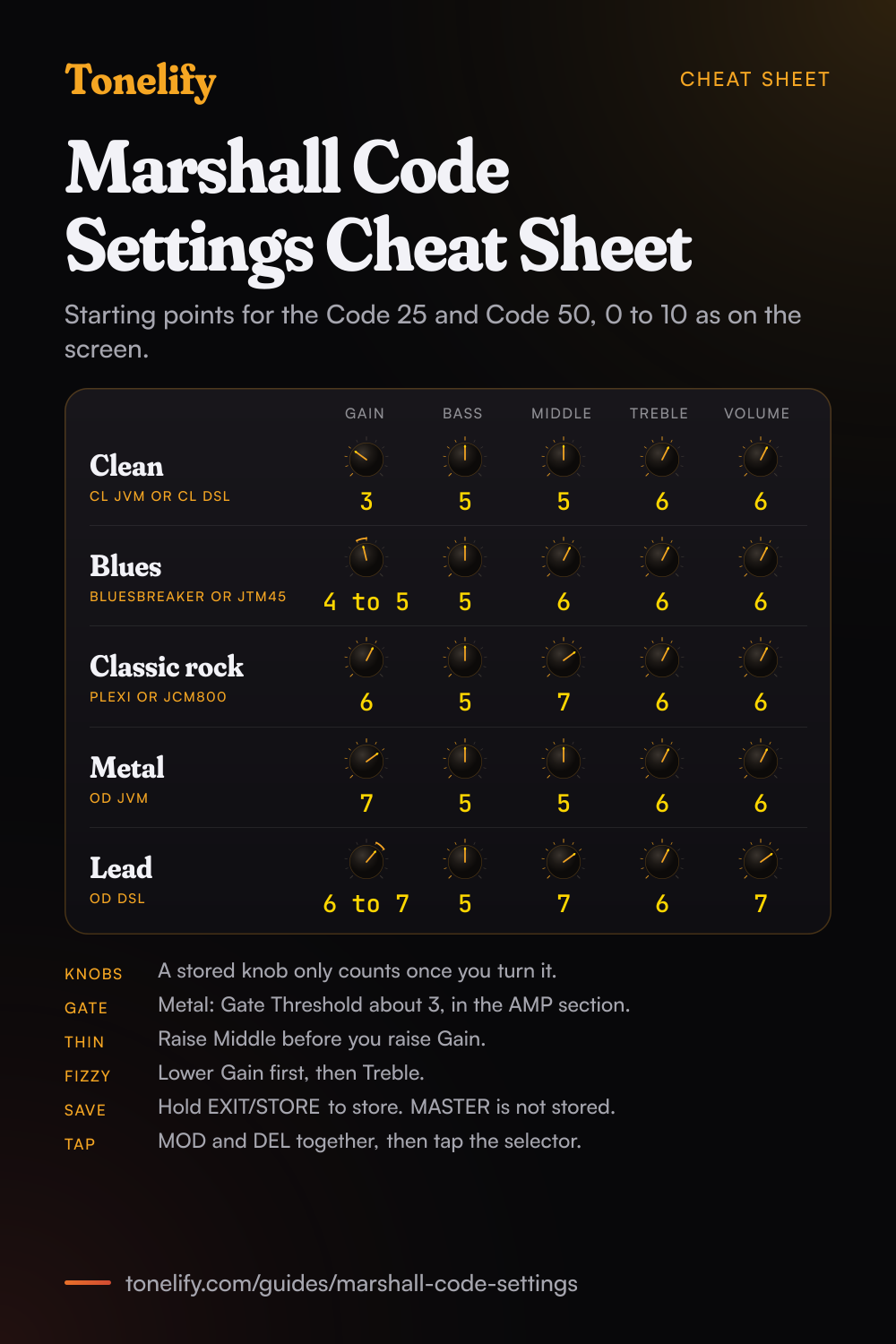
Free download
Printable cheat sheet: PDF and PNG
The clean, blues, classic rock, metal and lead settings from this guide, together on one sheet with short tips. The PDF prints on white; the PNG is the dark version for your phone.
How the Code's panel works
A Code has six knobs: GAIN, BASS, MIDDLE, TREBLE, VOLUME and MASTER. The first five are stored in every preset, and MASTER, the overall level, is not. Marshall's manual spells out what follows from that: the five panel controls only become active when they are used, so until you turn one its position has nothing to do with its setting in the preset.[1] Turn a knob and it takes over: the screen shows its current setting and the stored one, and the EXIT/STORE LED flashes red to show the preset has changed.
Seven section switches follow the signal chain: PRE FX, AMP, MOD, DEL, REV, POWER and CAB. Pressing one turns its section on, with a red LED, or bypasses it. Holding one opens that section for editing. On a Code 25 everything is then done with the one selector, PRESET: turn it to scroll or to change a value, push it to move on. A Code 50 has a second selector, EDIT, for that job, and pushing EDIT on its own previews the stored Gain, Bass, Middle, Treble and Volume without touching a knob.[2]
Do Code 25 settings work on a Code 50?
Yes. Marshall's two manuals describe the same engine: 14 MST preamps, 4 MST power amps, 8 MST speaker cabinets and 24 effects, up to five of them at once with the Gate, and 100 presets you can edit.[1][2] What differs is the box around it, in the table below, so a sound built on one model can be dialled in on the other number for number.
The range also had a 100 watt model: MusicRadar's 2016 review describes a line-up from a 25-watt 1x10 combo to a 100-watt 2x12 combo and head.[5] Marshall's support pages carried manuals for the Code 25 and the Code 50 when this guide was checked, and none for the Code 100, so nothing on this page is taken from a Code 100 manual. If its screen shows the same preamp names, start from the same numbers.
| Code 25 | Code 50 | |
|---|---|---|
| Power | 25 watts | 50 watts |
| Speaker | 10 inch, custom voiced | 12 inch, custom voiced |
| Weight | 8 kg | 13 kg |
| Size | 350 x 340 x 215 mm | 530 x 440 x 280 mm |
| Selectors | PRESET | PRESET and EDIT |
| Preamps, power amps, cabinets | 14, 4 and 8 | 14, 4 and 8 |
| Effects | 24, up to 5 at once | 24, up to 5 at once |
| Presets | 100, all editable | 100, all editable |
| Connections | Bluetooth 4.0 and USB 2.0 | Bluetooth 4.0 and USB 2.0 |
| Footcontroller | PEDL-91009, sold separately | PEDL-91009, sold separately |
Which real amp is each Marshall Code preamp based on?
Marshall's manual sorts the 14 preamps into three groups, Clean, Crunch and Overdrive, and names a Marshall behind nine of them.[1] The three American models and '50s British name no amp: the manual calls them classic American and classic British sounds and leaves it there, so this page does not guess which amps they are. Natural is a fifteenth choice with no modelled preamp. Marshall says it is designed to be used with external effects, and it gives EQ and access to the Gate.
Any preamp can run into any of the four power amp models: Classic Marshall 100W (Class A/B, 100 watts, EL34 valves), Vintage Marshall 30W (Class A/B, 30 watts, 5881 valves), British Class A (30 watts, EL84 valves) and American Class A/B (100 watts, 6L6 valves). The eight cabinets are the 1960, 1960V, 1960AX and 1960HW 4x12s, the 1936 and 1936V 2x12s, the 1912 1x12 and the handwired 1974CX 1x12.[1]
| Preamp | Group | What it models, per Marshall |
|---|---|---|
| JTM45 | Clean | JTM45 2245 on a clean setting |
| CL DSL | Clean | DSL100H on the Classic Gain Channel, Clean setting |
| CL American | Clean | Classic American pure-valve sound, no amp named |
| CL JVM | Clean | JVM410H on the Clean Channel in Green Mode |
| Acoustic Simulator | Clean | The sound of an electro-acoustic guitar |
| Bluesbreaker | Crunch | 1962 Bluesbreaker combo overdriven |
| Plexi | Crunch | 1959SLP overdriven |
| CR American | Crunch | Classic American valve overdrive, no amp named |
| JCM800 | Crunch | JCM800 2203 overdriven, high sensitivity input |
| '50s British | Crunch | Classic British valve combo overdrive, no amp named |
| OD JVM | Overdrive | JVM410H on OD1 Channel in Red Mode |
| OD DSL | Overdrive | JCM2000 DSL Lead 2 Channel |
| OD American | Overdrive | Classic American higher gain overdrive, no amp named |
| OD Silver Jubilee | Overdrive | JCM2555 Silver Jubilee Lead Channel |
| Natural | None | No modelled preamp: EQ and the Gate, for external effects |
Clean settings
CL JVM, which Marshall's manual describes as the JVM410H on the Clean Channel in Green Mode, or CL DSL, the DSL100H on its Classic Gain Channel, Clean setting. Gain 3, Bass 5, Middle 5, Treble 6, Volume 6. In POWER, American Class A/B, Marshall's 100 watt model with 6L6 valves, suits a clean. Add Spring or Room in REV with its Level low.
Marshall's own JVM Clean preset stores Gain 3.4, Bass 5.8, Middle 3.1, Treble 7.2 and Volume 5.0[3]: close on Gain, with less midrange and more top. Single coils usually want Treble a step lower than humbuckers.
- Gain 3
- Bass 5
- Middle 5
- Treble 6
- Volume 6
American Class A/B power amp, Spring or Room reverb low.
Blues and edge-of-breakup settings
Bluesbreaker, Marshall's model of the 1962 Bluesbreaker combo overdriven, or JTM45, a JTM45 2245 on a clean setting, which makes it the one to push. Gain 4 to 5, Bass 5, Middle 6, Treble 6, Volume 6. Set Gain where hard picking just breaks up, then roll the guitar's volume back for cleaner rhythm. Pair either with Vintage Marshall 30W in POWER, the 30 watt model with 5881 valves.
For more push, turn on Distortion in PRE FX in GUV mode, which is a Marshall Guv'nor, with its Drive low. The manual says the stompbox Distortion is particularly effective with the classic and vintage preamp models.[1] Marshall's own Bluesbreaker preset stores Gain 4.4, Bass 6.6, Middle 7.4, Treble 7.5 and Volume 4.9.[3]
- Gain 4 to 5
- Bass 5
- Middle 6
- Treble 6
- Volume 6
Vintage Marshall 30W power amp. Distortion in GUV mode, Drive low, for more push.
Classic rock settings
Plexi, Marshall's model of a 1959SLP overdriven, or JCM800, the JCM800 2203 overdriven on its high sensitivity input. Gain 6, Bass 5, Middle 7, Treble 6, Volume 6. Use Classic Marshall 100W in POWER, the 100 watt model with EL34 valves, and the 1960 in CAB, a 4x12 with Celestion G12-T75 speakers.
Keep Middle up: rock rhythm guitar sits in the mids, and cutting them is the usual reason a preset sounds thin next to a band. Marshall's own presets agree: its Plexi preset stores Gain 5.5 with Middle 8.3, and its JCM800 preset Gain 6.5 with Middle 7.2.[3]
- Gain 6
- Bass 5
- Middle 7
- Treble 6
- Volume 6
Classic Marshall 100W power amp, 1960 cabinet.
Metal settings
OD JVM, the JVM410H on its OD1 Channel in Red Mode, or OD Silver Jubilee, the JCM2555 Silver Jubilee's Lead Channel. Gain 7, Bass 5, Middle 5, Treble 6, Volume 6. Use Classic Marshall 100W in POWER and the 1960V in CAB, the 4x12 with Celestion Vintage 30 speakers. Most rhythm parts need less gain than people expect: each step past 7 adds fizz and blurs palm mutes.
In the AMP section, raise the Gate's Threshold, which sets the point at which the Gate begins to close,[1] to about 3, until the hiss between chords stops. Marshall's own JVM OD preset stores Gain 7.1 with the Threshold at 6.0,[3] so go higher if the hiss stays. For tighter palm mutes, put Distortion in ODR mode in front with its Drive low and take Gain a step down.
- Gain 7
- Bass 5
- Middle 5
- Treble 6
- Volume 6
Gate Threshold about 3. Classic Marshall 100W power amp, 1960V cabinet.
Lead settings
OD DSL, Marshall's model of the JCM2000 DSL's Lead 2 Channel. Gain 6 to 7, Bass 5, Middle 7, Treble 6, Volume 7, a step of Volume above your rhythm presets so the solo comes forward. Marshall's own DSL OD preset runs much hotter, with Gain 9.6:[3] start lower and add gain only until single notes sustain.
Add a delay in DEL with its Level low and set the time by tap tempo: press MOD and DEL together, tap the selector in time with the music, then press EXIT/STORE to go back. The DEL LED flashes in time with the delay.
- Gain 6 to 7
- Bass 5
- Middle 7
- Treble 6
- Volume 7
Delay Level low, timed by tap tempo.
What Marshall's own presets store, preamp by preamp
Marshall's Code Presets site carries official presets made by Marshall's in-house guitarists, 100 of them when this page was checked on 14 November 2026, and each one shows the values it stores.[3] The table gives the plain preset for each of the 14 preamps, on the site's 0.0 to 10.0 scale.
Three patterns stand out. The four clean amp presets keep Gain between 2.6 and 3.5. The five crunch presets raise Middle, from 7.2 on the JCM800 preset to 9.1 on Brit 50's. And every one of the 14 stores Treble at 6.9 or higher, brighter than the starting points above: if one of those sounds dull on your guitar, more Treble is the direction Marshall's own numbers point.
| Official preset | Gain | Bass | Middle | Treble | Volume |
|---|---|---|---|---|---|
| JTM45 | 2.6 | 6.5 | 5.3 | 8.9 | 7.3 |
| DSL Clean (CL DSL) | 3.5 | 6.2 | 3.4 | 8.2 | 6.7 |
| American Clean (CL American) | 3.0 | 5.9 | 3.4 | 7.2 | 5.0 |
| JVM Clean (CL JVM) | 3.4 | 5.8 | 3.1 | 7.2 | 5.0 |
| Acoustic (Acoustic Simulator) | 5.0 | 6.4 | 2.8 | 6.9 | 10.0 |
| Bluesbreaker | 4.4 | 6.6 | 7.4 | 7.5 | 4.9 |
| Plexi | 5.5 | 7.5 | 8.3 | 8.4 | 3.4 |
| American Crunch (CR American) | 4.7 | 6.2 | 8.4 | 8.0 | 3.9 |
| JCM800 | 6.5 | 9.5 | 7.2 | 8.1 | 3.3 |
| Brit 50's ('50s British) | 5.5 | 7.3 | 9.1 | 7.8 | 5.2 |
| JVM OD (OD JVM) | 7.1 | 7.2 | 5.3 | 8.1 | 3.0 |
| DSL OD (OD DSL) | 9.6 | 4.7 | 5.9 | 7.4 | 6.0 |
| American OD (OD American) | 9.8 | 8.6 | 3.5 | 7.3 | 7.2 |
| Silver Jub (OD Silver Jubilee) | 10.0 | 7.1 | 8.4 | 7.5 | 2.9 |
Marshall Code presets list: the 100 official presets
The same site lists its official presets by name.[3] Grouped by the preamp each one uses, they come out as below: 15 on the JCM800 model, the most of any, 11 on CL American and at least four on every other preamp. Many are one sound in several versions, such as JCM800, JCM800 Delay, JCM800 Drive and JCM800 Rev.
These are the official presets on Marshall's site. Marshall's manuals do not list the 100 presets an amp ships with, so this page does not claim the two sets are the same. To get one onto the amp, Marshall's app guide says to register with my.marshall and link the Gateway app, which then downloads any new presets you have added on the website when it syncs.[4]
| Preamp | Presets | Marshall's official presets |
|---|---|---|
| JTM45 | 6 | Arena Rock, JTM45, JTM45 Phase, JTM45 Reverb, JTM45 Trem, L.A SESSION |
| CL DSL | 5 | Been Delayed, DSL Clean, DSL Clean Chorus, DSL Clean Rev, Looper |
| CL American | 11 | AMBIENT WASH, American Clean, American Clean Cho, American Clean Rev, Analogue Freak, Classic Combo, CLEAN SLATE, Delay For You Too., Modern Blues, NASHVILLE GRIT, Virus |
| CL JVM | 6 | Air, Harmonic Bliss, JVM Clean, JVM Clean Flange, JVM Clean Rev, Psychedelia |
| Acoustic Simulator | 4 | Acoustic, Acoustic Chorus, Acoustic Rev, Double Trouble |
| Bluesbreaker | 7 | 1962 BluesBreaker, 1962 Tremolo, Bluesbreaker, Bluesbreaker Del, Bluesbreaker Rev, Bluesbreaker Trem, Marshall Fury |
| Plexi | 7 | Concert Hall, Experienced, PLEX APPEAL, Plexi, Plexi Del, Plexi Rev, THE GUV'NOR |
| CR American | 6 | 70's Blues, American Crun Rev, American Crun Trem, American Crunch, Chilling, Small Combo |
| JCM800 | 15 | Brit Rock, Guitar Star, Half Stack, Heavy Chorus, JCM 800 Heaven, JCM800, JCM800 Delay, JCM800 Drive, JCM800 Rev, JCM_800, NWOBHM, Soulful Lead, Stadium Hero, Subtle Chorus, The Guv'nor |
| '50s British | 6 | Blues Legend, Brit 50's, Brit 50's Phase, Brit 50's Rev, Studio Stack, Trematron |
| OD JVM | 6 | JVM HEAVY, JVM OD, JVM OD Delay, JVM OD Reverb, Pitchy, Stack Attack |
| OD DSL | 4 | DSL OD, DSL OD Chorus, DSL OD Rev, Hard Rhythm |
| OD American | 6 | American OD, American OD Rev, American OD Trem, Heavy Gate, Nightmare, Rock God |
| OD Silver Jubilee | 6 | JUBILEE LEAD, Metal 80's, Silver Jub, Silver Jub Delay, Silver Jub Drive, Silver Jub Rev |
| Natural | 5 | Dirty Blues, Pedal 1, Pedal 2, Pedal 3, Pedal Max |
Matching a song on a Marshall Code
Each of Tonelify's song pages reports the amp used on the recording. Where Marshall's list has that amp, start from that preamp; where it does not, start from the preamp for the style and set the knobs as above.
When you want one song set up on the Code you own, Tonelify adapts that song's settings to the Code's own knobs.
| Song | Amp on the record | Code preamp | How close |
|---|---|---|---|
| Back in Black | Marshall Super Lead, Super Bass | Plexi | Same model: Marshall's Plexi is the 1959, its 100 watt Super Lead |
| Eruption | 1968 Marshall 1959 Super Lead | Plexi | Same model |
| Basket Case | Marshall 1959SLP Super Lead | Plexi | Same model: Marshall names the 1959SLP |
| November Rain | Modded Marshall JCM800 2203 | JCM800 | Same model, modded on the record |
| No More Tears | Marshall JCM800 2203, 75-watt Celestions | JCM800 | Same model: Marshall names the 2203 |
| Killing in the Name | Marshall JCM800 2205 | JCM800 | Same family: the record is a 2205, Marshall models the 2203 |
| Money for Nothing | Marshall JTM45 into a Laney 4x12 | JTM45 | Same model |
| Still Got the Blues | Marshall JTM45 with a Guv'nor pedal | JTM45, Distortion in GUV mode | Same model, and GUV mode is a Marshall Guv'nor |
| Master of Puppets | Mesa/Boogie Mark IIC+ into Marshall heads | None | No Mesa/Boogie is named: start from OD JVM |
Saving a preset, and getting the factory ones back
Each of the 100 presets stores the preamp, power amp, cabinet, their settings and the effects, everything but MASTER. Press and hold EXIT/STORE to store your edits over the current preset. To keep the preset you started from, hold EXIT/STORE briefly until the preset's name starts to move, flashing on a Code 25 and scrolling on a Code 50, turn PRESET to another slot and hold EXIT/STORE again until STORED shows. The preset that was in that slot is overwritten.[1][2]
Scroll away from an edited preset without storing and it reverts to its last stored settings. A factory reset returns the presets to how they were when the amp was new and overwrites your own: switch off, hold the AMP section switch and switch on, then follow the screen.
When it sounds wrong
A knob does nothing, or the sound jumps when you touch one: the five tone knobs are stored in the preset, so the panel does not show what you hear. Turn each knob once to take it over. Fizzy or harsh: lower Gain first, then Treble. Thin: raise Middle before you raise Gain. Muddy: lower Bass, then Gain.
Dull or boomy in a way the tone knobs do not fix: hold POWER and adjust Presence, which Marshall describes as adding higher frequency content to the sound, or Resonance, which adds lower end thud.[1] One preset much louder than another: each preset stores its own Volume, so balance presets with Volume and use MASTER for the room.
Backing track too loud or too quiet: audio streamed over Bluetooth bypasses the panel, all but MASTER, so set its level with MASTER or on your music player.
Songs from the table



Common questions
What are the best Marshall Code settings for metal?
Start with the OD JVM preamp at Gain 7, Bass 5, Middle 5, Treble 6 and Volume 6, into Classic Marshall 100W and the 1960V cabinet, with the Gate's Threshold at about 3. These are starting points rather than Marshall's numbers; Marshall's own JVM OD preset stores Gain 7.1. For tighter palm mutes, put Distortion in ODR mode in front with its Drive low and take Gain a step down.
Do Marshall Code 25 settings work on a Code 50?
Yes. Marshall's manuals give both amps the same 14 preamps, 4 power amps, 8 speaker cabinets and 24 effects, on the same 0 to 10 controls, so a preset's numbers carry over. The Code 50 is the 50 watt model with a 12 inch speaker and a second selector, EDIT. The Code 25 is 25 watts with a 10 inch speaker and one selector, PRESET.
Which amps are the Marshall Code preamps based on?
Marshall's manual names a Marshall behind nine of the 14: the JTM45 2245, the DSL100H for CL DSL, the JVM410H for CL JVM and OD JVM, the 1962 Bluesbreaker, the 1959SLP for Plexi, the JCM800 2203, the JCM2000 DSL for OD DSL and the JCM2555 Silver Jubilee. The three American models and '50s British name no amp, and Acoustic Simulator is the sound of an electro-acoustic guitar.
Why do the knobs on my Marshall Code not match the sound?
Because GAIN, BASS, MIDDLE, TREBLE and VOLUME are stored in each preset. Marshall's manual says the knobs only become active when they are used: until you turn one, its position has nothing to do with the preset's setting. Turn it and it takes over, and the screen shows its current setting and the stored one. MASTER is the exception: it is not stored in a preset.
Is there a list of Marshall Code presets?
Marshall's manuals do not list the presets an amp ships with. Its Code Presets site lists official presets by name, 100 on 14 November 2026, and this page groups them by preamp: 15 use the JCM800 model, 11 CL American, and Plexi and Bluesbreaker 7 each. Each preset on the site shows its stored Gain, Bass, Middle, Treble and Volume.
Where can I download Marshall Code presets?
From Marshall's Code Presets site. It has official presets made by Marshall's in-house guitarists and community presets made by musicians around the world, many inspired by artists. Marshall's app guide says to register with my.marshall and link the Gateway app, which then downloads any new presets you have added on the website when it syncs.
What are good Marshall Code settings for Metallica?
Marshall's manual names no Mesa/Boogie among the Code's preamps, and Tonelify's Master of Puppets page reports a Mesa/Boogie Mark IIC+ into Marshall heads. Start from OD JVM and shape it like that song's starting point: Gain 7, Bass 6, Middle 3 and Treble 7, with the Gate's Threshold raised until the gaps are silent. OD American is the one to try second: Marshall calls it a classic American higher gain overdrive and names no amp.
What do Presence and Resonance do on a Marshall Code?
They belong to the power amp model, in the POWER section, and each runs from 0 to 10. Marshall's manual describes Presence as a power stage function that adds higher frequency content to the sound, and Resonance as one that adds lower end thud. Hold the POWER switch to reach them.
Is there a printable Marshall Code settings cheat sheet?
Yes. The cheat sheet on this page puts the clean, blues, classic rock, metal and lead starting points on one page, with the preamp for each and notes on the Gate, the stored knobs and saving. Download the PDF to print it on white, or save the PNG to your phone.
Sources
The numbers in brackets in the text point to this list.
Gear in this guide
Settings for your own amp
This guide covers what is true of every rig. For a specific song on a specific amp, Tonelify reads the documented chain behind the recording and returns gain, bass, middle, treble and presence values for the controls your amp actually has. A first plan starts with 7 days free, $0 today.