
Boss Katana Artist Gen 3 settings
BOSS's flagship Katana Gen 3 combo: 100 watts into a custom 12-inch Waza speaker, the six Gen 3 amp types with a Bloom button, Resonance and Presence knobs, a three-way Cab Resonance switch, a Solo section with its own level and delay, eight tone settings and an XLR line out.
⚡ Match a tone on this amp- Amp Type knob
- Variation
- Bloom
- Gain
- Volume
- Contour
- Bass
- Middle
- Treble
- Booster
- Mod
- FX
- Delay
- Tap
- Reverb
- Resonance
- Presence
- Master
- Solo
- Solo Level
- Solo Delay
- Global EQ
- Power Control
- Cab Resonance
How do you dial in a specific tone on a Boss Katana Artist Gen 3?
The Boss Katana Artist Gen 3 is a modelling amp, so a tone match here has two halves: which model or voicing to select, and where to set the controls once it is selected. Getting the second right on the wrong model gets you nowhere. Tonelify picks the voicing first and writes the knob positions against it, using the front panel this unit actually has.
Name the song you are chasing in the tone matcher and Tonelify returns the settings for this exact guitar amp, not the settings the original artist used. Those are two different things: the recording was made on gear most players do not own.
Settings for this amp only ever use controls it actually has, because its front panel is stored in our gear database. You will not be told to set a knob that is not on the amp.
Free download
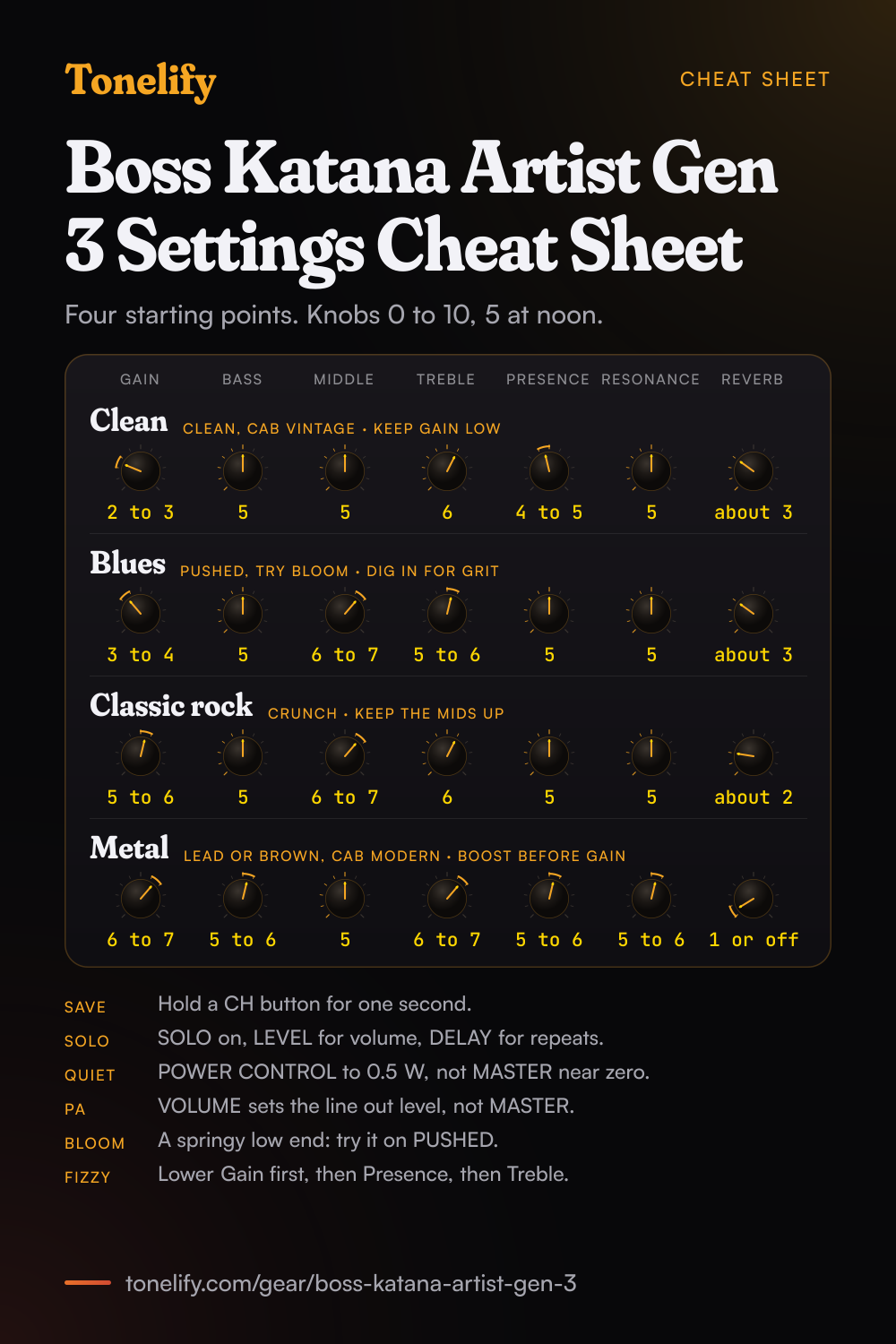
Printable cheat sheet: PDF and PNG
The clean, blues, classic rock and metal settings from this page, together on one sheet with short tips. The PDF prints on white; the PNG is the dark version for your phone.
Starting settings on the Boss Katana Artist Gen 3
Positions on a 0 to 10 scale, with 5 at twelve o'clock. They are where to begin, not Boss's numbers: pick the amp type first, then move one control at a time from here.
Clean
CLEAN amp type, Gain 2 to 3, Bass 5, Middle 5, Treble 6, Presence 4 to 5, Resonance 5, Reverb about 3. Keep Gain low and set the level with Volume, so the sound stays clear when you strum hard. BOSS notes that Clean can also be used for solo or lead in conjunction with the Booster. Start with CAB RESONANCE on VINTAGE, which BOSS describes as the warm and sweet sound of a vintage cabinet, and BLOOM off. These are starting points, not BOSS's numbers: read each knob as 0 to 10 with 5 at twelve o'clock, and move one control at a time from here.
- Gain 2 to 3
- Bass 5
- Middle 5
- Treble 6
- Presence 4 to 5
- Resonance 5
- Reverb about 3
Edge of breakup and blues
PUSHED amp type, Gain 3 to 4, Bass 5, Middle 6 to 7, Treble 5 to 6, Presence 5, Resonance 5, Reverb about 3. BOSS's launch release describes Pushed as the touch-responsive gain of a clean combo driven into harmonic saturation, so play lighter for a cleaner sound and dig in for grit. This is the place to try BLOOM: BOSS's manual says it switches the power amp circuit to produce a sound with a springy low end, and the product page calls the result a sharper attack and a richly dynamic low-end response. One of BOSS's own factory sounds, A CH4, is named Bloom Crunch. CRUNCH at the same settings gives what BOSS calls a fat crunch sound.
- Gain 3 to 4
- Bass 5
- Middle 6 to 7
- Treble 5 to 6
- Presence 5
- Resonance 5
- Reverb about 3
Classic rock
CRUNCH amp type, Gain 5 to 6, Bass 5, Middle 6 to 7, Treble 6, Presence 5, Resonance 5, Reverb about 2. Keep the mids up: classic rock sits in the midrange, and scooping it is the usual reason a rock tone sounds thin next to a band. The CONTOUR button switches between three types of midrange band characteristics, green, red and orange, then off, so try each before you move the EQ knobs. For a solo, use the Solo section rather than more Gain, so the rhythm sound stays where it was. As shipped, tone setting A CH1 has OVERDRIVE on the Booster's red colour.
- Gain 5 to 6
- Bass 5
- Middle 6 to 7
- Treble 6
- Presence 5
- Resonance 5
- Reverb about 2
Metal
LEAD or BROWN amp type, Gain 6 to 7, Bass 5 to 6, Middle 5, Treble 6 to 7, Presence 5 to 6, Resonance 5 to 6, Reverb 1 or off. BOSS describes Lead as covering a wide range from crunch to high gain depending on the gain setting, and Brown as a lead sound with an edge inherited from the BOSS WAZA brown sound. Set CAB RESONANCE to MODERN, which BOSS calls a modern cabinet sound notable for a tight low-end, or DEEP for a powerful low end with a distinctive edge. For tighter palm mutes, add a boost before you add Gain: on tone settings A CH2 and B CH2 to B CH4 as shipped, the BOOSTER button's red colour is MID BST, and in BOSS Tone Studio T-SCREAM, which BOSS models on an Ibanez TS-808, can take its place. BOSS says the Resonance knob changes the definition of the low-frequency range, so if palm mutes get loose, try it a step lower. The noise suppressor is set in BOSS Tone Studio, not on the panel.
- Gain 6 to 7
- Bass 5 to 6
- Middle 5
- Treble 6 to 7
- Presence 5 to 6
- Resonance 5 to 6
- Reverb 1 or off
Add a boost from the Booster before you raise the Gain.
Lead and the Solo section
The Artist has a SOLO section of its own for this. Press SOLO to switch it on: the inner LEVEL knob sets the volume for soloing, and the outer DELAY knob sets a delay that is heard only while Solo is on, with its own TAP button for the delay time. If the solo needs to cut more, raise Middle a step on the rhythm sound before you save it. In BOSS Tone Studio the Solo section also has a three-band SOLO EQ, and the SOLO DELAY settings, which only the Artist and the Artist Head have, include whether the repeats carry over when you switch sounds. A latch-type footswitch on the GA-FC jack, an FS-5L, or an FS-6 or FS-7 set to FS-5L (LATCH), switches CH1 and CH2 with its tip and Solo with its ring.
Recording, the line out and headphones
LINE OUT comes out of an XLR connector and a 1/4-inch jack, for a PA or a recorder, and the AIR FEEL switch beside it picks the sound: REC is a distantly-miked sound for recording, LIVE a close-miked sound for live, BLEND a blend of the two, and CUSTOM one of two mic setups, M1 and M2, that you make in BOSS Tone Studio and pick with the CUSTOM button above it, green or red. BOSS's app manual says the same setting shapes the PHONES/REC OUT and the USB effect output too. The line out level follows the VOLUME knob, not MASTER, so you can turn MASTER down and still feed the desk. If the PA hums, try the GND LIFT switch, which is normally OFF, and note that with a cable in the 1/4-inch LINE OUT the XLR is silent. Headphones in STEREO PHONES silence the speaker. Over USB-C with BOSS's KATANA3 driver the Artist records at up to 32-bit/96 kHz; the operating system's own driver gives 16-bit/48 kHz audio and no MIDI.
Quiet practice and Power Control
POWER CONTROL has four positions: STANDBY, 0.5 W, HALF and MAX. STANDBY mutes the sound while leaving the amp on and every knob where it was, which BOSS suggests for the gap between sets. On the Artist and the Artist Head only, the POWER CONTROL page in BOSS Tone Studio adjusts the output of the HALF position. At home, use 0.5 W rather than turning MASTER almost off: BOSS's product page says the integrated Power Control lets you dial in cranked-amp inspiration with no adverse effect on the sound.
Boss Katana Artist Gen 3 amp types
Six amp types on the AMP TYPE knob, each with a second voicing on the VARIATION button, so twelve in all. BOSS's manual says all of them are original: it names no real amp behind any type, and the only lineage it gives is Brown's, from its own Waza amp.
| Amp type | What BOSS says it is |
|---|---|
| ACOUSTIC | A dedicated acoustic guitar amp that supports connection of an acoustic guitar |
| CLEAN | A clean and natural sound; with the Booster it can be used for solo or lead |
| PUSHED | A big, penetrating sound with a tonal color that responds to your picking nuances |
| CRUNCH | A fat crunch sound that faithfully responds to the nuances of your picking |
| LEAD | Covers a wide range from crunch to high gain, depending on the gain setting |
| BROWN | A lead sound with an edge inherited from the BOSS WAZA brown sound |
Boss Katana Artist Gen 3 factory tone settings
The eight tone settings as shipped, four channels in each bank, with BOSS's names. The last column is the effect each section has switched on when you recall the channel; the other two colours on each button hold other effects, listed in BOSS's manual. Hold PANEL while switching on to bring all eight back.
| Tone setting | BOSS's name | On when recalled: Booster, Mod, FX, Delay, Reverb |
|---|---|---|
| A CH1 | Chunky Brown | TREBLE BST, PHASER 90E, FLNGR 117E, SDE-3000, HALL |
| A CH2 | Picking Pushed | CLEAN BST, T.WAH, TREMOLO, TAPE ECHO, SPRING |
| A CH3 | Riff Shred | DISTORTION, PHASER 90E, HEAVY OCT, DIGITAL, HALL |
| A CH4 | Bloom Crunch | BLUES DRIVE, FLNGR 117E, HEAVY OCT, ANALOG, PLATE |
| B CH1 | Sparkle Clean | BLUES DRIVE, CHORUS, TREMOLO, TAPE ECHO, PLATE |
| B CH2 | Church Brown | CLEAN BST, COMP, PITCH SHIFT, MODULATE, HALL |
| B CH3 | Spongy Crunch | CLEAN BST, DC-30, PITCH SHIFT, MODULATE, PLATE |
| B CH4 | Bite Lead | TREBLE BST, COMP, FLNGR 117E, SDE-3000, PLATE |
Boss Katana Artist Gen 3 booster list
23 types for the Booster, picked in BOSS Tone Studio, from clean boosts to fuzz, with the pedals BOSS says it models. On the amp, each of the BOOSTER button's three colours holds one of them and the outer ring of the BOOSTER/MOD knob sets how much you hear.
| Booster type | What BOSS says it is |
|---|---|
| CLEAN BOOST | A booster that also gives a clean tone with punch on its own |
| TREBLE BOOST | A booster with bright characteristics |
| MID BOOST | A booster with unique characteristics in the midrange, suited to solos before the preamp |
| CRUNCH OD | A lustrous crunch sound with an added element of amp distortion |
| BLUES DRIVE | The crunch sound of the BOSS BD-2, faithful to the nuances of picking |
| OVERDRIVE | Models the BOSS OD-1, sweet, mild distortion |
| NATURAL OD | An overdrive with distortion that has a natural feeling |
| WARM OD | A warm overdrive |
| TURBO OD | The high-gain overdrive sound of the BOSS OD-2 |
| T-SCREAM | Models an Ibanez TS-808 |
| DISTORTION | A basic, traditional distortion sound |
| FAT DS | A distortion sound with thick distortion |
| DST+ | Models an MXR Distortion+ |
| GUV DS | Models a Marshall Guv'nor |
| RAT | Models a ProCo RAT |
| METAL ZONE | Models the BOSS MT-2, from old style to slash metal |
| METAL DS | A distortion sound ideal for heavy riffs |
| '60S FUZZ | Models a Fuzz Face, a fat fuzz sound |
| MUFF FUZZ | Models an Electro-Harmonix Big Muff |
| OCT FUZZ | A fuzz sound with rich harmonic content |
| HM-2 | Models the BOSS HM-2, cranked-up distortion with compression |
| METAL CORE | Models the BOSS ML-2, for high-speed metal riffs |
| CENTA OD | Models a Klon Centaur |
Boss Katana Artist Gen 3 effects list
31 types for MOD and FX, which share one list, 8 delays, 5 reverbs and 3 pedal effects for an expression pedal, on top of the 23 boosters, plus a parametric EQ, a GE-10 graphic EQ and a noise suppressor that are set only in BOSS Tone Studio. The Delay 2 slot, heard on the REVERB knob when its mode is DELAY or DLY+REV, takes the same 8 delays.
| Effect | Block | What BOSS says it does |
|---|---|---|
| CHORUS | MOD or FX | Two choruses, one for the lows and one for the highs, for a more natural chorus |
| FLANGER | MOD or FX | A twisting, jet-airplane-like character |
| PHASER | MOD or FX | A whooshing, swirling character |
| UNI-V | MOD or FX | Models a Uni-Vibe |
| TREMOLO | MOD or FX | A cyclic change in volume |
| VIBRATO | MOD or FX | Vibrato from slightly modulating the pitch |
| ROTARY | MOD or FX | Like the sound of a rotary speaker |
| RING MOD | MOD or FX | A bell-like sound from the internal oscillator |
| SLOW GEAR | MOD or FX | A volume swell, the violin-like sound |
| SLICER | MOD or FX | Interrupts the sound so it sounds like a rhythm backing phrase |
| COMP | MOD or FX | A long sustain from evening out the volume level |
| LIMITER | MOD or FX | Attenuates loud input levels to prevent distortion |
| T. WAH | MOD or FX | A wah whose filter follows the guitar level |
| AUTO WAH | MOD or FX | A wah that changes over a periodic cycle |
| PEDAL WAH | MOD or FX | A wah played from an expression pedal on a GA-FC |
| GRAPHIC EQ | MOD or FX | Ten-band EQ |
| PARAMETRIC EQ | MOD or FX | Four-band EQ |
| GUITAR SIM | MOD or FX | Switches between guitar types, pickups and bodies on one guitar |
| AC.GUITAR SIM | MOD or FX | Turns an electric guitar into the sound of an acoustic |
| AC. PROCESSOR | MOD or FX | Makes an acoustic-electric's pickup sound closer to a mic near the guitar |
| WAVE SYNTH | MOD or FX | A synth sound from the guitar input |
| OCTAVE | MOD or FX | Adds a note an octave lower |
| HEAVY OCTAVE | MOD or FX | Adds sound an octave lower, chords included |
| PITCH SHIFTER | MOD or FX | Shifts the pitch up or down within two octaves |
| HARMONIST | MOD or FX | Harmonies based on diatonic scales |
| HUMANIZER | MOD or FX | Human vowel-like sounds |
| PHASER 90E | MOD or FX | Models an MXR EVH-90 Phase Shifter |
| FLANGER117E | MOD or FX | Models an MXR EVH-117 Flanger |
| WAH 95E | MOD or FX | Models a Jim Dunlop EVH-95 Wah, played from an expression pedal |
| DC-30 | MOD or FX | Models a Roland DC-30 |
| PEDAL BEND | MOD or FX | Pitch bend from an expression pedal |
| DIGITAL | Delay | A simple mono delay |
| PAN | Delay | A tap delay, the time divided across left and right |
| STEREO | Delay | A stereo in and out delay |
| ANALOG | Delay | A mild analog delay sound |
| TAPE ECHO | Delay | The wavering sound of a tape echo |
| REVERSE | Delay | The sound played back in reverse |
| MODULATE | Delay | Adds a pleasant wavering to the delay |
| SDE-3000 | Delay | Models the Roland SDE-3000 |
| PLATE | Reverb | A plate reverb: metallic, with a distinct upper range |
| ROOM | Reverb | A small room: warm reverberation |
| HALL | Reverb | A concert hall: clear and spacious |
| SPRING | Reverb | A guitar amp's built-in spring reverb |
| MODULATE | Reverb | Hall reverb with a wavering sound |
| PEDAL WAH | Pedal FX | Wah in six modes, CRY WAH and VO WAH among them, modelled on a Cry Baby and a VOX V846 |
| WAH 95E | Pedal FX | Models a Jim Dunlop EVH-95 |
| PEDAL BEND | Pedal FX | A pitch-bend effect; chords cannot be played through it |
What controls does the Boss Katana Artist Gen 3 have?
The Boss Katana Artist Gen 3 has 24 controls on its front panel: Amp Type knob, Variation button, Bloom button, Gain, Volume, Contour button, Bass, Middle, Treble, Booster, Mod, FX, Delay, Tap button, Reverb, Resonance, Presence, Master, Solo button, Solo Level, Solo Delay, Global EQ button, Power Control switch and Cab Resonance switch.
Boss Katana Artist Gen 3 specifications
- Power
- 100W, with Half and 0.5W settings
- Speaker
- 1x12" Waza
- Voicings
- Acoustic, Clean, Pushed, Crunch, Lead, Brown
- Front panel
- Amp Type knob, Variation button, Bloom button, Gain, Volume, Contour button, Bass, Middle, Treble, Booster, Mod, FX, Delay, Tap button, Reverb, Resonance, Presence, Master, Solo button, Solo Level, Solo Delay, Global EQ button, Power Control switch, Cab Resonance switch
- Released
- 2024
What the Boss Katana Artist Gen 3 panel means when you dial it in
100W, with Half and 0.5W settings through a 1x12" Waza. There is enough headroom to hold a clean setting at band volume, so the gain control does the driving rather than the master. It has a presence control, so the top end above the treble band is set separately from the tone stack. That is the control to reach for when a setting sounds close but harsh. A resonance control shapes the definition of the low end on a knob of its own, apart from the bass knob, so the two are set separately. Gain and master volume are separate, so the preamp can be driven hard at a volume that is liveable. Where a tone sits between the two is part of the answer, not a detail. Reverb is onboard, so a tone that needs it does not need a pedal in the chain. The selectable voicings are Acoustic, Clean, Pushed, Crunch, Lead and Brown. Picking the voicing comes before the knob positions, because the same numbers land somewhere else on each one.
Boss Katana Artist Gen 3 questions
What amp types does the Boss Katana Artist Gen 3 have?
Six, each with a second voicing on the VARIATION button, so twelve: ACOUSTIC, CLEAN, PUSHED, CRUNCH, LEAD and BROWN, the same six as every Katana Gen 3. BOSS's manual says all provided amp types are original and names no real amp behind them. It describes Pushed as a big, penetrating sound that responds to your picking, Crunch as a fat crunch sound, Lead as covering crunch to high gain depending on the gain setting, and Brown as a lead sound with an edge inherited from the BOSS WAZA brown sound.
What does the Bloom button do on the Katana Artist Gen 3?
BOSS's manual says that when Bloom is on, the power amp circuit switches to produce a sound with a springy low end. The product page says it engages a dedicated circuit that revoices the amp's feel and response, with a sharper attack and a richly dynamic low-end response, two characteristics BOSS calls difficult to achieve at once. Among the Gen 3 amps, only the Katana Head, the Artist and the Artist Head have it.
What is the difference between Resonance and Cab Resonance on the Katana Artist?
The RESONANCE knob, which only the Artist and the Artist Head have, changes the definition of the low-frequency range. The CAB RESONANCE switch adds the resonance of a speaker cabinet in one of three types: VINTAGE, the warm and sweet sound of a vintage cabinet; MODERN, a modern cabinet sound notable for a tight low-end; and DEEP, a powerful low end with a distinctive edge. PRESENCE, the knob beside RESONANCE, adds a lustrous outline to the mid and high frequencies.
What does the Contour button do on the Katana Artist Gen 3?
It switches between three types of midrange band characteristics, green, red and orange, to change the sonic definition of the sound. Each press moves to the next one in order, green, red, orange and then off. BOSS Tone Studio can fine-tune the three Contour settings.
What does the Global EQ button do?
It turns the global equalizer on and off and switches between three equalizer settings, green, red and orange. The three are set up only in BOSS Tone Studio, not on the amp, and in the app the global EQ can sit before or after the effect chain to adjust the tone of the entire Katana. Among the Gen 3 amps, only the Artist and the Artist Head have the button.
How does the Solo button work on the Katana Artist Gen 3?
SOLO switches the solo function on and off. The inner LEVEL knob sets the volume used for soloing and the outer DELAY knob sets a delay effect heard while Solo is on, with its own TAP button for the delay time. Solo Delay is on the Artist and the Artist Head only; the Katana-100 Gen 3 has the Solo button without it. A latching footswitch's ring turns Solo on and off.
How do you save a sound on the Katana Artist Gen 3?
Press and hold CH1, CH2, CH3 or CH4 for one second. The channel stores every top panel knob and button except MASTER, which is why VOLUME is the control for balancing sounds and MASTER the one for the room. The BANK button switches between bank A and bank B and lights up on B, so the Artist holds eight tone settings. PANEL plays whatever the knobs are set to now.
What does the Power Control switch do on the Katana Artist Gen 3?
It sets the output level of the power amp for where you are playing: 0.5 W, HALF or MAX. STANDBY mutes the sound while leaving the unit powered on, so you can leave the stage without changing a knob. On the Artist and the Artist Head only, BOSS Tone Studio's POWER CONTROL page adjusts the output of the HALF position.
Does the Katana Artist Gen 3 have a built-in tuner?
No. BOSS's Gen 3 manual describes no tuner, and Premier Guitar's review lists its absence as the review's only con: a built-in tuner would have been a nice touch. Use a pedal or clip-on tuner before the INPUT jack.
Can you record with the Katana Artist Gen 3?
Yes, three ways. USB-C records to a computer, at up to 32-bit/96 kHz with BOSS's KATANA3 driver or 16-bit/48 kHz with the operating system's own driver, which needs system program 1.07 or later. LINE OUT, on XLR or 1/4-inch, feeds a recorder or a PA, with the AIR FEEL switch choosing a distantly-miked REC sound, a close-miked LIVE sound, BLEND or a CUSTOM mic setup; its level follows VOLUME, not MASTER. STEREO PHONES works for silent practice. BOSS's block diagram notes that USB playback is not sent to the speaker.
Can you connect an external speaker cabinet to the Katana Artist Gen 3?
Yes. It has a SPEAKER OUT 8 ohm jack and two 16 ohm jacks, A and B, and BOSS's product page gives one or two external cabinets with an 8-ohm total load. As shipped, the internal speaker is plugged into the 8 ohm jack, so to use an external speaker, disconnect the internal speaker's plug from it. A cabinet on the 8 ohm jack must be 8 ohms or higher, each one on the 16 ohm jacks 16 ohms or higher, and with a plug in the 8 ohm jack the 16 ohm jacks are silent. Use speaker cable, not guitar cable.
Does the Katana Artist Gen 3 have Bluetooth?
Not built in. The optional BT-DUAL adaptor fits the Bluetooth ADAPTOR slot on the rear panel, after removing its cover and screw with the amp unplugged. It then plays music from a phone through the amp, shown on the phone as KATANA 3 Audio, and lets the BOSS Tone Studio app for iOS and Android edit the sounds. Set the music level on the phone, then with MASTER.
What footswitches and pedals work with the Katana Artist Gen 3?
BOSS's GA-FC and GA-FC EX foot controllers switch tone settings and effects. On the GA-FC jack, a latch-type FS-5L, or an FS-6 or FS-7 set to FS-5L (LATCH), switches CH1 and CH2 and Solo; momentary footswitches such as the FS-5U cannot be used there. The EXP PEDAL jack takes an EV-30, FV-500L, FV-500H or Roland EV-5 for volume or an effect such as wah. MIDI IN accepts program changes from a multi-effects unit or MIDI foot controller: 1 to 4 call bank A, 5 PANEL, 6 to 9 bank B.
What is the difference between the Katana Artist Gen 3 and the Katana-100 Gen 3?
Both are 100-watt combos with one 12-inch speaker and the same six amp types, Presence, Contour, Solo, eight tone settings, an effects loop and Stereo Expand. The Artist adds BLOOM, a RESONANCE knob, Solo Level and Solo Delay knobs with their own tap button, a BANK button, an XLR line out with AIR FEEL and GND LIFT switches, a GLOBAL EQ button, MIDI IN and three speaker outputs, and BOSS's launch release names a custom 12-inch Waza speaker for it. The Artist weighs 19 kg against the 100's 14.8 kg.
What is the difference between the Katana Artist Gen 3 and the Katana Artist Head Gen 3?
The panel, features and 100 watts are the same; the Head has no speaker of its own and drives a cabinet from its SPEAKER OUT jacks. BOSS gives the Head as 12.4 kg and the combo as 19 kg, 41 lbs 15 oz, at 630 by 248 by 515 mm including handle and feet.
What speaker is in the Katana Artist Gen 3?
A custom 12-inch Waza speaker, which BOSS says provides the true character and response of the famous '60s 25-watt British stack speaker with modern power handling capacity. The combo cabinet has a wide baffle and a semi-closed design. Premier Guitar's review names the speaker as a Waza G12W.
What are the factory tone settings on the Katana Artist Gen 3?
BOSS ships eight. Bank A: CH1 Chunky Brown, CH2 Picking Pushed, CH3 Riff Shred, CH4 Bloom Crunch. Bank B: CH1 Sparkle Clean, CH2 Church Brown, CH3 Spongy Crunch, CH4 Bite Lead. The effects each one switches on are in the list below. Holding PANEL while switching on brings them back.
How do you factory reset the Katana Artist Gen 3?
With no other devices connected, switch the amp on while holding down PANEL. The EFFECTS buttons blink one after another from the left; when the blinking stops, all settings are back to the factory state. It takes about 30 seconds, and the power must stay on until it finishes. Back up your own sounds first with ALL DATA BACKUP in BOSS Tone Studio.
What is the latest firmware for the Katana Artist Gen 3?
BOSS's KATANA3 System Program Ver.1.07, from October 2024, added support for the USB generic driver and fixed a Harmonist pitch detection bug; Ver.1.06, from May 2024, added support for BOSS Tone Studio. To check yours, hold REVERB while switching on: on 1.07 BOOSTER lights green, MOD and FX stay dark, DELAY lights green and REVERB orange.
What are the best Boss Katana Artist Gen 3 settings for metal?
Start with the LEAD or BROWN amp type, Gain 6 to 7, Bass 5 to 6, Middle around 5, Treble 6 to 7, Presence 5 to 6 and Reverb 1 or off, with CAB RESONANCE on MODERN and MID BST from the Booster in front rather than Gain at 10. These are starting points, not BOSS's numbers: move one control at a time from here. If it fizzes, lower Gain first, then Presence, then Treble.
When did the Boss Katana Artist Gen 3 come out and how much is it?
BOSS announced it with the rest of the Katana Gen 3 range in a press release dated 23 May 2024, calling it the flagship Gen 3 model, and said the full lineup would be available later that year. Premier Guitar's review of 5 July 2024 gave its street price as $599; BOSS's release gave no price for the Artist.
Does Tonelify support the Boss Katana Artist Gen 3?
Yes, and its front panel is stored, so settings only ever reference controls this guitar amp has: Amp Type knob, Variation button, Bloom button, Gain, Volume, Contour button, Bass, Middle, Treble, Booster, Mod, FX, Delay, Tap button, Reverb, Resonance, Presence, Master, Solo button, Solo Level, Solo Delay, Global EQ button, Power Control switch, Cab Resonance switch. You will not be told to set a knob that is not there.
Sources
Panel, specifications and dates checked against these on .
- BOSS: KATANA Gen 3 Reference Manual (PDF)
- BOSS: Using BOSS TONE STUDIO for KATANA Gen3, computer (PDF)
- BOSS: Using BOSS TONE STUDIO for KATANA Gen3, mobile (PDF)
- BOSS: Katana Artist Gen 3 product page
- BOSS: Katana Artist Gen 3 specifications
- BOSS: KATANA3 System Program Ver.1.07
- BOSS: Katana Gen 3 launch press release, 23 May 2024
- Premier Guitar: Boss Katana Artist Gen 3 review (5 July 2024)
The manuals are the files BOSS's Katana Artist Gen 3 support page links, read on 7 November 2026; the Reference Manual covers all seven Gen 3 amps and marks what only the Artist and Artist Head have. Premier Guitar is used for the street price, the speaker's G12W name and the missing tuner, which BOSS's pages do not state.