
Marshall MG15GR settings
Two channels on one switch, green for Clean and red for Overdrive. Clean has a Volume and no Gain; Overdrive has Gain and its own Volume. Bass, Middle, Treble and Reverb are shared. The MG15G is the same amp without the Reverb knob.
⚡ Match a tone on this amp- Clean Volume
- Channel
- Gain
- Overdrive Volume
- Bass
- Middle
- Treble
- Reverb
How do you dial in a specific tone on a Marshall MG15GR?
Solid-state amps hold their voicing steady across the volume range, which makes the Marshall MG15GR far more predictable to dial in than a valve amp and is exactly why some of the most aggressive rhythm tones ever recorded came off solid-state heads. The trade is headroom before the EQ starts to sound brittle, so on this amp the treble control does more damage than the gain control does.
Name the song you are chasing in the tone matcher and Tonelify returns the settings for this exact guitar amp, not the settings the original artist used. Those are two different things: the recording was made on gear most players do not own.
Settings for this amp only ever use controls it actually has, because its front panel is stored in our gear database. You will not be told to set a knob that is not on the amp.
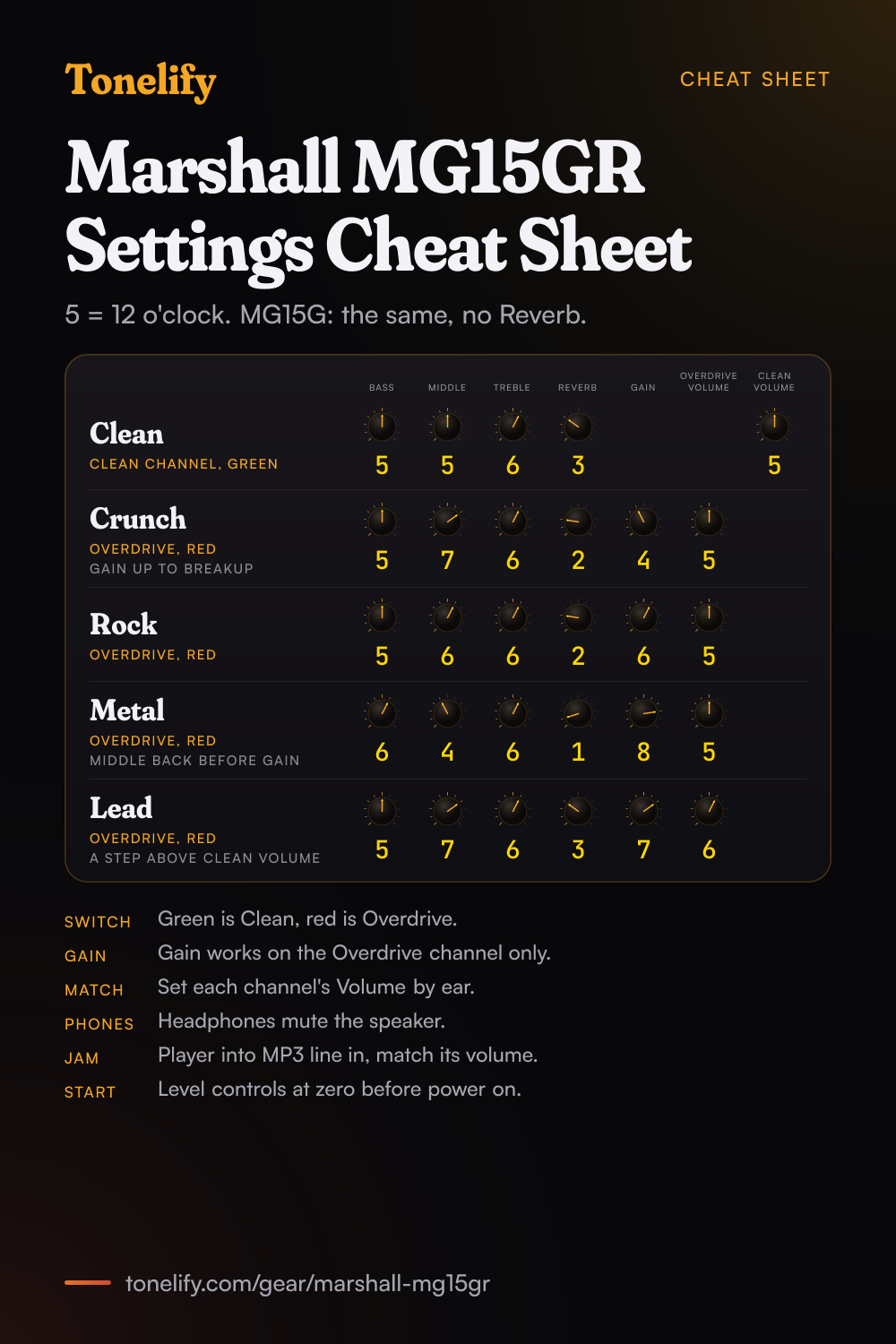
Free download
Printable cheat sheet: PDF and PNG
The clean, crunch, rock, metal and lead settings from this page, together on one sheet with short tips. The PDF prints on white; the PNG is the dark version for your phone.
Starting settings on the Marshall MG15GR
Positions on a 0 to 10 scale, with 5 at twelve o'clock. They are where to begin, not Marshall's numbers: pick the channel first, then move one control at a time from here.
Clean
Clean channel: press the Channel switch until its LED is green. Clean Volume 5, Bass 5, Middle 5, Treble 6, Reverb 3. The Clean channel has only its Volume: the Gain knob belongs to the Overdrive channel, so it does nothing here. Treble sits a little past halfway because Marshall says more treble makes the tone brighter, ideal for more percussive playing styles, which keeps strummed chords clear. Marshall says Reverb adds a lush reverb to the selected channel, from a subtle hint to cavernous; 3 is a hint. On an MG15G, which has no Reverb, set the rest the same.
- Clean Volume 5
- Bass 5
- Middle 5
- Treble 6
- Reverb 3
Gain does nothing on the Clean channel.
Crunch for blues and classic rock
Overdrive channel: press the Channel switch until its LED is red. Gain 4, Overdrive Volume 5, Bass 5, Middle 7, Treble 6, Reverb 2. Marshall's guide says to turn up the Gain until the required amount of distortion is achieved, so start here and raise it until chords just break up while each string still comes through. Middle is up because Marshall says increasing the middle will add body to the sound, and that is what keeps a crunch from sounding thin.
- Gain 4
- Overdrive Volume 5
- Bass 5
- Middle 7
- Treble 6
- Reverb 2
Raise Gain until chords just break up.
Rock
Overdrive channel, red LED. Gain 6, Overdrive Volume 5, Bass 5, Middle 6, Treble 6, Reverb 2. This is the setting for hard rock rhythm: thicker than the crunch, with Middle still above halfway so power chords keep their body. If it turns muddy, lower Gain a step before you touch Bass; Marshall says turning Bass up gives deeper and thicker sounds, and turning it down reduces any bottom end thud.
- Gain 6
- Overdrive Volume 5
- Bass 5
- Middle 6
- Treble 6
- Reverb 2
Metal
Overdrive channel, red LED. Gain 8, Overdrive Volume 5, Bass 6, Middle 4, Treble 6, Reverb 1. Marshall says turning Middle down gives a more hollow sound with the bass and treble frequencies appearing to be more accentuated, which is the scooped sound of metal rhythm. Below about 4 the riffs tend to vanish next to a drummer, so add Middle back before you add Gain. Reverb 1 keeps fast palm mutes tight. Marshall also says the louder the Overdrive channel is set, the looser the amp will sound and feel, so if palm mutes go loose at volume, take Bass down a step.
- Gain 8
- Overdrive Volume 5
- Bass 6
- Middle 4
- Treble 6
- Reverb 1
Add Middle back before more Gain.
Lead over a clean rhythm
Overdrive channel, red LED, for the solo, with the Clean setting above for the rhythm. Gain 7, Overdrive Volume 6, Bass 5, Middle 7, Treble 6, Reverb 3. Set Overdrive Volume a little above where it matches Clean Volume, so switching from green to red lifts the solo over the rhythm. Middle 7 pushes single notes forward, and a little more Reverb than the rhythm settings gives the notes some tail. The Channel switch is on the front panel, so you change channels by hand.
- Gain 7
- Overdrive Volume 6
- Bass 5
- Middle 7
- Treble 6
- Reverb 3
Overdrive Volume a little above Clean Volume.
Headphones, playing along and setting up
Marshall's setup steps start with the power switch off and the level controls on the front panel at zero; switch on, then turn the volume up to your preferred level. The headphone socket is for silent practice, and Marshall says connecting headphones automatically mutes the internal speaker. To play along with a track, connect the line out or headphone output of your player to the MP3 line in socket and adjust the volume of the player to match that of your guitar: Marshall calls that the perfect play-along practice system.
Chasing one song? Name it and the matcher writes that song's settings for the Marshall MG15GR.
What controls does the Marshall MG15GR have?
The Marshall MG15GR has 8 controls on its front panel: Clean Volume, Channel switch, Gain, Overdrive Volume, Bass, Middle, Treble and Reverb.
Marshall MG15GR specifications
- Power
- 15W
- Channels
- Clean, Overdrive
- Front panel
- Clean Volume, Channel switch, Gain, Overdrive Volume, Bass, Middle, Treble, Reverb
What the Marshall MG15GR panel means when you dial it in
15W. At that rating it is built for practice and small rooms rather than for keeping up with a drummer. There is no presence control on this panel, so everything above the treble band has to come from the treble control and the guitar's own tone knob. A setting copied from an amp with presence has to be rebalanced here. Drive and volume have separate knobs, so the amp can sound driven at a volume that is liveable. Where a tone sits between the two is part of the answer, not a detail. Reverb is onboard, so a tone that needs it does not need a pedal in the chain. 2 channels, Clean and Overdrive, and a setting only means something once the channel it belongs to is named.
Marshall MG15GR questions
What is the difference between the Marshall MG15G and MG15GR?
The Reverb knob. Marshall's quick start guide covers both, calling them the MG15 and MG15R, and marks the Reverb control MG15R only. Both measure 370 by 375 by 195 mm; the MG15R weighs 7.8 kg and the MG15 7.6 kg. Every other control is the same, so the settings on this page work on an MG15G with Reverb left out.
How many channels does the Marshall MG15GR have?
Two, Clean and Overdrive, chosen with the Channel switch on the front panel. Marshall's guide says the Clean channel is engaged when its LED is green and the Overdrive channel when it is red. The same switch lights up whenever the amp is on.
Why doesn't the Gain knob change the clean sound on the MG15GR?
Because Gain belongs to the Overdrive channel. Marshall's guide lists it as the Gain control of the Overdrive channel, which sets the operating level of the pre-amp, and says to turn it up until the required amount of distortion is achieved. The Clean channel has one control of its own, its Volume. Bass, Middle, Treble and Reverb work on both.
Why does the MG15GR sound looser when the Overdrive channel is louder?
Marshall's guide says so of its Overdrive Volume: the louder this channel is set, the looser the amplifier will sound and feel. If palm mutes go loose at volume, take Bass down a step before you lower the volume.
Can you use headphones with the Marshall MG15GR?
Yes. Marshall's guide says the headphone socket is for silent practice and that connecting headphones automatically mutes the internal speaker. The channel Volumes set the level.
How do you play along with music on the MG15GR?
Through the MP3 line in socket. Marshall's guide says to connect the line out or headphone output of your player there and adjust the player's volume to match that of your guitar. The guitar's level stays on the amp's channel Volume.
Is it normal for the Marshall MG15GR to hiss?
A little, yes. Marshall's support page says it is the nature of the amplifier to hear a hiss when sat idle. High Gain and Treble settings make it louder, so lower those first if it bothers you.
Does the MG15GR have a footswitch or an effects loop?
Marshall's guide lists three sockets on the front panel, the input, the MP3 line in and the headphone socket, and no footswitch socket or effects loop. Channels change with the Channel switch, and pedals go between the guitar and the input; drive pedals work best into the Clean channel, so the pedal does the driving.
Does the Marshall MG15GR have a master volume?
No. Marshall's front panel list has two level controls, the Volume of the Clean channel and the Volume of the Overdrive channel, so each channel sets its own loudness. Match them by ear once, so switching channels does not jump in level.
How powerful is the Marshall MG15GR?
Marshall's support page lists it as a 15W solid-state combo with built-in reverb, two channels and a headphone output for silent practice. Its page for the MG15G, the same amp without reverb, lists an 8 inch custom speaker.
Is the Marshall MG15GR a tube amp?
No. Marshall's support pages call both the MG15GR and the MG15G 15W solid-state combos. The overdrive comes from the Overdrive channel's Gain, not from valves.
What are the best Marshall MG15GR settings for metal?
Start on the Overdrive channel at Gain 8, Overdrive Volume 5, Bass 6, Middle 4, Treble 6 and Reverb 1. These are Tonelify's starting points; Marshall publishes no numbers. If riffs get lost, raise Middle before Gain.
Does Tonelify support the Marshall MG15GR?
Yes, and its front panel is stored, so settings only ever reference controls this guitar amp has: Clean Volume, Channel switch, Gain, Overdrive Volume, Bass, Middle, Treble, Reverb. You will not be told to set a knob that is not there.
Sources
Panel, specifications and dates checked against these on .
- Marshall: MG15 and MG15R quick start guide (PDF)
- Marshall: Support for MG15GR Combo
- Marshall: Support for MG15G Combo
The guide is the file Marshall's MG15GR and MG15G support pages link as the user manual, read on 14 November 2026. Marshall publishes no knob values; the numbers are Tonelify's.
More Marshall gear
Similar amps from other makers
Settings for the song you are chasing
Name a song and Tonelify reads the documented rig behind the recording, then writes the settings for the controls the Marshall MG15GR has. A first plan starts with 7 days free, $0 today.