Amp cheat sheets
Marshall MG settings: MG10, MG15, MG30GFX and MG50GFX
Updated 10 min read4 knob panels8 sources
On a Marshall MG30GFX, MG15GFX or MG50GFX, start clean on the Clean channel at Gain 3, Bass 5, Middle 5, Treble 6, Reverb 3 and Volume 5, and play metal on OD-2 at Gain 7 to 8, Bass 6, Middle 4, Treble 6 and Reverb 1. On a two channel MG15G or MG15GR, metal is the Overdrive channel at Gain 8, Bass 6, Middle 4 and Treble 6. On an MG10, which has one Contour knob instead of Bass, Middle and Treble, use the Overdrive channel at Gain 8 and turn Contour from 5 until the riffs sound right.
Marshall's guides say what each control does but give no knob numbers, so every value on this page is Tonelify's starting point; the GFX and MG15 values are the same as on our MG30GFX and MG15GR pages. On the GFX amps, press Store before you change channel, or your changes are lost.

Free download
Printable cheat sheet: PDF and PNG
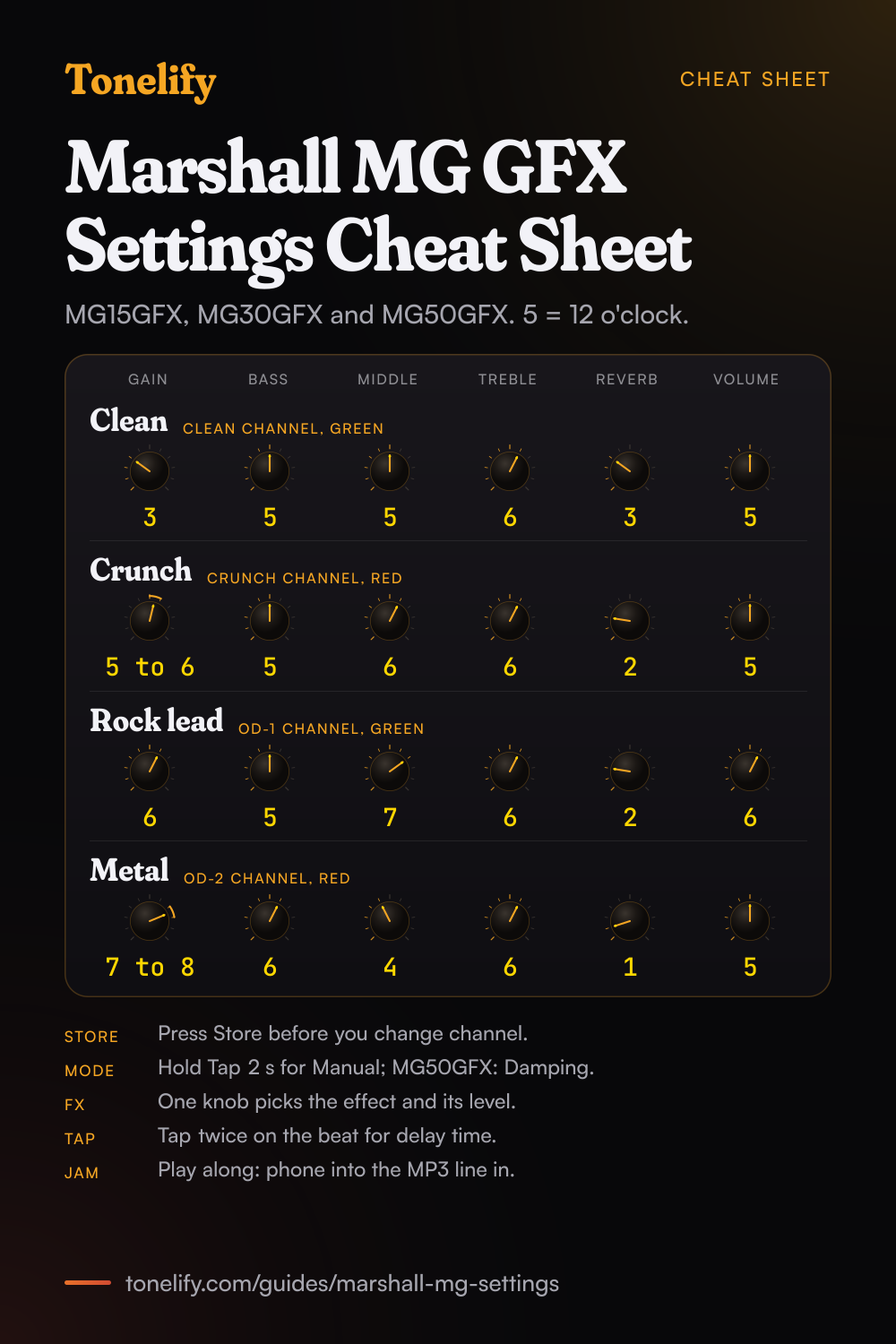
The clean, crunch, rock lead and metal settings from this guide, together on one sheet with short tips. The PDF prints on white; the PNG is the dark version for your phone.
Gain, Volume and the channels on a Marshall MG
Every MG sets distortion and loudness with separate knobs. On the MG10, Marshall says the Gain sets the operating level of the pre-amp and to turn it up until the required amount of distortion is achieved;[1] the MG15G and MG15GR guide says the same. On the GFX amps, Gain controls the amount of signal entering the pre-amp and the amount of distortion created in the selected channel.[3] So set the drive with Gain first, then the loudness with the channel's Volume.
The MG10, MG15G and MG15GR have two channels, Clean and Overdrive, picked with one Channel switch: green is Clean and red is Overdrive. Their Gain belongs to the Overdrive channel only, and Marshall says of the Overdrive Volume that the louder this channel is set, the looser the amplifier will sound and feel.[1] The MG15GFX, MG30GFX and MG50GFX have four channels, Clean, Crunch, OD-1 and OD-2, on two switches,[3] and one Gain that works on whichever channel is selected.
Which Marshall MG do you have?
All of these are solid state combos with a headphone output, according to Marshall's support pages.[5] If your amp has a Contour knob and two channels it is an MG10; Bass, Middle and Treble with one Channel switch make it an MG15G or MG15GR; two channel switches and an FX knob make it a GFX.
| Amp | Power | Channels | Tone controls | Extras |
|---|---|---|---|---|
| MG10 | 10W | Two: Clean, Overdrive | Contour | Headphone out, MP3 in |
| MG15G, MG15GR | 15W, 8 inch speaker | Two: Clean, Overdrive | Bass, Middle, Treble; Reverb on the MG15GR | Headphone socket, MP3 line in |
| MG15GFX | 15W | Four: Clean, Crunch, OD-1, OD-2 | Bass, Middle, Treble, Reverb | FX knob with five effects, Tap, Store, footcontroller socket |
| MG30GFX | 30W, 10 inch speaker | Four: Clean, Crunch, OD-1, OD-2 | Bass, Middle, Treble, Reverb | FX knob with five effects, Tap, Store, footcontroller socket |
| MG50GFX | 50W, 12 inch speaker | Four: Clean, Crunch, OD-1, OD-2 | Bass, Middle, Treble, Reverb | Separate Delay knob, Damping switch, effects loop, line out |
Best Marshall MG10 settings
The MG10 has four knobs: Clean Volume, Gain, Overdrive Volume and Contour. Marshall calls Contour a highly effective tone control that works by modifying the mid-range (body).[1] The guide does not say which way adds mids and which way cuts them, so every row starts Contour at 5. From there, turn it each way: for rock keep the side with more body, for metal the side that sounds more hollow.
On the Clean row the Gain does nothing, because it belongs to the Overdrive channel. Set the Clean Volume and Overdrive Volume by ear so the two channels play at the same level, then push the Overdrive Volume a step higher for solos. These are Tonelify's starting points; Marshall's guide gives no settings.
| Sound | Channel, LED | Gain | Channel Volume | Contour |
|---|---|---|---|---|
| Clean | Clean, green | Not used | 5 | 5 |
| Crunch | Overdrive, red | 4 | 5 | 5 |
| Rock | Overdrive, red | 6 | 5 | 5 |
| Metal | Overdrive, red | 8 | 5 | 5 |
| Lead | Overdrive, red | 7 | 6 | 5 |
Best Marshall MG15G and MG15GR settings
The MG15GR is the MG15G with a Reverb knob; Marshall's guide covers both and marks Reverb as the MG15R's only.[2] On an MG15G, set everything else the same. Middle does most of the work: Marshall says turning it up adds body to the sound, so the crunch and lead rows sit at 7, and metal drops it to 4 for a scooped rhythm sound.
These are Tonelify's starting points, the same as on our MG15GR page. If a setting turns muddy, lower Gain a step before you touch Bass. Below a Middle of about 4, riffs tend to vanish next to a drummer, so add Middle back before you add Gain.
| Sound | Channel, LED | Gain | Channel Volume | Bass | Middle | Treble | Reverb |
|---|---|---|---|---|---|---|---|
| Clean | Clean, green | Not used | 5 | 5 | 5 | 6 | 3 |
| Crunch | Overdrive, red | 4 | 5 | 5 | 7 | 6 | 2 |
| Rock | Overdrive, red | 6 | 5 | 5 | 6 | 6 | 2 |
| Metal | Overdrive, red | 8 | 5 | 6 | 4 | 6 | 1 |
| Lead | Overdrive, red | 7 | 6 | 5 | 7 | 6 | 3 |
Best Marshall MG30GFX, MG15GFX and MG50GFX settings
The three GFX amps share the same four channels and the same Gain, Bass, Middle, Treble, Reverb and Volume knobs, so one set of settings works on all of them. Clean: Clean channel, Gain 3, Bass 5, Middle 5, Treble 6, Reverb 3, Volume 5. Crunch for blues and classic rock: Crunch channel, Gain 5 to 6, Bass 5, Middle 6, Treble 6, Reverb 2, Volume 5. Rock lead: OD-1, Gain 6, Bass 5, Middle 7, Treble 6, Reverb 2, Volume 6. Metal: OD-2, Gain 7 to 8, Bass 6, Middle 4, Treble 6, Reverb 1, Volume 5.
Leave the Master where the room needs it: it is the only control that is not stored with the channel.[3] If the crunch gets muddy, lower Gain before Bass; if metal riffs get lost, add Middle back before more Gain.
For the lead, turn the FX knob to the delay with the repeats low, then push Tap twice on the beat. On an MG50GFX the delay has its own Delay knob and the FX knob holds Chorus, Phaser, Flanger, Vibe and Octave instead.[4] These are Tonelify's starting points, the same as on our MG30GFX page.
- Gain 3
- Bass 5
- Middle 5
- Treble 6
- Reverb 3
- Volume 5
Press Store to keep it in the channel.
- Gain 5 to 6
- Bass 5
- Middle 6
- Treble 6
- Reverb 2
- Volume 5
Lower Gain before Bass if it gets muddy.
- Gain 6
- Bass 5
- Middle 7
- Treble 6
- Reverb 2
- Volume 6
Low delay; tap the time on the beat.
- Gain 7 to 8
- Bass 6
- Middle 4
- Treble 6
- Reverb 1
- Volume 5
Add Middle back before more Gain.
Store, Preset mode and Manual mode
The GFX amps start in Preset mode, which Marshall calls the factory default operation of the amplifier. Each channel should be considered a preset: it stores every control except the Master, and selecting a channel recalls them.[3] So after you change channel, the sound comes from the stored settings, not from where the knobs point. Press Store when a channel sounds right; if you select another channel first, Marshall says any altered settings will be lost.[3]
In Manual mode the amp's settings always match the physical positions of the controls, and the Store switch lights red.[3] On the MG15GFX and MG30GFX, hold the Tap switch for at least two seconds to change mode; on the MG50GFX, hold the Damping switch for longer than 2 seconds.[4] The MG10, MG15G and MG15GR have no presets: the knobs are the sound.
Effects, delay and the MG50GFX extras
On the MG15GFX and MG30GFX, the FX knob selects and adjusts one of five digital effects: Chorus, Phaser, Flanger, Delay and Octave.[3] The Tap switch matches the delay time to the time between two pushes. Reverb has two types, Studio and Spring. The MG50GFX adds a REV switch and an FX switch to turn those sections on and off, and a separate Delay knob with four delay types: Hi-Fi, Tape, Multi and Reverse.[4]
The MG50GFX's Damping switch changes the power amp between classic amp feeling with the LED off and modern response with the LED on;[4] try modern for tight metal rhythm. It is also the only MG here with an effects loop, a Send and Return on the back with an Ext FX switch on the front,[4] so delay and reverb pedals can go after the preamp. On the other MGs, every pedal goes between the guitar and the input.
Headphones, playing along and hiss
Every MG on this page has a headphone output. On the MG10, Marshall's guide says connecting headphones will automatically mute the internal speaker,[1] and the MG15 and MG30GFX guides say the same. The MG50GFX's socket is a 3.5mm Headphone and Line out.[4] To play along with a song, connect the line out or headphone output of a phone or player to the MP3 input and match its volume to your guitar.
A little hiss is normal: Marshall's support pages say it is the nature of the amplifier to hear a hiss when sat idle.[8] High Gain and Treble make it louder, so lower those first. Before you switch on, Marshall's setup steps say to set the level controls on the front panel to zero, then turn the volume up to your preferred level.[2]
Common questions
What are the best Marshall MG amp settings?
On an MG15GFX, MG30GFX or MG50GFX: clean on the Clean channel at Gain 3, Bass 5, Middle 5, Treble 6, Reverb 3, Volume 5, and metal on OD-2 at Gain 7 to 8, Bass 6, Middle 4, Treble 6, Reverb 1. On an MG15G or MG15GR, metal is the Overdrive channel at Gain 8, Bass 6, Middle 4, Treble 6. These are Tonelify's starting points; Marshall publishes no knob numbers.
What are the best Marshall MG15 settings?
On an MG15G or MG15GR: clean on the Clean channel, Clean Volume 5, Bass 5, Middle 5, Treble 6, Reverb 3; crunch on Overdrive at Gain 4, Middle 7; rock at Gain 6; metal at Gain 8, Bass 6, Middle 4, Treble 6, Reverb 1. On an MG15GFX, use the GFX settings instead, because it has four channels and one Gain for all of them.
What are the best Marshall MG30GFX settings?
Clean channel: Gain 3, Bass 5, Middle 5, Treble 6, Reverb 3, Volume 5. Crunch: Gain 5 to 6, Middle 6, Reverb 2. OD-1 for a rock lead: Gain 6, Middle 7, Volume 6 with a low delay. OD-2 for metal: Gain 7 to 8, Bass 6, Middle 4, Treble 6, Reverb 1. Press Store on each channel to keep it.
What are the best Marshall MG10 settings?
Clean channel with Clean Volume 5 and Contour 5. For crunch, the Overdrive channel at Gain 4, Overdrive Volume 5; for rock, Gain 6; for metal, Gain 8. Start Contour at 5 and turn it each way until the sound has the body or the hollow you want, because Marshall's guide does not say which way cuts the mids.
What are the best Marshall MG50GFX settings?
The same as on the MG30GFX: Clean at Gain 3, Bass 5, Middle 5, Treble 6, Reverb 3; OD-2 for metal at Gain 7 to 8, Bass 6, Middle 4, Treble 6, Reverb 1. Use the separate Delay knob for the lead on OD-1, and try the Damping switch's modern response, LED on, for tight metal rhythm.
What are good Marshall MG settings for metal?
On a GFX amp, OD-2 at Gain 7 to 8, Bass 6, Middle 4, Treble 6, Reverb 1. On an MG15G or MG15GR, the Overdrive channel at Gain 8, Bass 6, Middle 4, Treble 6, Reverb 1. Going past Gain 8 mostly adds hiss and blur, so if the riffs get lost, raise Middle before Gain.
What does the Contour knob do on a Marshall MG10?
Marshall's guide calls it a highly effective tone control that works by modifying the mid-range (body). It is the MG10's only tone knob, in place of Bass, Middle and Treble. The guide does not say which direction cuts the mids, so start at 5 and turn it both ways while you play.
Why does my Marshall MG not sound like the knobs say?
On a GFX amp it is in Preset mode. Marshall's guide says each channel should be considered a preset and selecting a channel recalls the settings stored in it, so the sound comes from the stored settings, not the knob positions. Switch to Manual mode, or turn a knob to update it and press Store.
How do I save a setting on a Marshall MG GFX amp?
Set the knobs on the channel and press Store. Marshall's guide says that if you select another channel without pressing Store, any altered settings will be lost. The Master is not stored, so it stays where you leave it.
How do I put a Marshall MG into Manual mode?
On an MG15GFX or MG30GFX, hold the Tap switch for at least two seconds. On an MG50GFX, hold the Damping switch for longer than 2 seconds. In Manual mode the Store switch lights red and the amp follows the knobs. The MG10, MG15G and MG15GR have no modes.
Which Marshall MG has an effects loop?
Of the amps on this page, the MG50GFX. Marshall's guide lists Send and Return sockets on its back panel and an Ext FX switch on the front that turns the external loop on and off. The MG10, MG15G, MG15GR, MG15GFX and MG30GFX have no loop, so pedals go in front of the input.
Can you use headphones with a Marshall MG?
Yes. Every MG on this page has a headphone output, and Marshall's MG10, MG15 and MG30GFX guides say connecting headphones automatically mutes the internal speaker. Play along through the MP3 input with a phone or player.
Is a Marshall MG a tube amp?
No. Marshall's support pages call the MG10, MG15GR, MG15GFX, MG30GFX and MG50GFX solid-state combos. The drive comes from the Gain control, not from valves.
Is it normal for a Marshall MG to hiss?
A little, yes. Marshall's support pages say it is the nature of the amplifier to hear a hiss when sat idle. High Gain and Treble make it louder, so lower those first if it bothers you.
Is there a printable Marshall MG settings cheat sheet?
Yes. The cheat sheet on this page puts the four GFX settings, clean, crunch, rock lead and metal, on one page with the channel for each. Download the PDF to print it on white, or save the PNG to your phone. The MG15GR has its own sheet on its gear page.
Sources
The numbers in brackets in the text point to this list.
- Marshall: MG10 quick start guide (PDF)
- Marshall: MG15 and MG15R quick start guide (PDF)
- Marshall: MG15GFX and MG30GFX quick start guide (PDF)
- Marshall: MG50GFX quick start guide (PDF)
- Marshall: Support for MG10 Combo
- Marshall: Support for MG15GFX Combo
- Marshall: Support for MG30GFX Combo
- Marshall: Support for MG50GFX Combo
Gear in this guide
Settings for your own amp
This guide covers what is true of every rig. For a specific song on a specific amp, Tonelify reads the documented chain behind the recording and returns gain, bass, middle, treble and presence values for the controls your amp actually has. A first plan starts with 7 days free, $0 today.