
Mooer GE100 presets and settings
Compact floor unit with two footswitches, a built-in expression pedal, a MODE selector and a VALUE knob over a large LCD. Eight effect modules with 66 types, 7 amp simulations and 23 drives, a 180 second looper, a drum machine, a scales and chords dictionary and 80 presets; it runs on four AA batteries or a 9V adaptor.
⚡ Match a tone on this gearHow do you dial in a specific tone on a Mooer GE100?
A multi-effects unit gives you the whole chain in one box, which means the order of the blocks is as much of the answer as the values inside them. Settings for the Mooer GE100 name the amp model, the block order and the parameters together, rather than handing you numbers with no chain to put them in.
Name the song you are chasing in the tone matcher and Tonelify returns the settings for this exact multi-effects unit, not the settings the original artist used. Those are two different things: the recording was made on gear most players do not own.
Free download
Printable cheat sheet: PDF and PNG
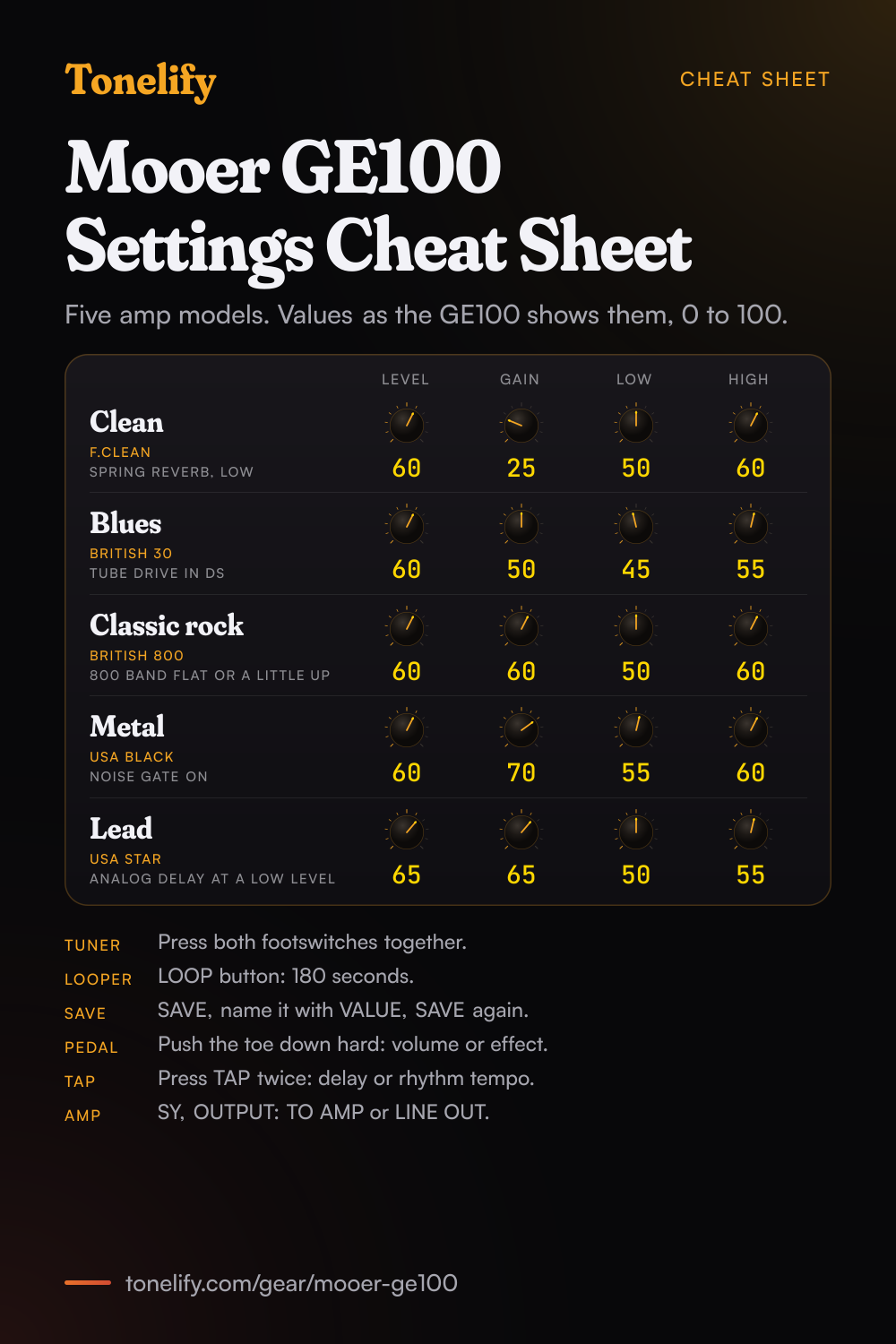
The clean, blues, classic rock, metal and lead settings from this page, together on one sheet with short tips. The PDF prints on white; the PNG is the dark version for your phone.
Starting settings on the Mooer GE100
Values as the unit's screen shows them, on its own scale; each drawn knob shows that value's share of the range. They are where to begin, not Mooer's numbers: pick the amp model first, then move one control at a time from here.
Clean
F.Clean, which Mooer's manual says simulates the sound of a Fender Twin Reverb. Level 60, Gain 25, Low 50, High 60. Its edit screen shows four controls, LEVEL, GAIN, LOW and HIGH, from 0 to 100, and Level sets how loud the patch is against your others. Add Spring in the REV module and keep its LEVEL low, and for width, Chorus in MOD. Jazz Clean, Mooer's Roland JC-120, is the other clean amp. Presets P01 DYN CLEAN and P16 JAZZ CLEAN are Mooer's own to compare against.
- Level 60
- Gain 25
- Low 50
- High 60
Spring reverb kept low, Chorus in MOD for width.
Edge of breakup and blues
British 30, Mooer's Vox AC30. Level 60, Gain 50, Low 45, High 55. Dig in for grit and play lighter to clean up. For more push, switch on the DS module with Tube Drive, Mooer's Ibanez TS9 Tube Screamer, at DRIVE 20 and VOLUME 70, so the pedal pushes the amp rather than taking it over; Blink Drive, the Voodoo Lab Sparkle Drive, is the other one to try. Bassman, the Fender Bassman, sits between the clean amps and this one. Presets P05 BLUES and P25 BLUES ROCK are Mooer's own.
- Level 60
- Gain 50
- Low 45
- High 55
Tube Drive in DS, DRIVE 20 and VOLUME 70, for more push.
Classic rock
British 800, Mooer's Marshall JCM800. Level 60, Gain 60, Low 50, High 60. The amp has no mid control, so the midrange lives in the EQ module's 800 band: leave it flat or lift it, since rock guitar sits in the mids and cutting them is the usual reason a patch sounds thin next to a band. For more gain without more fizz, put Super Drive, the BOSS SD-1, in DS with its DRIVE low. Presets P26 ACDC DRIVE and P52 BRITISH LEAD are Mooer's own.
- Level 60
- Gain 60
- Low 50
- High 60
EQ module's 800 band flat or a little up, never cut.
Metal
USA Black, Mooer's MESA/Boogie Mark V. Level 60, Gain 70, Low 55, High 60. Turn on the Noise Gate in NS and raise its THRESHOLD until the hiss stops between chords. For tighter palm mutes, put Tube Drive in DS with its DRIVE low and take the amp's Gain down a step. Metal Land, Mooer's BOSS MT-2 Metal Zone, into British 800 is the pedal route instead. Presets P07 MODERN METAL, P21 METAL RHYTHM and P28 PANTERA METAL are Mooer's own.
- Level 60
- Gain 70
- Low 55
- High 60
Tube Drive in DS and the Noise Gate on before you raise the Gain.
Lead
USA Star, Mooer's MESA/Boogie Lone Star Special. Level 65, Gain 65, Low 50, High 55, with Level a step above your rhythm patch so the solo comes forward. Add Analog in DLY at a low LEVEL and set its time with the TAP button, whose LED blinks orange when it is timing the delay. To ride the drive with your foot, choose GAIN in PEDAL settings and push the expression pedal down hard to light its LED. Presets P22 METAL LEAD and P30 POP SOLO are Mooer's own.
- Level 65
- Gain 65
- Low 50
- High 55
Analog delay at a low LEVEL, timed with TAP.
Acoustic guitar
Acoustic A and Acoustic B are in the DS module. Mooer's manual says both simulate the sound properties of an authentic acoustic guitar, so they turn an electric into one. Pick one, keep the AMP module on F.Clean or Jazz Clean at a low Gain, and add Room or Hall in REV. Presets P43 ACOUSTIC and P44 HOT ACOUSTIC are Mooer's own to compare against.
Mooer GE100 amp list
The AMP module has seven amp simulations, and each row gives the amp Mooer's manual says it simulates. On the edit screen, F.Clean shows four controls, LEVEL, GAIN, LOW and HIGH, from 0 to 100. There is no cabinet module, and the EQ module after the amp adds bands at 160 Hz, 800 Hz and 3.2 kHz.
| Amp | Based on |
|---|---|
| F.Clean | Fender Twin Reverb |
| Jazz Clean | Roland JC-120 |
| Bassman | Fender Bassman |
| British 30 | Vox AC30 |
| British 800 | Marshall JCM800 |
| USA Star | MESA/Boogie Lone Star Special |
| USA Black | MESA/Boogie Mark V |
Mooer GE100 drive list
The DS module has 23 types: overdrives, distortions, fuzzes and two acoustic guitar simulators. 16 name the pedal they are based on; for the rest the row gives Mooer's own description. On the edit screen the boosts and overdrives show VOLUME, DRIVE and TONE, and the expression pedal can move the gain of every type but the two acoustic ones.
| Drive | Based on |
|---|---|
| Flex Boost | Mooer's Flex Boost |
| Preamp OD | DOD Overdrive Preamp/250 |
| Tube Drive | Ibanez TS9 Tube Screamer |
| Juicer Drive | Similar to Mooer's Neil Zaza signature pedal, the Juicer |
| Vintage OD | BOSS OD-1 Over Drive |
| Super Drive | BOSS SD-1 Super OverDrive |
| Blink Drive | Voodoo Lab Sparkle Drive |
| Split Drive | No model named. Mooer: a warm and sweet overdrive sound |
| Modern OD | No model named. Mooer: an overdrive with special mid range tone |
| Classic OD | ProCo Rat |
| Distortion | BOSS DS-1 Distortion |
| Fab DS | Danelectro DD1 Fab Tone |
| Modern DS | No model named. Mooer: a sound like a full stack high gain amp |
| Pi Fuzz | Electro-Harmonix Big Muff Pi |
| Face Fuzz | Dallas-Arbiter Fuzz Face |
| Bend Fuzz | Colorsound Tonebender |
| Hog Fuzz | Electro-Harmonix Hog's Foot |
| Modern Fuzz | No model named. Mooer: a powerful fuzz sound |
| Metal Land | BOSS MT-2 Metal Zone |
| Metal Club | Ibanez SM-7 Smash Box |
| Metal Man | No model named. Mooer: an intense, radical distortion sound |
| Acoustic A | No model named. Mooer: simulates the sound properties of an authentic acoustic guitar |
| Acoustic B | No model named. Mooer: simulates the sound properties of an authentic acoustic guitar |
Mooer GE100 effects list
Mooer counts 66 effect types in eight modules: the 7 amps and 23 drives above, and the 36 below, with the three-band EQ counted as one. One type per module runs at a time, so up to eight effects at once, in the chain FX, DS, AMP, NS, EQ, MOD, DLY and REV. FX and MOD both have a tremolo and a phaser, so one patch can run two of each.
- FX (10)
- Compressor, Pure Boost (Mooer Pure Boost), E.L Flanger, Tremolo, Phaser, Pedal Wah, Auto Monkey, Touch Wah, Slow Engine, Drop Bit
- NS (1)
- Noise Gate
- EQ (1, three bands)
- 160 (low band, 160 Hz), 800 (middle band, 800 Hz), 3.2K (high band, 3.2 kHz)
- MOD (11)
- Chorus, Flanger, T.Flanger, Phaser, Step Phaser, Tremolo, Pitch, Vibrato, Filter, Ring Mod, Stutter
- DLY (6)
- Digital, Analog, Dynamic, Tape Echo, Echo, Reverse
- REV (7)
- Room, Hall, Church, Plate, Mod (a hall with chorus), Spring, Treverb (reverb with tremolo)
Mooer GE100 preset list
80 factory presets, P01 to P80, and 80 user patches; you can save only into the user patches. The Pedal assign column is what the expression pedal moves in each preset once its toe switch has lit the EXP. PEDAL LED: the reverb's decay, the gain, the wah, the MOD module's depth, or the pitch for Oct Up and Oct Down.
| Preset | Name | Pedal assign |
|---|---|---|
| P01 | DYN CLEAN | Reverb |
| P02 | MODERN DRIVE | Gain |
| P03 | WAH SOLO | Wah |
| P04 | CLEAN PHASER | Mod |
| P05 | BLUES | Gain |
| P06 | FLYING CHORUS | Mod |
| P07 | MODERN METAL | Gain |
| P08 | TALKING CHORUS | Reverb |
| P09 | JUMP | Reverb |
| P10 | ARPEGGIO | Reverb |
| P11 | WHAMMY UP | Oct Up |
| P12 | WHAMMY DOWN | Oct Down |
| P13 | CLEAN FLANGER | Reverb |
| P14 | LITTLE WING | Gain |
| P15 | BEST TREMOLO | Wah |
| P16 | JAZZ CLEAN | Mod |
| P17 | ROOM 335 | Gain |
| P18 | DIRTY FUZZ | Gain |
| P19 | POST ROCK | Reverb |
| P20 | CHORUS SOUND | Mod |
| P21 | METAL RHYTHM | Gain |
| P22 | METAL LEAD | Gain |
| P23 | STUTTER CLEAN | Mod |
| P24 | CLEAN START | Wah |
| P25 | BLUES ROCK | Gain |
| P26 | ACDC DRIVE | Gain |
| P27 | TREMOLO CLEAN | Mod |
| P28 | PANTERA METAL | Gain |
| P29 | TOUCH DRIVE | Gain |
| P30 | POP SOLO | Mod |
| P31 | RECORDER | Reverb |
| P32 | REIT MELON | Reverb |
| P33 | PINK WALL | Reverb |
| P34 | CONFUSED ROOM | Mod |
| P35 | SQUIRREL | Reverb |
| P36 | BROKEN TV | Reverb |
| P37 | POP DIST | Reverb |
| P38 | PUNCH BACK | Mod |
| P39 | VINTAGE DRIVE | Mod |
| P40 | TELE RING | Mod |
| P41 | OCTAVE SOLO | Oct Down |
| P42 | EIGHTY DIST | Reverb |
| P43 | ACOUSTIC | Reverb |
| P44 | HOT ACOUSTIC | Reverb |
| P45 | BRIGHT RHYTHM | Reverb |
| P46 | CRUNCH HIM | Reverb |
| P47 | DEEP ECHO | Reverb |
| P48 | SHINNING | Reverb |
| P49 | BIT CRUSH | Reverb |
| P50 | THE FIFTH | Mod |
| P51 | VIOLIN | Reverb |
| P52 | BRITISH LEAD | Gain |
| P53 | STUTTER DRIVER | Mod |
| P54 | CHORUS LEAD | Reverb |
| P55 | 12 STRINGS | Reverb |
| P56 | PITCH LEAD | Oct Up |
| P57 | SPACE CLEAN | Reverb |
| P58 | SHIM REVERSE | Reverb |
| P59 | OCTAVE FUZZ | Mod |
| P60 | SHINNING DRIVE | Gain |
| P61 | WET CLEAN | Wah |
| P62 | CALIFORNIA RF | Gain |
| P63 | ROUGH WHIP | Oct Up |
| P64 | PREAMP DRIVE | Gain |
| P65 | JC AMP | Mod |
| P66 | ROLLING WHEEL | Gain |
| P67 | MAD WING | Gain |
| P68 | EIGHTY HI GAIN | Gain |
| P69 | WHIRLY ROOM | Reverb |
| P70 | SPACE DRIVE | Mod |
| P71 | STEP CLEAN | Wah |
| P72 | DREAM RIVER | Gain |
| P73 | VOODOO BOY | Wah |
| P74 | FUNKY | Oct Down |
| P75 | FUSION OD | Mod |
| P76 | ST FLANGER | Reverb |
| P77 | GYRAL DRIVER | Reverb |
| P78 | FL BASS | Oct Down |
| P79 | TENDER WAH | Mod |
| P80 | ELE DIST | Mod |
Mooer GE100 specifications
- Released
- 2015
Mooer GE100 questions
What amps are in the Mooer GE100?
Seven amp simulations in the AMP module. Mooer's manual bases them on the Fender Twin Reverb (F.Clean), the Roland JC-120 (Jazz Clean), the Fender Bassman (Bassman), the Vox AC30 (British 30), the Marshall JCM800 (British 800), the MESA/Boogie Lone Star Special (USA Star) and the MESA/Boogie Mark V (USA Black). Mooer sells the GE100 on its 23 drive sounds with 7 amp simulators: the drives sit in their own DS module in front of the amp, and there is no separate cabinet module.
How many effects does the Mooer GE100 have?
66 effect types in eight modules, and up to eight run at once, one type per module. Counted from the manual's tables: 10 in FX, 23 in DS, 7 in AMP, 1 in NS, the three-band EQ as one, 11 in MOD, 6 in DLY and 7 in REV. The manual's effect chain runs FX, DS, AMP, NS, EQ, MOD, DLY and REV.
Which drive pedals does the GE100 model?
16 of the DS module's 23 types name a pedal: Mooer's Flex Boost, the DOD Overdrive Preamp/250, the Ibanez TS9 Tube Screamer, Mooer's Juicer (Neil Zaza's signature pedal), the BOSS OD-1, SD-1, DS-1 and MT-2, the Voodoo Lab Sparkle Drive, the ProCo Rat, the Danelectro DD1 Fab Tone, the Electro-Harmonix Big Muff Pi and Hog's Foot, the Dallas-Arbiter Fuzz Face, the Colorsound Tonebender and the Ibanez SM-7 Smash Box. Split Drive, Modern OD, Modern DS, Modern Fuzz and Metal Man have Mooer's descriptions instead, and Acoustic A and B simulate an acoustic guitar.
How do you save a patch on the GE100?
Press SAVE in any mode, turn VALUE to pick each letter, number or space of the name and press VALUE to set it, then press SAVE again to store the patch. You can save only into the 80 user patches, not over the 80 factory presets. Turning the MODE selector to another position cancels without saving.
What can the GE100's expression pedal control?
With its EXP. PEDAL LED off it is a volume pedal. Push it all the way down until it presses the switch under the toe and the LED lights: it then moves the one parameter chosen in PEDAL settings, out of six, the wah's central frequency, the pitch for OCTAVE UP or OCTAVE DOWN, the gain, the MOD module's depth or the reverb's decay. Press PEDAL, then turn and press VALUE to choose. The choice is stored in a user patch.
How do you calibrate the GE100's expression pedal?
Turn MODE to SY, choose PEDAL and press VALUE. Raise the pedal fully and press VALUE, push it fully down and press VALUE, then push it down hard and press VALUE once more, and the GE100 goes back to SY mode. Mooer suggests it when the effect barely changes, changes too much with a light push, or the pedal is hard to switch. If the two positions end up too close, the reset will not complete.
How long is the looper on the GE100?
180 seconds. Press LOOP to enter looper mode. The PATCH down footswitch, marked PLAY/RECORD, starts recording, sets the loop's end and starts playback, and each further press records another layer, with no limit on layers. PATCH up, marked STOP/DELETE, stops; hold it for two seconds to delete the loop. You can still change patch with the VALUE knob in PL mode while the loop runs, and LOOP again leaves looper mode.
How do you use the tuner on the GE100?
Press both footswitches together, in any mode, and again to leave. BYPASS lets your guitar through while you tune and MUTE silences the output, and the reference pitch can be set from 435 to 445 Hz.
Does the GE100 have a drum machine?
Yes: 40 drum rhythms and 10 metronome patterns, which the RHYTHM button turns on. Turn MODE to R.S and use VALUE to choose DRUM or METRONOME, the pattern, its speed and its volume. The TAP button sets the tempo with two presses, its LED blinking blue when it times the rhythm and orange when it times the delay.
Can the Mooer GE100 run on batteries?
Yes, on four AA (LR6) batteries in the holder underneath, and on batteries, plugging a cable into INPUT turns it on. The screen shows a battery symbol when they run low. Otherwise it takes a 9V DC adaptor at 300 mA, centre negative, which comes in the box. It weighs 730 g without batteries and measures 230 by 140 mm, 60 mm high.
How do you use the GE100 with a guitar amp or headphones?
SY mode has an OUTPUT setting with two choices: TO AMP, to send the GE100 into your guitar amp, and LINE OUT, for a mixer or an audio interface. There is one OUTPUT jack, a 1/4 inch stereo socket that doubles as the headphone output, and AUX IN takes a phone or music player to play along with.
Does the Mooer GE100 have USB?
Mooer's manual lists no USB port: the rear panel it draws has INPUT, OUTPUT (PHONES), AUX IN and the 9V jack. To record the GE100, take its OUTPUT into an audio interface with OUTPUT set to LINE OUT.
What is the lesson function on the GE100?
A Scales and Chords dictionary with 192 scales and 216 chords. Press LESSON and turn VALUE to SCALE LESSON or CHORD LESSON, then press VALUE to switch between TONIC, the root note, and MOD, the scale or chord type. The screen spells out the notes, and for a chord draws where to fret it. LESSON again goes back to where you were.
What is in the GE100's system menu?
Turn MODE to SY. VOLUME sets the global output level, LCD B. the screen brightness and LCD M. a positive or inverted display, OUTPUT chooses TO AMP or LINE OUT, PEDAL runs the pedal reset, and RESET restores the factory settings, which erases every user patch. Moving the MODE selector away cancels a reset before it runs.
Is the GE100 the same as the GE100 Pro?
No. Mooer's download centre lists the GE100 Pro as a unit of its own, with MOOER Studio editor software, an ASIO audio driver and firmware from March to June 2026. This page covers the original GE100, with its seven amps and 23 drives.
What are the best Mooer GE100 settings for metal?
Start with USA Black, Level 60, Gain 70, Low 55 and High 60, with Tube Drive in DS at a low DRIVE in front and the Noise Gate on. These are starting points rather than Mooer's numbers. If it fizzes, lower Gain first and High second.
When did the Mooer GE100 come out?
The PDF of Mooer's English owner's manual was made in August 2015, and the Internet Archive shows Mooer's site offering it by September 2016. Mooer's product page still offers the same manual.
How do you build a patch on the Mooer GE100?
Pick the amp model first, then set its controls, then add the blocks in signal-chain order: drive before the amp, time and modulation after it. A patch built the other way around ends up compensating for the wrong stage. Tonelify returns the model, the order and the parameters together.
Does Tonelify support the Mooer GE100?
Yes. Name it in the tone matcher along with the song you are chasing and the settings come back adapted to it. Gear does not need to be in the catalog for a match to run.
Sources
Panel, specifications and dates checked against these on .