
Strymon Iridium presets and settings
Amp and IR cab pedal with three amps, nine stereo 24 bit, 96 kHz cab IRs you can replace, a room control, a Favorite footswitch, stereo in and out, headphones and MIDI on the EXP jack.
⚡ Match a tone on this unitHow do you dial in a specific tone on a Strymon Iridium?
A multi-effects unit gives you the whole chain in one box, which means the order of the blocks is as much of the answer as the values inside them. Settings for the Strymon Iridium name the amp model, the block order and the parameters together, rather than handing you numbers with no chain to put them in.
Name the song you are chasing in the tone matcher and Tonelify returns the settings for this exact multi-effects unit, not the settings the original artist used. Those are two different things: the recording was made on gear most players do not own.
Free download
Printable cheat sheet: PDF and PNG
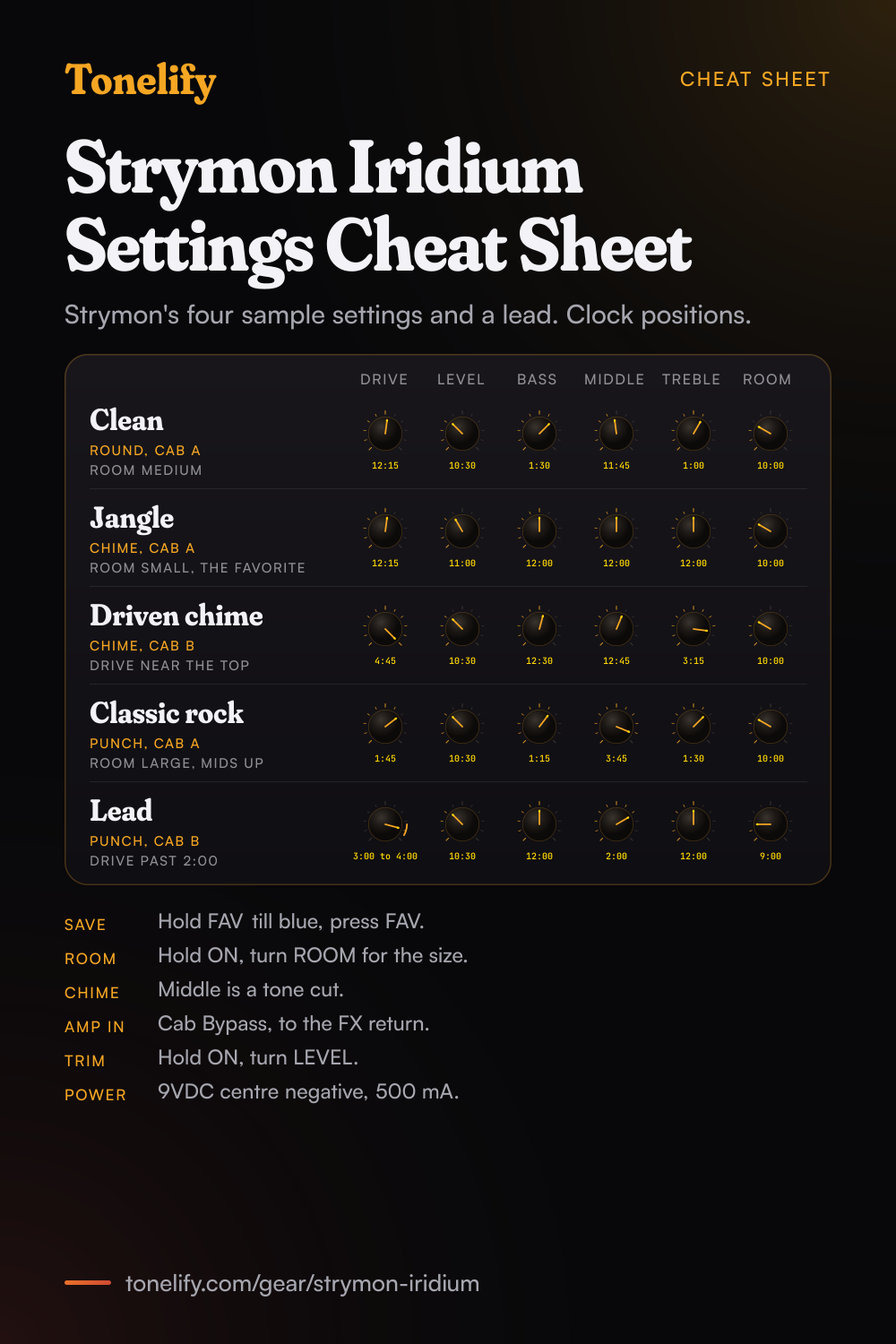
The clean, jangle, driven chime, classic rock and lead settings from this page, together on one sheet with short tips. The PDF prints on white; the PNG is the dark version for your phone.
Starting settings on the Strymon Iridium
Positions as clock times, since the knobs carry no numbers: 12:00 is the middle of the travel. They are where to begin, not Strymon's numbers: pick the amp model first, then move one control at a time from here.
Clean
Strymon's Classic Clean sample setting: AMP on round, which Strymon bases on a Fender Deluxe Reverb, CAB on a, the 1x12 Deluxe Reverb cab, and Room Size Medium. Drive 12:15, Level 10:30, Bass 1:30, Middle 11:45, Treble 1:00, Room 10:00. Strymon describes round as clean, bright and mid-scooped, with plenty of headroom. It added a MIDDLE knob the original Normal channel does not have: at noon you get the Deluxe's standard character, lower it for a more scooped sound, raise it for tweed-era tones. The positions are read off Strymon's drawing in the manual, to the nearest quarter hour.
- Drive 12:15
- Level 10:30
- Bass 1:30
- Middle 11:45
- Treble 1:00
- Room 10:00
Room Size Medium. Strymon's sample setting, read off the manual.
Jangle
Strymon's Clean Jangle sample setting, which the manual marks as the onboard Favorite setting: AMP on chime, based on the Brilliant channel of a Vox AC30TB, CAB on a, the 2x12 AC30 open back cab, and Room Size Small. Drive 12:15, Level 11:00, Bass 12:00, Middle 12:00, Treble 12:00, Room 10:00. On chime the MIDDLE knob is not a mid control: Strymon's manual says it acts as a tone cut, rolling off high frequencies as it is turned up, as on the AC30TB. Strymon calls chime jangly and bright, with air for a light touch and bite when you dig in.
- Drive 12:15
- Level 11:00
- Bass 12:00
- Middle 12:00
- Treble 12:00
- Room 10:00
Room Size Small. Middle is a tone cut on chime.
Driven chime
Strymon's Crown Jewel sample setting: AMP on chime, CAB on b, a 1x12 custom cab with a Celestion Blue AlNiCo, and Room Size Medium. Drive 4:45, Level 10:30, Bass 12:30, Middle 12:45, Treble 3:15, Room 10:00. Drive sits near the top of its travel, where Strymon says it added a frequency-shaped front end boost to chime, to tighten the low end while driving the amp further into saturation. As DRIVE goes up, Strymon compensates the LEVEL knob so the output stays about the same, which is why Level barely moves between these settings.
- Drive 4:45
- Level 10:30
- Bass 12:30
- Middle 12:45
- Treble 3:15
- Room 10:00
Room Size Medium. The front end boost is near the top of Drive.
Classic rock
Strymon's Punched Up sample setting: AMP on punch, based on a Marshall Plexi, the Super Lead model 1959, CAB on a, the 4x12 Marshall with Celestion G12M-25s, and Room Size Large. Drive 1:45, Level 10:30, Bass 1:15, Middle 3:45, Treble 1:30, Room 10:00. Strymon's manual says DRIVE at around 2 o'clock gets the maximum gain the original Plexi design allowed, so this is a full Plexi with the mids pushed up. Strymon describes punch as meatier, with higher gain than the other two amps and a powerful midrange.
- Drive 1:45
- Level 10:30
- Bass 1:15
- Middle 3:45
- Treble 1:30
- Room 10:00
Room Size Large. Drive near 2 o'clock is a stock Plexi's full gain.
Lead
AMP on punch with CAB on b, the 2x12 custom cab with Celestion Vintage 30s. Drive 3:00 to 4:00, Level 10:30, Bass 12:00, Middle 2:00, Treble 12:00, Room 9:00. Strymon's manual says turning DRIVE beyond 2 o'clock on punch gives custom hot-rodded Plexi high gain tones, so this is the most gain the Iridium has. Keep Room lower than on the clean settings so the notes stay clear, and add delay from a pedal after the Iridium. These knob positions are Tonelify's starting point, not one of Strymon's sample settings. Save it to the FAV footswitch to have it one press away.
- Drive 3:00 to 4:00
- Level 10:30
- Bass 12:00
- Middle 2:00
- Treble 12:00
- Room 9:00
Drive past 2 o'clock on punch. Tonelify's starting point.
Chasing one song? Name it and the matcher writes that song's settings for the Strymon Iridium.
Strymon Iridium amp list
Three amps on the AMP switch, each with its own three cabs on the CAB switch. Strymon names the amps it studied for reference only; their makers are not associated with Strymon.
| Amp | Based on | What the manual says |
|---|---|---|
| round | Fender Deluxe Reverb | Clean, bright and mid-scooped with plenty of headroom; adds a MIDDLE control, standard at noon |
| chime | Brilliant channel of a Vox AC30TB | Jangly and bright; MIDDLE is a tone cut; front end boost near the top of DRIVE |
| punch | Marshall Plexi, Super Lead model 1959 | Meatier, higher gain, powerful midrange; full Plexi gain near 2 o'clock on DRIVE |
Strymon Iridium cab list
Nine factory IRs, each a left and right 24 bit, 96 kHz impulse response of 500 ms. Any slot can be replaced with your own 24 bit, 96 kHz WAV through Strymon Impulse Manager.
| Slot | Cab | Speaker | IR by |
|---|---|---|---|
| round a | 1x12 Fender Deluxe Reverb (stereo) | Fender CTS ceramic | OwnHammer |
| round b | 1x12 Fender Blues Junior (mono) | Jensen C12N | cabIR.eu |
| round c | 2x10 Fender Vibrolux (stereo) | Jensen C10NS | cabIR.eu |
| chime a | 2x12 Vox AC30/6 open back fawn (stereo) | Celestion T0530 Blue AlNiCo | OwnHammer |
| chime b | 1x12 custom closed back (mono) | Celestion Blue AlNiCo | Celestion |
| chime c | 4x12 Mesa/Boogie Half-Back (mono) | Celestion Black Shadow MC-90 + Electro-Voice Black Shadow EVM12-L | Valhallir.at |
| punch a | 4x12 Marshall (stereo) | Celestion T1221 G12M-25 | OwnHammer |
| punch b | 2x12 custom open back (mono) | Celestion Vintage 30 | Celestion |
| punch c | 8x12 Marshall (mono) | Celestion T652 AlNiCo | cabIR.eu |
Strymon Iridium MIDI CC list
MIDI reaches the Iridium through the EXP jack in Digital mode. Bank 0 holds presets 0 to 127, bank 1 128 to 255 and bank 2 256 to 299; bank 0, patch 127 is Manual mode.
| CC | Parameter | Range |
|---|---|---|
| 0 | Bank Select | 0 to 2 |
| 7 | Volume Pedal | 0 to 127 |
| 9 | Volume Pedal Pre/Post | 0 pre, 1 to 127 post |
| 12 | Level | 0 to 127 |
| 13 | Drive | 0 to 127 |
| 14 | Bass | 0 to 127 |
| 15 | Mid | 0 to 127 |
| 16 | Treble | 0 to 127 |
| 17 | Room Level | 0 to 127 |
| 18 | Room Size | 1 small, 2 medium, 3 large |
| 19 | Amp | 1 round, 2 chime, 3 punch |
| 20 | Cab | 0 to 2 round a to c, 3 to 5 chime, 6 to 8 punch |
| 21 | Amp Disable | 0 enabled, 1 to 127 disabled |
| 27 | Footswitch Fav | 0 release, 1 to 127 press |
| 28 | Footswitch On | 0 release, 1 to 127 press |
| 60 | MIDI Expression Off/On | 0 off, 1 to 127 on |
| 100 | Expression Pedal | 0 to 127 |
| 102 | Bypass/On | 0 bypass, 1 to 127 on |
Strymon Iridium specifications
- Released
- 2019
Strymon Iridium questions
What is the Strymon Iridium?
An amp and IR cab pedal from Strymon: three modelled amps, nine stereo speaker cabinet impulse responses and a room ambience control in one pedal. Strymon announced it on 23 October 2019 at USD 399 street. It runs on 9VDC centre negative at 500 mA minimum and measures 4.5 inches deep, 4 wide and 1.75 tall (11.4 by 10.2 by 4.4 cm). The manual says it is designed and built in the USA.
What amps are in the Strymon Iridium?
Three, on the AMP switch. round is based on a Fender Deluxe Reverb, with a MIDDLE control the original Normal channel does not have. chime is based on the Brilliant channel of a Vox AC30TB, with a front end boost added near the top of DRIVE. punch is based on a Marshall Plexi, the Super Lead model 1959, and is the highest gain of the three. Strymon says it hot-rodded each amp to go past what the originals could do.
What cabs come in the Strymon Iridium?
Nine IRs, three for each amp on the CAB switch, from Cabir.eu, Celestion, OwnHammer and Valhallir.at. Each cab is a left and right 24 bit, 96 kHz impulse response of 500 ms; the mono ones load the same IR on both sides. For round they are a 1x12 Deluxe Reverb, a 1x12 Blues Junior and a 2x10 Vibrolux; for chime a 2x12 AC30, a 1x12 with a Celestion Blue and a 4x12 Mesa/Boogie Half-Back; for punch a 4x12 Marshall, a 2x12 with Vintage 30s and an 8x12 Marshall. The full list is below.
Can you load your own IRs into the Iridium?
Yes. Any 24 bit, 96 kHz WAV impulse response can replace the factory IRs in the nine cab slots, loaded over USB with Strymon's free Impulse Manager software from strymon.net/support. The manual says it can be any WAV of that kind, including bass cabs, acoustic instrument body resonance or samples of music. The IR part of the ROOM control is not replaceable. A factory reset erases your IRs and puts the factory ones back.
How do you save a preset on the Iridium?
Press and hold FAV until its LED blinks blue, then press FAV again to save. The Favorite stores every knob and switch, the Live Edit settings such as Room Size, and the bypass state; Power Up modes are not stored. With a MultiSwitch Plus you get three more presets, and over MIDI the Iridium has 300 preset locations, numbered 0 to 299. The Favorite sits at MIDI Program Change 0.
How do you change the room size on the Iridium?
Press and hold the ON footswitch until both LEDs flash, then release it and turn the ROOM knob. The ON LED shows the size: green for Small, amber for Medium, which is the default, and red for Large. Press ON or FAV to store it. Room Size is saved per Favorite or preset. The room itself combines 256 ms impulse responses of real rooms with an algorithmic reverb for a longer decay.
Can you use the Strymon Iridium with a guitar amp?
Not in front of one with the amp and cab on: the manual says that is not desirable, and to bypass the Iridium when the same board goes into an amp. To use it as a preamp, set Cab Bypass mode, then run its outputs to the amp's effects return or power amp input. To set it, hold ON while connecting power and turn DRIVE until the FAV LED is amber. Never connect an amp's speaker output to the Iridium; use a line out or effects send, with a load on the speaker output.
Can you use headphones with the Iridium?
Yes. The side panel has a stereo 1/8 inch headphone output with the same signal as the quarter-inch outputs, built for headphones of about 25 to 70 ohms. LEVEL sets the volume. To change the overall volume without changing the levels saved in your presets, use Level Trim: hold ON until both LEDs flash and turn LEVEL, which sweeps from -20 dB to +3 dB with no change near 12 o'clock.
Is the Strymon Iridium stereo?
Yes. The rear Audio Input Selector has three positions. MONO takes a guitar or other mono signal and gives a stereo output; use OUT L for a mono connection. STEREO takes a stereo signal on a TRS cable and keeps it stereo. SUM takes a stereo signal and sums it to mono at OUT L. The input impedance is 1 MOhm, and the outputs are buffered when the pedal is bypassed.
What can an expression pedal do on the Iridium?
By default the EXP jack is set to Volume PRE, a volume pedal before the amp, cab and room. Volume POST puts it after the amp and cab but before the room. Expression mode lets a TRS pedal move any knobs between a heel and a toe setting, which you set by holding both footswitches until the LEDs blink green. Change the mode by holding FAV while connecting power and turning LEVEL; the ON LED shows the mode by colour.
Does the Strymon Iridium have MIDI?
Yes, through the EXP jack, with a Strymon MIDI EXP cable or a MIDI to TRS interface; set the EXP jack to Digital mode first, shown by a blue ON LED. MIDI channel 1 is the default. The 300 presets sit in three banks: bank 0 holds presets 0 to 127, bank 1 128 to 255 and bank 2 256 to 299. Every knob has a CC number, listed below. If you only send MIDI to the Iridium, the manual says to set MIDI Output to OFF.
Can you use the Iridium for bass or acoustic guitar?
Strymon's manual offers a way: disable the amp and load a non-guitar IR, such as a bass cab or an acoustic body resonance, into a cab slot. With the amp off, Level, EQ, Room and the IR still work. To turn the amp off for a preset, hold ON until both LEDs flash red, then turn DRIVE below halfway until the LEDs turn amber. The Iridium has no bass amp model of its own.
How much gain does the Iridium have?
punch has the most. Strymon's manual says DRIVE at around 2 o'clock gives the maximum gain the original Plexi design allowed, and past 2 o'clock you reach custom hot-rodded Plexi high gain tones. On chime, a front end boost near the top of DRIVE tightens the low end and drives the amp further. Before the amps, the pedal's discrete JFET analog front end gives up to 22 dB of analog gain. There is no modern high gain amp model.
How do you factory reset the Strymon Iridium?
Hold ON while connecting power, release it when both LEDs flash, then sweep the MIDDLE knob from 0% to 100% and back twice. The LEDs go amber, red, amber, then both blink red and the pedal resets and power cycles. The manual warns that a factory reset erases your custom IR cabs, stored presets, Power Up modes, expression pedal assignments and Live Edit settings.
How do you build a patch on the Strymon Iridium?
Pick the amp model first, then set its controls, then add the blocks in signal-chain order: drive before the amp, time and modulation after it. A patch built the other way around ends up compensating for the wrong stage. Tonelify returns the model, the order and the parameters together.
Does Tonelify support the Strymon Iridium?
Yes. Name it in the tone matcher along with the song you are chasing and the settings come back adapted to it. Gear does not need to be in the catalog for a match to run.
Sources
Panel, specifications and dates checked against these on .
Similar multi-effects units from other makers
Settings for the song you are chasing
Name a song and Tonelify reads the documented rig behind the recording, then writes the settings for a rig with the Strymon Iridium in it. A first plan starts with 7 days free, $0 today.