
Vox AC15C1 settings
No middle knob and no presence. Tone Cut works backwards from a presence control: turning it up removes top end.
⚡ Match a tone on this amp- Normal Volume
- Top Boost Treble
- Top Boost Bass
- Top Boost Volume
- Tone Cut
- Master
- Reverb
- Tremolo Speed
- Tremolo Depth
How do you dial in a specific tone on a Vox AC15C1?
A valve amp does not respond to a knob the way a number on a page suggests. Where the Vox AC15C1 sits in its own gain range changes what every other control does: the same treble setting is bright at low volume and harsh once the power section is working. That is why copying an artist's numbers onto this amp gives the wrong answer, and why the settings here are written against this amp's behaviour rather than the one the record was cut on.
Name the song you are chasing in the tone matcher and Tonelify returns the settings for this exact guitar amp, not the settings the original artist used. Those are two different things: the recording was made on gear most players do not own.
Settings for this amp only ever use controls it actually has, because its front panel is stored in our gear database. You will not be told to set a knob that is not on the amp.
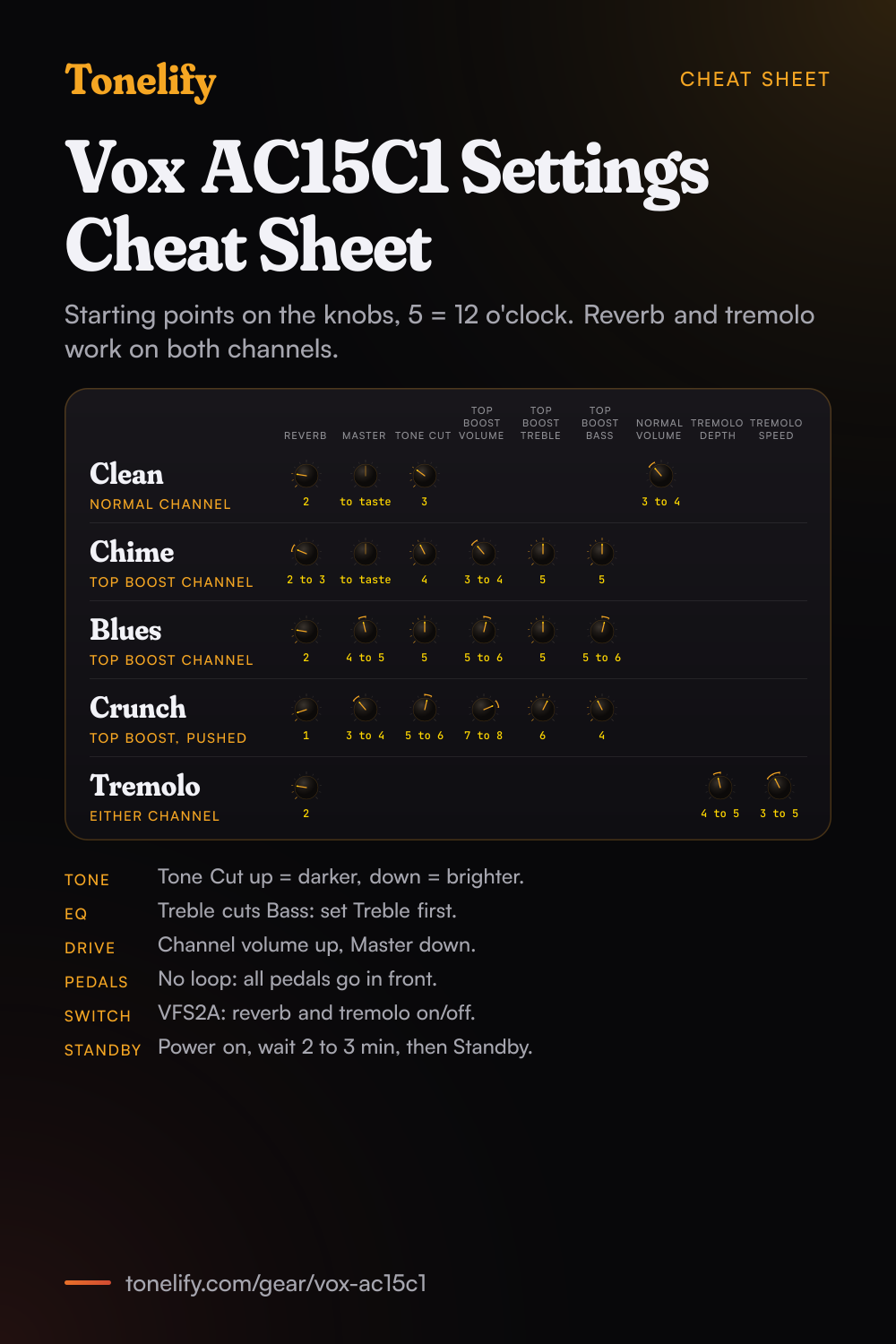
Free download
Printable cheat sheet: PDF and PNG
The clean, chime, blues, crunch and tremolo settings from this page, together on one sheet with short tips. The PDF prints on white; the PNG is the dark version for your phone.
Starting settings on the Vox AC15C1
Positions on a 0 to 10 scale, with 5 at twelve o'clock. They are where to begin, not Vox's numbers: pick the channel first, then move one control at a time from here.
Clean
Normal input, Normal Volume 3 to 4, Master to taste, Tone Cut 3, Reverb 2. Vox's manual lists one control for the Normal channel, its Volume; Bass and Treble belong to the Top Boost channel, so on Normal the Tone Cut is the only tone control. Vox says a low channel volume with the Master high gives a clean sound at a high volume. The Tone Cut works the opposite way to what you may think: clockwise takes highs away, so turn it down for a brighter clean.
- Normal Volume 3 to 4
- Master to taste
- Tone Cut 3
- Reverb 2
Normal has no Bass or Treble: use Tone Cut.
Chime clean
Top Boost input, Top Boost Volume 3 to 4, Top Boost Treble 5, Top Boost Bass 5, Tone Cut 4, Reverb 2 to 3, Master to taste. This is the sound the Top Boost channel is known for: Vox's manual says setting its Volume lower gives a cleaner, chimey sound. Vox also warns that the two tone controls are very interactive, so raising Treble cuts Bass, and says to begin with both at 12 o'clock. Move Treble first and set Bass after it.
- Top Boost Volume 3 to 4
- Top Boost Treble 5
- Top Boost Bass 5
- Tone Cut 4
- Reverb 2 to 3
- Master to taste
Treble and Bass interact: set Treble first.
Blues, edge of breakup
Top Boost input, Top Boost Volume 5 to 6, Top Boost Treble 5, Top Boost Bass 5 to 6, Tone Cut 5, Master 4 to 5, Reverb 2. Here the channel volume sits where a hard pick strike breaks up and a soft one stays clean. Roll the guitar's volume knob back to clean up, and forward for a solo. If the sound turns woolly as it breaks up, take Bass down a step before touching Treble.
- Top Boost Volume 5 to 6
- Top Boost Treble 5
- Top Boost Bass 5 to 6
- Tone Cut 5
- Master 4 to 5
- Reverb 2
British crunch
Top Boost input, Top Boost Volume 7 to 8, Top Boost Treble 6, Top Boost Bass 4, Tone Cut 5 to 6, Master 3 to 4, Reverb 1. Vox's manual says the Master lower and the channel volume higher gives a fatter, more distorted tone at a lower volume, which is how this setting gets its drive. With the preamp pushed the top end gets louder, so the Tone Cut goes up a little to take the edge off, and Bass comes down to keep chords tight.
- Top Boost Volume 7 to 8
- Top Boost Treble 6
- Top Boost Bass 4
- Tone Cut 5 to 6
- Master 3 to 4
- Reverb 1
Tremolo
Either channel, from the clean or chime setting, Tremolo Depth 4 to 5, Tremolo Speed 3 to 5, Reverb 2. Vox describes tremolo as like having someone next to your amp turning the master volume up and down, and says Depth at maximum gives a very dramatic, choppy effect. Set Speed to the song's pulse first, then raise Depth until the pulse is as strong as you want it. The tremolo and reverb work on both channels.
- Tremolo Depth 4 to 5
- Tremolo Speed 3 to 5
- Reverb 2
Pedals
The AC15C1 has no effects loop: Vox's manual lists the loop for the AC30C2 models only, and the AC15C1's connections are the Normal and Top Boost inputs, the footswitch jack and two speaker jacks. So every pedal goes between the guitar and the input. For drive pedals, use the chime setting with Top Boost Volume at 3 to 4 so the pedal does the driving. Delay and reverb pedals also go in front; Vox says a loop keeps strange distortions off the delay repeats, so without one keep the channel volume low when the delay is on.
Chasing one song? Name it and the matcher writes that song's settings for the Vox AC15C1.
What controls does the Vox AC15C1 have?
The Vox AC15C1 has 9 controls on its front panel: Normal Volume, Top Boost Treble, Top Boost Bass, Top Boost Volume, Tone Cut, Master, Reverb, Tremolo Speed and Tremolo Depth.
Vox AC15C1 specifications
- Power
- 15W
- Speaker
- 1x12" Celestion G12M Greenback
- Channels
- Normal, Top Boost
- Front panel
- Normal Volume, Top Boost Treble, Top Boost Bass, Top Boost Volume, Tone Cut, Master, Reverb, Tremolo Speed, Tremolo Depth
What the Vox AC15C1 panel means when you dial it in
15W through a 1x12" Celestion G12M Greenback. At that rating the power section starts working early, so the loudness knob is part of the tone setting rather than separate from it. There is no presence control on this panel, so everything above the treble band has to come from the treble control and the guitar's own tone knob. A setting copied from an amp with presence has to be rebalanced here. The EQ has no middle control, so the midrange is fixed by the amp's own voicing and can only be shaped around with bass and treble, or in front of the amp with a pedal. Gain and master volume are separate, so the preamp can be driven hard at a volume that is liveable. Where a tone sits between the two is part of the answer, not a detail. Reverb is onboard, so a tone that needs it does not need a pedal in the chain. 2 channels, Normal and Top Boost, and a setting only means something once the channel it belongs to is named.
Vox AC15C1 questions
What is the difference between the Normal and Top Boost channels on the Vox AC15C1?
Vox's manual lists one control for the Normal channel, its Volume, and three for the Top Boost channel: Volume, Treble and Bass. The Master Volume, Tone Cut, Reverb Level and the tremolo's Speed and Depth work on both. Each channel has its own input jack, so you pick a channel by the jack you plug into.
What does the Tone Cut knob do on the AC15C1?
It removes treble, and it works backwards from what you may expect. Vox's manual says the circuit is placed in the power amp, not in the preamp like the Treble and Bass, and that turning it clockwise decreases the higher frequencies while counterclockwise adds them. To brighten the amp, turn the Tone Cut down.
Where should I start the AC15C1's tone controls?
At 12 o'clock. Vox's manual says the Top Boost tone controls are very interactive, so increasing the Treble cuts the Bass, and that it is best to begin with them at 12 o'clock and experiment from there. On this page that is 5 on the dial.
How do I get more distortion at a lower volume on the AC15C1?
Turn the channel volume up and the Master down. Vox's manual says setting the Master lower and the Normal or Top Boost volume higher gives a fatter, more distorted tone at a lower volume, and the reverse, a low channel volume with the Master high, gives a clean sound at a high volume.
Does the Vox AC15C1 have an effects loop?
No. Vox's manual lists the effects loop for the AC30C2 and AC30C2X only, as a true bypass loop that sends at -10dB for stomp boxes. On the AC15C1 every pedal goes between the guitar and the input.
What footswitch does the AC15C1 use?
Vox's manual names the optional VFS2A footswitch, which plugs into the footswitch jack on the back and turns the reverb and the tremolo on and off. The channels are not footswitchable: you change channel by moving the guitar cable to the other input.
What speaker is in the Vox AC15C1?
One 12-inch Celestion G12M Greenback, 16 ohms. Vox makes the AC15C1X with a Celestion Alnico Blue instead; otherwise the two amps share the same controls and 15 watts.
Can I add an extension cabinet to the AC15C1?
Yes. Vox's manual says the Extension jack runs in parallel with the internal speaker, while a cabinet in the External jack mutes the internal speaker. It also says not to use an extension cabinet of any impedance other than 16 ohms, not to use a speaker rated under 15 watts, to use a speaker cable rather than a guitar cable, and to turn the power off before connecting it.
How do I use the Standby switch on the AC15C1?
With both switches off, turn on Power first and wait 2 to 3 minutes before turning on Standby. Vox's manual says this lets the amp reach the correct working temperature, that doing it each time helps tube life, and that Standby keeps the valves warm between sets when you play live.
How powerful is the Vox AC15C1 and what tubes does it use?
Vox rates it at 15 watts RMS into 16 ohms and calls the AC15 Custom an all-tube, EL84 driven workhorse with footswitchable spring reverb and classic Vox tremolo. Vox says the AC15 tradition began in 1958.
How heavy is the Vox AC15C1?
Vox's manual gives 22 kg, 48.50 lb, and 602 by 265 by 456 mm, 23.70 by 10.43 by 17.95 inches. Vox asks that the amp be switched off and unplugged before it is moved.
How is the AC15C1 different from the AC30C2?
The AC30C2 is 30 watts into two 12-inch Greenbacks and weighs 32.2 kg, against 15 watts into one speaker and 22 kg. It adds a Tone knob to the reverb beside the Level, high and low input jacks on each channel, and the effects loop the AC15C1 lacks. The channel layout and the Tone Cut work the same way on both.
Is there a printable Vox AC15C1 settings cheat sheet?
Yes. The cheat sheet on this page puts all five starting settings on one page, from clean to tremolo, each with its channel, and short tips under them. Download the PDF to print it on white, or save the PNG to your phone.
Does Tonelify support the Vox AC15C1?
Yes, and its front panel is stored, so settings only ever reference controls this guitar amp has: Normal Volume, Top Boost Treble, Top Boost Bass, Top Boost Volume, Tone Cut, Master, Reverb, Tremolo Speed, Tremolo Depth. You will not be told to set a knob that is not there.
Sources
Panel, specifications and dates checked against these on .
More Vox gear
Similar amps from other makers
Settings for the song you are chasing
Name a song and Tonelify reads the documented rig behind the recording, then writes the settings for the controls the Vox AC15C1 has. A first plan starts with 7 days free, $0 today.