Amp cheat sheets
Blackstar ID:Core settings cheat sheet: clean, blues, rock and metal
Updated 10 min read6 knob panels6 sources
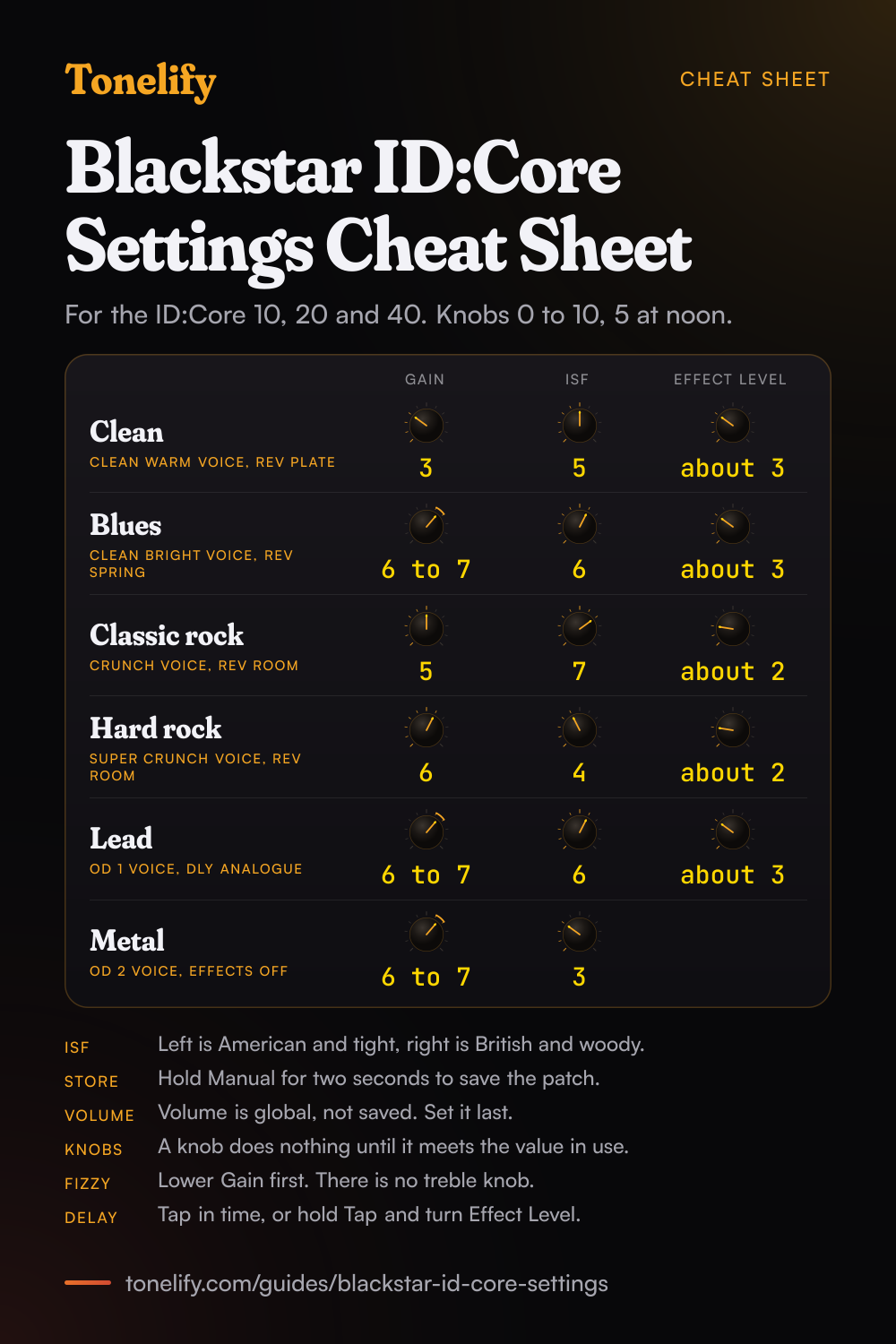
Pick the Voice first, then set Gain and ISF: an ID:Core 10, 20 or 40 has no bass, middle or treble knob. For clean, use Clean Warm with Gain 3 and ISF 5. For classic rock, use Crunch with Gain 5 and ISF 7. For metal, use OD 2 with Gain 6 to 7 and ISF 3, effects off. For solos, use OD 1 with Gain 6 to 7, ISF 6 and the Analogue delay.
These are Tonelify's starting points on a 0 to 10 scale with 5 at twelve o'clock, and they hold on every ID:Core Stereo 10, 20 and 40 from the first version to V4: Blackstar's four handbooks give all of them the same six voices, the same ISF control and one stored patch per voice. ISF is the tone control. Blackstar's manual says fully counter clockwise has a more American characteristic, with a tight bottom end and a more aggressive middle, and fully clockwise a British one, more woody and less aggressive.
Free download
Printable cheat sheet: PDF and PNG
The clean, blues, classic rock, hard rock, lead and metal settings from this guide, together on one sheet with short tips. The PDF prints on white; the PNG is the dark version for your phone.
How the ID:Core's panel works
Voice picks one of six preamp voicings, from what Blackstar calls ultra clean to extremely overdriven. Gain sets the amount of overdrive. Volume is a preamp volume, and Blackstar's manual says high levels bring in the effect of valve power amp distortion and compression, so a clean turned right up starts to thicken.[1] ISF is the one tone knob. Voice, Gain and ISF are saved when you store a patch; Volume is a global setting and is not.
Three switches, MOD, DLY and REV, turn the modulation, delay and reverb on, and all three can run at once. The Effect Type and Effect Level knobs work on whichever effect is focused, the one whose LED is green. Each effect has four types: Phaser, Chorus/Flanger, Envelope and Tremolo on MOD from V2 onward, Linear, Analogue, Tape and Multi on DLY, and Room, Hall, Spring and Plate on REV.[1]
The six ID:Core voices, in Blackstar's words
Every setting on this page starts from a voice, so the table gives Blackstar's own line for each and the sound it is used for here. Blackstar's manual names no real amplifier behind any of the six, so this page does not match them to makes of amp: pick a voice by how much gain the sound needs.
The two clean voices differ in what happens when you dig in. Clean Warm is the one that stays clean; Clean Bright, in Blackstar's words, will break up when pushed hard,[1] which makes it the edge-of-breakup voice. OD 1 and OD 2 split the same way for high gain: OD 1 for solos, OD 2 for tight rhythm.
| Voice | Blackstar's description | Used here for |
|---|---|---|
| Clean Warm | Classic clean | Clean |
| Clean Bright | Boutique clean, will break up when pushed hard | Blues, edge of breakup |
| Crunch | Classic crunch sound with medium gain overdrive | Classic rock |
| Super Crunch | A modern driven gain with more punch than Crunch | Hard rock |
| OD 1 | Hot-rodded master volume overdrive, perfect for those smooth solos | Lead |
| OD 2 | A tight metal rhythm tone with mid boosted overdrive | Metal |
Clean settings
Clean Warm voice, Gain 3, ISF 5. Turn REV on with the Plate reverb and Effect Level about 3. Keep Gain low and set the loudness with Volume. With ISF at 5 the sound sits between Blackstar's American and British characters; turn it down a step or two for a tighter low end, or up for a less aggressive middle.
- Gain 3
- ISF 5
- Effect Level about 3
Blues and edge-of-breakup settings
Clean Bright voice, Gain 6 to 7, ISF 6. Turn REV on with the Spring reverb and Effect Level about 3. Set Gain so the grit arrives with your picking hand, then roll the guitar's volume back to clean it up again. ISF a step past the middle leans toward the side Blackstar calls British.
- Gain 6 to 7
- ISF 6
- Effect Level about 3
Classic rock settings
Crunch voice, Gain 5, ISF 7. Turn REV on with the Room reverb and Effect Level about 2, low enough that chords stay clear in a band. With no bass, middle or treble knob, ISF does the shaping: at 7 the crunch leans toward the British side, which Blackstar describes as more woody and less aggressive.
- Gain 5
- ISF 7
- Effect Level about 2
Hard rock settings
Super Crunch voice, Gain 6, ISF 4. Turn REV on with the Room reverb and Effect Level about 2. ISF a step toward the American side gives the tight bottom end Blackstar describes for that end of the knob, so palm mutes stay defined. If the sound turns fizzy, lower Gain before anything else: there is no treble or presence knob to take it out.
- Gain 6
- ISF 4
- Effect Level about 2
Lead settings
OD 1 voice, Gain 6 to 7, ISF 6. Turn DLY on with the Analogue delay and Effect Level about 3. Press Tap in time with the song to set the delay time, or hold Tap and turn Effect Level to set it by hand. For a reverb under the delay, press REV as well: Effect Level then works on whichever of the two shows a green LED.
- Gain 6 to 7
- ISF 6
- Effect Level about 3
Metal settings
OD 2 voice, Gain 6 to 7, ISF 3, effects off. ISF toward the American side adds what Blackstar calls a tight bottom end and a more aggressive middle. Leave the reverb off for rhythm parts, where it blurs palm mutes, and lower Gain a step before you move ISF if the sound fizzes. On a V4, the Power Reduction button drops the output stage to 1 W,[1] so the same patch works at bedroom volume.
- Gain 6 to 7
- ISF 3
ID:Core 10 vs 20 vs 40: what differs
Blackstar's V4 manual covers the Stereo 10, 20 and 40 in one document, with one front panel for all three, so the settings above are the same on each. What changes is power, speaker size and two sockets: only the 20 and the 40 take a footswitch, and only the Stereo 10 V4 Bluetooth has Bluetooth.[1]
The power figures are stereo totals: the 10 is two 5 watt channels, the 20 two of 10 and the 40 two of 20. Blackstar's product page adds that the 40 V4 is louder than earlier 40s.[5] Weights and sizes are the same in all four generations' handbooks.
| ID:Core Stereo 10 | ID:Core Stereo 20 | ID:Core Stereo 40 | |
|---|---|---|---|
| Power | 10 watts | 20 watts | 40 watts |
| Speakers | Two 3 inch | Two 5 inch | Two 6.5 inch |
| Weight | 3.7 kg | 5.2 kg | 6.2 kg |
| Size (W x H x D) | 340 x 265 x 185 mm | 375 x 292 x 185 mm | 434 x 336 x 185 mm |
| Footswitch | No socket | FS-11 or FS-18, not supplied | FS-11 or FS-18, not supplied |
| Bluetooth | Only the Stereo 10 V4 Bluetooth | No | No |
| Voices, patches, effects | 6 voices, 6 patches, 12 effects | 6 voices, 6 patches, 12 effects | 6 voices, 6 patches, 12 effects |
Do ID:Core V4 settings work on a V3, V2 or first version?
Yes for Voice, Gain and ISF. Blackstar's handbooks for the first ID:Core, V2, V3 and V4 all list the same six voices by the same names, with ISF beside them and six patches, one per voice.[1][2][3][4] So a patch written for a V4 is dialled in the same way on a first-version ID:Core 20.
The effects differ in one place. The first version's four MOD types are Phaser, Flanger, Chorus and Tremolo; from V2 they are Phaser, Chorus/Flanger, Envelope and Tremolo.[3][4] The delays and reverbs are the same four in every handbook. The rest of what changed is around the sound rather than in it, as the table shows.
The ID:Core 100 and 150 are a different design. Their handbook gives them Bass, Middle and Treble knobs, a master volume, a looper, an octaver and an effects loop, and says the six voices were enhanced from the original ones.[6] Use the same voice and Gain there, and set the three tone knobs by ear.
| First version | V2 | V3 | V4 | |
|---|---|---|---|---|
| Voices and ISF | Six voices, ISF | Six voices, ISF | Six voices, ISF | Six voices, ISF |
| MOD effects | Phaser, Flanger, Chorus, Tremolo | Phaser, Chorus/Flanger, Envelope, Tremolo | Phaser, Chorus/Flanger, Envelope, Tremolo | Phaser, Chorus/Flanger, Envelope, Tremolo |
| Software | Insider | Insider | Architect, with CabRig Lite | Architect, with CabRig Lite |
| USB | Recording over USB | 4-channel USB audio | 4-channel USB audio | 4-channel audio over USB-C |
| Music input | MP3/Line In | Stereo MP3/Line In with Dynamic EQ | Line In / Streaming, TRRS | Line In / Streaming, TRRS |
| Power reduction | - | - | - | Full power or 1 W |
| Bluetooth | - | - | - | Stereo 10 V4 Bluetooth only |
| Footswitch (20 and 40) | FS-11 | FS-11 | FS-11 or FS-18 | FS-11 or FS-18 |
Matching a song on an ID:Core
Each of Tonelify's song pages reports the amp used on the recording. An ID:Core names no amp, so start from the patch above with the right amount of gain, then turn ISF toward the side the record's amp came from: counter clockwise for an American amp, clockwise for a British one, in Blackstar's own terms.
When you want one song set up on the ID:Core you own, Tonelify adapts that song's settings to the amp's own knobs, Voice, Gain and ISF.
| Song | Amp on the record | Voice | ISF | Why |
|---|---|---|---|---|
| Sultans of Swing | Fender Twin | Clean Warm | 4 | American amp: the clean patch with ISF a step to the American side |
| Pride and Joy | Jackson Browne's Dumble and two Fender Vibroverbs | Clean Bright | 4 | American amps: the blues patch with ISF moved from 6 to 4 |
| Back in Black | Marshall Super Lead, Super Bass | Crunch | 7 | British amp: the classic rock patch as it stands |
| Sweet Child O' Mine | Rented, modded 100-watt Marshall | OD 1 | 6 | British amp: the lead patch as it stands |
| Everlong | Mesa/Boogie Rectifier | Super Crunch | 4 | American amp: the hard rock patch as it stands |
| Master of Puppets | Mesa/Boogie Mark IIC+ into Marshall heads | OD 2 | 3 | American preamp: the metal patch as it stands |
Saving patches, Manual mode and the knob that does nothing
An ID:Core stores six patches, one on each voice, so the six sounds above each have a slot. Set the knobs and effects, then hold Manual for two seconds: the Voice LED flashes and the patch replaces whatever was there. With the Manual LED off, turning Voice recalls each patch. With it on, the amp follows the knobs where they sit, and any effects that were on are switched off.[1]
After a patch change the knobs no longer match what you hear. To prevent a jump in level, a knob has no effect until it reaches the value in use; the Recall Indicator then flashes twice and the knob takes control. Recall is active for Gain, Volume and ISF.[1]
To get the factory patches back, hold MOD, DLY and REV together while switching the amp on, wait for the Voice LEDs to count down, then switch off. It overwrites every patch you have stored.[1]
When it sounds wrong
Fizzy or harsh: lower Gain first, then turn ISF clockwise, toward the side Blackstar calls less aggressive. Boomy or loose in the low end: turn ISF counter clockwise, toward the tight bottom end. Thin: raise Gain a step, or move to the next voice up, before reaching for effects.
A clean that distorts when you turn up: Volume is a preamp volume and adds its own drive at high levels, so lower Gain to compensate. Too loud for the room on a V4: press Power Reduction for 1 W.[1] Effects gone after pressing Manual: Manual mode switches them off, so press MOD, DLY or REV again.
Songs from the table



Common questions
What are the best Blackstar ID:Core settings for metal?
Start with the OD 2 voice, Gain 6 to 7 and ISF 3, with the effects off. These are starting points rather than Blackstar's numbers. Blackstar describes OD 2 as a tight metal rhythm tone with mid boosted overdrive, and ISF toward the American side as a tight bottom end with a more aggressive middle. For solos, switch to OD 1 with the Analogue delay. They apply to the ID:Core 10, 20 and 40 alike.
Does a Blackstar ID:Core have bass, middle and treble knobs?
Not the Stereo 10, 20 or 40. Their tone comes from the Voice knob and ISF, which Blackstar's manual says runs from a more American characteristic fully counter clockwise to a British one fully clockwise. The larger ID:Core 100 and 150 are different: their handbook gives them Bass, Middle and Treble knobs as well as ISF.
Do the same settings work on the ID:Core 10, 20 and 40?
Yes. Blackstar's V4 manual covers all three with one front panel: the same six voices, Gain, Volume, ISF and 12 effects, and six patches. They differ in power, 10, 20 and 40 watts, in speaker size, and in that only the 20 and 40 take a footswitch. A patch dialled in on one is dialled in the same way on the others.
Do ID:Core V4 settings work on a V3 or V2?
Yes. Blackstar's handbooks for the first version, V2, V3 and V4 list the same six voices, the ISF control and one patch per voice, so Voice, Gain and ISF values carry over. From V2 on the 12 effects are the same too. V4 adds power reduction to 1 W, USB-C and a Bluetooth version of the Stereo 10; the first version has Flanger and Chorus as separate MOD types and no Envelope.
What is the difference between the ID:Core 10, 20 and 40?
Power and size. Blackstar's V4 manual gives 10 watts and 3.7 kg for the Stereo 10, 20 watts and 5.2 kg for the 20, and 40 watts and 6.2 kg for the 40, and its product page gives two 3 inch, two 5 inch and two 6.5 inch speakers. The 20 and 40 have a footswitch socket for an FS-11 or FS-18. Bluetooth is only on the Stereo 10 V4 Bluetooth.
What does ISF do on a Blackstar ID:Core?
ISF is the tone control. Blackstar's manual says fully counter clockwise has a more American characteristic, with a tight bottom end and a more aggressive middle, and fully clockwise a British characteristic, more woody and less aggressive. On an ID:Core 10, 20 or 40 it stands in for bass, middle and treble knobs, and its position is saved in each patch.
How many presets does a Blackstar ID:Core have?
Six, which Blackstar calls patches: one for each voice, and each patch has to use its own voice. Hold Manual for two seconds to store one over the patch that was there. A factory reset, holding MOD, DLY and REV while switching on, restores the factory patches. Blackstar's Architect software can also store patches and share them through its online community.
What power supply does a Blackstar ID:Core use?
The detachable DC power supply that comes with the amp, plugged into the DC input on the rear panel. Blackstar's V4 manual gives no voltage figure, so match a replacement to the rating printed on the original supply. The manual also says the amp can run from Blackstar's PB-1 PowerBank, not supplied, for between 4 and 8 hours depending on use.
Is there a printable Blackstar ID:Core settings cheat sheet?
Yes. The cheat sheet on this page puts the six starting patches on one page, from clean to metal, each with its voice and effect, and short notes on ISF, saving and the Recall Indicator under them. Download the PDF to print it on white, or save the PNG to your phone.
Sources
The numbers in brackets in the text point to this list.
Gear in this guide
Settings for your own amp
This guide covers what is true of every rig. For a specific song on a specific amp, Tonelify reads the documented chain behind the recording and returns gain, bass, middle, treble and presence values for the controls your amp actually has. A first plan starts with 7 days free, $0 today.