Amp cheat sheets
Fender Champion settings cheat sheet: 20, 40, 50XL, 100 and Champion II
Updated 11 min read6 knob panels5 sources
Pick the voice first, then set three knobs. For clean, use the '65 Twin voice with Gain 3, Treble 6 and Bass 5, and spring reverb at about 3. For blues, use a tweed voice with Gain 5 to 6, Treble 6 and Bass 4. For classic rock, use 70s British with Gain 6, Treble 6 and Bass 5. For metal, use a metal voice with Gain 7, Treble 6, Bass 6 and the effects off.
These are Tonelify's starting points on the 0 to 10 knobs, and they carry over from one Champion to another; the voice numbers do not. The '65 Twin is voice 04 on a Champion 20 or 40, 01 on a 50XL, 05 on a Champion 100, 4 on a Champion II 25 or 50 and 6 on a Champion II 100. Only the two 100 watt models have a Mid knob, on channel 2, and the Champion II's MODIFY knob takes the place of FX Level.
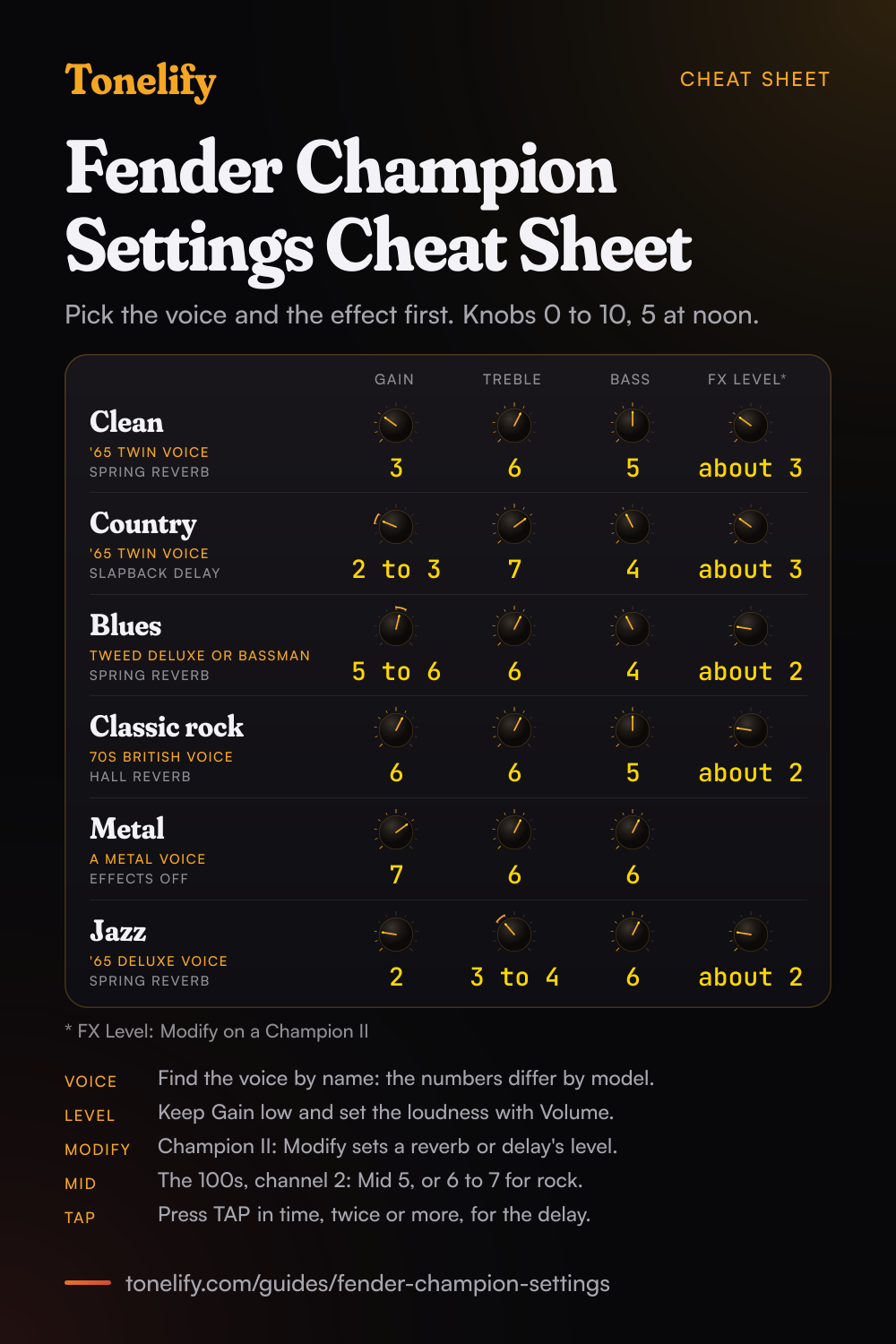
Free download
Printable cheat sheet: PDF and PNG
The clean, country, blues, classic rock, metal and jazz settings from this guide, together on one sheet with short tips. The PDF prints on white; the PNG is the dark version for your phone.
How a Champion's panel works
Every Champion is set the same way: pick a voice, set the tone knobs, then pick one effect. VOICE selects the amp model, and Fender's manuals describe GAIN as the channel's distortion level, used together with the channel's VOLUME to set the overall loudness.[1][4] TREBLE and BASS shape the tone. FX SELECT picks the effect, one position at a time, and FX LEVEL sets how much of it you hear.
The Champion II changes two things. Its MODIFY knob replaces FX LEVEL and sets the effect's main control: the level of a delay or a reverb, the depth of a chorus or a tremolo. And its TAP button can be held to switch a delay from quarter notes, with a red LED, to dotted eighths, with a blue one.[4][5] On every Champion, pressing TAP in time, twice or more, sets the delay time or the speed of a modulation effect. On a Champion II 25 or 50, the LED beside VOICE and FX SELECT runs red, green and amber and then repeats, the colours Fender's tables give for each position.
Which Fender Champion do you have?
Fender has made two generations: the Champion 20, 40, 50XL and 100, and the Champion II 25, 50 and 100. The settings on this page work on all seven, because each has Gain, Volume, Treble, Bass, a voice selector and an effect selector. What changes is the number of voices and effects, where each voice sits on the knob, and the extras in the table below.
On the Champion 40, the Champion 100 and the two-channel Champion IIs, channel 1 is a clean channel, and each manual names the Twin Reverb as its basis.[1][3][4][5] The 50XL's manual does not describe channel 1's sound; its panel has the same controls in the same order as the 40's.[1][2] The Champion II 25 has a single Volume knob, and its panel has no channel switch or footswitch jack.
| Model | Power and speaker | Channels | Voices | Effect positions | Footswitch |
|---|---|---|---|---|---|
| Champion 20 | 20 watts, one 8 inch | One | 12 | 13, with FX Level | None |
| Champion 40 | 40 watts, one 12 inch | Two, channel 1 clean | 12 | 13, with FX Level | 2-button, optional |
| Champion 50XL | 50 watts, one 12 inch Celestion G12N-60 | Two | 12, a list of its own | 13, with FX Level | 2-button, optional |
| Champion 100 | 100 watts, two 12 inch | Two, channel 1 clean | 16, on channel 2 | 16 on each channel, with FX Level | 2-button, included |
| Champion II 25 | 25 watts, one 8 inch | One | 12 | 13, with Modify | None |
| Champion II 50 | 50 watts, one 12 inch | Two, channel 1 clean | 12 | 13, with Modify | 2-button, optional |
| Champion II 100 | 100 watts, two 12 inch | Two, channel 1 clean | 16, on channel 2 | 16 on each channel, with Modify | 2-button, included |
Which voice to pick on each Champion
The voices are where the models differ most. Fender's manuals number them from the knob's first position, and the same amp sits at a different number on each model: the '65 Twin is 04 on a Champion 20 or 40, 01 on a 50XL, 05 on a Champion 100, 4 on a Champion II 25 or 50 and 6 on a Champion II 100. The table gives a voice for each sound in this guide, by the names Fender's manuals use.
The lists also differ in what they hold. The Champion 100 splits the Tweed Deluxe, the '65 Princeton and the 60s British into clean and dirty/compressed versions and adds a sixteenth voice, JazzMaster flat, solid-state clean.[3] The 50XL names its voices by type, such as Fender Clean 1, with the amp in brackets, and has no Super-Sonic.[2] The Champion II 100's 16 add four to the 12 of the Champion II 25 and 50: a '61 Deluxe, a '65 Princeton, a Blues Junior w/Fat and a British Colour.[4][5]
| Sound | Champion 20 and 40 | Champion 50XL | Champion 100 | Champion II 25 and 50 | Champion II 100 |
|---|---|---|---|---|---|
| Clean | 04, '65 Twin-Amp | 01, Fender Clean 1 ('65 Twin-Amp) | Channel 1, or 05, '65 Twin-Amp | 4, '65 Twin | Channel 1, or 6, '65 Twin |
| Country | 04, '65 Twin-Amp | 03, Fender Clean + Compressor ('65 Twin) | 05, '65 Twin-Amp | 4, '65 Twin | 6, '65 Twin |
| Blues | 02, Tweed Deluxe, or 01, Tweed Bassman | 04, Fender Crunch 1 (tweed Bassman) | 03, Tweed Deluxe dirty/compressed, or 01, Tweed Bassman | 1, Tweed Deluxe, or 2, Bassman | 1, Tweed Deluxe, or 2, Bassman |
| Classic rock | 08, 70s British | 09, Brit + Distortion ('70s British) | 11, 70s British | 7, British '70s | 10, British '70s |
| Metal | 11, 90s Metal, or 12, 2000 Metal | 11, High Gain 2 (Metal 2000) | 14, 90s Metal, or 15, 2000 Metal | 10, Modern Metal, or 11, American '90s | 14, Modern Metal, or 15, American '90s |
| Jazz | 05, '65 Deluxe, or 06, '65 Princeton | 02, Fender Clean 2 ('65 Deluxe) | 06, '65 Deluxe, or 16, JazzMaster | 3, '65 Deluxe | 5, '65 Deluxe, or 4, '65 Princeton |
| Lead | 10, Super-Sonic | 10, High Gain 1 ('90s American) | 13, Super-Sonic | 6, Super-Sonic 22 | 9, Super-Sonic 22 |
Which effect position on each Champion
The effect lists differ too. The Champion 20, 40 and 50XL share one list of 13 positions, the Champion 100 has 16 on each channel, the Champion II 25 and 50 have 13 and the Champion II 100 has 16 on each channel.[1][2][3][4][5] Each position is one effect or one fixed pair, such as delay with reverb, so you hear one position at a time.
On a Champion II, MODIFY sets the level of a delay or a reverb and the depth of a chorus, phaser, Vibratone or tremolo, and TAP sets a delay's tempo and a modulation effect's rate.[4][5] There is no slapback position on a Champion II: use Mono Delay with Modify low and press TAP quickly for a short repeat.
| Effect | Champion 20, 40 and 50XL | Champion 100 | Champion II 25 and 50 | Champion II 100 |
|---|---|---|---|---|
| Off | 01, Effects OFF | 01, Effects OFF | 1, OFF | 1, OFF |
| Spring reverb | 04, Reverb Spring | 16, Reverb Spring | 9, Spring Reverb | 12, Spring Reverb |
| Hall reverb | 03, Reverb Hall | 15, Reverb Hall | 11, Mod Large Hall Reverb | 14, Mod Large Hall Reverb |
| Short delay | 08, Delay Slapback | 09, Delay Slapback | 7, Mono Delay | 10, Mono Delay |
| Long delay | 09, Delay Long | 10, Delay Long | 8, Tape Delay | 11, Tape Delay |
| Delay and reverb | 10, Delay + Reverb | 13, Reverb + Delay | 12, Tape Delay/Reverb | 15, Tape Delay/Reverb |
| Chorus | 05, Chorus Fast Sweep, or 06, Chorus Deep Sweep | 06, Chorus | 2, Chorus | 2, Chorus |
| Tremolo | 13, Tremolo | 11, Tremolo Slow, or 12, Tremolo Fast | 5, Vintage Tremolo | 6, Vintage Tremolo |
Clean settings
The '65 Twin voice: 04 on a Champion 20 or 40, 01 on a 50XL, 05 on a Champion 100, 4 on a Champion II 25 or 50 and 6 on a Champion II 100. Gain 3, Treble 6, Bass 5, spring reverb with FX Level about 3, and Volume for loudness. Keep Gain low and turn Volume up, so the sound stays clean when you strum hard.
On a two-channel model other than the 50XL, channel 1 is the other way to a clean sound, the channel built on the Twin Reverb. On a Champion II, set Modify about 3 in place of FX Level: for a reverb, Modify is its level. The '65 Deluxe voice is the warmer alternative.
- Gain 3
- Treble 6
- Bass 5
- FX Level about 3
Champion II: Modify about 3 in place of FX Level.
Country settings
The '65 Twin voice again, with a short delay: FX 08, Delay Slapback, on a Champion 20, 40 or 50XL, and 09 on a Champion 100. Gain 2 to 3, Treble 7, Bass 4, FX Level about 3. Slapback is a single short repeat, the echo behind a lot of country lead playing. Use the bridge pickup and pick hard; if the extra treble turns harsh, bring it back to 6 before touching anything else.
On a 50XL, voice 03, Fender Clean + Compressor, is the one to try first: the compressor evens out the picking. On a Champion II, use Mono Delay with Modify low and press TAP quickly for the short repeat.
- Gain 2 to 3
- Treble 7
- Bass 4
- FX Level about 3
Champion II: Mono Delay, tapped quickly.
Blues and edge-of-breakup settings
A tweed voice, Tweed Deluxe or Tweed Bassman: 02 or 01 on a Champion 20 or 40, and 1 or 2 on a Champion II. On a 50XL use 04, Fender Crunch 1, its tweed Bassman; on a Champion 100, 03, Tweed Deluxe dirty/compressed. Gain 5 to 6, Treble 6, Bass 4, spring reverb with FX Level about 2.
Set Gain so the amp breaks up when you dig in and cleans up when you play softly or roll back the guitar's volume. Bass a little below the middle keeps the low strings from blurring once it breaks up. On the two 100s, set Mid to 6 on channel 2. The Champion II 100 also has a Blues Junior w/Fat voice, 7, to try here.
- Gain 5 to 6
- Treble 6
- Bass 4
- FX Level about 2
Champion 100 and II 100: Mid 6 on channel 2.
Classic rock settings
The 70s British voice: 08 on a Champion 20 or 40; 09 on a 50XL, where Fender calls it Brit + Distortion; 11 on a Champion 100; 7 on a Champion II 25 or 50 and 10 on a Champion II 100. Gain 6, Treble 6, Bass 5, hall reverb with FX Level about 2.
On the two 100s, set Mid 6 to 7 on channel 2: rock rhythm guitar sits in the mids. On the other models, the voice is how you change the character: for a part that has to sit forward in a band, start from a British voice rather than a '65 one. For a solo, switch to a long delay and tap its time in on TAP.
- Gain 6
- Treble 6
- Bass 5
- FX Level about 2
Champion 100 and II 100: Mid 6 to 7 on channel 2.
Metal settings
A metal voice: 11, 90s Metal, or 12, 2000 Metal, on a Champion 20 or 40; 11, High Gain 2, on a 50XL; 14 or 15 on a Champion 100; Modern Metal or American '90s on a Champion II, 10 or 11 on the 25 and 50 and 14 or 15 on the 100. Gain 7, Treble 6, Bass 6, effects off.
Leave the effects off for rhythm parts, where reverb blurs palm mutes. If the low strings smear, lower Gain a step before you touch Bass; if it fizzes, lower Treble before Gain. On the two 100s, keep Mid at 5 on channel 2. The 50XL's voice 12 adds an octaver: Fender lists it as High Gain + Octaver.
- Gain 7
- Treble 6
- Bass 6
Champion 100 and II 100: Mid 5 on channel 2.
Jazz settings
The '65 Deluxe voice: 05 on a Champion 20 or 40, 02 on a 50XL, 06 on a Champion 100, 3 on a Champion II 25 or 50 and 5 on a Champion II 100. Gain 2, Treble 3 to 4, Bass 6, spring reverb with FX Level about 2.
Play the neck pickup with the guitar's tone control rolled back a little; the low Treble setting takes the pick attack off the top of the note. The Champion 100 has a voice of its own to try here, 16, which Fender lists as JazzMaster flat, solid-state clean.
- Gain 2
- Treble 3 to 4
- Bass 6
- FX Level about 2
Headphones, recording and the effects loop
Every Champion has a headphone jack that mutes the speaker and an aux input for a media player or other device, whose level you set on the device. Fender's manuals for the Champion 20, 40 and 100 say the PHONES jack carries the amp's effects in stereo and can also be used for recording or sound reinforcement,[1][3] and the 50XL's manual says the same of recording. The Champion II's manuals describe PHONES as a 1/8 inch headphone output.
The Champion II's rear USB-C port has one job in Fender's manuals: firmware updates from a Mac or PC.[4][5] The two 100s add an effects loop: connect PRE OUT to an external effect's input and PWR IN to its output.
Matching a song on a Fender Champion
Each of Tonelify's song pages reports the amp used on the recording. Several are Fender amps that a Champion voice is named after, so start from that voice and set the knobs for the style as above. The numbers in the table are the Champion 20 and 40's; on another model, find the same name in the voice table.
When you want one song set up on the Champion you own, Tonelify adapts that song's settings to its knobs.
| Song | Amp on the record | Champion voice | How close |
|---|---|---|---|
| Hotel California | Cranked Fender Tweed Deluxe | 02, Tweed Deluxe | Same model, played loud on the record |
| Vertigo | 1957 tweed Fender Deluxe (5E3) | 02, Tweed Deluxe | Same model |
| Layla | One small Fender Champ | 03, Tweed Champ | Same family; the amp on the record is reported, not confirmed |
| Sultans of Swing | Fender Twin | 04, '65 Twin-Amp | Same family, by Knopfler's own account |
| Yellow | Two Fender Twin Reverbs | 04, '65 Twin-Amp, FX 09, Delay Long | Same family; the record used one with delays and one dry |
| How Soon Is Now? | Fender Twin Reverbs | 04, '65 Twin-Amp, FX 13, Tremolo | Same family; the rhythm track went through several at once, with tremolo on |
| Guitars, Cadillacs | 1965 Fender Deluxe Reverb modified by Jim Williams | 05, '65 Deluxe | Same model, modified on the record |
| Black | Fender Bassman for the clean tones | 01, Tweed Bassman | Same name; the song page does not date the Bassman |
When it sounds wrong
Fizzy on a metal voice: lower Treble before Gain. The low strings smear: lower Gain a step before you touch Bass. Thin: on the two 100s, raise Mid on channel 2 before you raise Gain; on the others, try a British voice. Too loud before it breaks up: raise Gain and lower Volume, since the two together set the loudness.
The delay is out of time: press TAP in time with the song, at least twice. On a Champion II, check the TAP LED, red for quarter notes and blue for dotted eighths. On the Champion 20, 40, 50XL and 100, a single press sets the longest interval.
Songs from the table




Common questions
What are good Fender Champion 40 settings?
The Champion 40 has the same 12 voices and 13 effect positions as the Champion 20, so the same settings work. Clean: voice 04, '65 Twin-Amp, Gain 3, Treble 6, Bass 5, FX 04 Reverb Spring with FX Level about 3. Classic rock: voice 08, 70s British, Gain 6, Treble 6, Bass 5. Metal: voice 11, 90s Metal, Gain 7, Treble 6, Bass 6, effects off. The 40 adds channel 1, a clean channel Fender bases on the Twin Reverb.
What are the best Fender Champion settings for metal?
Pick a metal voice and leave the effects off: Gain 7, Treble 6, Bass 6. On a Champion 20 or 40 that is voice 11, 90s Metal, or 12, 2000 Metal; on a 50XL, 11, High Gain 2; on a Champion 100, 14 or 15; on a Champion II, Modern Metal or American '90s. These are starting points rather than Fender's numbers. If it fizzes, lower Treble before Gain; on the two 100s, keep Mid at 5.
What are good Fender Champion 100 settings?
Use channel 1 for clean, the channel Fender bases on its Blackface amps such as the Twin Reverb, with Treble 6 and Bass 5. On channel 2, use voice 03, Tweed Deluxe dirty/compressed, with Gain 5 to 6 for blues; 11, 70s British, with Gain 6 and Mid 6 to 7 for classic rock; and 14, 90s Metal, with Gain 7, Mid 5 and the effects off for metal. Spring reverb is FX 16 on either channel.
Do Champion 20 settings work on a Champion II?
The knob settings do; the voice numbers do not. Both have Gain, Volume, Treble and Bass, so Gain 3, Treble 6 and Bass 5 is a clean start on either. But the Champion II's 12 voices are a different list in a different order: the '65 Twin is 04 on a Champion 20 and 4 on a Champion II 25. And the Champion II's MODIFY knob replaces FX Level; for a reverb or a delay it sets the level.
What is the difference between the Fender Champion and the Champion II?
Fender's manuals show these main changes. MODIFY replaces FX Level: it sets a delay or reverb's level and a chorus or tremolo's depth. The voice lists differ, adding models such as the Bassbreaker 15 and Ultra Gain. Holding TAP switches a delay to dotted eighths. And a rear USB-C port takes firmware updates. The speakers carry the same part numbers as before: the II 25 shares the Champion 20's 8 inch, the II 50 the 40's 12 inch and the II 100 the 100's two 12s.
Does the Fender Champion have a mid knob?
Only the 100 watt models. The Champion 20, 40 and 50XL and the Champion II 25 and 50 have Treble and Bass only. The Champion 100 and the Champion II 100 add Mid on channel 2, the channel with the voices; on the Champion II 100, channel 1 has Treble and Bass. On the others, change the voice to change the midrange: a British voice sits further forward in a band than a '65 one.
How many voices does a Fender Champion have?
Twelve on the Champion 20, 40 and 50XL and on the Champion II 25 and 50, and 16 on the Champion 100 and Champion II 100. The lists are not the same: the 50XL names its voices by type, such as Fender Clean 1 and Brit Crunch, with the amp in brackets, and the Champion II's lists add the Bassbreaker 15, Modded British, Modern Metal and Ultra Gain.
How do you set the delay time on a Fender Champion?
Press TAP in time with the song, at least twice. On the Champion 20, 40, 50XL and 100 the TAP light then blinks at the delay or modulation interval, and a single press sets the longest interval. On a Champion II, TAP sets the tempo of a delay and the rate of a modulation effect, and holding it switches the delay from quarter notes, red LED, to dotted eighths, blue LED.
What does the Modify knob do on a Champion II?
It sets the main control of the effect FX SELECT has picked, per the table in Fender's manuals: the level of the delays, the reverbs and the delay and reverb pairs, and the depth of the chorus, phaser, Vibratone and the two tremolos. On a Champion II 100 it also sets the Flanger's depth, the Envelope Filter's sensitivity and the Octave Down's level. In the OFF position it does nothing.
What footswitch works with a Fender Champion?
A two-button footswitch for channel selection and effects on and off. Fender lists part 0097298000 as optional on the Champion 40 and 50XL and included with the Champion 100 and Champion II 100; the Champion II 50's manual lists part 0071359000, optional. The Champion 20's specifications list none, and the Champion II 25's panel has no footswitch jack.
Can you record with a Fender Champion?
On the Champion 20, 40, 50XL and 100, Fender's manuals say the PHONES output can also be used for recording or sound reinforcement, and plugging in mutes the speaker. The Champion II's manuals describe PHONES only as a 1/8 inch headphone output that mutes the speaker, and give its rear USB-C port one use, firmware updates.
Which Fender Champion has an effects loop?
The two 100 watt models. The Champion 100 and the Champion II 100 have PRE OUT and PWR IN jacks: connect PRE OUT to an external effect's input and PWR IN to its output. On the Champion II 100 they are 1/4 inch TRS jacks, and Fender's manual says standard 1/4 inch TS patch cables can be used. The other Champions have no loop.
Is there a printable Fender Champion settings cheat sheet?
Yes. The cheat sheet on this page puts the six starting settings on one page, from clean to jazz, each with its voice and effect, and short tips on the Champion II's Modify knob, the Mid knob on the 100s and tap tempo. Download the PDF to print it on white, or save the PNG to your phone.
Sources
The numbers in brackets in the text point to this list.
- Fender: Champion 20 and Champion 40 owner's manual (PDF)
- Fender: Champion 50XL owner's manual (PDF, a retailer's copy)
- Fender: Champion 100 owner's manual, English page, as ManualsLib shows it
- Fender: Champion II 50 and Champion II 25 owner's manual (PDF, a retailer's copy)
- Fender: Champion II 100 owner's manual (PDF, a retailer's copy)
Gear in this guide
Settings for your own amp
This guide covers what is true of every rig. For a specific song on a specific amp, Tonelify reads the documented chain behind the recording and returns gain, bass, middle, treble and presence values for the controls your amp actually has. A first plan starts with 7 days free, $0 today.