
Fender Mustang GTX50 settings
Seven knobs: Gain, Volume, Treble, Middle, Bass, Reverb and Master Volume. The amp model is picked with the encoder from 39, with 73 effects before or after it. TAP sets delay and modulation time. The GTX100 has the same panel at 100 watts.
⚡ Match a tone on this amp- Gain
- Volume
- Treble
- Middle
- Bass
- Reverb
- Master Volume
- Tap
How do you dial in a specific tone on a Fender Mustang GTX50?
The Fender Mustang GTX50 is a modelling amp, so a tone match here has two halves: which model or voicing to select, and where to set the controls once it is selected. Getting the second right on the wrong model gets you nowhere. Tonelify picks the voicing first and writes the knob positions against it, using the front panel this unit actually has.
Name the song you are chasing in the tone matcher and Tonelify returns the settings for this exact guitar amp, not the settings the original artist used. Those are two different things: the recording was made on gear most players do not own.
Settings for this amp only ever use controls it actually has, because its front panel is stored in our gear database. You will not be told to set a knob that is not on the amp.
Free download
Printable cheat sheet: PDF and PNG
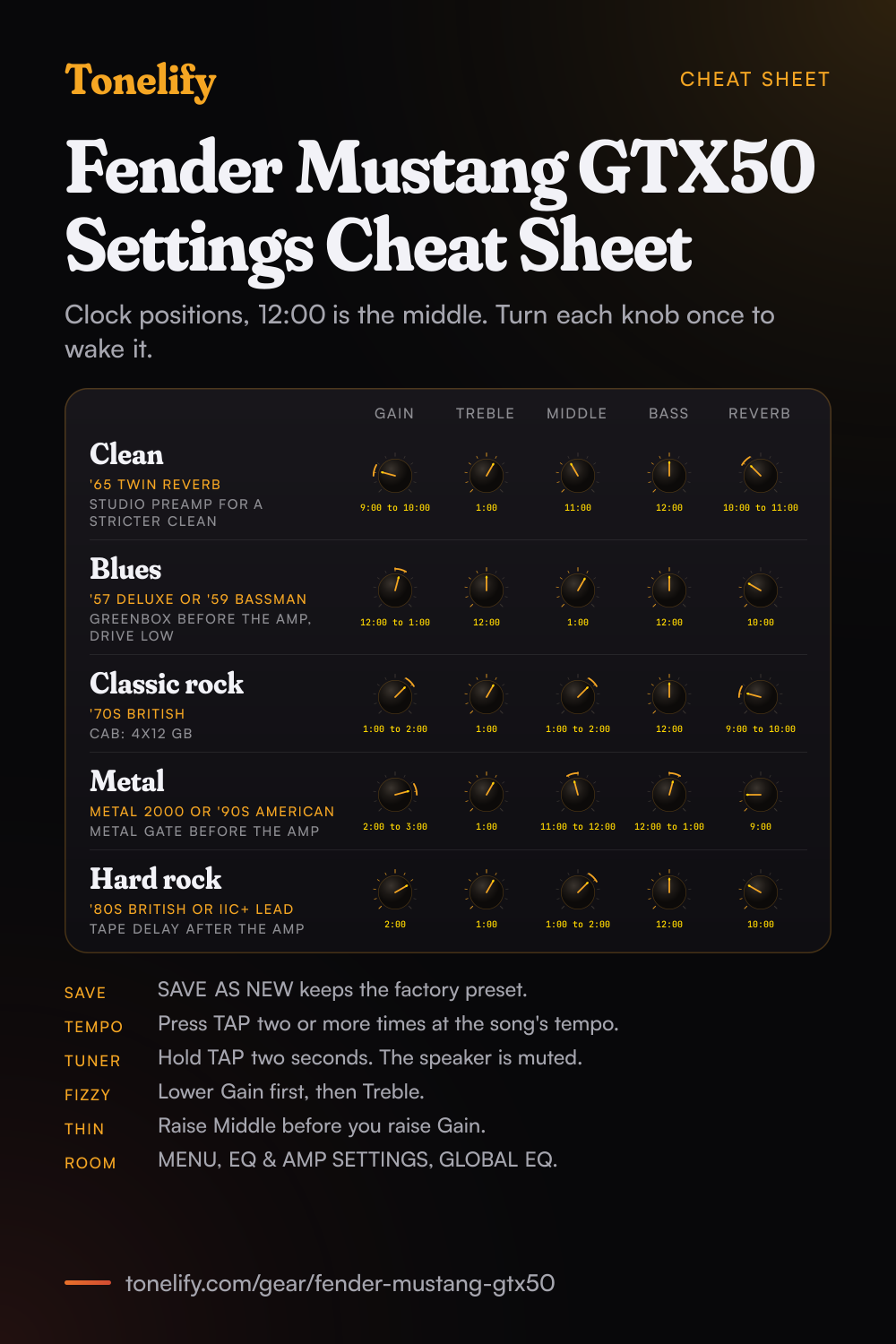
The clean, blues, classic rock, metal and hard rock settings from this page, together on one sheet with short tips. The PDF prints on white; the PNG is the dark version for your phone.
Starting settings on the Fender Mustang GTX50
Positions as clock times, since the knobs carry no numbers: 12:00 is the middle of the travel. They are where to begin, not Fender's numbers: pick the amp type first, then move one control at a time from here.
Clean
'65 Twin Reverb, which Fender's manual calls prized for producing the Fender clean tone, or '65 Deluxe Reverb for a smaller sound. Gain 9:00 to 10:00, Treble 1:00, Middle 11:00, Bass 12:00, Reverb 10:00 to 11:00. Six of the seven knobs are programmable: when you pick a preset, a knob's position may not match the preset, and the display shows the real setting. Turn a knob and it takes over from that point, so set each one to the position here. Master Volume is the only knob that always means what it shows, the amp's overall volume. For a clean that stays clean however hard you pick, Studio Preamp is the clean, uncoloured model.
- Gain 9:00 to 10:00
- Treble 1:00
- Middle 11:00
- Bass 12:00
- Reverb 10:00 to 11:00
Turn each knob once: a programmable knob takes over from where you turn it.
Edge of breakup and blues
'57 Deluxe, the late-'50s tweed Fender describes as known for thick, compressed overdrive, or '59 Bassman. Gain 12:00 to 1:00, Treble 12:00, Middle 1:00, Bass 12:00, Reverb 10:00. Set Gain where hard picking just starts to break up, then ride the guitar's volume: lower for rhythm, full up for a solo. For more push, add Greenbox, inspired by the Ibanez TS808 Tube Screamer, before the amp, on the left of the amp model in the SIGNAL PATH LAYER, with its own drive low so it thickens the sound rather than taking it over.
- Gain 12:00 to 1:00
- Treble 12:00
- Middle 1:00
- Bass 12:00
- Reverb 10:00
For more push, Greenbox before the amp with its drive low.
Classic rock
'70s British, inspired by a late-'60s or early-'70s Marshall Super Lead, which Fender calls the amp that powered the dawn of hard rock. Gain 1:00 to 2:00, Treble 1:00, Middle 1:00 to 2:00, Bass 12:00, Reverb 9:00 to 10:00. Keep Middle up: classic rock lives in the midrange, so when the sound feels thin, raise Middle before Gain. For a cab, try 4x12 GB, Fender's Marshall cab with Celestion Greenbacks, under CAB in the amp's deeper settings.
- Gain 1:00 to 2:00
- Treble 1:00
- Middle 1:00 to 2:00
- Bass 12:00
- Reverb 9:00 to 10:00
Sounds thin? Middle up first, then Gain.
Metal
Metal 2000, based on the EVH 5150III, '90s American, based on the Mesa Dual Rectifier, or Uber, inspired by the Bogner Uberschall's lead channel. Gain 2:00 to 3:00, Treble 1:00, Middle 11:00 to 12:00, Bass 12:00 to 1:00, Reverb 9:00. Before the amp, add Metal Gate, which Fender's manual calls especially ideal for high-gain metal, and Greenbox with its drive near zero and its level high to tighten the low end, then take the amp's Gain a step lower. The amp model also has a GATE setting among its deeper parameters in the CONTROLS LAYER. Most rhythm parts need less gain than people expect: past 3:00, palm mutes blur and the top end turns fizzy.
- Gain 2:00 to 3:00
- Treble 1:00
- Middle 11:00 to 12:00
- Bass 12:00 to 1:00
- Reverb 9:00
Metal Gate and Greenbox, drive low, level high, before the amp.
Hard rock and lead
'80s British, inspired by the Marshall JCM800, which Fender credits with the quintessential '80s metal tone, or IIC+ Lead, inspired by the Mesa/Boogie Mark IIC+ lead channel. Gain 2:00, Treble 1:00, Middle 1:00 to 2:00, Bass 12:00, Reverb 10:00. For a solo, add Tape Delay after the amp, on the right of the amp model, and press TAP two or more times at the song's tempo; on the GTX-7, tap twice on the selected preset's button. Save the solo as a preset of its own, next to the rhythm sound, so one press on the footswitch moves between them.
- Gain 2:00
- Treble 1:00
- Middle 1:00 to 2:00
- Bass 12:00
- Reverb 10:00
Tape Delay after the amp. Delay time: press TAP at the song's tempo.
Saving the five as presets and on the footswitch
Once you change anything, the box with the preset number turns from blue to red and the SAVE button lights. Press SAVE, then pick SAVE to keep the edit in the same slot, RENAME to keep it there under a new name, or SAVE AS NEW to put it in the next open position, so the factory preset stays. An edit you do not save is gone when you leave the preset or switch the amp off. Hold the encoder for a few seconds and the preset goes into the FAVORITES setlist; under MENU, SETLISTS you can build up to 25 setlists of up to 50 presets each. On the GTX-7 footswitch, PRESETS mode lays the presets out in banks of five, so put the five sounds next to each other, for example in slots 101 to 105, and BANK UP brings them all under your feet.
Chasing one song? Name it and the matcher writes that song's settings for the Fender Mustang GTX50.
Mustang GTX50 vs GTX100
One manual covers both amps and says the GTX50's top and rear panels share the GTX100's features. The amp models, effects, presets, menus and connections are the same. What changes is the power, the speaker, the size and whether the GTX-7 footswitch is in the box.
| Difference | Mustang GTX50 | Mustang GTX100 |
|---|---|---|
| Power output | 50 watts | 100 watts |
| Power draw | 118 watts | 300 watts |
| Speaker | One 12 inch Celestion G12P-80, 8 ohms | One 12 inch Celestion G12FSD-100, 4 ohms |
| GTX-7 footswitch | Optional | Included |
| Size | 19.25 x 17 x 9 in (48.9 x 43.2 x 22.8 cm) | 21 x 18 x 10 in (53.3 x 45.7 x 25.3 cm) |
| Weight | 19.5 lb (8.8 kg) | 22 lb (10 kg) |
| Part number (120V) | 2310600000 | 2310700000 |
Fender Mustang GTX amp list
39 amp models in the order Fender's manual lists them, the same on the GTX50 and GTX100. Most are Fender amps or another maker's amp that Fender names; Studio Preamp and Tube Preamp are direct-to-desk preamps, and Acoustasonic and Acoustic Sim are for acoustic sounds. Each preset holds one amp model, picked in the SIGNAL PATH LAYER with the encoder.
| GTX model | Fender's description |
|---|---|
| Studio Preamp | Direct-to-desk studio preamp, clean and uncoloured |
| '57 Champ | Small late-'50s Fender recording amp |
| '57 Deluxe | Late-'50s Fender tweed known for thick, compressed overdrive |
| '57 Twin | Original-era 2x12 tweed, clean to dirty |
| '57 Bandmaster | Three-speaker Fender narrow-panel tweed known for crisp highs |
| '59 Bassman | Fender tweed that began as a bass amp |
| '61 Deluxe | Brown Panel era Deluxe, between tweed and Black Panel |
| '65 Princeton | Mid-'60s Fender studio amp with one 10 inch speaker |
| '65 Deluxe Reverb | Mid-'60s Fender, clean or dirty |
| '65 Twin Reverb | Mid-'60s Fender prized for the Fender clean tone |
| '65 Super Reverb | Mid-'60s Fender with four 10 inch speakers |
| Excelsior | Modern Fender with a 15 inch speaker |
| '66 GA-15 | Inspired by a 1966 Gibson GA-15RVT Explorer |
| '60s Thrift | Inspired by a 1960s Sears Silvertone |
| British Watts | Inspired by the 100-watt Hiwatt DR103 |
| '60s British | Inspired by the Vox AC30 |
| '70s British | Inspired by a late-'60s or early-'70s Marshall Super Lead |
| '80s British | Inspired by the Marshall JCM800 |
| British Colour | Inspired by the Orange OR120 |
| Super-Sonic | Modern Fender with two cascading preamp gain stages |
| '90s American | Based on the Mesa Dual Rectifier |
| Metal 2000 | Modern high gain, based on the EVH 5150III |
| IIC+ Clean | Inspired by the clean channel of the Mesa/Boogie Mark IIC+ |
| IIC+ Lead | Mid-'80s metal, inspired by the Mark IIC+ lead channel |
| BB15 Low | Fender Bassbreaker 15, low gain setting |
| BB15 Med | Fender Bassbreaker 15, medium gain setting |
| BB15 High | Fender Bassbreaker 15, high gain setting |
| FBE-100 | Inspired by both lead channels of the Friedman BE-100 |
| Dual Showman | '60s and '70s all-tube Fender stage amp |
| Tube Preamp | Direct-to-desk preamp with tube console colour |
| Acoustasonic | For piezo-equipped guitars, from Fender's Acoustasonic amps |
| Acoustic Sim | Six acoustic guitar simulations for an electric guitar |
| Blues Junior | Fender 1x12 combo with overdrive and FAT switch |
| Vibro-King | Modern Fender with natural overdrive |
| JC-120 Clean | Based on the clean channel of the Roland JC-120 Jazz Chorus |
| Jubilee Clean | Clean channel of the Marshall Silver Jubilee 50-watt head |
| Jubilee Rhythm | Silver Jubilee with the rhythm clip switch on |
| Jubilee Lead | Lead channel of the Marshall Silver Jubilee |
| Uber | Inspired by the high-gain lead channel of the Bogner Uberschall |
Fender Mustang GTX cab list
34 cabinet models, None included, set with CAB among the amp's deeper settings in the CONTROLS LAYER. The B versions of the 4x12s are brighter takes on the cab above them.
| GTX cab | Fender's description |
|---|---|
| None | No speaker simulation |
| '57 Champ | Late-'50s Fender, one 8 inch speaker |
| '57 Deluxe | Late-'50s Fender tweed, one 12 inch alnico speaker |
| '65 Twin | Mid-'60s Fender, two 12 inch Jensen speakers |
| '57 Bandmaster | Late-'50s Fender, three 10 inch Jensen P10R |
| '59 Bassman | Fender tweed, four 10 inch Jensen P10R |
| '61 Brown | Early-'60s Fender, one 12 inch Oxford |
| '65 Princeton | Mid-'60s Fender, one 10 inch Jensen C10R |
| '65 Deluxe | Mid-'60s Fender, one 12 inch Jensen |
| Excelsior | Modern Fender, one 15 inch speaker |
| '66 GA-15 | One 10 inch CTS, from the Gibson GA-15RVT |
| 1x12 EV | Open-back Mesa/Boogie Mark IIC+ cab, EVM12L |
| 1x12 BB15 | Open-back Bassbreaker 15, Celestion V-Type |
| 2x12 Blue | Two Celestion Alnico Blues, as in the Vox AC30 |
| 4x12 75W | Marshall JCM800 cab, Celestion G12T75 |
| 4x12B 75W | Brighter 4x12 75W |
| 1x12 Super-Sonic | Fender combo, Celestion Vintage 30 |
| 2x12 Super-Sonic | Fender combo, two Vintage 30s |
| 4x12 RCT | Closed-back Mesa Rectifier cab, Vintage 30s |
| 4x12 GB | Marshall cab, Celestion Greenbacks |
| 4x12B GB | Brighter 4x12 GB |
| 4x12 V30 | Fender Super-Sonic cab, Vintage 30s |
| 4x12B V30 | Brighter 4x12 V30 |
| 4x12 SOL | Closed-back Soldano cab, Eminence Legends |
| 4x12 FRD | Closed-back Friedman cab, Greenbacks |
| 4x12B FRD | Brighter 4x12 FRD |
| 2x15 D130 | Fender Dual Showman cab, two JBL D130F |
| 2x12 Jubilee | Small Marshall slant cab, Celestion G12-75s |
| Blues Junior | Open-back Fender combo, Celestion A-Type |
| 1x12 LTD | Blues Junior LTD open-back cab, Jensen |
| 2x12 JC | Open-back Roland JC-120 combo |
| 3x10 VKING | Fender Vibro-King cab, three 10s |
| 4x10 SUP | Fender Super Reverb cab, four 10 inch Jensens |
| 4x12 Uber | Bogner Uberkab, four 12 inch Celestions |
Fender Mustang GTX effects list
73 effects in the six category menus Fender's manual lists. An effect goes before the amp model, to its left on the screen, or after it, to its right, as in an effects loop. TAP sets the time of the delay and modulation effects.
- Stompbox (15)
- Ranger Boost, Overdrive, Mythic Drive, Greenbox, Blackbox, Yellowbox, Orangebox, Fuzz, Big Fuzz, Varifuzz, Round Fuzz, Octobot, Ram Fuzz, Russian Fuzz, Tube OD
- Modulation (15)
- Sine Chorus, Triangle Chorus, Sine Flanger, Triangle Flanger, Vibratone, Vintage Tremolo, Sine Tremolo, Ring Modulator, Phaser, Phaser 90, Vibe Unit, Harmonic Tremolo, 4-Knob Flanger, JC Chorus, JC Vibrato
- Delay (13)
- Mono Delay, Mono Echo Filter, Stereo Echo Filter, Tape Delay, Stereo Tape Delay, Multi Tap Delay, Reverse Delay, Ping Pong Delay, Ducking Delay, 2290 Delay, Memory Delay, Space Delay, Tape Plex
- Reverb (14)
- Small Hall, Mod. Small Hall, Large Hall, Mod. Large Hall, Small Room, Large Room, Small Plate, Large Plate, '63 Spring, '65 Spring, Arena, Ambient, Shimmer, GA-15 Reverb
- Dynamics and EQ (7)
- Simple Comp, Compressor, Sustain, Metal Gate, EQ Parametric, EQ5 Graphic, EQ7 Graphic
- Filters and pitch (9)
- Pedal Wah, Touch Wah, Envelope Filter, Step Filter, Pitch Shifter, Diatonic Pitch, Pedal Shift, Pedal Harmony, Pedal Detune
What controls does the Fender Mustang GTX50 have?
The Fender Mustang GTX50 has 8 controls on its front panel: Gain, Volume, Treble, Middle, Bass, Reverb, Master Volume and Tap.
Fender Mustang GTX50 specifications
- Power
- 50W
- Speaker
- 1x12" Celestion G12P-80
- Voicings
- Studio Preamp, '57 Champ, '57 Deluxe, '57 Twin, '57 Bandmaster, '59 Bassman, '61 Deluxe, '65 Princeton, '65 Deluxe Reverb, '65 Twin Reverb, '65 Super Reverb, Excelsior, '66 GA-15, '60s Thrift, British Watts, '60s British, '70s British, '80s British, British Colour, Super-Sonic, '90s American, Metal 2000, IIC+ Clean, IIC+ Lead, BB15 Low, BB15 Med, BB15 High, FBE-100, Dual Showman, Tube Preamp, Acoustasonic, Acoustic Sim, Blues Junior, Vibro-King, JC-120 Clean, Jubilee Clean, Jubilee Rhythm, Jubilee Lead, Uber
- Front panel
- Gain, Volume, Treble, Middle, Bass, Reverb, Master Volume, Tap
What the Fender Mustang GTX50 panel means when you dial it in
50W through a 1x12" Celestion G12P-80. There is enough headroom to hold a clean setting at band volume, so the gain control does the driving rather than the master. There is no presence control on this panel, so everything above the treble band has to come from the treble control and the guitar's own tone knob. A setting copied from an amp with presence has to be rebalanced here. Gain and master volume are separate, so the preamp can be driven hard at a volume that is liveable. Where a tone sits between the two is part of the answer, not a detail. Reverb is onboard, so a tone that needs it does not need a pedal in the chain. The selectable voicings are Studio Preamp, '57 Champ, '57 Deluxe, '57 Twin, '57 Bandmaster, '59 Bassman, '61 Deluxe, '65 Princeton, '65 Deluxe Reverb, '65 Twin Reverb, '65 Super Reverb, Excelsior, '66 GA-15, '60s Thrift, British Watts, '60s British, '70s British, '80s British, British Colour, Super-Sonic, '90s American, Metal 2000, IIC+ Clean, IIC+ Lead, BB15 Low, BB15 Med, BB15 High, FBE-100, Dual Showman, Tube Preamp, Acoustasonic, Acoustic Sim, Blues Junior, Vibro-King, JC-120 Clean, Jubilee Clean, Jubilee Rhythm, Jubilee Lead and Uber. Picking the voicing comes before the knob positions, because the same numbers land somewhere else on each one.
Fender Mustang GTX50 questions
What is the difference between the Mustang GTX50 and GTX100?
Power, speaker, size and the footswitch. Fender's manual gives the GTX50 50 watts and a 12 inch Celestion G12P-80, and the GTX100 100 watts and a 12 inch Celestion G12FSD-100. The GTX100 comes with the seven-button GTX-7 footswitch, which is optional for the GTX50. The GTX50 weighs 19.5 lb (8.8 kg), the GTX100 22 lb (10 kg). Everything else matches: the manual covers both and says the GTX50's panels share the GTX100's features.
Do Mustang GTX50 settings work on the GTX100?
Yes. One owner's manual covers both amps, with the same amp models, effects, presets and menus, so a preset's amp model, knob settings and effects carry across. The GTX100 is louder and has a different speaker, so set Bass and Master Volume by ear in the room.
How many amp models does the Mustang GTX have?
39 in Fender's expanded owner's manual, the same on the GTX50 and GTX100. Among them are Fender's '65 Twin Reverb and '57 Deluxe, '70s British and '80s British for the Marshall Super Lead and JCM800, '90s American for the Mesa Dual Rectifier, Metal 2000 for the EVH 5150III, FBE-100 for the Friedman BE-100 and Uber for the Bogner Uberschall. The full list is above, with 34 cab models.
What effects does the Mustang GTX have?
73 in six categories, Fender's manual says: 15 stompbox, 15 modulation, 13 delay, 14 reverb, 7 dynamics and EQ, and 9 filters and pitch. Among them are Greenbox, inspired by the Ibanez TS808, Mythic Drive, inspired by the Klon Centaur, Metal Gate, Tape Plex, after the Maestro Echoplex EP-3, and Space Delay, based on the Roland RE-201. Each effect sits before or after the amp model in the preset's signal path.
How many presets does the Mustang GTX have?
Fender's manual says it comes with more than 100 numbered presets and that you can add more: SAVE AS NEW puts an edit in the next open position. Fender does not publish values for its factory presets. The Fender Tone app adds official Fender presets, artist signature presets, player presets and genre presets to download.
How do you save a preset on the Mustang GTX?
Press the lit SAVE button and pick SAVE to keep the edit in the same slot, RENAME to keep it there under a new name, or SAVE AS NEW to put it in the next open position under a name you spell with the encoder. A red preset number means the preset has unsaved changes, and an edit you do not save is lost when you leave the preset or switch the amp off.
Does the Mustang GTX50 come with a footswitch?
No. The seven-button GTX-7 comes with the GTX100 and is optional for the GTX50, part number 0994072000. The four-button MGT-4 and the EXP-1 expression pedal are optional for both, and a GTX-7 or MGT-4 can be chained with the EXP-1. All plug into the FOOTSWITCH jack on the rear panel.
Does the Mustang GTX have a looper?
Yes, on the GTX-7 footswitch: its LOOPER mode records loops up to 60 seconds long and layers any number of overdubs. REC, DUB, PLAY, STOP and UNDO sit on its five buttons, and UNDO takes back only the last overdub. On a GTX50, that means buying the GTX-7.
Does the Mustang GTX have Bluetooth?
Yes. Under MENU, WIFI & BLUETOOTH, turn Bluetooth on and pick MUSTANG GTX on your phone to stream music or connect the Fender Tone app. BT & AUX VOLUME sets the streaming level to LOW, NORMAL, HIGH or the amp's Master Volume. Fender's manual says Bluetooth audio streaming and USB audio cannot be used at the same time.
Can you record with the Mustang GTX over USB?
Yes, from the USB port on the rear panel with a micro USB cable, which is not included. A Mac needs no driver; on Windows, Fender's manual points to the Fender universal ASIO driver. The recording level is LINE OUT/USB GAIN under MENU, EQ & AMP SETTINGS, the same control as the line out's.
Does the Mustang GTX have a line out and an effects loop?
Yes, both on the rear panel. The balanced line outputs, left and right, go to recording or PA gear. The left and right FX send and return take mono or stereo pedals, and Fender's manual says those effects are global, not set per preset, and come last in the signal path.
Why does the Mustang GTX sound different from where the knobs point?
Because six of the seven knobs are programmable. When you pick a preset, a knob may not point at the preset's setting, and the display shows the real value. Once you turn a knob, it and the preset match. Master Volume is the exception: its position always gives the amp's actual overall volume.
Where is the tuner on the Mustang GTX?
Hold TAP for two seconds, or press MENU and choose TUNER. The note name shows with red bars for sharp to the right and flat to the left, and the centre bar turns green when the string is in tune. On the GTX-7, hold the MODE button. The speaker is muted while you tune; press the PRESET LAYER button to leave.
How do you update the Mustang GTX's firmware?
Over WiFi. Connect the amp to a network under MENU, WIFI & BLUETOOTH, then hold the encoder for five seconds while you switch the amp on. It searches for the update, downloads and applies it, then asks you to restart. ABOUT THIS AMP, under EQ & AMP SETTINGS, shows the firmware version.
How do you factory reset a Mustang GTX?
Under MENU, EQ & AMP SETTINGS: RESTORE SETTINGS brings back the factory amp settings only, and RESTORE ALL the amp settings and presets. Holding the PRESET LAYER button for five seconds while you switch the amp on does RESTORE ALL too. Back up first: Fender Tone's BACKUP/RESTORE saves all presets and setlists to the cloud.
What does Global EQ do on the Mustang GTX?
It reshapes the whole amp for the room without changing your presets. Under MENU, EQ & AMP SETTINGS, GLOBAL EQ has nine profiles: BRIGHT CUT EQ, FLAT EQ, two GUITAR FOCUS, two BRIGHT BOOST, two LOW CUT and LOW VOLUME BASS BOOST, which Fender warns can turn boomy at higher volumes.
Mustang GTX vs Mustang LT: what is the difference?
The GTX is the bigger amp. Fender's manuals list 39 amp models and 73 effects on the GTX against 20 and 26 on the LT50, and the GTX has WiFi, Bluetooth, a Reverb knob, balanced stereo line outs and a stereo effects loop, none of which the LT50 manual lists. The LT50 has 60 preset slots and takes the four-button MGT-4; the GTX takes the MGT-4 or the seven-button GTX-7. Our Mustang LT50 page has its settings.
What are the best Fender Mustang GTX50 settings for metal?
Start with Metal 2000, based on the EVH 5150III, at Gain 2:00 to 3:00, Treble 1:00, Middle 11:00 to 12:00 and Bass 12:00 to 1:00. These are starting points, not Fender's numbers. Put Metal Gate and Greenbox, drive low and level high, before the amp to tighten palm mutes.
Is there a printable Fender Mustang GTX settings cheat sheet?
Yes. The cheat sheet on this page puts all five starting settings on one page, from clean to hard rock and lead, each with its amp model, and short tips under them. Download the PDF to print it on white, or save the PNG to your phone.
Does Tonelify support the Fender Mustang GTX50?
Yes, and its front panel is stored, so settings only ever reference controls this guitar amp has: Gain, Volume, Treble, Middle, Bass, Reverb, Master Volume, Tap. You will not be told to set a knob that is not there.
Sources
Panel, specifications and dates checked against these on .
More Fender gear
Similar amps from other makers
Settings for the song you are chasing
Name a song and Tonelify reads the documented rig behind the recording, then writes the settings for the controls the Fender Mustang GTX50 has. A first plan starts with 7 days free, $0 today.