
Positive Grid Spark 2 settings
⚡ Match a tone on this amp- Preset
- Gain
- Bass
- Mid
- Treble
- Master
- Mod
- Delay
- Reverb
- Guitar Volume
- Music Volume
How do you dial in a specific tone on a Positive Grid Spark 2?
The Positive Grid Spark 2 is a modelling amp, so a tone match here has two halves: which model or voicing to select, and where to set the controls once it is selected. Getting the second right on the wrong model gets you nowhere. Tonelify picks the voicing first and writes the knob positions against it, using the front panel this unit actually has.
Name the song you are chasing in the tone matcher and Tonelify returns the settings for this exact guitar amp, not the settings the original artist used. Those are two different things: the recording was made on gear most players do not own.
Settings for this amp only ever use controls it actually has, because its front panel is stored in our gear database. You will not be told to set a knob that is not on the amp.
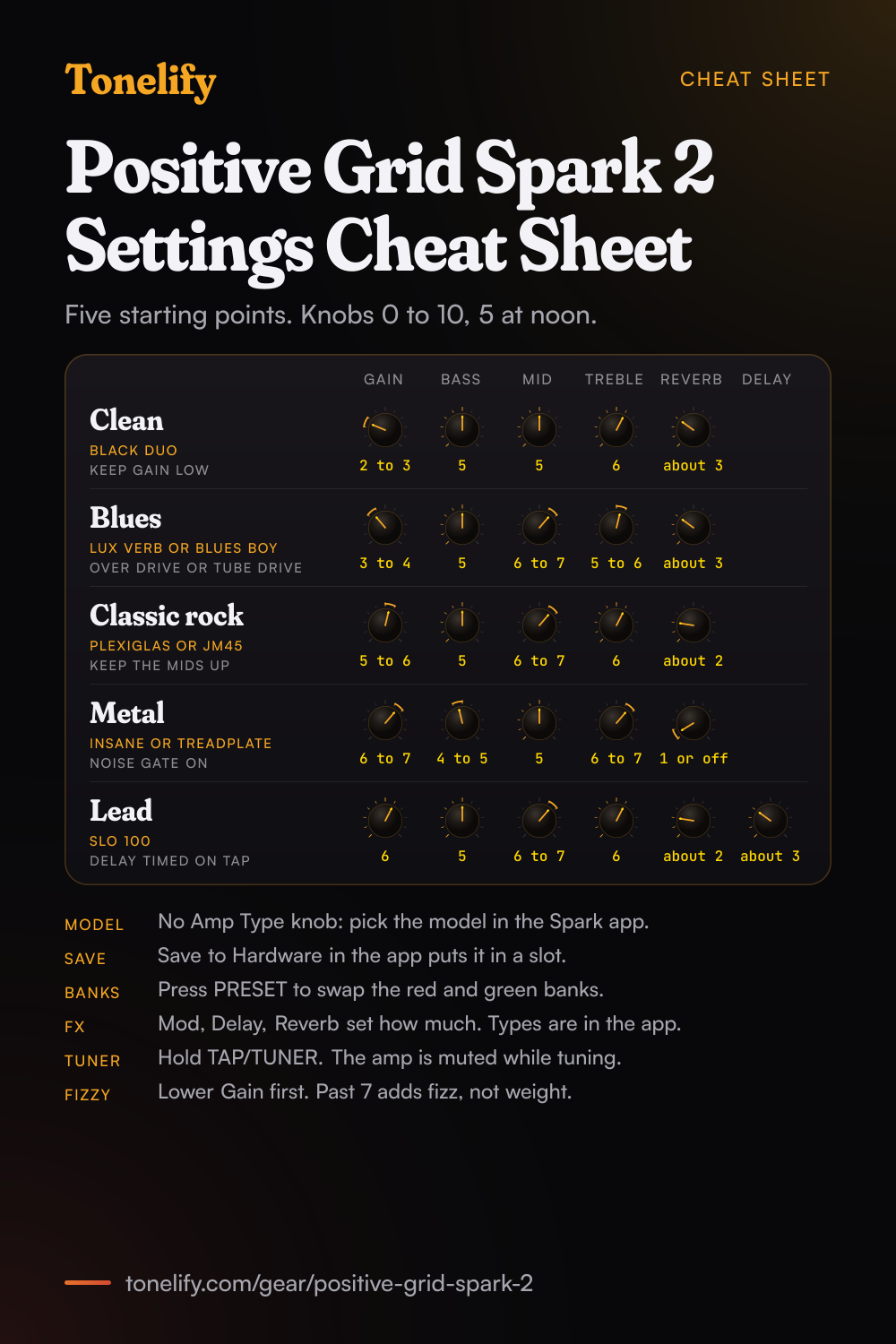
Free download
Printable cheat sheet: PDF and PNG
The clean, blues, classic rock, metal and lead settings from this page, together on one sheet with short tips. The PDF prints on white; the PNG is the dark version for your phone.
Starting settings on the Positive Grid Spark 2
Positions on a 0 to 10 scale, with 5 at twelve o'clock. They are where to begin, not Positive Grid's numbers: move one control at a time from here.
Clean
Black Duo, the Spark model Positive Grid says is inspired by a Fender Twin Reverb. Gain 2 to 3, Bass 5, Mid 5, Treble 6, Reverb about 3. The Spark 2 has no Amp Type knob: Positive Grid's specification gives each preset one amp model, with up to three effects before it and three after, and the model is picked in the Spark app. Load Black Duo there, set the knobs, then save it to a preset. Keep Gain low and take the level from Master, so the clean stays clear when you strum hard. Silver 120, inspired by a Roland JC120, is the other clean to try at the same settings.
- Gain 2 to 3
- Bass 5
- Mid 5
- Treble 6
- Reverb about 3
Edge of breakup and blues
Lux Verb, inspired by a Fender Deluxe Reverb, or Blues Boy, inspired by a Fender Blues Junior, both in Positive Grid's Crunch group. Gain 3 to 4, Bass 5, Mid 6 to 7, Treble 5 to 6, Reverb about 3. Set Gain where hard picking just starts to break up, then use the guitar's volume: back to 7 or 8 for rhythm, up to 10 for a solo. For more push, put Over Drive or Tube Drive from the app's Drive group in front of the amp with its drive low. To start from a ready-made tone instead, Premier Guitar's review singles out the app's Blues Ark preset, from its blues category, which with a touch more gain sounded creamy and clear.
- Gain 3 to 4
- Bass 5
- Mid 6 to 7
- Treble 5 to 6
- Reverb about 3
Classic rock
Plexiglas, inspired by a Marshall Super Lead 100, or JM45, inspired by a Marshall JTM45, both in Positive Grid's Crunch group. Gain 5 to 6, Bass 5, Mid 6 to 7, Treble 6, Reverb about 2. Keep the mids up: rock guitar sits in the midrange, and scooping it is the usual reason a preset sounds thin next to a band. For hard rock, raise Gain to 6 or 7 and leave Mid where it is.
- Gain 5 to 6
- Bass 5
- Mid 6 to 7
- Treble 6
- Reverb about 2
Metal
Insane, inspired by an EVH 5150 III, Treadplate, inspired by a Mesa Boogie Triple Rectifier, or Insane 6508, inspired by a Peavey 6505. All three are in Positive Grid's Metal group. Gain 6 to 7, Bass 4 to 5, Mid 5, Treble 6 to 7, Reverb 1 or off. Switch on the Noise Gate, the one effect in the app's Gate group, so the silence between riffs stays silent. Each step of Gain past 7 adds fizz and blurs palm mutes more than it adds weight.
- Gain 6 to 7
- Bass 4 to 5
- Mid 5
- Treble 6 to 7
- Reverb 1 or off
Noise Gate on in the Spark app.
Lead
SLO 100, inspired by a Soldano SLO-100, or American High Gain, inspired by a Mesa Boogie JP-2C, both in Positive Grid's High Gain group. Gain 6, Bass 5, Mid 6 to 7, Treble 6, Delay about 3, Reverb about 2. For a solo, add Delay rather than more Gain, and set its time with TAP: Positive Grid's manual says tapping it sets the tempo of delay effects and the looper, and the help centre says its light flashes red at the tempo of the delay and modulation effects. The Delay knob sets how much delay you hear; Digital Delay, Vintage Delay, Echo Tape and the rest are chosen in the app.
- Gain 6
- Bass 5
- Mid 6 to 7
- Treble 6
- Delay about 3
- Reverb about 2
Delay timed on TAP.
Saving the five to the eight presets
The Spark 2 stores eight presets in two banks of four, red and green: turn the PRESET knob to switch presets and press it to swap banks. Positive Grid's manual lists the factory eight as Rhythm, Lead, Solo and Ambient guitar style tones, one of each in each bank. To keep the five here, build each one in the Spark app and choose Save to Hardware from its menu, which saves the current preset to a slot on the amp. Clean, blues, classic rock and metal on red 1 to 4 and lead on green 1 leaves three factory tones on green 2 to 4. A factory reset erases all eight presets, the Bluetooth pairing, the power saving settings and the looper tracks, so back up your presets in the app first.
Positive Grid Spark 2 amp list
Positive Grid's list has 33 amp models once the three preamps marked for the Spark LIVE and EDGE are left out, and 33 is the count in the Spark 2's specification: 25 for electric guitar in five groups, 4 acoustic and 4 bass. The Spark 2 has no Amp Type knob. Each of its eight presets holds one amp model, and the Spark app picks any of the 33 for it.
| Spark model | Group | Inspired by |
|---|---|---|
| Silver 120 | Clean | Roland JC120 |
| Black Duo | Clean | Fender Twin Reverb |
| AD Clean | Clean | Orange AD 30 |
| MATCH DC | Clean | Matchless DC30 |
| ODS 50 | Clean | Dumble ODS 50 HRM |
| Tweed Bass | Glassy | Fender Bassman |
| AC Boost | Glassy | Vox AC30 |
| Checkmate | Glassy | Teisco Checkmate 20 |
| Two Stone SP50 | Glassy | Two Rock Studio Pro 50 |
| American Deluxe | Crunch | Fender '57 Custom Deluxe |
| Plexiglas | Crunch | Marshall Super Lead 100 |
| JM45 | Crunch | Marshall JTM45 |
| Lux Verb | Crunch | Fender Deluxe Reverb |
| Blues Boy | Crunch | Fender Blues Junior |
| RB 101 | High Gain | Bogner Ecstasy 101 |
| British 30 | High Gain | Orange AD30 |
| American High Gain | High Gain | Mesa Boogie JP-2C |
| SLO 100 | High Gain | Soldano SLO-100 |
| YJM100 | High Gain | Marshall YJM100 Signature |
| Treadplate | Metal | Mesa Boogie Triple Rectifier |
| Insane | Metal | EVH 5150 III |
| SwitchAxe | Metal | H&K Switch Blade |
| Rocker V | Metal | Orange Rockerverb 50 |
| BE 101 | Metal | Friedman BE100 |
| Insane 6508 | Metal | Peavey 6505 |
| Pure Acoustic | Acoustic | PG Original |
| Fishboy | Acoustic | Fishman Acoustic Amp |
| Jumbo | Acoustic | PG Original |
| Flat Acoustic | Acoustic | PG Original |
| RB-800 | Bass | Gallien-Krueger 800RB |
| Sunny 3000 | Bass | Sunn 300T |
| W600 | Bass | Eden WTP600 |
| Hammer 500 | Bass | Aguilar Tone Hammer 500 |
Positive Grid Spark 2 effects list
44 effects in Positive Grid's list once the vocal and mic effects marked for the Spark LIVE and EDGE are left out, in six groups. The Spark 2's specification gives 43, and the list does not say which one the Spark 2 lacks. Each preset takes up to three effects before the amp and three after. On the amp, the Mod, Delay and Reverb knobs set how much of each effect you hear; the effect itself and its settings are chosen in the Spark app.
- Gate (1)
- Noise Gate
- Comp (6)
- LA Comp, Sustain Comp, Red Comp, Bass Comp, Optical Comp, Auto Wah
- Drive (10)
- Booster, Tube Drive, Over Drive, Fuzz Face, Black Op, Bass Muff, Guitar Muff, Bassmaster, SAB Driver, Clone Drive (Klon Centaur)
- MOD/EQ (12)
- Tremolo, Chorus, Flanger, Phaser, Vibrato, UniVibe, Cloner Chorus, Classic Vibe, Tremolator, Tremolo Square, Guitar EQ, Bass EQ
- Delay (6)
- Digital Delay, Echo Filt, Vintage Delay, Reverse Delay, Multi Head, Echo Tape
- Reverb (9)
- Room Studio A, Chamber, Hall Natural, Plate Short, Hall Ambient, Plate Rich, Hall Medium, Plate Long, Room Studio B
What controls does the Positive Grid Spark 2 have?
The Positive Grid Spark 2 has 11 controls on its front panel: Preset, Gain, Bass, Mid, Treble, Master, Mod, Delay, Reverb, Guitar Volume and Music Volume.
Positive Grid Spark 2 specifications
- Power
- 50W stereo
- Speaker
- 2x4"
- Front panel
- Preset, Gain, Bass, Mid, Treble, Master, Mod, Delay, Reverb, Guitar Volume, Music Volume
- Released
- 2024
What the Positive Grid Spark 2 panel means when you dial it in
50W stereo through a 2x4". There is enough headroom to hold a clean setting at band volume, so the gain control does the driving rather than the master. There is no presence control on this panel, so everything above the treble band has to come from the treble control and the guitar's own tone knob. A setting copied from an amp with presence has to be rebalanced here. Gain and master volume are separate, so the preamp can be driven hard at a volume that is liveable. Where a tone sits between the two is part of the answer, not a detail. Reverb is onboard, so a tone that needs it does not need a pedal in the chain.
Positive Grid Spark 2 questions
What amps are in the Positive Grid Spark 2?
33 amp models for electric guitar, acoustic guitar and bass, and 43 effects, Positive Grid's specification says, and Guitar.com's review calls them the same 33 models and 43 effects as the other Spark amps, overhauled with new HD modelling. Positive Grid's Amp & Effect List has 33 once the preamps marked for the Spark LIVE and EDGE are left out: 25 guitar amps in five groups, Clean, Glassy, Crunch, High Gain and Metal, plus 4 acoustic and 4 bass, from Silver 120 (Roland JC120) and Black Duo (Fender Twin Reverb) to Plexiglas (Marshall Super Lead 100) and Insane (EVH 5150 III). The full table is below.
How do you change the amp model on the Spark 2?
In the Spark app. The Spark 2 has no Amp Type knob: its PRESET knob switches between eight presets, and Positive Grid's specification says each preset holds one amp model with up to three effects before it and three after. Gain, Bass, Mid, Treble and Master set the amp model in the current preset, and Mod, Delay and Reverb set how much of each effect you hear. To keep a model on the amp, save the preset to a slot with Save to Hardware.
What is the difference between the Spark 2 and the Spark 40?
Positive Grid gives the Spark 2 twice the processing power, 25% more volume, 50 watts against 40, new HD amp models, a looper on the amp, eight presets in two banks against four, an optional battery and Wi-Fi for firmware updates. The panel changed with it: Guitar.com's review notes that the Spark 40's amp model selector and four preset buttons gave way to one preset knob. Both specifications list 33 amp models and 43 effects. Over USB the Spark 2 records at 24 bit and 44.1 kHz where the Spark 40 gives 16 bit and 48 kHz, and its Bluetooth is 5.0 against 4.2. Positive Grid announced it on 23 July 2024, at a regular price of 299 US dollars.
What presets come on the Spark 2?
Eight, Positive Grid's manual says: Rhythm, Lead, Solo and Ambient guitar style tones, Tone 1 of each on red presets 1 to 4 and Tone 2 of each on green presets 1 to 4. Positive Grid does not publish their settings. More presets come from ToneCloud in the Spark app, free to download and save to the amp with Save to hardware preset.
How do you save a preset on the Spark 2?
In the Spark app. The menu on the tone screen has Save to Hardware, which saves the current preset to one of the Spark 2's eight slots, and presets from ToneCloud go to the amp the same way. A red dot with CH1 to CH4, or RHYTHM, LEAD, SOLO or CUSTOM, under the preset name in the app shows that a preset stored on the amp is the one in use. Positive Grid's manual describes saving from the app only.
Does the Spark 2 have a looper?
Yes, two. The onboard looper records up to 60 seconds from the REC/DUB, PLAY/STOP and UNDO/REDO buttons on the amp. In Auto Mode, the default, with the click on, it starts after a one bar count-in and stops at the length set in the Spark app; hold PLAY/STOP to switch to Signal Detection Mode, which starts recording when it hears the guitar and stops when you tap REC/DUB. Tap UNDO/REDO to remove or restore the last layer, and hold it to erase the loop. The Groove Looper in the app adds drum patterns, and Premier Guitar's review gives loop lengths of up to 16 bars.
Does the Spark 2 have a tuner?
Yes, a chromatic tuner: hold TAP/TUNER. The Spark 2 is muted while it is on, and the three looper LEDs show whether the string is too low, too high or in tune. Press TAP/TUNER again to leave it. For the exact note, connect the Spark app, which has a tuner of its own under Menu.
Can you record with the Spark 2 over USB?
Yes. With the Spark 2 off, connect it to a computer with the USB-C cable, switch it on and choose Spark 2 USB Audio as the recording and playback device. Positive Grid's specification gives one input and two outputs at 24 bit and 44.1 kHz, for macOS and Windows, and Windows needs the ASIO driver from the Spark 2 support page. Music Volume sets the USB playback level and Guitar Volume the direct monitoring. USB playback skips the amp's EQ curve, so Positive Grid suggests Bluetooth or Aux In for listening to music.
Does the Spark 2 run on batteries?
Yes, with the Spark Battery, sold separately: a detachable 6,000 mAh lithium-ion pack that goes in under a cover on the bottom. Positive Grid's specification gives 3 hours to charge and up to 12 hours of play at mid volume, and the battery charges whenever the Spark 2 is plugged in. Positive Grid warns that a third party battery can damage the amp.
Does the Spark 2 have an effects loop?
No. Positive Grid says the Spark 2 has no effects loop. With a pedalboard in front of it, Positive Grid suggests bypassing all the effects in the presets saved on the amp, and with an amp simulator pedal, bypassing the amp model as well.
Can you use a footswitch with the Spark 2?
Yes, Positive Grid's Spark Control X, sold separately, which controls the Spark 2 without the Spark app: hold the Pair button on the back until both wireless LEDs light, and it connects. Firmware 2.2.2.58, in September 2024, added its custom profiles and looper control. The older Spark Control also works, connected through the app.
Can you use headphones or a line out with the Spark 2?
Yes. Headphones go in the 1/8 inch jack on the front panel. For a PA or an audio interface, the back has two 1/4 inch line outputs, L/Mono and R; use L/Mono for a single cable. By default the speakers mute when a line output is connected, and firmware 2.5.2.149, in November 2024, added a setting on the Spark app's device card to keep them playing.
Is the Spark 2 loud enough to gig?
Reviewers differ. Premier Guitar's found it loud enough for small café gigs without a PA, with the stereo line outs for bigger stages. Guitar.com's called it shockingly loud for its size but not an amp you would gig, and pointed to the Spark LIVE as the Spark for that. Positive Grid rates the Spark 2 at 50 watts and 114 dB SPL RMS at 1 metre.
How do you factory reset the Spark 2?
With the power supply connected and the amp off, hold the PRESET knob, then hold the Power button with it, and let go of both when the battery indicator next to the Power button turns white. Then hold Power until all four preset LEDs blink twice, and let go: the Spark 2 switches off, and comes back with its factory settings when you turn it on. It erases all eight presets, the Bluetooth pairing, the power saving settings and the looper tracks, so back up your presets in the Spark app first.
What power supply does the Spark 2 use?
The adapter in the box: 20 V at 3.25 A on a barrel plug 5.5 mm outside and 2.5 mm inside, centre positive, from 100 to 240 V mains at 50 or 60 Hz. Positive Grid notes that it is not the same as the Spark 40's, which gives 19 V at 2.5 A.
What are the best Positive Grid Spark 2 settings for metal?
Start with Insane or Treadplate at Gain 6 to 7, Bass 4 to 5, Mid 5, Treble 6 to 7 and Reverb 1 or off, with the Noise Gate on in the app, saved to a preset. These are starting points rather than Positive Grid's numbers. For tighter palm mutes, put a drive from the Drive group in front of the amp with its drive near zero and its level high, and take Gain a step lower.
Does Tonelify support the Positive Grid Spark 2?
Yes, and its front panel is stored, so settings only ever reference controls this guitar amp has: Preset, Gain, Bass, Mid, Treble, Master, Mod, Delay, Reverb, Guitar Volume, Music Volume. You will not be told to set a knob that is not there.
Sources
Panel, specifications and dates checked against these on .
- Positive Grid: Spark 2 user manual v1.0.2 (PDF)
- Positive Grid: Technical Specification for Spark 2
- Positive Grid: Spark 2 Panel Overview
- Positive Grid: Amp & Effect List
- Positive Grid: What is Spark 2, and how is it different from the original Spark?
- Positive Grid: Spark 2 Firmware Release Notes
- Positive Grid: Onboard Tuner on Spark 2
- Positive Grid: Tap Tempo on Spark 2
- Positive Grid: Recording with Spark 2 (USB I/O)
- Positive Grid: Is there a FX Loop in Spark 2?
- Positive Grid: Does Spark 2 come with a footswitch?
- Positive Grid: Control main output mute/unmute behavior with line out
- Positive Grid: Factory Reset for Spark 2
- Positive Grid: Technical Specification for Spark 2's Power Supply
- Positive Grid: Technical Specification for Spark (40), for the comparison
- Positive Grid: Technical Specification for Spark (40)'s Power Supply, for the comparison
- Bass Gear Magazine: Positive Grid Introduces Spark 2, Positive Grid's press release of 23 July 2024
- Guitar.com: Positive Grid Spark 2 review (30 August 2024)
- Premier Guitar: Positive Grid Spark 2 Amp Review (14 October 2024)
The manual is the file Positive Grid's help centre download page links for the Spark 2, and the help centre articles were read on 21 October 2026. Bass Gear Magazine printed Positive Grid's press release on 1 August 2024.