
Zoom G1on / G1Xon presets and settings
Compact floor unit from 2013 with two footswitches, 100 patches and up to five effects at once in any order, 22 of them amp models. The G1Xon is the same unit with an expression pedal and five pedal effects.
⚡ Match a tone on this unitHow do you dial in a specific tone on a Zoom G1on / G1Xon?
A multi-effects unit gives you the whole chain in one box, which means the order of the blocks is as much of the answer as the values inside them. Settings for the Zoom G1on / G1Xon name the amp model, the block order and the parameters together, rather than handing you numbers with no chain to put them in.
Name the song you are chasing in the tone matcher and Tonelify returns the settings for this exact multi-effects unit, not the settings the original artist used. Those are two different things: the recording was made on gear most players do not own.
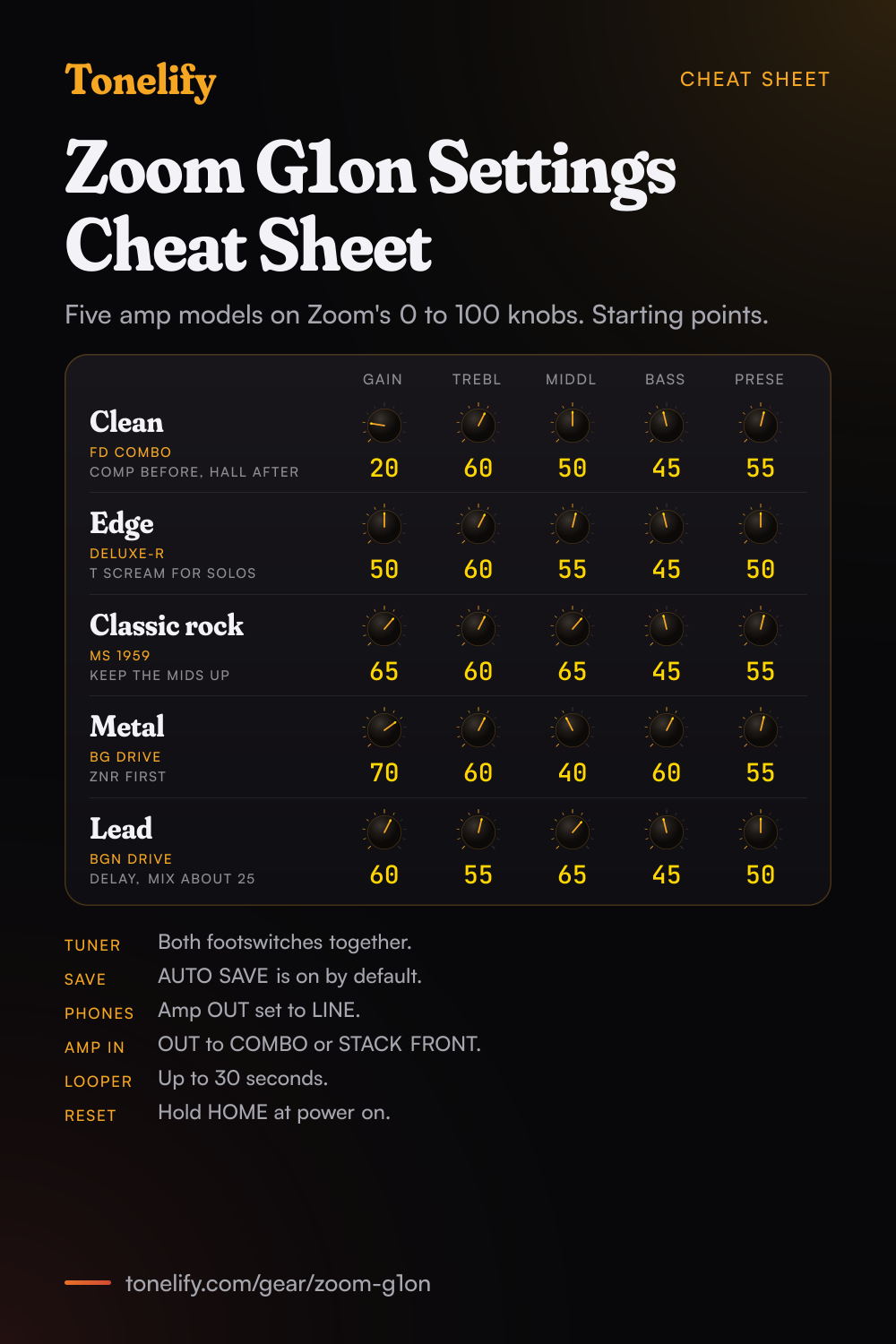
Free download
Printable cheat sheet: PDF and PNG
The clean, edge, classic rock, metal and lead settings from this page, together on one sheet with short tips. The PDF prints on white; the PNG is the dark version for your phone.
Starting settings on the Zoom G1on / G1Xon
Values as the unit's screen shows them, on its own scale; each drawn knob shows that value's share of the range. They are where to begin, not Zoom's numbers: pick the amp model first, then move one control at a time from here.
Clean
FD COMBO, Zoom's model of a '65 Fender Twin Reverb, with its own 2x12 cabinet. Gain 20, Trebl 60, Middl 50, Bass 45, Prese 55, and Tube low, since it adds tube amp compression. Zoom prints no knob values, so every setting on this page is Tonelify's starting point on the 0 to 100 knobs. For a finished patch, add Comp before the amp and Hall after it, the recipe behind factory patch B0 CLEAN.
- Gain 20
- Trebl 60
- Middl 50
- Bass 45
- Prese 55
Comp before, Hall after.
Edge of breakup and blues
DELUXE-R, Zoom's model of a 1965 Fender Deluxe Reverb, the amp in factory patch I1 DX CRUNCH. Gain 50, Trebl 60, Middl 55, Bass 45, Prese 50. Play softer to clean up and dig in for grit. For solos, put T Scream, Zoom's Ibanez TS808, in front with its Gain low and its Level up, the way patch I2 TEXAS TONE uses it on the FD VIBRO amp.
- Gain 50
- Trebl 60
- Middl 55
- Bass 45
- Prese 50
T Scream in front for solos.
Classic rock
MS 1959, Zoom's model of a 1969 Marshall 1959 Plexi, the amp in factory patch J1 OCTAVE MS. Gain 65, Trebl 60, Middl 65, Bass 45, Prese 55. Keep the mids up: rock guitar lives in the midrange, and a scooped patch sounds thin next to a band. MS CRUNCH, the other 1959 model, is a lighter crunch.
- Gain 65
- Trebl 60
- Middl 65
- Bass 45
- Prese 55
Metal
BG DRIVE, Zoom's model of the Mesa Boogie Dual Rectifier red channel in Vintage mode, the amp in factory patch F7 FOOFIGHT. Gain 70, Trebl 60, Middl 40, Bass 60, Prese 55. Put ZNR, Zoom's noise reduction, first in the chain and raise its THRSH until the hiss stops between chords. For tighter palm mutes, add T Scream in front with its Gain at 0 and take the amp's Gain down a step.
- Gain 70
- Trebl 60
- Middl 40
- Bass 60
- Prese 55
ZNR first in the chain.
Lead
BGN DRIVE, Zoom's model of the lead sound from channel 3 of a Bogner Ecstasy. Gain 60, Trebl 55, Middl 65, Bass 45, Prese 50. Add Delay after the amp with Mix about 25 so the echoes sit under the notes, and set the master BPM in the MENU, since the tempo is shared by every effect, the rhythms and the looper. Factory patch J9 Power Lead does the same job on REVO-1.
- Gain 60
- Trebl 55
- Middl 65
- Bass 45
- Prese 50
Delay after the amp, Mix about 25.
Chasing one song? Name it and the matcher writes that song's settings for the Zoom G1on / G1Xon.
Zoom G1on and G1Xon amp list
The AMP SIMULATOR category has 22 models, the same on both units. Each has Gain, Tube, Level, Trebl, Middl, Bass and Prese, all 0 to 100 except Level (0 to 150), plus a CAB setting with a matching cabinet and an OUT setting for what the unit is plugged into. Each row gives the amp Zoom names as the basis and the cabinet that model loads.
| Model | Based on | Cabinet |
|---|---|---|
| FD COMBO | Fender Twin Reverb ('65) | 2x12, Jensen |
| DELUXE-R | Fender Deluxe Reverb (1965) | 1x12, Jensen |
| FD VIBRO | Fender Vibroverb ('63) | 2x10, Jensen |
| US BLUES | Fender Tweed Bassman, crunch | 4x10, Jensen |
| VX COMBO | British combo of the 1960s Liverpool sound | 2x12, Celestion Alnico |
| VX JMI | Early class-A British combo | 2x12, Celestion Alnico |
| BG CRUNCH | Mesa Boogie MkIII combo, crunch | 1x12, Electro Voice |
| MATCH 30 | Matchless DC-30, channel 1 | 2x12, Celestion |
| CAR DRIVE | Carr Mercury | 1x12, Eminence |
| TW ROCK | Two Rock Emerald 50, drive channel | 1x12, Fane |
| TONE CITY | Sound City 50 Plus Mark 2 | 4x12, Fane |
| HW STACK | Hiwatt Custom 100 | 4x12, Fane |
| TANGERINE | Orange Graphic 120 | 4x12, Celestion |
| B-BREAKER | Marshall 1962 Bluesbreaker | 2x12, Celestion |
| MS CRUNCH | Marshall 1959, crunch | 4x12, Celestion |
| MS 1959 | Marshall 1959 Plexi (1969) | 4x12, Celestion |
| MS DRIVE | Marshall JCM2000, high gain | 4x12, Celestion |
| BGN DRIVE | Bogner Ecstasy, channel 3 lead | 4x12, Celestion |
| BG DRIVE | Mesa Boogie Dual Rectifier, red channel (Vintage mode) | 4x12, Celestion |
| DZ DRIVE | Diezel Herbert | 4x12, Celestion |
| ALIEN | Engl Invader | 4x12, Celestion |
| REVO-1 | Krank Revolution 1 Plus | 4x12, Eminence |
Zoom G1on and G1Xon effects list
Zoom's effects list names 75 effect types in five categories, plus five PEDAL effects on the G1Xon only, which is the count the manual's specifications give. Version 1.21 (March 2014) added 25 effects that this list does not name, which makes the 100 on Zoom's product page; Guitar World's 2014 review counts 22 amps, 16 dynamics and filter, 18 drive, 24 modulation and 20 delay and reverb. Where Zoom names the pedal or amp an effect models, it is in brackets.
- Dynamics and filter (11)
- Comp (MXR Dyna Comp), 160 Comp (dbx 160A), SlowATTCK, ZNR (Zoom noise reduction), NoiseGate, GraphicEQ (6 bands), ParaEQ (2 bands), AutoWah, Cry, M-Filter (Moog MF-101), SeqFLTR (Z.Vex Seek-Wah)
- Overdrive and distortion (12)
- Booster, OverDrive (BOSS OD-1), T Scream (Ibanez TS808), Governor (Marshall Guv'nor), Dist+ (MXR Distortion+), Squeak (Pro Co RAT), FuzzSmile (Fuzz Face), GreatMuff (Electro-Harmonix Big Muff), Z Clean, Lead, ExtremeDS, Aco.Sim (acoustic simulator)
- Amp simulator (22)
- FD COMBO, DELUXE-R, FD VIBRO, US BLUES, VX COMBO, VX JMI, BG CRUNCH, MATCH 30, CAR DRIVE, TW ROCK, TONE CITY, HW STACK, TANGERINE, B-BREAKER, MS CRUNCH, MS 1959, MS DRIVE, BGN DRIVE, BG DRIVE, DZ DRIVE, ALIEN, REVO-1
- Modulation and SFX (16)
- Tremolo, Slicer, Phaser, Vibrato, TheVibe, Detune, StereoCho, SuperCho (BOSS CH-1), CoronaTri (tc electronic Corona Tri-Chorus), Flanger (ADA flanger), Octave, PitchSHFT, MonoPitch, HPS (scale-based harmonizer), RingMod, Rt Closet (rotary speaker)
- Delay and reverb (14)
- Delay (up to 4000 ms), CarbonDly (MXR Carbon Copy), TapeEcho, ReverseDL, FilterDly, StereoDly, HD Hall, Hall, Room, Plate, Spring63 ('63 Fender Reverb), Air, ModReverb, ParticleR (Line 6 M9 Particle Verb)
- Pedal, G1Xon only (5)
- PedalVx (vintage British wah), PedalCry (vintage Cry Baby), WAH100 (Ibanez wah), PDL Pitch, PDL MnPit (mono pitch shift)
Zoom G1on factory patch list
100 patches in ten banks, A to J, of ten (0 to 9). Bank A is Demo, B and C clean, D and E crunch, F and G high gain, H Tweak Freak and I and J Legendary Tone. The G1Xon list is the same except A3 Wakapon! (PedalVx wah) in place of AUTOWAH and G3 BIGWAH in place of Dist Hell, and its A0 MUSEUM adds PDL MnPit for bends. The last column lists the effects Zoom's comment names.
| Patch | Name | Category | Effects Zoom names |
|---|---|---|---|
| A0 | MUSEUM | Demo | DZ DRIVE |
| A1 | Duermete | Demo | Delay, reverb, chorus |
| A2 | Blue Lead | Demo | |
| A3 | AUTOWAH | Demo | AutoWah |
| A4 | Down Heavy | Demo | |
| A5 | ChorusPad | Demo | StereoCho |
| A6 | PhasrFunk | Demo | Phaser |
| A7 | Jazzy Lead | Demo | T Scream, Comp |
| A8 | Acoustix | Demo | Aco.Sim, HD Hall |
| A9 | Supernova | Demo | ParticleR |
| B0 | CLEAN | Clean | Compression, reverb |
| B1 | CORONA | Clean | Chorus |
| B2 | STRATTY | Clean | |
| B3 | Clean Arp | Clean | Aco.Sim |
| B4 | Just Funk | Clean | Spring63 |
| B5 | CrystalVib | Clean | TheVibe |
| B6 | Pic Chic | Clean | Slapback delay, Comp |
| B7 | Rev Dream | Clean | ModReverb |
| B8 | TapeSlap | Clean | Tape delay |
| B9 | Funky Duck | Clean | AutoWah, SuperCho, Comp |
| C0 | Big Rack | Clean | Delay, mix on the G1Xon pedal |
| C1 | RAKE | Clean | |
| C2 | TRIPY | Clean | |
| C3 | ACO | Clean | Aco.Sim, 160 Comp |
| C4 | StRahht | Clean | |
| C5 | Natural | Clean | Reverb |
| C6 | SPAGHETTI | Clean | Spring63, Tremolo |
| C7 | GardenRock | Clean | Dist+ |
| C8 | CleanJazz | Clean | |
| C9 | YELLOW 12 | Clean | |
| D0 | BritCombo | Crunch | |
| D1 | OJ | Crunch | |
| D2 | Talk Funk | Crunch | Cry, T Scream |
| D3 | MS STACK | Crunch | |
| D4 | 80s Rhythm | Crunch | Chorus |
| D5 | REC.POP | Crunch | ZNR |
| D6 | FAT RHYTHM | Crunch | |
| D7 | KRAVITZ | Crunch | Flanger |
| D8 | Tap Delay | Crunch | Dotted eighth delay |
| D9 | GIRL | Crunch | NoiseGate |
| E0 | SURF | Crunch | Spring reverb |
| E1 | CLASSIC | Crunch | Delay |
| E2 | B.SESSION | Crunch | Rhythm pattern |
| E3 | YORKE | Crunch | VX COMBO |
| E4 | SIMPLETONE | Crunch | Delay |
| E5 | FunkRotary | Crunch | Auto wah, rotary |
| E6 | WHITE | Crunch | TapeEcho, Spring63 |
| E7 | ORG CRUNCH | Crunch | |
| E8 | VALENTINE | Crunch | Compression |
| E9 | FILTER$ | Crunch | FilterDly, Delay |
| F0 | METAL RIFF | High gain | |
| F1 | Wilhelm | High gain | |
| F2 | MUFFBIG | High gain | |
| F3 | Dr.Rock | High gain | |
| F4 | MiraclWyld | High gain | |
| F5 | MODERN HVY | High gain | |
| F6 | Gilmourish | High gain | |
| F7 | FOOFIGHT | High gain | BG DRIVE |
| F8 | JIMI | High gain | FuzzSmile, TheVibe |
| F9 | SpeedMetal | High gain | |
| G0 | Green BIG | High gain | |
| G1 | LA Metal | High gain | Distortion |
| G2 | Shred Pick | High gain | |
| G3 | Dist Hell | High gain | |
| G4 | MASSIVE LD | High gain | Reverb |
| G5 | MUFFLR | High gain | GreatMuff, TONE CITY, CarbonDly |
| G6 | TappinHero | High gain | Hall |
| G7 | OCT GTR | High gain | |
| G8 | LegatoHero | High gain | 160 Comp |
| G9 | GtSoloTime | High gain | Long delay |
| H0 | JeanSplice | Tweak Freak | |
| H1 | BassSim | Tweak Freak | |
| H2 | Harm | Tweak Freak | Harmony |
| H3 | POGISH | Tweak Freak | PitchSHFT, CoronaTri |
| H4 | PartyViola | Tweak Freak | |
| H5 | Caverns | Tweak Freak | Reverb |
| H6 | PROGRESS | Tweak Freak | Octave |
| H7 | ARP ONE | Tweak Freak | SeqFLTR, CarbonDly |
| H8 | PartSpace | Tweak Freak | Delay, ParticleR, Z Clean |
| H9 | SnacMonstr | Tweak Freak | Octave, Cry |
| I0 | Comp Clean | Legendary Tone | Compression |
| I1 | DX CRUNCH | Legendary Tone | DELUXE-R, dotted eighth delay |
| I2 | TEXAS TONE | Legendary Tone | FD VIBRO, T Scream |
| I3 | NASHVILLE | Legendary Tone | US BLUES, compression |
| I4 | MERSEYBEAT | Legendary Tone | VX COMBO, chorus |
| I5 | WHITEBLUES | Legendary Tone | Booster |
| I6 | BRIGHTON | Legendary Tone | VX JMI, StereoDly |
| I7 | CA.COMBO | Legendary Tone | BG CRUNCH |
| I8 | BTQ COMBO | Legendary Tone | HD Hall |
| I9 | ROCK TONE | Legendary Tone | |
| J0 | FuzzOrange | Legendary Tone | TANGERINE, GreatMuff |
| J1 | OCTAVE MS | Legendary Tone | MS 1959, Octave |
| J2 | REVERSE HW | Legendary Tone | HW STACK, ReverseDL |
| J3 | Guitorgan | Legendary Tone | MATCH 30, Rt Closet, Hall |
| J4 | PHASE CITY | Legendary Tone | TONE CITY, Phaser |
| J5 | MS FLANGER | Legendary Tone | MS DRIVE, Flanger |
| J6 | DZ HEAVY | Legendary Tone | |
| J7 | LA LEAD | Legendary Tone | |
| J8 | 7strBoogie | Legendary Tone | Rectifier sound |
| J9 | Power Lead | Legendary Tone | REVO-1 |
OUT setting: what the G1on is plugged into
Every amp model has an OUT setting that shapes the sound for the next thing in the chain. Set it on each amp model you use, since it is a parameter of the model, not a global setting.
| OUT | Use it when the output goes to |
|---|---|
| LINE | Headphones, speakers or a line level input |
| COMBO FRONT | The input of an ordinary combo amp |
| STACK FRONT | The input of an ordinary stack amp |
| COMBO POWER AMP | The return of an ordinary combo amp |
| STACK POWER AMP | The return of an ordinary stack amp |
G1on vs G1Xon
One manual covers both. The G1Xon is the G1on with an expression pedal, its pedal switch and five pedal effects.
| G1on | G1Xon | |
|---|---|---|
| Effect types in the manual | 75 | 80 (75 plus 5 PEDAL) |
| Expression pedal | No | Yes, with pedal switch |
| Patches | 100 (10 banks of 10) | 100 (10 banks of 10) |
| Effects at once | 5 | 5 |
| Size (D x W x H) | 154.8 x 146.0 x 43.0 mm | 154.8 x 237.0 x 50.0 mm |
| Weight, no batteries | 380 g | 640 g |
| Power | 4 AA or AD-16 (9 V, 500 mA) | 4 AA or AD-16 (9 V, 500 mA) |
Zoom G1on / G1Xon specifications
- Released
- 2013
Zoom G1on / G1Xon questions
What is the Zoom G1on?
A compact floor multi-effects pedal from Zoom with two footswitches, 100 patches in ten banks of ten and up to five effects at once in any order. Zoom's version history dates mass production to December 2013. It runs about 20 hours on four AA alkaline batteries with the backlight off, or on Zoom's AD-16 adapter. Zoom's product page now lists it as discontinued.
What is the difference between the Zoom G1on and G1Xon?
The G1Xon adds an expression pedal with a pedal switch and five PEDAL effects: two wahs modelled on a vintage British wah and a vintage Cry Baby, an Ibanez wah and two pitch effects. That makes it wider, 237 mm against 146 mm, and heavier, 640 g against 380 g without batteries. Everything else, from patches to the looper, is the same, and one manual covers both.
How many effects does the Zoom G1on have?
Zoom's product page says 100, plus five pedal effects on the G1Xon. The manual's specifications say 75 types, 80 on the G1Xon, and version 1.21 of March 2014 added 25 new effects. Guitar World's 2014 review counted 22 amp models, 16 dynamics and filter, 18 overdrive and distortion, 24 modulation and 20 delay and reverb effects.
What amp models are in the Zoom G1on?
22, each with its own cabinet: Fender-based FD COMBO, DELUXE-R, FD VIBRO and US BLUES; VX COMBO and VX JMI; BG CRUNCH (Mesa MkIII); MATCH 30; CAR DRIVE; TW ROCK; TONE CITY; HW STACK; TANGERINE (Orange); B-BREAKER, MS CRUNCH, MS 1959 and MS DRIVE (Marshall); BGN DRIVE (Bogner); BG DRIVE (Dual Rectifier); DZ DRIVE (Diezel); ALIEN (Engl) and REVO-1 (Krank). The full list is below.
How many effects can the G1on use at once?
Five, chained in any order. Amp models use a lot of processing power, and if a combination needs more than the unit has, PROCESSING LIMIT appears and that effect is bypassed. Zoom's fix is to change some of the effect types. Effects that are off show grey on the display.
How do you save a patch on the Zoom G1on?
By default you don't need to: AUTO SAVE is on from the factory, so every change is saved as you make it. To save to another slot, press MENU on the HOME screen, choose SAVE, pick the slot and confirm YES. With AUTO SAVE off, the unit asks whether to save when you leave a changed patch. SWAP trades the places of two saved patches.
How do you turn on the tuner on the G1on?
Press both footswitches at the same time on the HOME screen or an effect screen, and press either one to leave. Press MENU in the tuner for its settings: OUTPUT BYPASS or MUTE, calibration from 435 to 445 Hz, chromatic or set tunings (guitar, including 7-string, open A, D, E and G, and DADGAD), and a FLAT setting for drop tuning, from ♭1 to ♭3, which does not work in chromatic mode.
How long is the looper on the G1on?
Up to 30 seconds. Set its length in quarter notes, from 1 to 64, or MANUAL to stop recording with a footswitch. It shares the BPM, 40 to 250, with the rhythms and every effect, and it can record in sync with a rhythm after a count in. Changing the length or the tempo erases the loop, so set both first.
Does the Zoom G1on have drum patterns?
Yes, 68 rhythm patterns from 8Beats and Rock to Swing, Bossa, Waltz, 5/4 and metronome clicks. Open them with the RHYTHM/LOOPER key, set the pattern, the BPM from 40 to 250 and the volume from 0 to 100. The rhythm keeps playing when you go back to the HOME screen, and the looper can record along with it.
Can you use headphones with the G1on?
Yes. The OUTPUT jack is a stereo jack that drives headphones as well as an amp. Set each amp model's OUT setting to LINE for headphones, speakers or a line input, or to COMBO FRONT or STACK FRONT when you plug into an amp. A phone or music player goes into AUX IN, which bypasses the effects.
What power supply does the Zoom G1on use?
Zoom's AD-16, 9 V DC with a centre-negative plug at 500 mA, or four AA batteries, alkaline or nickel-metal hydride. On batteries, plugging a cable into INPUT turns the unit on. It can also run on USB bus power. Set the battery type in SETTINGS so the charge display is right, and eco mode turns it off after 10 hours unused.
Can the Zoom G1on be used as a USB audio interface?
No. Zoom's specifications give the USB port one job, firmware updates, and it can also power the unit. To record, take the OUTPUT jack into an audio interface with the amp models' OUT set to LINE.
How do you use the expression pedal on the G1Xon?
Add a PEDAL effect and the pedal is assigned to it automatically. Otherwise set it per patch under PATCH SETTINGS, PEDAL: one parameter with a minimum (pedal up) and a maximum (pedal down), or input or output volume. The pedal switch turns the assigned effects on and off. To calibrate, hold MENU while turning the unit on; a hex key sets the pedal's torque.
How do you reset the Zoom G1on to factory settings?
Hold HOME while you turn the power on, choose YES on the ALL INITIALIZE screen and press ENTER. This restores every setting to the factory state, so save anything you want to keep first. A firmware update, by contrast, does not erase saved patches.
How do you update the G1on firmware?
Download the update from Zoom's support page, where the latest is version 1.21. With the unit off, hold both footswitches and connect it to a computer with a USB cable until FIRMWARE UPDATE appears, then run the update application. Complete! shows when it is done. MENU, VERSION shows the installed version.
What are the best Zoom G1on settings for metal?
Start with BG DRIVE, Gain 70, Trebl 60, Middl 40, Bass 60 and Prese 55, with ZNR first in the chain. These are Tonelify's starting points, not Zoom's numbers. Factory patches F0 METAL RIFF, F5 MODERN HVY, J6 DZ HEAVY and J8 7strBoogie are good places to start too.
How do you build a patch on the Zoom G1on / G1Xon?
Pick the amp model first, then set its controls, then add the blocks in signal-chain order: drive before the amp, time and modulation after it. A patch built the other way around ends up compensating for the wrong stage. Tonelify returns the model, the order and the parameters together.
Does Tonelify support the Zoom G1on / G1Xon?
Yes. Name it in the tone matcher along with the song you are chasing and the settings come back adapted to it. Gear does not need to be in the catalog for a match to run.
Sources
Panel, specifications and dates checked against these on .
- Zoom: G1on / G1Xon Operation Manual (PDF)
- Zoom: G1on / G1Xon Effect Types and Parameters (PDF)
- Zoom: G1on / G1Xon System Software Version History, version 1.21 (PDF)
- Zoom: G1on product page
- Zoom: G1Xon product page
- Zoom: G1on support and downloads
- Guitar World: Zoom G1Xon review (25 September 2014)
- MusicRadar: Zoom G1Xon review (24 June 2014)
More Zoom gear
Similar multi-effects units from other makers
Settings for the song you are chasing
Name a song and Tonelify reads the documented rig behind the recording, then writes the settings for a rig with the Zoom G1on / G1Xon in it. A first plan starts with 7 days free, $0 today.