
Zoom G6 presets and settings
Floor modeller driven from a 4.3in touchscreen, with four footswitches, a TAP switch, a treadle and four ways of laying the switches out.
⚡ Match a tone on this unitHow do you dial in a specific tone on a Zoom G6?
A multi-effects unit gives you the whole chain in one box, which means the order of the blocks is as much of the answer as the values inside them. Settings for the Zoom G6 name the amp model, the block order and the parameters together, rather than handing you numbers with no chain to put them in.
Name the song you are chasing in the tone matcher and Tonelify returns the settings for this exact multi-effects unit, not the settings the original artist used. Those are two different things: the recording was made on gear most players do not own.
Free download
Printable cheat sheet: PDF and PNG
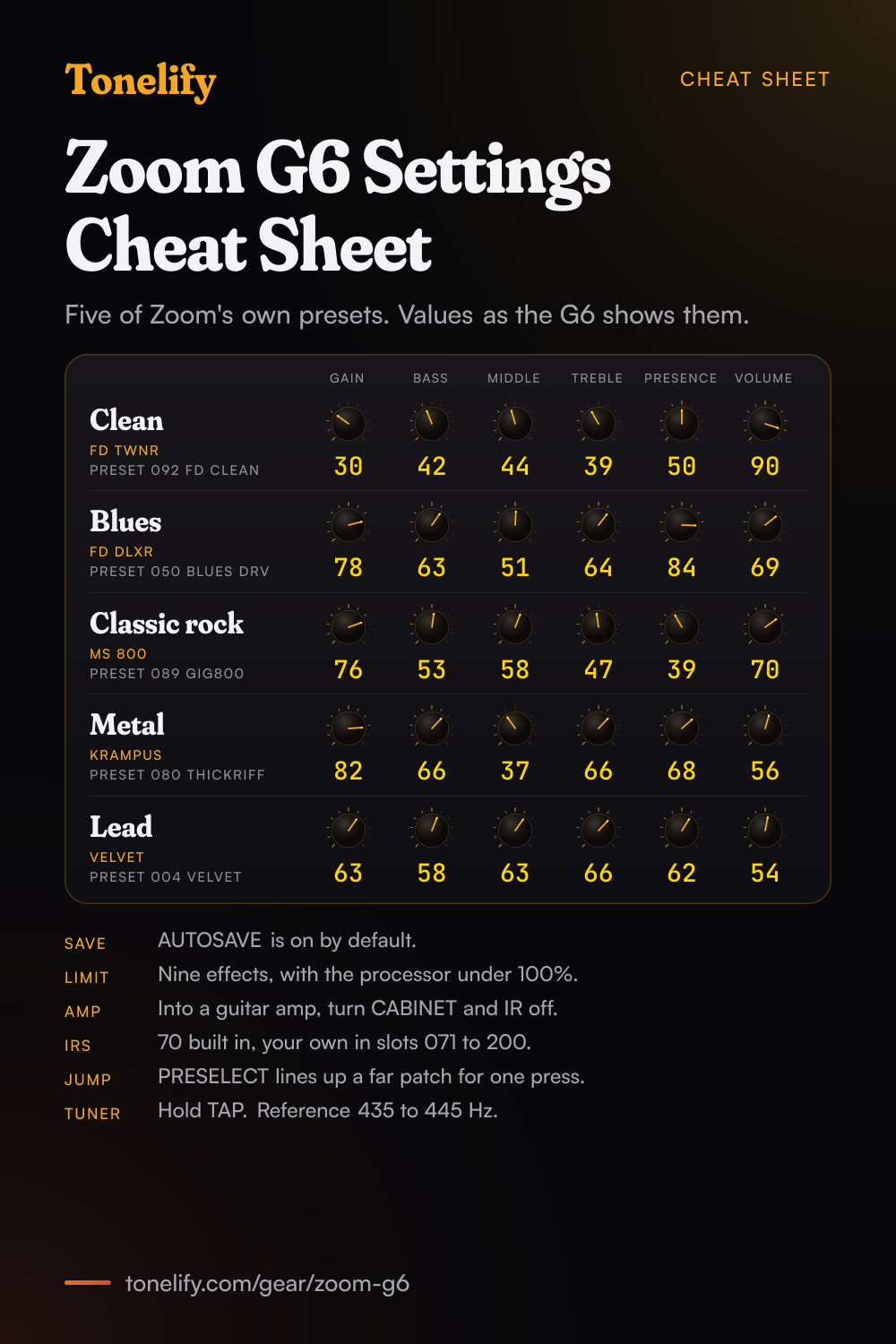
The clean, blues, classic rock, metal and lead settings from this page, together on one sheet with short tips. The PDF prints on white; the PNG is the dark version for your phone.
Settings from Zoom's presets on the Zoom G6
Values as the unit's screen shows them, on its own scale; each drawn knob shows that value's share of the range. They are Zoom's own numbers, from its factory presets: pick the amp model first, then move one control at a time from here.
Clean
Zoom's preset 092 FD Clean, a simple clean sound it suits to backing play. The amp is FD TWNR, Zoom's model of the Fender '65 Twin Reverb, at Gain 30, Bass 42, Middle 44, Treble 39, Presence 50 and Volume 90, with BRIGHT off; Zoom notes the bright switch is most noticeable at lower gain settings. In front of the amp, OptComp, an optical compressor, is on at Drive 5, and after it come an IR and LMT-76, Zoom's model of the UREI 1176LN limiter. ChromeWah and a Room reverb sit in the chain switched off. Zoom's 091 R&B Clean uses the same amp with Treble up at 68, and 090 45 Clean uses MS 45os, its model of the Marshall JTM 45 Offset.
- Gain 30
- Bass 42
- Middle 44
- Treble 39
- Presence 50
- Volume 90
Zoom's own values. OptComp before the amp, LMT-76 after it.
Edge of breakup and blues
Zoom's preset 050 Blues DRV, a drive sound it made for blues backing parts. FD DLXR, Zoom's model of the Fender '65 Deluxe Reverb, on its NORMAL input, at Gain 78, Bass 63, Middle 51, Treble 64, Presence 84 and Volume 69. A Spring reverb is on before the amp with Mix at 10, and GoldDrive, which Zoom describes as a model of a famous gold overdrive boutique pedal, waits off in front of it for more push. For the solo, Zoom's 051 Blues LEAD runs the same amp at Gain 69 with TS Drive, its simulation of the Ibanez TS808, on at Gain 20. 010 MudBlues uses MUDDY, one of Zoom's own amps, and Zoom says it covers backing to solo parts from the guitar's volume knob.
- Gain 78
- Bass 63
- Middle 51
- Treble 64
- Presence 84
- Volume 69
Zoom's own values. INPUT on NORMAL, Spring on before the amp.
Classic rock
Zoom's preset 089 Gig800, a crunch sound it suits to rock backing parts. MS 800, Zoom's model of the Marshall JCM800 2203, with INPUT on HI, at Gain 76, Bass 53, Middle 58, Treble 47, Presence 39 and Volume 70. Middle is the highest of the tone controls, which keeps the guitar in the range where rock rhythm parts sit. TS Drive waits off in front of the amp at Gain 0 and VOL 98, so turning it on adds level ahead of the amp more than drive of its own, and a Delay at Time 373 sits after the IR, off, for a fill. Zoom's 084 1959Crunch uses MS 1959, its model of the Marshall 1959 Super Lead 100, with TapeEcho, and 007 ORG Crunch uses ORG120, its model of the Orange Graphic120, for open chords.
- Gain 76
- Bass 53
- Middle 58
- Treble 47
- Presence 39
- Volume 70
Zoom's own values. INPUT on HI, TS Drive in front for a boost.
Metal
Zoom's preset 080 ThickRiff, a high-gain sound it made for metal riffs on humbuckers. The amp is KRAMPUS, one of Zoom's own, which it describes as the solid low range of a modern high gain amp with the brightness of an 80s British amp, at Gain 82, Bass 66, Middle 37, Treble 66, Presence 68 and Volume 56, with Middle well under Bass and Treble. In front of it, MetalWRLD, Zoom's simulation of the BOSS Metal Zone, runs at only Gain 21, followed by LMT-76 and a six-band Gt GEQ. ZNR, Zoom's noise reduction, sits right before the amp with THRSH, which Zoom says adjusts its sensitivity, at 68; Zoom says ZNR cuts noise during pauses in playing without affecting the tone. For a Rectifier sound, 016 RectoPan uses Recti ORG, Zoom's model of the Mesa Boogie Dual Rectifier's Orange channel, and for 7 and 8 string guitars, 015 Djent7 uses 7 HEAVEN.
- Gain 82
- Bass 66
- Middle 37
- Treble 66
- Presence 68
- Volume 56
Zoom's own values. MetalWRLD in front at Gain 21, ZNR before the amp.
Lead
Zoom's preset 004 VELVET, which it calls a thick and creamy lead sound for flowing solos. VELVET is one of Zoom's own amps, built to balance the response of the wound and plain strings so that one sound covers lead and backing. Gain 63, Bass 58, Middle 63, Treble 66, Presence 62 and Volume 54. TS Drive is on in front of the amp at Gain 4 and VOL 84, and TapeEcho after it at Time 389, F.B 37 and Mix 23, with Tail ON, which Zoom says lets the echoes carry on after the effect is turned off. In EFFECT BOARD mode, below, the boost and the echo can each go on a footswitch. For more gain, Zoom's 056 Prog.M LD pairs KRAMPUS with P-P Delay, and 079 ExtraLD pairs XtasyBlue, its model of the Bogner Ecstasy's Blue channel, with GoldDrive.
- Gain 63
- Bass 58
- Middle 63
- Treble 66
- Presence 62
- Volume 54
Zoom's own values. TS Drive in front, TapeEcho after with Tail ON.
Nine effects and the processor
A G6 patch memory takes up to nine effects in any order, but only as many as keep the processor under 100%. The processing status shows on the screens where you pick a category and an effect, and an effect that would push it over is refused, with PROCESS OVERFLOW on the display: change or delete another amp or effect to make room. Large effects, the ones drawn bigger on the EFFECT BOARD and EDIT EFFECTS screens, use two of the nine spaces and have two pages of parameters, and the send and return counts as one. Zoom's specifications put the total as nine effects, or seven effects and an amp. Unlike Zoom's smaller G2 Four, the G6 keeps the amp and the speaker cabinet as separate effects, and Zoom's presets put an IR after the amp in place of a cabinet. To build a patch from scratch, the patch creation screen starts you with four effect slots, DYNMCS/FILTER, DRIVE, MOD and DELAY/REVERB, plus an amp and a speaker cabinet. Drag an effect's icon to move it, and touch the indicator above it to switch it: it lights red when the effect is on.
Four play modes
The PLAY MODE switch, left of the screen, steps through four modes, and the one selected lights; each sets what the screen and the four footswitches do. LOOPER puts REC/PLAY, STOP, UNDO/REDO and CLEAR on the switches. MEMORY shows a bank and calls up its four patch memories, one switch each. BANK/PATCH shows the patch name in large letters, and the switches step down and up through banks and patches; with PRESELECT on, added in firmware 2.00, you line up a patch far from the current one while the current sound keeps playing, then press the PLAY MODE switch to change to it. EFFECT BOARD shows every effect and the amp in the patch, and you touch the ones you want on the switches: they are assigned from the left, whatever order you touch them in, and the base of each switch takes the colour of its effect's category. Some effects, such as Hold DLY, add special footswitch functions, like an effect that is on only while the switch is held. A switch's on or off state is saved with the patch, but the state set by pressing the front of the expression pedal is not. TAP sets the tempo and, held, opens the tuner.
Chasing one song? Name it and the matcher writes that song's settings for the Zoom G6.
Zoom G6 amp list
Zoom's effect list has 22 amps: 15 that model a named amp, one described only as an early class A British combo, and 6 of Zoom's own. Every one has GAIN, BASS, MIDDLE, TREBLE, PRESENCE and VOLUME, each 0 to 100 unless the middle column says otherwise, and that column gives the controls a model adds. On the G6 the amp and the speaker cabinet are separate effects: the cabinets, and the impulse responses that can take their place, are in the next list.
| Amp | Controls it adds | What Zoom says it is |
|---|---|---|
| MS 800 | INPUT: LO or HI | Marshall JCM800 2203 |
| MS 1959 | Two inputs: GAIN sets input 1 and INPUT2 input 2, each OFF to 100 | Marshall 1959 Super Lead 100 |
| MS 45os | Two inputs: GAIN sets input 1 and INPUT2 input 2, each OFF to 100 | Marshall JTM 45 Offset |
| FD TWNR | BRIGHT on or off; SPEED of the modulation | Fender '65 Twin Reverb |
| FD B-MAN | INPUT: the NORMAL or BRIGHT channel | Fender '59 Bassman |
| FD DLXR | INPUT: the NORMAL or VIBRATO channel; SPEED of the modulation | Fender '65 Deluxe Reverb |
| FD MASTER | FAT on or off | Fender ToneMaster, B channel |
| UK 30A | CUT, a tone control; SPEED of the modulation | An early class A British combo amp |
| BG MK1 | GAIN1 and GAIN2, the first and second gain stages | Mesa Boogie Mark I combo |
| BG MK3 | GAIN1 and GAIN2, the first and second gain stages | Mesa Boogie Mark III combo |
| XtasyBlue | STRCT: LO or HI | Bogner Ecstasy, Blue channel |
| HW 100 | INPUT: the NORMAL or BRILL channel | Hiwatt Custom 100 |
| Recti ORG | MODE: VNTG or MDRN | Mesa Boogie Dual Rectifier, Orange channel |
| ORG120 | INPUT: LO or HI; COLOR 1 to 6 | Orange Graphic120 |
| DZ DRV | DEEP, which adds low end, and MID CUT | Diezel Herbert, channel 2 |
| MATCH30 | Two channels: GAIN and GAIN2, each OFF to 100; CUT, a tone control | Matchless DC-30 |
| KRAMPUS | None | Zoom's own: the solid low range of a modern high gain amp with the brightness of an 80s British amp |
| REDLOOM | None | Zoom's own: the simple tone of early guitar amps with the overtones of a small 60s tube amp, for rhythm |
| VELVET | None | Zoom's own: a smooth amp that balances wound and plain strings, for lead and backing without switching tones |
| MUDDY | None | Zoom's own: a vintage style amp with natural crunch, for blues and rock |
| 7 HEAVEN | None | Zoom's own: a very tight low end for 7 and 8 string guitars and metal |
| POLLEX | None | Zoom's own: a djent style metal sound for extreme drop tunings, also for slap playing |
Zoom G6 cabinet list
The CABINET category has 22 cabinets, one for each amp. Each has a MIC switch, which Zoom says to set OFF when the G6 feeds a guitar amp and ON for headphones or monitor speakers, a blend between a Shure SM57 and a Sennheiser MD421 that only works with MIC on, and Hi and Lo. The IR effect can take a cabinet's place: the G6 ships with 70 impulse responses in slots 001 to 070 and takes your own in 071 to 200. Zoom's factory presets use an IR rather than a cabinet.
| Cabinet | What Zoom says it models |
|---|---|
| MS4x12 | Marshall 1960 A-type, four 12in Celestion speakers |
| MS4x12GB | Marshall 1960 B-type, four 12in Celestion G12M Greenbacks |
| MS4x12AL | Marshall JTM45 Offset half stack cabinet, four 12in Celestion G12 Alnicos |
| FD2x12 | Fender '65 Twin Reverb, two 12in Jensens |
| FD-B4x10 | Fender '59 Bassman, four 10in Jensens |
| FD-DX1x12 | Fender '65 Deluxe Reverb, one 12in Jensen C-12K |
| FD MA2x12 | Fender ToneMaster 2x12, two 12in Celestion G12-80s |
| UK2x12 | An early British combo, two 12in Celestion Alnicos |
| MK1 1x12 | Mesa Boogie Mark I, one 12in Altec 417-8H |
| MK3 1x12 | Mesa Boogie Mark III, one 12in Celestion Black Shadow |
| BGN4x12 | Bogner Ecstasy, four 12in Celestions |
| HW4x12 | Hiwatt SE-4123, four 12in Fanes |
| RCT4x12 | Mesa Boogie Recto Standard Slant Armor, four 12in Celestion Vintage 30s |
| ORG4x12 | Orange PPC412, four 12in Celestion Vintage 30s |
| DZ4x12F | Diezel 412F, four 12in Celestion Vintage 30s |
| MA2x12 | Matchless DC-30, a customised 12in Celestion G12H30 and a 12in Celestion G12M Greenback |
| KP4x12 | The KRAMPUS cabinet, four 12in speakers |
| RED4x10 | The REDLOOM cabinet, four 10in speakers |
| VT4x12 | The VELVET cabinet, four 12in speakers |
| MD1x12 | The MUDDY cabinet, one 12in speaker |
| 7H4x12 | The 7 HEAVEN cabinet, four 12in speakers |
| PL4x12 | The POLLEX cabinet, four 12in speakers |
Zoom G6 effects list
A patch memory holds up to nine effects in any order, as long as the processor stays under 100%; Zoom's specifications put it as nine effects, or seven effects and an amp. These are the 132 effects in Zoom's list, plus the three send and return types for an external effect, which count as one of the nine. Where Zoom names what an effect models, it is in brackets. Zoom's product page also lists three effects added through Guitar Lab since December 2025, OverDrive, BitCrush and DynaDelay, which are not in this list.
- DYNAMICS (10)
- Comp (MXR Dyna Comp), RackComp, SlowATTCK, ZNR (Zoom's noise reduction), MuteSW, GrayComp (Ross Compressor), NoiseGate, OptComp, BlackOpt (Demeter COMP-1 Compulator), LMT-76 (UREI 1176LN)
- FILTER (14)
- AutoWah, Resonance, Cry, SeqFLTR (the flavour of a Z.Vex Seek-Wah), Gt GEQ, Gt GEQ7, St Gt GEQ, ParaEQ, EG FLTR, RndmFLTR, LowPassFL, Exciter, Step, LFO FLTR
- DRIVE (26)
- TS Drive (Ibanez TS808), EP Stomp (Maestro Echoplex preamp), RC Boost, GoldDrive, SweetDrv, DYN Drive, RedCrunch, MetalWRLD (BOSS Metal Zone), TB MK1.5, OctFuzz, SpotBoost, Aco.Sim, NYC Muff (Electro-Harmonix Big Muff Pi), HG THRTTL (Mesa Boogie Throttle Box), BG GRID (Mesa Boogie Grid Slammer), TS+Boost, RedCR+BST, DIST 1 (BOSS DS-1), Squeak (ProCo RAT), UpOctBSTR, OutputBST (the Output Booster of Zoom's G5n, improved), DIST Plus (MXR Distortion+), Zen O.DRV (Hermida Audio Zendrive), VioletDST (Suhr Riot Reloaded), WaveSHPR, Razor DRV
- MODULATION (26)
- Tremolo, Chorus, StereoCho, Phaser, VinFLNGR (similar to an MXR M-117R), TheVibe, Vibrato, SwellVibe, Octave, RingMod, Detune, PitchSHFT, PolyShift, MonoPitch, HPS, Kick FLNG, Slicer, CloneCho (Electro-Harmonix Small Clone), SuperCho (BOSS CH-1 Super Chorus), StonePha (Electro-Harmonix Small Stone), CoronaTri (TC Electronic Corona Tri-Chorus), BendCho, AnalogCho, WarpPhase, Duo Phase, GEMINOS
- SFX (4)
- Bomber, AutoPan, LoopRoll, HotSpice (a sitar tone)
- DELAY (17)
- Delay, AnalogDly, TapeEcho, ReverseDL, ModDelay, Hold DLY, P-P Delay, FilterDly, Dual DLY, Pitch DLY, SlapBackD, A-Pan DLY, PhaseDly, TapeEcho3 (Maestro Echoplex EP-3), ICE Delay, SlwAtkDly, SoftEcho
- REVERB (17)
- Air, Room, BrghtRoom, Hall, BrghtHall, HD Hall, Spring, FD Spring (the spring reverb of the '65 Fender Twin Reverb), Plate, EarlyRef, SpaceHole, Church, Ambience, ParticleR, Chamber, GateRev, HoldVerb
- PEDAL (18)
- PDL Vol, BlackWah (the Cry Baby), ChromeWah (a British wah with a chrome finish), WAH100 (an Ibanez wah), PDL Pitch, PDL MnPit, PDL Vibe, PDL Drive, PDL PHSR, PDL Delay, PDL Rev, OSC Echo, VoiceWah, PDL Roto, P-BitCRSH, PDL FLNGR, PDL Reso, Output VP
- SEND/RETURN (3)
- FxLoop, Send, Return
Zoom G6 preset list
The G6 stores 240 patch memories in 60 banks of four. Zoom's 100 presets fill banks A to Y, four to a bank. Zoom voices the presets for a PA system, powered monitors or headphones: into a guitar amp, it says to turn off the CABINET and the IR and set the amp's EQ to taste. These are the names in Zoom's Patch Memory List, Preset Ver. 1.10.
- Bank A: ZOOM AMPS
- 001 KRAMPUS, 002 POLLEX, 003 REDLOOM, 004 VELVET
- Bank B: CLASSIC
- 005 DLXTremolo, 006 OctFuzz, 007 ORG Crunch, 008 Unchain
- Bank C: CRUNCH
- 009 MS RoomMic, 010 MudBlues, 011 PugetPsy, 012 MasterDRV
- Bank D: DRIVE
- 013 MassiveDZ, 014 XtasyDRV, 015 Djent7, 016 RectoPan
- Bank E: CLEAN
- 017 TransAC, 018 MATCH Cln, 019 CntryCLN, 020 WorshipAMB
- Bank F: US ROCK
- 021 PanOHalen, 022 The 'Cuda, 023 Exit Light, 024 FlyHigh
- Bank G: UK ROCK
- 025 SOS Bottle, 026 RunRunRun, 027 SultanOJaz, 028 RedFrames
- Bank H: LEGEND
- 029 PlainCrazy, 030 TheTower, 031 Blisters, 032 IfYouWanna
- Bank I: R&R
- 033 YouSoGotIt, 034 TheOne, 035 Odd Brew, 036 SonicRokit
- Bank J: METAL
- 037 WildTrain, 038 StukByJira, 039 StukMoshin, 040 Scopicane
- Bank K: POPS
- 041 Pops CLN, 042 Pops DRV, 043 POPS LEAD, 044 POPS PAD
- Bank L: FUSION
- 045 Fusion CLN, 046 Fusion DRV, 047 FusionLEAD, 048 Fusion AMB
- Bank M: BLUES
- 049 Blues CLN, 050 Blues DRV, 051 Blues LEAD, 052 Blues FUZZ
- Bank N: PROG.M
- 053 Prog.M CLN, 054 Prog.M DRV, 055 Prog.M DBL, 056 Prog.M LD
- Bank O: VINTAGE
- 057 Rockabilly, 058 EU Boogie, 059 60's, 060 HazyFuzz
- Bank P: JAZZ-FUNK
- 061 Jazz CLN, 062 70'sRhythm, 063 Sparky, 064 FunkyWah
- Bank Q: ALT-ROCK
- 065 Alt.HW, 066 SwVibClean, 067 DC.Crunch, 068 MudFuzz
- Bank R: AMBIENT
- 069 AMB PAD, 070 MoonSnow, 071 Sequencer, 072 Polyor
- Bank S: COMBO AMPS
- 073 Red Hot, 074 UK Combo, 075 NYC Blue, 076 TXS Blues
- Bank T: STACK AMPS
- 077 PunchLine, 078 PLX-DST, 079 ExtraLD, 080 ThickRiff
- Bank U: DELAY
- 081 PulseDelay, 082 HW Dotted, 083 Andromeda, 084 1959Crunch
- Bank V: SWAY
- 085 Swellvibe, 086 ArpMachine, 087 UK Clean, 088 StayWavy
- Bank W: VERSATILE
- 089 Gig800, 090 45 Clean, 091 R&B Clean, 092 FD Clean
- Bank X: HEAVY EFX
- 093 Endorphin, 094 OctDown, 095 FuzzyTail, 096 DarkMatter
- Bank Y: MAGICAL
- 097 ICE Clean, 098 SciFiSyn, 099 Memories, 100 BOMBER!!!
Zoom G6 specifications
- Released
- 2020
Zoom G6 questions
What amps are in the Zoom G6?
Zoom's effect list has 22: MS 800 (Marshall JCM800 2203), MS 1959 (1959 Super Lead 100), MS 45os (JTM 45 Offset), FD TWNR (Fender '65 Twin Reverb), FD B-MAN ('59 Bassman), FD DLXR ('65 Deluxe Reverb), FD MASTER (ToneMaster, B channel), UK 30A (an early class A British combo), BG MK1 and BG MK3 (Mesa Boogie Mark I and Mark III), XtasyBlue (Bogner Ecstasy, Blue channel), HW 100 (Hiwatt Custom 100), Recti ORG (Dual Rectifier, Orange channel), ORG120 (Orange Graphic120), DZ DRV (Diezel Herbert, channel 2) and MATCH30 (Matchless DC-30), plus six of Zoom's own: KRAMPUS, REDLOOM, VELVET, MUDDY, 7 HEAVEN and POLLEX. Each has a matching cabinet among the 22 in the CABINET category, a separate effect on the G6.
How many effects can the Zoom G6 use at once?
Up to nine per patch memory, in any order, as long as the processor stays under 100%. Large effects take two of the nine spaces and the send and return takes one, and an effect that would go over 100% is refused with PROCESS OVERFLOW. Zoom's specifications give it as nine effects, or seven effects and an amp. One line of Zoom's product page speaks of patches of up to seven effects; the manual and the specifications both say nine.
How do you use the Zoom G6 with a guitar amp?
Zoom voices its presets for a PA system, powered monitors or headphones. Into a guitar amp, its Patch Memory List says to turn off both the CABINET and the IR in the patch and then set the amp's EQ to taste. If you keep a cabinet, set its MIC parameter OFF: Zoom says MIC OFF is optimised for amp modelling into a guitar amp and MIC ON for headphones or monitor speakers. A single amp goes to the LEFT/MONO [PHONES] output. The OUTPUT EQ, opened from the Menu Screen, adjusts the G6's overall tone in four bands and stays the same when you change patch.
Can you load IRs into the Zoom G6?
Yes. The G6 ships with 70 impulse responses in slots 001 to 070, and takes your own in 071 to 200: WAV files at 44.1 to 192 kHz and 16, 24 or 32 bits, copied to the G6_IR folder on an SD card the G6 has formatted, then assigned to a slot from the Menu Screen and named. The Handy Guitar Lab app can also import IRs from an iPhone, from places like Dropbox and iCloud. In a patch, the IR effect has LO, HI, BAL and VOL; set BAL below 0 and the polarity of the effect sound is reversed.
How do you save a patch on the Zoom G6?
With AUTOSAVE on, the default, changes are saved as you make them. With it off, a mark at the top right of the screen shows that the patch differs from its saved version: touch it, or the save icon on the Menu Screen, then touch SAVE twice to overwrite, or swipe to another location, touch it and touch SAVE twice to save there. The G6 holds 240 patch memories in 60 banks of four. ALL INITIALIZE, in the system settings, puts every patch back to its factory state, so back up first.
What are the play modes on the Zoom G6?
Four, stepped through with the PLAY MODE switch left of the screen. LOOPER puts the looper on the footswitches, MEMORY puts the four patches of a bank on them, BANK/PATCH steps through banks and patches with the name in large letters, and EFFECT BOARD turns the patch's effects on and off. Even with the Menu Screen open, the play mode stays active on the footswitches, and a loop keeps playing when you switch to another mode.
What does PRESELECT do on the Zoom G6?
It lets you jump to a patch memory far from the current one without hearing the ones in between. Turn it on from its icon on the Menu Screen, then in BANK/PATCH mode use the footswitches to pick the bank and patch: the screen shows the current patch and the next one, and the sound does not change until you press the PLAY MODE switch to confirm. PRESELECT came with firmware 2.00 in December 2021.
How long is the Zoom G6 looper?
Without an SD card, 2 to 45 seconds in stereo or 2 to 90 in mono. With an SD card it records from 2 seconds to 2 hours, in stereo only, and saves each loop as a LOOPER file in the G6_LOOPER folder, where your own 44.1 kHz, 16-bit stereo audio files can be loaded as loops too. The recording time is MANUAL or 1 to 64 quarter notes at the master tempo, and the looper sits before or after the effects: placed before them, a recorded loop can be reshaped by changing the patch.
Can the Zoom G6 be used as an audio interface?
Yes: over its USB Micro-B port it is a 2-in, 2-out interface at 44.1 kHz and 32 bits, which sends the processed sound to a computer. Windows needs the G6 Driver from Zoom's site; a Mac, iPhone or iPad needs none, and a device with a Lightning connector needs Apple's Lightning to USB Camera Adapter. RECORDING GAIN sets the level sent to the computer, from -6 to +6 dB, and MONITOR BALANCE blends the computer's playback with the G6's own sound. Use a cable that carries data.
Which apps work with the Zoom G6?
Two. Guitar Lab, for Mac and Windows over USB, manages patch memories and edits and adds effects, and keeps the G6's firmware up to date when connected; Zoom's product page lists three effects it has added since December 2025: OverDrive, BitCrush and DynaDelay. Handy Guitar Lab for G6, on the App Store, controls the G6 from an iPhone over Bluetooth, which needs Zoom's BTA-1 adapter in the REMOTE connector, fitted before the G6 is switched on. Handy Guitar Lab support came with firmware 1.30 in April 2021.
How does the expression pedal work on the Zoom G6?
The built-in pedal works the patch's PEDAL category effect, such as PDL Vol or one of the wahs, and pressing its front turns that effect on and off; that state is not saved with the patch. If the pedal does too little or too much, run PEDAL CALIBRATION from the Menu Screen. Zoom's FP02M pedal plugs into CONTROL IN, and with EXTERNAL PEDAL turned on a patch can hold a second PEDAL effect, marked EXT, for it.
How does the Zoom G6 tuner work?
Hold TAP, or touch the tuner icon on the Menu Screen, and play an open string. The reference pitch for middle A runs from 435 to 445 Hz. Besides CHROMATIC there are GUITAR, which covers a 7th string tuned to B, OPEN A, OPEN D, OPEN E, OPEN G and DADGAD, and all of them except CHROMATIC can be tuned one, two or three semitones flat. The tuner can mute the output while you tune.
What power does the Zoom G6 need?
Zoom's AD-16 adapter, 9V DC at 500 mA, centre negative, which comes in the box. Zoom's specifications list no other power source and say USB bus power is not supported. ECO mode switches the G6 off after 10 hours with no use, and can be turned off. The unit is 418 mm wide, 228 mm deep and 65 mm high, and weighs 1.94 kg.
What are the best Zoom G6 settings for metal?
Zoom's own answer is preset 080 ThickRiff: KRAMPUS at Gain 82, Bass 66, Middle 37, Treble 66, Presence 68 and Volume 56, with MetalWRLD in front at Gain 21, LMT-76, a six-band Gt GEQ, and ZNR right before the amp. These are Zoom's numbers from its Patch Memory List, voiced for a PA or headphones. For a Rectifier sound try 016 RectoPan, on Recti ORG, and for 7 and 8 string guitars 015 Djent7, on 7 HEAVEN.
When did the Zoom G6 come out?
Zoom's firmware history dates version 1.00, the mass production firmware, to December 2020. Version 1.30 added support for Handy Guitar Lab in April 2021, and version 2.00, in December 2021, added PRESELECT and one-touch access to the edit screens. This page follows the manual and effect list for firmware 2.00 and the Patch Memory List for Preset Ver. 1.10.
How do you build a patch on the Zoom G6?
Pick the amp model first, then set its controls, then add the blocks in signal-chain order: drive before the amp, time and modulation after it. A patch built the other way around ends up compensating for the wrong stage. Tonelify returns the model, the order and the parameters together.
Does Tonelify support the Zoom G6?
Yes. Name it in the tone matcher along with the song you are chasing and the settings come back adapted to it. Gear does not need to be in the catalog for a match to run.
Sources
Panel, specifications and dates checked against these on .
- Zoom: G6 Operation Manual (PDF)
- Zoom: G6 Effect Types and Parameters (PDF)
- Zoom: G6 Patch Memory List, Preset Ver. 1.10 (PDF)
- Zoom: Handy Guitar Lab for G6 Operation Manual (PDF)
- Zoom: G6 Firmware Update Guide (PDF)
- Zoom: G6 product page and specifications
- Zoom: G6 support and downloads, with the firmware version history
More Zoom gear
Similar multi-effects units from other makers
Settings for the song you are chasing
Name a song and Tonelify reads the documented rig behind the recording, then writes the settings for a rig with the Zoom G6 in it. A first plan starts with 7 days free, $0 today.