
Boss Katana:GO settings
BOSS's headphone amp that plugs straight into the guitar or bass: five guitar amp types with a variation each, three bass types, 30 memories per mode and the amp knobs set in the BOSS Tone Studio app, with Bluetooth audio, USB-C audio and up to five hours on its battery.
⚡ Match a tone on this amp- Gain (BOSS Tone Studio)
- Volume (BOSS Tone Studio)
- Bass (BOSS Tone Studio)
- Middle (BOSS Tone Studio)
- Treble (BOSS Tone Studio)
- Presence (BOSS Tone Studio)
- A/B/C buttons
- Multi-function
- Stage Feel
- Volume dial
How do you dial in a specific tone on a Boss Katana:GO?
The Boss Katana:GO is a modelling amp, so a tone match here has two halves: which model or voicing to select, and where to set the controls once it is selected. Getting the second right on the wrong model gets you nowhere. Tonelify picks the voicing first and writes the knob positions against it, using the front panel this unit actually has.
Name the song you are chasing in the tone matcher and Tonelify returns the settings for this exact guitar amp, not the settings the original artist used. Those are two different things: the recording was made on gear most players do not own.
Settings for this amp only ever use controls it actually has, because its front panel is stored in our gear database. You will not be told to set a knob that is not on the amp.
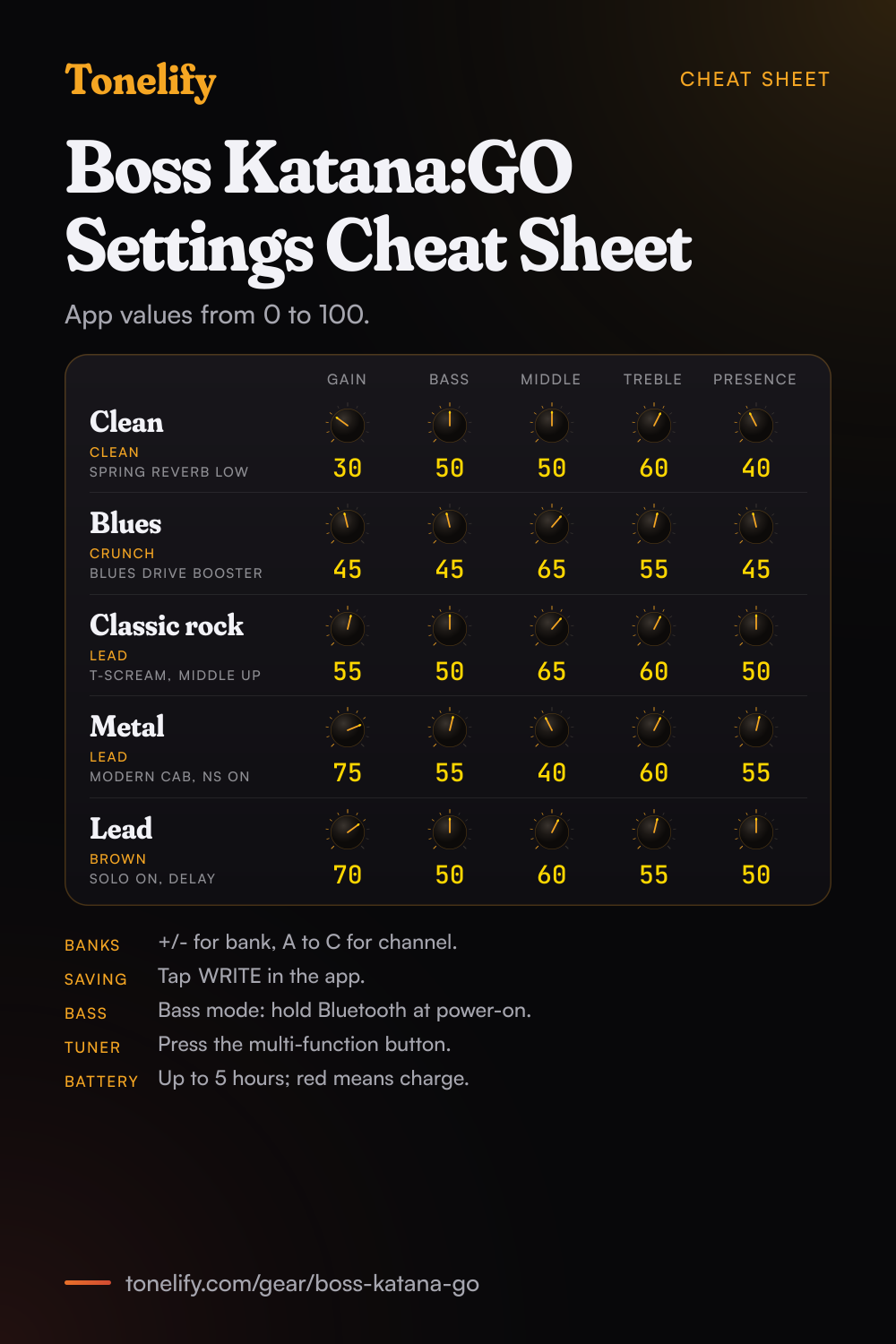
Free download
Printable cheat sheet: PDF and PNG
The clean, blues, classic rock, metal and lead settings from this page, together on one sheet with short tips. The PDF prints on white; the PNG is the dark version for your phone.
Starting settings on the Boss Katana:GO
Positions on a 0 to 10 scale, with 5 at twelve o'clock. They are where to begin, not Boss's numbers: pick the amp type first, then move one control at a time from here.
Where the settings are
The Katana:GO itself has a Volume dial, the A, B and C buttons, a multi-function button for the bank and the tuner, a STAGE FEEL button and a Bluetooth button. The amp's knobs, GAIN, VOLUME, BASS, MIDDLE, TREBLE and PRESENCE, are in the BOSS TONE STUDIO for KATANA:GO app for iOS and Android, each from 0 to 100. Slide up or down to edit a value, or long-press to type a number. Tap WRITE to save the edit to a memory on the unit. The panels below are those 0 to 100 values. These are starting points, not BOSS's numbers.
Clean
CLEAN, which BOSS calls a clean and natural sound. Gain 30, Bass 50, Middle 50, Treble 60, Presence 40, with CAB RESONANCE on VINTAGE, the warm and sweet sound of a vintage cabinet. Add REVERB on SPRING, the sound of a guitar amp's built-in spring reverb, at a low EFFECT LEVEL. Turn the Volume dial right down before you switch on: BOSS warns the Katana:GO can make a loud sound at power-up.
- Gain 30
- Bass 50
- Middle 50
- Treble 60
- Presence 40
SPRING reverb low, CAB RESONANCE on VINTAGE.
Edge of breakup and blues
CRUNCH, a fat crunch that BOSS says responds to the nuances of your picking. Gain 45, Bass 45, Middle 65, Treble 55, Presence 45. Set GAIN where soft picking stays clean and digging in breaks up. For the push, turn on BOOSTER with BLUES DRIVE, the crunch of the BOSS BD-2, at a low DRIVE: the booster sits in front of the amp the way a pedal would.
- Gain 45
- Bass 45
- Middle 65
- Treble 55
- Presence 45
BOOSTER on BLUES DRIVE, low DRIVE.
Classic rock
LEAD, which BOSS says covers a wide range from crunch to high gain depending on the GAIN setting, kept in the middle of that range. Gain 55, Bass 50, Middle 65, Treble 60, Presence 50. Keep MIDDLE up: a scooped sound thins out quickly in headphones. T-SCREAM, BOSS's model of an Ibanez TS-808, in the BOOSTER block at a low DRIVE adds bite to the rhythm part without more GAIN.
- Gain 55
- Bass 50
- Middle 65
- Treble 60
- Presence 50
T-SCREAM in BOOSTER, low DRIVE.
Metal
LEAD at high gain. Gain 75, Bass 55, Middle 40, Treble 60, Presence 55, with CAB RESONANCE on MODERN, which BOSS describes as a modern cabinet with a tight low end. CONTOUR TYPE1 is BOSS's setting for heavy power chords with a low-end boost. Turn on NS and raise THRESHOLD until the hiss between riffs goes, but not so far that quiet notes vanish: BOSS warns a high threshold can cut the sound when the guitar's volume is down. For something older, METAL ZONE, BOSS's MT-2, sits in the BOOSTER block.
- Gain 75
- Bass 55
- Middle 40
- Treble 60
- Presence 55
CAB RESONANCE MODERN, CONTOUR TYPE1, NS on.
Lead
BROWN, which BOSS calls a lead sound with an edge inherited from the BOSS WAZA brown sound. Gain 70, Bass 50, Middle 60, Treble 55, Presence 50. Turn on the SOLO block and set SOLO LEVEL a little above the rhythm sound so the solo lifts. CONTOUR TYPE3, which BOSS says cuts the highs and mids at the right point for solos, smooths the top end. Add DELAY on ANALOG, BOSS's mild analog delay, around 400 ms.
- Gain 70
- Bass 50
- Middle 60
- Treble 55
- Presence 50
SOLO on, CONTOUR TYPE3, ANALOG delay.
Chasing one song? Name it and the matcher writes that song's settings for the Boss Katana:GO.
Boss Katana:GO amp types
Guitar mode has five amp types, and the VARIATION switch gives each one a second voice, which is how BOSS counts 10 amp types. Bass mode has three, which BOSS says come straight from the Katana Bass amps. Every guitar type has GAIN, VOLUME, BASS, MIDDLE, TREBLE and PRESENCE from 0 to 100, plus a CAB RESONANCE setting.
| Mode | Amp type | What BOSS says it is |
|---|---|---|
| Guitar | BROWN | A lead sound with an edge inherited from the BOSS WAZA brown sound |
| Guitar | LEAD | Covers crunch to high gain, depending on the GAIN setting |
| Guitar | CRUNCH | A fat crunch that responds to the nuances of your picking |
| Guitar | CLEAN | A clean and natural sound; with BOOSTER, usable for solo or lead |
| Guitar | ACOUSTIC | A dedicated acoustic guitar amp for plugging in an acoustic guitar |
| Guitar | VARIATION (OFF, ON) | Switches each type to its variation |
| Guitar | CAB RESONANCE: VINTAGE | The warm and sweet sound of a vintage cabinet |
| Guitar | CAB RESONANCE: MODERN | A modern cabinet with a tight low end |
| Guitar | CAB RESONANCE: DEEP | A powerful low end with a distinctive edge |
| Bass | VINTAGE, FLAT, MODERN | Ported from the Katana Bass amps, with a three-way SHAPE setting |
Boss Katana:GO booster and drive types
The BOOSTER block sits in front of the amp and holds BOSS's boosts, overdrives, distortions and fuzzes. DRIVE runs from 0 to 120, TONE and BOTTOM from -50 to +50, and SOLO SW gives a separate solo level.
| Type | What BOSS says it is |
|---|---|
| CLEAN BOOST | A booster that also gives a punchy clean tone on its own |
| TREBLE BOOST | A booster with bright characteristics |
| MID BOOST | A midrange booster, suited to solos in front of the preamp |
| CRUNCH OD | A crunch with an added element of amp distortion |
| BLUES DRIVE | The crunch of the BOSS BD-2 |
| OVERDRIVE | Models the BOSS OD-1: sweet, mild distortion |
| NATURAL OD | An overdrive with a natural feel |
| WARM OD | A warm overdrive |
| TURBO OD | The high-gain overdrive of the BOSS OD-2 |
| T-SCREAM | Models an Ibanez TS-808 |
| DISTORTION | A basic, traditional distortion |
| FAT DS | A thick distortion |
| DST+ | Models an MXR DISTORTION+ |
| GUV DS | Models a Marshall GUV'NOR |
| RAT | Models a Proco RAT |
| METAL ZONE | The BOSS MT-2, from old-style to slash metal |
| METAL DS | A distortion for heavy riffs |
| 60S FUZZ | Models a FUZZFACE |
| MUFF FUZZ | Models an Electro-Harmonix Big Muff |
| OCT FUZZ | A fuzz with rich harmonic content |
| HM-2 | The BOSS HM-2: cranked-up distortion with compression |
| METAL CORE | The BOSS ML-2, for high-speed metal riffs |
| CENTA OD | Models a KLON CENTAUR |
Boss Katana:GO effects list
Guitar mode's effect chain runs BOOSTER, MOD, FX, DELAY, DELAY 2, REVERB, SOLO, CONTOUR, PEDAL FX, EQ, EQ2 and NS, a noise suppressor. MOD and FX each take any type from the MOD/FX list, even the same one twice. Bass mode swaps BOOSTER for COMP and DRIVE and adds bass effects.
| Block | Types |
|---|---|
| MOD/FX: modulation | CHORUS, FLANGER, PHASER, UNI-V (a Uni-Vibe model), TREMOLO, VIBRATO, ROTARY, RING MOD, SLICER, PHASER 90E (an MXR EVH-90 model), FLANGER 117E (an MXR EVH-117 model), DC-30 (a Roland DC-30 model) |
| MOD/FX: dynamics, filter, EQ | SLOW GEAR, COMP, LIMITER, T.WAH, AUTO WAH, GRAPHIC EQ (ten bands), PARAMETRIC EQ (four bands) |
| MOD/FX: guitar and pitch | GUITAR SIM, AC.GUITAR SIM, AC. PROCESSOR, WAVE SYNTH, OCTAVE, HEAVY OCTAVE, PITCH SHIFTER, HARMONIST, HUMANIZER |
| DELAY and DELAY 2 | DIGITAL, PAN, STEREO, ANALOG, TAPE ECHO, REVERSE, MODULATE, SDE-3000 (a Roland SDE-3000 model); 1 to 2000 ms |
| REVERB | PLATE, ROOM, HALL, SPRING, MODULATE; 0.1 to 10.0 s |
| CONTOUR | OFF, TYPE1 to TYPE4, with FREQ SHIFT |
| PEDAL FX | PEDAL WAH (CRY WAH, VO WAH, FAT WAH, LIGHT WAH, 7STRING WAH, RESO WAH), WAH 95E (a Dunlop EVH-95 model), PEDAL BEND; played from an EV-1-WL or FS-1-WL |
| EQ and EQ2 | PARAMETRIC EQ or GE-10 (a BOSS GE-10 model), before or after the amp |
| NS | THRESHOLD and RELEASE, 0 to 100 |
What controls does the Boss Katana:GO have?
The Boss Katana:GO has 10 controls on its front panel: Gain (BOSS Tone Studio), Volume (BOSS Tone Studio), Bass (BOSS Tone Studio), Middle (BOSS Tone Studio), Treble (BOSS Tone Studio), Presence (BOSS Tone Studio), A/B/C buttons, Multi-function button, Stage Feel button and Volume dial.
Boss Katana:GO specifications
- Voicings
- Brown, Lead, Crunch, Clean, Acoustic
- Front panel
- Gain (BOSS Tone Studio), Volume (BOSS Tone Studio), Bass (BOSS Tone Studio), Middle (BOSS Tone Studio), Treble (BOSS Tone Studio), Presence (BOSS Tone Studio), A/B/C buttons, Multi-function button, Stage Feel button, Volume dial
- Released
- 2024
What the Boss Katana:GO panel means when you dial it in
It has a presence control, so the top end above the treble band is set separately from the tone stack. That is the control to reach for when a setting sounds close but harsh. Drive and volume have separate knobs, so the amp can sound driven at a volume that is liveable. Where a tone sits between the two is part of the answer, not a detail. The selectable voicings are Brown, Lead, Crunch, Clean and Acoustic. Picking the voicing comes before the knob positions, because the same numbers land somewhere else on each one.
Boss Katana:GO questions
What amps are in the Boss Katana:GO?
Guitar mode has five amp types, BROWN, LEAD, CRUNCH, CLEAN and ACOUSTIC, and a VARIATION switch that gives each a second voice, which makes BOSS's count of 10. Bass mode has VINTAGE, FLAT and MODERN, which BOSS says come straight from the Katana Bass amps. The table below has what BOSS says about each one.
How do you change the amp settings on the Katana:GO?
In the BOSS TONE STUDIO for KATANA:GO app for iOS or Android, connected over Bluetooth. The unit itself has only the Volume dial, the bank and channel buttons, the tuner, STAGE FEEL and Bluetooth. In the app, slide a value up or down or long-press to type it, then tap WRITE, pick a memory and name it to save.
How many presets does the Katana:GO have?
30 memories in guitar mode and 30 in bass mode, all filled with ready-to-play sounds. BOSS arranges them as 10 banks of three channels: press + or - on the multi-function button to change bank and A, B or C to pick the channel. The display shows the bank, channel and memory name.
How do you switch the Katana:GO to bass mode?
Turn the POWER switch off, then turn it on while holding the Bluetooth button. Choose GUITAR or BASS with + or - on the multi-function button and press it once. When the display says to turn off the power, switch it off and on again. It stays in that mode until you change it.
What does STAGE FEEL do on the Katana:GO?
It places the guitar and your Bluetooth music around you in the headphones, like a player on stage. MODE1 puts the amp in front and the music behind; MODE2 puts both behind; CUSTOM, set in the app, lets you move each one and pick a STUDIO or STAGE ambience. OFF turns it off. BOSS says STAGE FEEL is not applied to USB audio.
Can you use Katana amp patches on the Katana:GO?
Yes, in the app. From BOSS TONE EXCHANGE it takes livesets made for the KATANA:GO, the original KATANA and the KATANA Mk II in guitar mode, and for the KATANA BASS in bass mode. BOSS also says it imports Tone Setting data from Katana guitar and bass amps.
Can you play along with music on the Katana:GO?
Yes. Press the Bluetooth button and pick "KATANA:GO AUDIO" on your phone to hear its music through the Katana:GO. Set the balance with the phone's volume, and the overall level with the Volume dial. The app's SESSION screen also plays YouTube videos and songs on your phone, with A to B looping and markers that switch memories as the song plays.
Can the Katana:GO record into a computer?
Yes. Its USB-C port works as an audio interface with the standard driver of the operating system, so no BOSS driver is needed. An iPad or iPhone needs a USB-C adaptor or cable. The app's USB SETTING screen sets the input and output levels, from 0 to 200%, and a LOOPBACK switch. A charge-only USB cable will not carry audio.
How long does the Katana:GO battery last?
Up to five hours of continuous playing, by BOSS's figure, from its rechargeable lithium-ion battery. Charge it from a computer or a USB power adaptor of at least 5 V and 500 mA, with the power on or off; you can play while it charges. The CHARGE indicator is orange while charging, green when full, and red when the battery is low, after which the unit powers down within 30 minutes. BOSS says to recharge it every three months even when you don't use it.
How do you tune with the Katana:GO?
Press the multi-function button once and play a single note; the display shows the note and how far off it is. Press it again, or any other button, to leave the tuner. The reference pitch is set in the app.
Can you use a footswitch with the Katana:GO?
Yes, wirelessly: BOSS's FS-1-WL footswitch and EV-1-WL expression pedal connect over Bluetooth, and the app's WIRELESS PEDAL SETTING screen assigns what they do, such as volume, wah, memory changes and effects on or off. The PEDAL FX wahs and PEDAL BEND are played from those pedals.
Does the Katana:GO have a noise gate?
Yes, the NS block, with THRESHOLD and RELEASE from 0 to 100. Raise THRESHOLD for a noisier guitar, but BOSS warns that a high setting can cut the sound when you play with the guitar's volume turned down.
Is the new Katana:GO different from the first one?
No. BOSS sells the Katana:GO in two outside designs depending on when it was sold, and says the latest has the same sounds and features as the earlier model.
What are the best Katana:GO settings for metal?
Start with LEAD at Gain 75, Bass 55, Middle 40, Treble 60 and Presence 55, with CAB RESONANCE on MODERN, CONTOUR on TYPE1 and NS on. These are starting points rather than BOSS's numbers. For an older metal sound, try METAL ZONE in the BOOSTER block.
How do you factory reset the Katana:GO?
Turn the POWER switch on while holding the A button and the Bluetooth button, then press STAGE FEEL. When the display says to turn off the power, switch it off and on again. A reset also forgets every Bluetooth device, so delete the Katana:GO from your phone and pair it again.
Does Tonelify support the Boss Katana:GO?
Yes, and its front panel is stored, so settings only ever reference controls this guitar amp has: Gain (BOSS Tone Studio), Volume (BOSS Tone Studio), Bass (BOSS Tone Studio), Middle (BOSS Tone Studio), Treble (BOSS Tone Studio), Presence (BOSS Tone Studio), A/B/C buttons, Multi-function button, Stage Feel button, Volume dial. You will not be told to set a knob that is not there.
Sources
Panel, specifications and dates checked against these on .
- BOSS: KATANA:GO Owner's Manual (PDF)
- BOSS: KATANA:GO Parameter Guide (PDF)
- BOSS: Using BOSS TONE STUDIO for KATANA:GO (PDF)
- BOSS: KATANA:GO product page
The manuals are the English files BOSS's owner's manuals page links, read on 16 November 2026; the Parameter Guide is dated 2024. BOSS gives no suggested values, so the five panels are starting points on the app's 0 to 100 scale.
More Boss gear
Similar amps from other makers
Settings for the song you are chasing
Name a song and Tonelify reads the documented rig behind the recording, then writes the settings for the controls the Boss Katana:GO has. A first plan starts with 7 days free, $0 today.