
NUX MG-30 presets and settings
Floor modeller with a colour screen, dedicated knobs and a treadle, shipped with a two-button external footswitch.
⚡ Match a tone on this unitHow do you dial in a specific tone on a NUX MG-30?
A multi-effects unit gives you the whole chain in one box, which means the order of the blocks is as much of the answer as the values inside them. Settings for the NUX MG-30 name the amp model, the block order and the parameters together, rather than handing you numbers with no chain to put them in.
Name the song you are chasing in the tone matcher and Tonelify returns the settings for this exact multi-effects unit, not the settings the original artist used. Those are two different things: the recording was made on gear most players do not own.
Free download
Printable cheat sheet: PDF and PNG
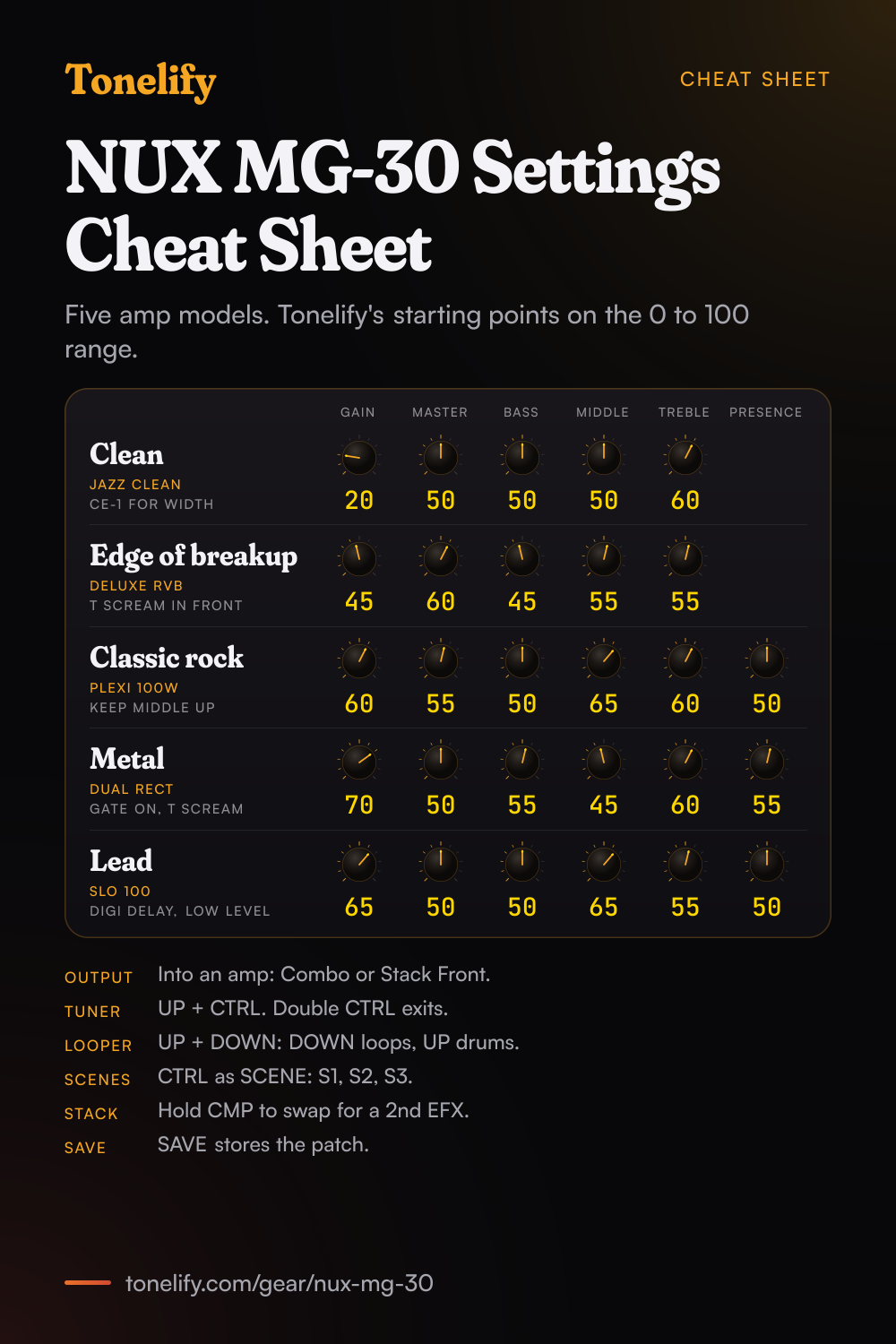
The clean, edge of breakup, classic rock, metal and lead settings from this page, together on one sheet with short tips. The PDF prints on white; the PNG is the dark version for your phone.
Starting settings on the NUX MG-30
Values as the NUX QuickTone app shows them, on the unit's own scale; each drawn knob shows that value's share of the range. They are where to begin, not NUX's numbers: pick the amp model first, then move one control at a time from here.
Pick the output mode first
Before any tone work, hold HOME/GLOBAL to open GLOBAL SETTING and choose OUTPUT MODE, because it decides whether the cab IR runs. There are five: STUDIO DIRECT, COMBO FRONT, STACK FRONT, COMBO REAR and STACK REAR. NUX's manual says that with COMBO FRONT or STACK FRONT the MG-30 bypasses the IR (cab) block, so the speaker of the amp you plug into does that job; the two rear modes are for an amp's FX loop return. STUDIO DIRECT keeps the cab IR on, for active speakers, where NUX's connection drawing suggests FRFR. Each mode has its own LOW, MID and HIGH EQ from -12 to +12 dB, which NUX's manual offers to tweak the global sound for the room, so fix a boomy stage there once rather than in every patch.
Clean
JAZZ CLEAN, first on Aria's parameter sheet. Gain 20, Master 50, Bass 50, Middle 50, Treble 60, with the Bright switch off. NUX's manual shows its knobs on two pages, Gain, Master, Bass and Middle on the first and Treble, Bright and Level on the second; press a knob to turn the page. It has no Bias knob. For width, put CE-1 in the MOD block with Intensity and Depth low. To keep delay and reverb from blurring the chords, NUX's manual says that with a MOD, DLY or RVB block selected, KNOB 3 or KNOB 4 sets the post effects to run in parallel, from the routing screen you reach by holding the 5-way encoder UP.
- Gain 20
- Master 50
- Bass 50
- Middle 50
- Treble 60
Bright switch off. No Bias on this amp.
Edge of breakup and blues
DELUXE RVB, second on Aria's sheet. Gain 45, Master 60, Bass 45, Middle 55, Treble 55, with Bias left where it loads: NUX put a Bias knob on its valve amp models to adjust the warmth of the sound. Dig in and it should break up, play softly and it should clean up. For more push, put T SCREAM in the EFX block, which has Drive, Tone and Level: Drive low and Level up, so it pushes the amp rather than replaces its grit. BRIT BLUES and VIBRO KING are the next amps to try.
- Gain 45
- Master 60
- Bass 45
- Middle 55
- Treble 55
Classic rock
PLEXI 100W, with PLEXI 45, BRIT 800 and 1987 X 50W after it on Aria's sheet. Gain 60, Master 55, Bass 50, Middle 65, Treble 60, Presence 50. Keep Middle up: rock guitar sits in the midrange, and scooping it is the usual reason a patch sounds thin next to a band. Treble, Presence, Bias and Level are on the second knob page.
- Gain 60
- Master 55
- Bass 50
- Middle 65
- Treble 60
- Presence 50
Metal
DUAL RECT. Gain 70, Master 50, Bass 55, Middle 45, Treble 60, Presence 55. Turn on the NOISE GATE block, which has Sensitivity and Decay. For tighter palm mutes, put T SCREAM in EFX with Drive low and take the amp's Gain down a step. The MG-30 can hold two drives at once: NUX's manual lists a hidden exchange, CMP to EFX, which means you can stack CMP and 2 EFXs (OD/DIST) at the same time. DIE VH4, UBER and FIREMAN HBE are the next amps to try.
- Gain 70
- Master 50
- Bass 55
- Middle 45
- Treble 60
- Presence 55
NOISE GATE on. T SCREAM in front before more Gain.
Lead
SLO 100. Gain 65, Master 50, Bass 50, Middle 65, Treble 55, Presence 50, with DIGI DELAY in the DLY block: Effect Level low, a few repeats on Feedback and Delay Time to the song. In preset mode, press KNOB 2 and tap it to set the tempo, or assign the CTRL footswitch to TAP, which NUX's manual says is a global tap tempo. To jump from a rhythm sound to this one inside a single patch, use scenes: assign CTRL to SCENE and it steps through S1, S2 and S3.
- Gain 65
- Master 50
- Bass 50
- Middle 65
- Treble 55
- Presence 50
DIGI DELAY in DLY, Effect Level low.
Chasing one song? Name it and the matcher writes that song's settings for the NUX MG-30.
NUX MG-30 amp models and their knobs
The 30 amp models on the MG-30 control parameter sheet Aria published in February 2021, for firmware 1.02.04, with the knobs each one has. NUX's page now counts 35 amp models, 28 electric, 2 acoustic and 5 bass, and does not name the five added since. This page gives the model names as NUX writes them.
| Amp model | Knobs in the AMP block |
|---|---|
| JAZZ CLEAN | Gain, Master, Bass, Middle, Treble, Bright switch, Level |
| DELUXE RVB | Gain, Master, Bass, Middle, Treble, Bias, Level |
| BASS MATE | Gain, Master, Bass, Middle, Treble, Presence, Bias, Level |
| TWEEDY | Gain, Tone, Master, Level |
| TWIN RVB | Gain, Master, Bass, Middle, Treble, Bright switch, Bias, Level |
| HIWIRE | Gain, Master, Bass, Middle, Treble, Presence, Bias, Level |
| CALI CRUNCH | Gain, Master, Bass, Middle, Treble, Presence, Bias, Level |
| CLASS A 15 | Gain, Master, Cut, Bass, Treble, Level |
| CLASS A 30 | Gain, Master, Cut, Bass, Treble, Level |
| PLEXI 100W | Gain, Master, Bass, Middle, Treble, Presence, Bias, Level |
| PLEXI 45 | Gain, Master, Bass, Middle, Treble, Presence, Bias, Level |
| BRIT 800 | Gain, Master, Bass, Middle, Treble, Presence, Bias, Level |
| 1987 X 50W | Gain, Master, Bass, Middle, Treble, Presence, Bias, Level |
| SLO 100 | Gain, Master, Bass, Middle, Treble, Presence, Bias, Level |
| FIREMAN HBE | Gain, Master, Bass, Middle, Treble, Presence, Bias, Level |
| DUAL RECT | Gain, Master, Bass, Middle, Treble, Presence, Bias, Level |
| DIE VH4 | Gain, Master, Bass, Middle, Treble, Presence, Bias, Level |
| VIBRO KING | Gain, Master, Bass, Middle, Treble, Presence, Bias, Level |
| BUDDA | Gain, Master, Cut, Bass, Middle, Treble, Level |
| MR Z 38 | Gain, Master, Cut, Bass, Middle, Treble, Level |
| SUPER RVB | Gain, Master, Bass, Middle, Treble, Bright switch, Bias, Level |
| BRIT BLUES | Gain, Master, Bass, Middle, Treble, Presence, Bias, Level |
| MATCH | Gain, Master, Cut, Bass, Treble, Level |
| BRIT 2000 | Gain, Master, Bass, Middle, Treble, Presence, Bias, Level |
| UBER | Gain, Master, Bass, Middle, Treble, Presence, Bias, Level |
| AGL | Gain, Master, Bass, Middle, M Freq, Treble, Level |
| BASSGUY | Gain, Master, Bass, Middle, Treble, Presence, Level |
| MLD | Gain, Master, Bass, Middle, M Freq, Treble, Level |
| OPTIMA AIR | Gain, Master, Bass, Middle, Treble, Level |
| STAGEMAN | Gain, Master, Bass, Middle, Treble, Level |
NUX MG-30 cabinet IRs
The IR block's cabinets on Aria's sheet. The first eight are the guitar cabs, each with a choice of 8 mics and 3 mic positions; NUX's page counts 8 bass cab IRs and 3 acoustic IRs besides, and one third party IR slot in every patch.
- Guitar cabs, with MIC and MIC AXIS
- JZ 120, DR112, BS410, A212, TR212, 1960, GB412, V412
- Bass cabs
- AGL DB810, AMP SV810, AMP SV410, AMP SV212, MKB 410, TRC 410, EDEN 410, BASSGUY 410
- Acoustic IRs
- M-D45, G-HBIRD, G-J15
- Your own
- USER IR CAB
NUX MG-30 effects list
The effects by block, as NUX's MG-30 page lists them, with the six models the GEN2 firmware adds. The MOD, DLY and RVB blocks can run in parallel after the amp.
- WAH
- Clyde, Cry BB, V847, Horse Wah, Octave-Shift
- CMP
- Rose, K Comp, Studio Comp
- GATE
- Noise Reduction
- EFX
- Dist+, RC Boost, AC Boost, Dist One, T Scream, Blues Drv, Morning Drv, EAT, Red Dirt, Crunch, Muff Fuzz, Katana Boost, Red Fuzz, Touch Wah
- EQ
- 6-Band, Align, 10-Band, Para
- MOD
- CE-1, CE-2, ST. Chorus, Vibrator, Detune, Flanger, Phase 90, Phase 100, S.C.F., U-Vibe, Tremolo, Rotary, Harmonist
- DLY
- Analog, Digital, Modulation, Tape, Reverse, Pan, Duotime, Phi
- RVB
- Room, Hall, Plate, Spring, Shimmer
- Added by the GEN2 firmware
- FULL-OD HP (EFX), HORSEMAN (EFX), NOB ODR (EFX), RIV BLUEFLOG COMBO (EFX), TURBO OD (EFX), MONO OCTAVE (MOD)
NUX MG-30 questions
What amp models are in the NUX MG-30?
NUX's MG-30 page counts 35: 28 electric guitar amp models, 2 acoustic amp models and 5 bass amp models, and the GEN2 firmware adds 10 NAM slots to the AMP block. NUX's manual has no amp list. The parameter sheet Aria, which carries NUX in Japan, published in February 2021 for firmware 1.02.04 names 30: JAZZ CLEAN, DELUXE RVB, BASS MATE, TWEEDY, TWIN RVB, HIWIRE, CALI CRUNCH, CLASS A 15, CLASS A 30, PLEXI 100W, PLEXI 45, BRIT 800, 1987 X 50W, SLO 100, FIREMAN HBE, DUAL RECT, DIE VH4, VIBRO KING, BUDDA, MR Z 38, SUPER RVB, BRIT BLUES, MATCH, BRIT 2000, UBER, AGL, BASSGUY, MLD, OPTIMA AIR and STAGEMAN. Neither source names the five added since. The table below gives each amp's knobs.
What does the Bias knob do on the MG-30?
NUX's page says it offers a BIAS parameter on its valve amp models so you can tweak it to adjust the warmth of your sound, and that a cathode biased power amp model has no BIAS parameter. On Aria's sheet 18 of the 30 amps have Bias; JAZZ CLEAN, TWEEDY, CLASS A 15, CLASS A 30, BUDDA, MR Z 38 and MATCH are among those without it. Set the sound with Gain and the EQ first, then move Bias in small steps and listen.
What effects does the NUX MG-30 have?
NUX's page lists them by block. WAH: Clyde, Cry BB, V847, Horse Wah and Octave-Shift. CMP: Rose, K Comp and Studio Comp. GATE: Noise Reduction. EFX: 14 drives, boosts and fuzzes plus Touch Wah. EQ: 6-Band, Align, 10-Band and Para. MOD: 13, from CE-1 to Rotary and Harmonist. DLY: Analog, Digital, Modulation, Tape, Reverse, Pan, Duotime and Phi. RVB: Room, Hall, Plate, Spring and Shimmer. The GEN2 firmware adds FULL-OD HP, HORSEMAN, NOB ODR, RIV BLUEFLOG COMBO and TURBO OD to EFX and MONO OCTAVE to MOD. The full list is below.
How do you build a patch on the MG-30?
Press the 5-way encoder to enter edit mode, go left or right to a block and rotate the encoder to change its model; KNOB 1 to 4 set the parameters, and pressing a knob turns to its next page. Pressing a signal block button turns that block on or off, and holding it opens its editing. NUX's manual says holding two signal block buttons exchanges their position, with the AMP and IR blocks fixed together, and holding the encoder UP in edit mode sets the block order and routing. Press SAVE to store.
Can you use two drive pedals at once on the MG-30?
Yes. NUX's manual lists a hidden function: holding a block exchanges CMP for EFX, EFX for MOD and MOD for EFX, which means you can stack CMP and 2 EFXs (OD/DIST) at the same time. A boost into a distortion, or T SCREAM into a high gain amp, is the usual use.
How do you use the MG-30 with a guitar amp?
Hold HOME/GLOBAL, open OUTPUT MODE and pick COMBO FRONT or STACK FRONT for the amp's input; NUX's manual says the MG-30 then bypasses the IR (cab) block. COMBO REAR and STACK REAR are for the amp's FX loop return. For the 4 cable method, NUX's page says the SEND and RETURN loop can sit at any position in the signal path, so the drives go before the amp's preamp and the delays after it.
How do scenes work on the MG-30?
Assign the CTRL footswitch to SCENE and it switches S1, S2 and S3 in turn. NUX's manual says QUICK SCENE turns signal blocks on and off freely and keeps DELAY and REVERB trails when you turn them off with SCENE CTRL. The V5 firmware adds Pro Scene, which NUX says can change effects models, amp models, settings and more within the same preset, for a clean verse, a crunchy chorus and a lead boost in one patch.
How do you open the tuner on the MG-30?
Press the UP and CTRL footswitches together. Rotate KNOB 1 to choose CHROMATIC or COMPEN. G, which NUX's manual calls a guitar compensation tuning algorithm, and press KNOB 1 to switch between Mute and Listening. Double press CTRL to leave the tuner. Aria's sheet gives the reference as 430 to 450 Hz.
How do the looper and drums work on the MG-30?
Press UP and DOWN together: the DOWN footswitch then runs the phrase looper and UP the drums. On the looper, one press records, then plays, then overdubs; holding undoes and redoes; two presses stop it and press and hold clears it. KNOB 1 sets the loop volume and a short press switches mono and stereo recording, which Aria's sheet gives as 60 seconds mono or 30 seconds stereo; a long press picks NR, normal recording, or AR, where the MG-30 starts recording as soon as it detects you playing. KNOB 2 sets the drum volume, KNOB 3 the tempo and KNOB 4 the style. Double press CTRL to leave.
Can you load IRs into the MG-30?
Yes. NUX's page says each patch can load a third party IR, so 128 IRs fit, one in each of the patches from 01A to 32D, at 1024 samples. The built-in guitar cabs are IRs from NUX's Solid Studio, with 8 mics and 3 mic positions: Aria's sheet shows each with a MIC choice, MIC AXIS (CENTER, MIDDLE or EDGE), LEVEL from -12 to +12 dB, LO CUT from 20 Hz to 1 kHz and HI CUT from 5 kHz to 20 kHz. NUX's page adds 8 bass cab IRs and 3 acoustic IRs.
Does the MG-30 load NAM captures?
With the GEN2 firmware, yes: NUX's page says there are 10 NAM slots in the AMP block. It lists GEN2 firmware 1.0.5, dated 17 August 2026, and notes that GEN2 firmware works only with the GEN2 QuickTone editor, version 2.6.7.16. The older V5 firmware, 5.0.2, pairs with QuickTone 2.4.12.27.
How do you update the MG-30's firmware?
Connect the USB cable to the computer, then hold the UP and DOWN footswitches while you turn the MG-30 on: NUX's manual says it then enters DFU (Device Firmware Update) mode. NUX's page warns that its firmware is only for the English version of the MG-30, and that updating a Mandarin version may cause a malfunction or damage the machine.
Can the MG-30 record to a computer?
Yes, over USB, which also runs QuickTone and firmware updates. Aria's sheet lists USB AUDIO SETTINGS with a REC Level and a PLAY Level from -12 to +12 dB and ROUTING as ReAmp, NORMAL or Dry Out, and the V5 firmware adds a LOOPBACK option. NUX suggests an I/O buffer size of 128 samples and publishes ASIO drivers: V3.29.0 for Windows 7 and V5.30.0 for Windows 10 and above.
What can the expression pedal and EXP1 do on the MG-30?
Holding the 5-way encoder down sets the EXP, EXP 1 and CTRL assignments, and the EXP light shows when the on-board pedal is on its secondary function. EXP1 is a 1/4 inch TRS jack for an external expression pedal or the NMP-2 LITE footswitch in the box; NUX's page says the NMP-2 LITE and CTRL let you work 3 signal blocks as stomps, its answer to why there is no Stomp Mode. Under EXP SETUP, EXP Ind. keeps the pedal engaged when you change patch, and CTRL starts the calibration.
What inputs, outputs and power does the MG-30 have?
An instrument input at 1M ohm, SEND and RETURN jacks, L/MONO and R outputs, a 1/8 inch phone jack that follows OUTPUT, a 1/8 inch AUX IN, the EXP1 jack, USB and a 9V DC negative center jack, drawing under 400 mA. NUX gives a 32 bit converter, 48 kHz and 110 dB of dynamic range. It measures 313 by 166 by 55 mm and weighs 1.5 kg, and the box holds the MG-30, the power adapter, a patch cable, the NMP-2 LITE and a USB cable.
What do PRE EQ and Para Follow do on the MG-30?
PRE EQ, in GLOBAL SETTING, sets the input trim and a 3 band EQ for the guitar itself; Aria's sheet gives each a range of -12 to +12 dB, with the bands at 80 Hz, 500 Hz and 4 kHz. It is the place to tame a bright guitar once. With PARA. FOLLOW on, the MG-30 remembers an effect model's parameters when you leave it and choose it again; with it off, the model comes back at its default parameters.
What is the difference between Master, patch level and Level on the MG-30?
NUX's manual says the MASTER knob controls overall master volume of MG-30, for every patch. The patch level, from -12 to +12 dB on Aria's sheet, is set by holding the 5-way encoder up or by pressing KNOB 1 in preset mode, and evens out patches. Gain, Master and Level inside the AMP block are the amp model's own knobs: match volumes with Level or the patch level, and keep the amp's Master where the amp sounds right.
What are good NUX MG-30 settings for metal?
Start with DUAL RECT at Gain 70, Master 50, Bass 55, Middle 45, Treble 60 and Presence 55, the NOISE GATE block on, and T SCREAM in EFX with Drive low and Level up. These are Tonelify's starting points, not NUX's. If it fizzes, lower Gain first and Treble second; DIE VH4, UBER and FIREMAN HBE are the next amps to try.
How do you build a patch on the NUX MG-30?
Pick the amp model first, then set its controls, then add the blocks in signal-chain order: drive before the amp, time and modulation after it. A patch built the other way around ends up compensating for the wrong stage. Tonelify returns the model, the order and the parameters together.
Does Tonelify support the NUX MG-30?
Yes. Name it in the tone matcher along with the song you are chasing and the settings come back adapted to it. Gear does not need to be in the catalog for a match to run.
Sources
Panel, specifications and dates checked against these on .
- NUX: MG-30 user manual V2 (PDF)
- NUX: MG-30 product page, with the GEN2 and V5 firmware notes
- Aria: NUX MG-30 Control Parameters, February 2021 (PDF)
NUX's manual PDF holds page images only, so its sentences were read from those pages. All three sources were read on 13 November 2026.
More NUX gear
Similar multi-effects units from other makers
Settings for the song you are chasing
Name a song and Tonelify reads the documented rig behind the recording, then writes the settings for a rig with the NUX MG-30 in it. A first plan starts with 7 days free, $0 today.