
Boss ME-25 presets and settings
Compact floor unit with three footswitches, an expression pedal, four knobs and a two-digit display. Ten COSM preamp types, a Sound Library of 60 sounds, 60 memories and a 38 second looper; it runs on six AA batteries.
⚡ Match a tone on this unitHow do you dial in a specific tone on a Boss ME-25?
A multi-effects unit gives you the whole chain in one box, which means the order of the blocks is as much of the answer as the values inside them. Settings for the Boss ME-25 name the amp model, the block order and the parameters together, rather than handing you numbers with no chain to put them in.
Name the song you are chasing in the tone matcher and Tonelify returns the settings for this exact multi-effects unit, not the settings the original artist used. Those are two different things: the recording was made on gear most players do not own.
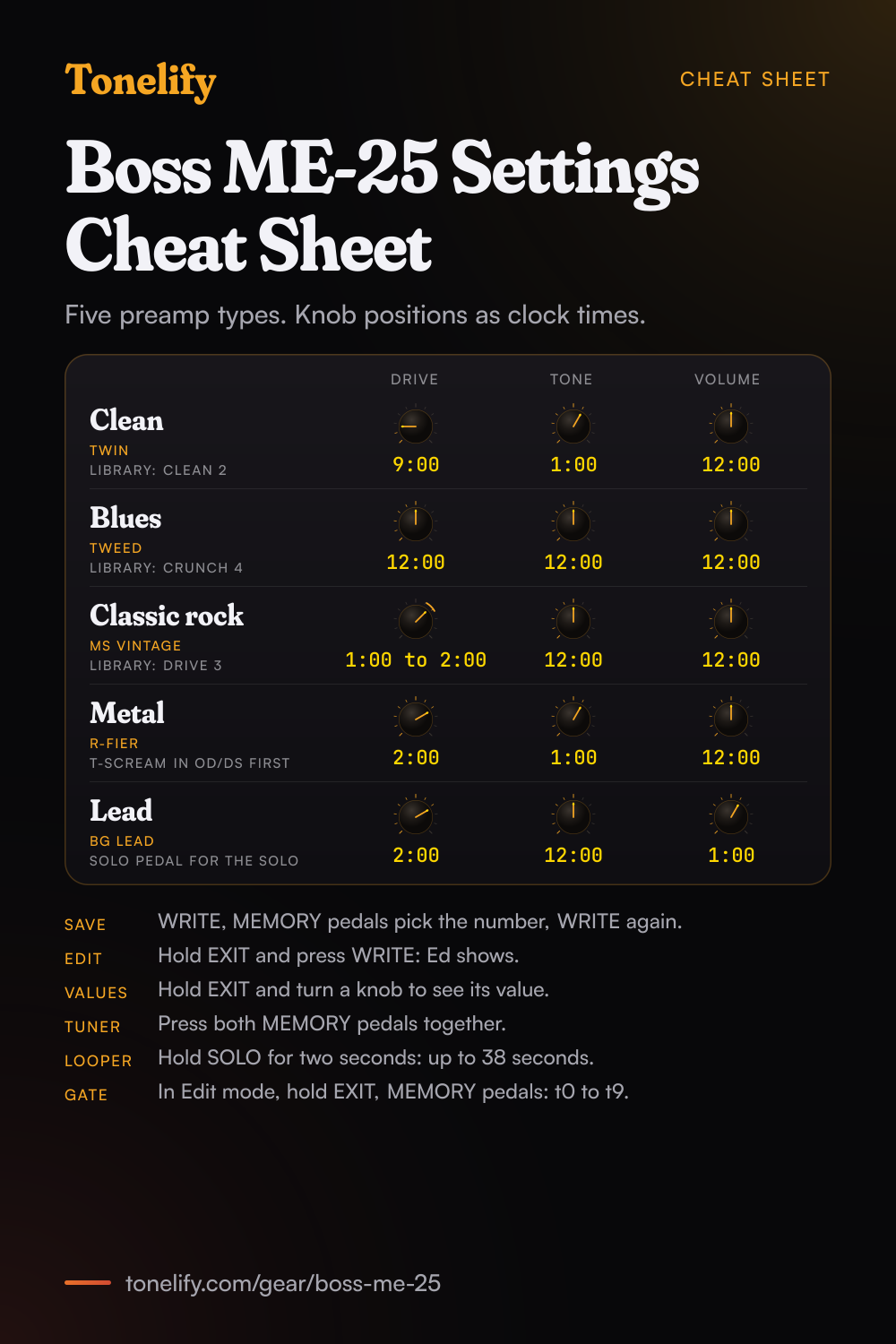
Free download
Printable cheat sheet: PDF and PNG
The clean, blues, classic rock, metal and lead settings from this page, together on one sheet with short tips. The PDF prints on white; the PNG is the dark version for your phone.
Starting settings on the Boss ME-25
Positions as clock times, since the knobs carry no numbers: 12:00 is the middle of the travel. They are where to begin, not Boss's numbers: pick the amp model first, then move one control at a time from here.
Clean
TWIN preamp type, which BOSS says models a Fender Twin Reverb. Drive 9:00, Tone 1:00, Volume 12:00. BOSS's manual gives no number scale for the three knobs, so the settings here are clock positions: DRIVE is the preamp's distortion, TONE its tone and VOLUME its level. CLEAN, the first type, is BOSS's own clean, which it calls smooth and warm. In the Sound Library, CLEAN 2 is TWIN Clean, built on this preamp with COMP/FX and REVERB on.
- Drive 9:00
- Tone 1:00
- Volume 12:00
Edge of breakup and blues
TWEED, which BOSS describes as the crunch sound of a Fender Bassman. Drive 12:00, Tone 12:00, Volume 12:00. Dig in for grit and play lighter to clean up. For more push, switch on OD/DS with BLUES, the overdrive BOSS says reproduces the nuances of picking, and keep its drive low. VO DRIVE, a crunch reminiscent of a VOX combo amp, is the other vintage crunch. In the Sound Library, CRUNCH 4 is BluesCrunch, on the TWEED preamp.
- Drive 12:00
- Tone 12:00
- Volume 12:00
BLUES in OD/DS, its drive low, for more push.
Classic rock
MS VINTAGE, a sound reminiscent of 1970s Marshall amps in BOSS's words. Drive 1:00 to 2:00, Tone 12:00, Volume 12:00. For the mids, go into Edit mode and hold the DRIVE (PREAMP) button until Ed blinks: the three knobs then set BASS, MIDDLE and TREBLE, and MIDDLE a little past 12:00 keeps the guitar from sounding thin next to a band. In the Sound Library, DRIVE 3 is MS Drive, on this preamp with only REVERB on.
- Drive 1:00 to 2:00
- Tone 12:00
- Volume 12:00
Metal
R-FIER, BOSS's model of a Mesa/Boogie Dual Rectifier, or 5150 DRIVE, the lead channel of a Peavey EVH5150. Drive 2:00, Tone 1:00, Volume 12:00. ULTRA METAL is BOSS's own metal amp, which it aims at intense riffs, downtuned riffs and fast solos. Set the noise suppressor just high enough to quiet the hiss between chords: BOSS warns that a setting higher than necessary can leave no sound when you play at low volume. For tighter palm mutes, switch on OD/DS with T-SCREAM (BOSS: a model of the Ibanez TS-808), its drive low and its level up, and take the preamp's DRIVE knob down a step. In the Sound Library, HEAVY 4 DarkMetal and HEAVY 5 PowerMetal are on R-FIER.
- Drive 2:00
- Tone 1:00
- Volume 12:00
T-SCREAM in OD/DS before the preamp for tighter palm mutes.
Lead
BG LEAD, BOSS's lead sound of a Mesa/Boogie combo amp. Drive 2:00, Tone 12:00, Volume 1:00. The SOLO pedal switches to a sound suited to solos, and turning the VOLUME knob while SOLO is on sets how loud the solo is. Add the 100 to 990 ms delay for repeats. If you choose the TAP delay instead, the SOLO pedal sets the tempo and can no longer switch SOLO on and off. In the Sound Library, LEAD 6 is LatinLead, on this preamp.
- Drive 2:00
- Tone 12:00
- Volume 1:00
SOLO pedal on for the solo, off for the rhythm part.
Acoustic guitar
AC SIM, the third COMP/FX type, turns the sound of an electric guitar into an acoustic guitar sound, with LOW and HIGH for the two ends of the range and LEVEL for its volume. BOSS's own version is CLEAN 10 in the Sound Library, Acoustic: the preamp is off, and COMP/FX and REVERB are on. Factory memories 10 AcousticStrum and 30 AC Chorus are also built without a preamp, with COMP/FX on.
Chasing one song? Name it and the matcher writes that song's settings for the Boss ME-25.
Boss ME-25 amp list
The ME-25 has ten COSM preamp types. BOSS names the amp behind eight of them; CLEAN and ULTRA METAL are its own. Each is set with three knobs, DRIVE, TONE and VOLUME. In Edit mode, holding the DRIVE (PREAMP) button until Ed blinks turns the same three knobs into BASS, MIDDLE and TREBLE.
| No. | Preamp type | What BOSS says it is |
|---|---|---|
| 1 | CLEAN | A clean sound that is smooth and warm |
| 2 | TWIN | Fender Twin Reverb |
| 3 | TWEED | The crunch sound of a Fender Bassman |
| 4 | VO DRIVE | A crunch sound reminiscent of a VOX combo amp |
| 5 | BG LEAD | The lead sound of a Mesa/Boogie combo amp |
| 6 | MS VINTAGE | A sound reminiscent of 1970s Marshall amps |
| 7 | MS MODERN | The higher-gain sound of more recent Marshall amps |
| 8 | 5150 DRIVE | The lead channel of a Peavey EVH5150 |
| 9 | R-FIER | Mesa/Boogie Dual Rectifier |
| 10 | ULTRA METAL | BOSS's own metal amp: distinct contours, bold bass and heavy distortion |
Boss ME-25 effects list
A memory holds one type from each section below, plus the noise suppressor. BOSS draws the signal flow as COMP/FX, OD/DS, PREAMP, PEDAL FX, the volume pedal, MODULATION, the noise suppressor, DELAY and REVERB, and notes that the order can change by itself to suit particular settings. Where BOSS names the pedal a type models, it is in brackets.
- COMP/FX (3 types)
- COMP, T.WAH, AC SIM
- OD/DS (10 types)
- BOOST, OD-1 (BOSS OD-1), T-SCREAM (Ibanez TS-808), BLUES, DIST, CLASSIC, MODERN, METAL, CORE, FUZZ
- PREAMP (10 types)
- The ten types in the amp list above
- MODULATION (8 types)
- CHORUS, PHASER, FLANGER, ROTARY, UNI-V (Uni-Vibe), TREMOLO, HARMONIST, OCTAVE
- DELAY (4 types)
- 1 to 99 ms, 100 to 990 ms, 1,000 to 6,000 ms, TAP (tempo set with the SOLO pedal)
- REVERB (2 types)
- ROOM, HALL
- PEDAL FX (4 types)
- WAH, +1 OCTAVE, -1 OCTAVE, FREEZE
- Also on the unit
- Noise suppressor (t0 to t9), Volume on the expression pedal, SOLO pedal, SUPER STACK button
Boss ME-25 Sound Library list
The Sound Library holds 60 ready sounds: six categories, CLEAN, CRUNCH, DRIVE, HEAVY, LEAD and EXTREME, with ten variations each. Press a category button, pick the variation and press EXIT. A sound cannot be saved back into the library on the unit, so keep the ones you like in a memory. BOSS's list gives the preamp type of each sound and which effect sections are on.
| Sound | Name | Preamp | Effects on |
|---|---|---|---|
| CLEAN 1 | StandardClean | CLEAN | COMP/FX, REVERB |
| CLEAN 2 | TWIN Clean | TWIN | COMP/FX, REVERB |
| CLEAN 3 | WarmClean | TWIN | COMP/FX, REVERB |
| CLEAN 4 | CompClean | TWIN | COMP/FX, REVERB |
| CLEAN 5 | MellowClean | CLEAN | COMP/FX, DELAY, REVERB |
| CLEAN 6 | CleanChorus | CLEAN | COMP/FX, MODULATION, REVERB |
| CLEAN 7 | CleanDelay | CLEAN | COMP/FX, OD/DS, DELAY, REVERB |
| CLEAN 8 | CleanCh+Dly | CLEAN | MODULATION, DELAY, REVERB |
| CLEAN 9 | PhaseClean | CLEAN | MODULATION |
| CLEAN 10 | Acoustic | Off | COMP/FX, REVERB |
| CRUNCH 1 | BrightCrunch | TWIN | COMP/FX, REVERB |
| CRUNCH 2 | WarmCrunch | CLEAN | COMP/FX, REVERB |
| CRUNCH 3 | WildCrunch | TWEED | COMP/FX, REVERB |
| CRUNCH 4 | BluesCrunch | TWEED | COMP/FX, REVERB |
| CRUNCH 5 | VO Crunch | VO DRIVE | COMP/FX, OD/DS, REVERB |
| CRUNCH 6 | MS Crunch | MS VINTAGE | COMP/FX, REVERB |
| CRUNCH 7 | CrunchChorus | CLEAN | MODULATION, REVERB |
| CRUNCH 8 | CrunchTremolo | TWIN | COMP/FX, MODULATION, REVERB |
| CRUNCH 9 | CrunchWah | MS VINTAGE | REVERB, PEDAL FX |
| CRUNCH 10 | CrunchDelay | VO DRIVE | COMP/FX, DELAY, REVERB |
| DRIVE 1 | TweedDrive | TWEED | REVERB |
| DRIVE 2 | VO Drive | VO DRIVE | REVERB |
| DRIVE 3 | MS Drive | MS VINTAGE | REVERB |
| DRIVE 4 | VintageDrive | TWIN | OD/DS, REVERB |
| DRIVE 5 | DoubleDrive | MS MODERN | DELAY, REVERB |
| DRIVE 6 | MS Scream | MS VINTAGE | OD/DS, REVERB |
| DRIVE 7 | HardDrive | 5150 DRIVE | REVERB |
| DRIVE 8 | DistDrive | CLEAN | OD/DS, REVERB |
| DRIVE 9 | FuzzDrive | CLEAN | OD/DS, REVERB |
| DRIVE 10 | ChorusDrive | MS MODERN | MODULATION |
| HEAVY 1 | HeavyMetal | MS MODERN | REVERB |
| HEAVY 2 | PopMetal | MS MODERN | MODULATION, DELAY |
| HEAVY 3 | FatMetal | 5150 DRIVE | REVERB |
| HEAVY 4 | DarkMetal | R-FIER | REVERB |
| HEAVY 5 | PowerMetal | R-FIER | REVERB |
| HEAVY 6 | UltraMetal | ULTRA METAL | REVERB |
| HEAVY 7 | AlternativeMetal | ULTRA METAL | REVERB |
| HEAVY 8 | CoreMetal | CLEAN | OD/DS, REVERB |
| HEAVY 9 | DoubleTrack | ULTRA METAL | DELAY, REVERB |
| HEAVY 10 | JetFlange | 5150 DRIVE | MODULATION, REVERB |
| LEAD 1 | BluesLead | TWEED | OD/DS, REVERB |
| LEAD 2 | RockLead | MS VINTAGE | OD/DS, DELAY, REVERB |
| LEAD 3 | OD Lead | CLEAN | OD/DS, DELAY, REVERB |
| LEAD 4 | MetalLead | CLEAN | OD/DS, DELAY, REVERB |
| LEAD 5 | HiGainLead | ULTRA METAL | DELAY, REVERB |
| LEAD 6 | LatinLead | BG LEAD | REVERB |
| LEAD 7 | BalladLead | MS VINTAGE | OD/DS, DELAY |
| LEAD 8 | ChorusLead | CLEAN | COMP/FX, OD/DS, MODULATION, DELAY |
| LEAD 9 | WahLead | 5150 DRIVE | DELAY, REVERB, PEDAL FX |
| LEAD 10 | OctaveLead | R-FIER | MODULATION, REVERB |
| EXTREME 1 | SuperHiGain | ULTRA METAL | REVERB |
| EXTREME 2 | PdlBend +1oct | MS MODERN | DELAY, REVERB, PEDAL FX |
| EXTREME 3 | PdlBend -1oct | MS MODERN | REVERB, PEDAL FX |
| EXTREME 4 | HarmoLead Am | MS MODERN | MODULATION, DELAY, REVERB |
| EXTREME 5 | T-WahMetal | ULTRA METAL | COMP/FX, REVERB |
| EXTREME 6 | EchoDelay | MS VINTAGE | OD/DS, DELAY, REVERB |
| EXTREME 7 | PsycheVibe | 5150 DRIVE | OD/DS, MODULATION, REVERB |
| EXTREME 8 | HeavyReverb | MS VINTAGE | OD/DS, REVERB |
| EXTREME 9 | Slice | TWIN | OD/DS, MODULATION |
| EXTREME 10 | Freeze | CLEAN | OD/DS, DELAY, REVERB, PEDAL FX |
Boss ME-25 preset list
The ME-25 calls its presets memories. There are 60, and these are the sounds they hold when the unit leaves the factory. There is no separate user bank: saving your own sound to a memory replaces what was there, and a factory reset brings all 60 back. Off in the Preamp column means the sound is built without a preamp.
| No. | Name | Preamp | Effects on |
|---|---|---|---|
| 1 | PunkStrum | MS VINTAGE | OD/DS, REVERB |
| 2 | SuperMetalRiff | ULTRA METAL | DELAY, REVERB |
| 3 | SpeedLead | MS MODERN | DELAY, REVERB |
| 4 | BD Crunch | TWIN | OD/DS, REVERB |
| 5 | NiceClean | CLEAN | MODULATION, DELAY, REVERB |
| 6 | Rock'nRoll | VO DRIVE | REVERB |
| 7 | SmoothLead | CLEAN | OD/DS, DELAY, REVERB |
| 8 | WahModernLead | MS MODERN | OD/DS, DELAY, PEDAL FX |
| 9 | Harmony Am | ULTRA METAL | MODULATION, DELAY |
| 10 | AcousticStrum | Off | COMP/FX, DELAY, REVERB |
| 11 | MaximumGain | ULTRA METAL | REVERB |
| 12 | CleanTremolo | TWIN | MODULATION, REVERB |
| 13 | StackDrive | MS VINTAGE | REVERB |
| 14 | Rockabilly | TWEED | DELAY, REVERB |
| 15 | DirtyFuzz | CLEAN | OD/DS, REVERB |
| 16 | CompPhase | CLEAN | COMP/FX, MODULATION, REVERB |
| 17 | HeavyOctave | CLEAN | OD/DS, MODULATION, DELAY |
| 18 | DistPedal | TWIN | OD/DS, REVERB |
| 19 | TweedClean | TWEED | REVERB |
| 20 | IrishDelay | VO DRIVE | DELAY, REVERB |
| 21 | Modern DS | Off | OD/DS, REVERB |
| 22 | VibeDrive | MS VINTAGE | OD/DS, MODULATION, REVERB |
| 23 | FunkyWah | CLEAN | COMP/FX, REVERB |
| 24 | FastRotary | CLEAN | MODULATION, REVERB |
| 25 | SlideCrunch | TWEED | COMP/FX, DELAY |
| 26 | CountryDelay | TWIN | COMP/FX, DELAY |
| 27 | ThunderFlange | ULTRA METAL | MODULATION, REVERB |
| 28 | DirtyTremolo | CLEAN | OD/DS, MODULATION, REVERB |
| 29 | UK 1963 | VO DRIVE | COMP/FX, REVERB |
| 30 | AC Chorus | Off | COMP/FX, MODULATION, DELAY, REVERB |
| 31 | 90sAlternative | Off | OD/DS, REVERB |
| 32 | StoneRiff | TWEED | REVERB |
| 33 | GrooveClean | CLEAN | REVERB, PEDAL FX |
| 34 | 80sFlange | CLEAN | COMP/FX, MODULATION, REVERB |
| 35 | FuzzLead | MS VINTAGE | OD/DS, DELAY, REVERB |
| 36 | Super 5150 | 5150 DRIVE | MODULATION, REVERB |
| 37 | 60sSurf | TWIN | REVERB |
| 38 | BluesyJazz | BG LEAD | OD/DS, DELAY, REVERB |
| 39 | HyperJazz | Off | OD/DS, MODULATION, DELAY, REVERB |
| 40 | MetalHarmony Em | MS MODERN | OD/DS, MODULATION, DELAY, REVERB |
| 41 | VintageCrunch | MS VINTAGE | DELAY, REVERB |
| 42 | SuperScoop | ULTRA METAL | REVERB |
| 43 | ModernClean | CLEAN | COMP/FX, MODULATION, DELAY, REVERB |
| 44 | CompCrunch | MS VINTAGE | COMP/FX, DELAY |
| 45 | RotaryCrunch | MS VINTAGE | MODULATION, REVERB |
| 46 | HiGainDist | MS VINTAGE | OD/DS, DELAY |
| 47 | SpaceyPS | CLEAN | COMP/FX, MODULATION, DELAY, REVERB |
| 48 | EdgyFuzz | TWIN | COMP/FX, OD/DS, REVERB |
| 49 | Clean Uni-V | TWIN | COMP/FX, MODULATION, DELAY, REVERB |
| 50 | TapTempoDelay | TWIN | COMP/FX, DELAY |
| 51 | TexasCrunch | TWEED | REVERB |
| 52 | DetuneLead | BG LEAD | MODULATION, DELAY |
| 53 | Browny | TWEED | REVERB |
| 54 | Low-B Clean | CLEAN | MODULATION, DELAY, REVERB |
| 55 | FatModern DS | TWIN | OD/DS, MODULATION, DELAY, REVERB |
| 56 | TightLead | MS VINTAGE | OD/DS, DELAY |
| 57 | FilterDelay | VO DRIVE | COMP/FX, DELAY, REVERB |
| 58 | PhaseLead | MS VINTAGE | OD/DS, MODULATION, REVERB |
| 59 | SubSonic | ULTRA METAL | COMP/FX, MODULATION, REVERB |
| 60 | FreezeWonder | MS VINTAGE | OD/DS, DELAY, REVERB, PEDAL FX |
Boss ME-25 specifications
- Released
- 2010
Boss ME-25 questions
What amps are in the Boss ME-25?
Ten COSM preamp types: CLEAN (BOSS's own smooth, warm clean), TWIN (Fender Twin Reverb), TWEED (Fender Bassman crunch), VO DRIVE (a VOX combo amp's crunch), BG LEAD (a Mesa/Boogie combo amp's lead sound), MS VINTAGE (1970s Marshall amps), MS MODERN (the higher-gain sound of more recent Marshall amps), 5150 DRIVE (the lead channel of a Peavey EVH5150), R-FIER (Mesa/Boogie Dual Rectifier) and ULTRA METAL, BOSS's own metal amp. Each has DRIVE, TONE and VOLUME on the knobs, and BASS, MIDDLE and TREBLE in Edit mode.
Which drive pedals does the ME-25 model?
OD/DS has ten types. BOSS names the pedal behind two: OD-1 is the sound of the BOSS OD-1 and T-SCREAM models an Ibanez TS-808. BOOST is a gain booster for pushing a preamp or for punchy cleans, BLUES an overdrive that follows your picking, DIST a sharp distortion with sustain, CLASSIC the sound of a vintage stack amp and MODERN a large high-gain amp. METAL stresses the midrange, CORE cuts it, and FUZZ is rough and heavy. Each has DRIVE, TONE and LEVEL.
What is the Sound Library on the ME-25?
A set of 60 ready sounds: six categories, CLEAN, CRUNCH, DRIVE, HEAVY, LEAD and EXTREME, with ten variations each. Press a category button, and SL shows in the display; choose the variation and press EXIT. You then shape the sound with the DRIVE, TONE and VOLUME knobs. The unit cannot save a sound back into the library, so BOSS says to save the ones you want to reuse in a memory. All 60 are in the list below.
What presets come with the Boss ME-25?
60 memories, which leave the factory filled, from 1 PunkStrum, 2 SuperMetalRiff and 3 SpeedLead to 60 FreezeWonder. There is no separate user bank: saving your own sound to a memory replaces the one that was there. A factory reset brings all 60 back, along with the tuner pitch and the knob response setting. The Sound Library's 60 sounds are a second set that you load from but cannot overwrite on the unit.
How do you save a sound on the ME-25?
Press WRITE, and the memory number in the display blinks. Choose the memory to save to with the MEMORY pedals, then press WRITE again; EXIT cancels. The sound already in that memory is lost. Until you do this, switching the power off or changing memory loses the sound you made. To copy a memory, call it up and save it to a different number.
How do you edit the effects on the ME-25?
Hold EXIT and press WRITE: Ed appears and the unit is in Edit mode. The buttons now work as the effect buttons printed in italics beside them, so the CLEAN button is COMP/FX, and each press steps a section through off, on and adjust. Pick the type with the VARIATION knob and set its three parameters with the DRIVE, TONE and VOLUME knobs. For PEDAL FX, press the toe of the expression pedal down firmly until the PEDAL FX light is on. EXIT leaves Edit mode, and the change is lost unless you save it with WRITE.
Why doesn't the ME-25 sound like its knobs show?
A memory or a Sound Library sound brings its own stored values, so the knobs can point somewhere other than what you hear. Hold EXIT and turn a knob to see its value in the display for a few seconds. By default a knob takes over the moment you move it. With the control operation set to n1, the value changes only once the knob passes the stored position: hold EXIT, press the MEMORY up pedal, choose n0 or n1 with the MEMORY pedals and press WRITE.
Does the Boss ME-25 have a looper?
Yes, a Phrase Loop of up to 38 seconds. Hold the SOLO pedal for two seconds to arm it, press to record and press again to play the loop back; repeat those two presses to overdub. Two presses within a second stop it, and BOSS notes that the recording is deleted when playback ends. Holding the pedal for two seconds again leaves Phrase Loop. You can change memory while a loop plays, so each layer can have its own sound.
How do you set the noise gate on the ME-25?
Go into Edit mode by holding EXIT and pressing WRITE. Then hold EXIT and use the MEMORY pedals: the display shows the noise suppressor's setting from t0 to t9, and t0 turns it off. BOSS warns that a setting higher than necessary can leave no sound when the guitar is played at low volume. Press EXIT to leave, and save with WRITE to keep the setting in the memory.
What does SUPER STACK do on the ME-25?
It is a button of its own. BOSS says it gives the powerful sound of a large, stack-type tube amp even when you play through a small amp; pressing it switches Super Stack on and lights the SUPER STACK indicator. BOSS's press release describes it as big amp tone from a small practice amp.
Can you use the ME-25 with headphones?
Yes. Putting a plug into the PHONES jack switches on the built-in guitar amp simulator, so headphones get a natural guitar sound. BOSS says to take the plug out of PHONES again when the OUTPUT feeds a normal guitar amp. To send the PHONES output to a recorder, it suggests a PCS-31L cable, which splits the stereo plug into two. For mono, use the L/MONO output only. AUX IN mixes a music player into the output, and its level is set on the player. The ME-25 has no amp or speakers of its own.
Can the Boss ME-25 run on batteries?
Yes: six AA batteries, which come in the box and which BOSS rates at about 9 hours of continuous use with alkalines or 3 with carbon, or a BOSS PSA-series adaptor, sold separately. It draws 150 mA. The INPUT jack doubles as the power switch, so the unit is on while a guitar cable is plugged in. It weighs 1.9 kg with batteries and measures 300 by 191 mm.
Can the ME-25 be used as an audio interface?
Yes, over USB, and BOSS says to install the ME-25 driver before you connect. It converts at 24 bits and 44.1 kHz. While it is connected to a computer the built-in guitar amp simulator is on, the level of the computer's sound is set in the computer's software, and whatever comes in at AUX IN is not sent over USB. BOSS TONE STUDIO for ME-25, BOSS's librarian program, backs up the memories and the Sound Library and loads extra sounds from BOSS TONE CENTRAL.
How do you tune with the ME-25?
Press the two MEMORY pedals at the same time. Play one open string, and tune until the note you want shows and both tuning guide lights are on. While the tuner is on the sound passes through with no effects, and the expression pedal still controls the volume. Holding EXIT and pressing the MEMORY pedals changes the reference pitch between 435 and 445 Hz; it leaves the factory at 440 Hz and is saved by itself.
How do you reset the ME-25 to factory settings?
Hold EXIT and press the MEMORY down pedal: FA appears in the display. Press WRITE, then WRITE again, and do not switch the power off while it runs. The reset restores the 60 memories, the tuner's reference pitch and the knob response setting, and everything you saved in the memories is lost.
What are the best Boss ME-25 settings for metal?
Start with R-FIER or 5150 DRIVE, Drive 2:00, Tone 1:00 and Volume 12:00, with T-SCREAM in OD/DS in front and the noise suppressor on. These are starting points rather than BOSS's numbers. If it fizzes, lower Drive first and Tone second. For BOSS's own metal sounds, try HEAVY 4 DarkMetal and HEAVY 6 UltraMetal in the Sound Library.
When did the Boss ME-25 come out?
BOSS announced it on 14 January 2010 at a retail price of $276.50, as the first multi-effects unit at that price with its COSM amp modelling, and announced on 20 April 2010 that it was shipping.
How do you build a patch on the Boss ME-25?
Pick the amp model first, then set its controls, then add the blocks in signal-chain order: drive before the amp, time and modulation after it. A patch built the other way around ends up compensating for the wrong stage. Tonelify returns the model, the order and the parameters together.
Does Tonelify support the Boss ME-25?
Yes. Name it in the tone matcher along with the song you are chasing and the settings come back adapted to it. Gear does not need to be in the catalog for a match to run.
Sources
Panel, specifications and dates checked against these on .
More Boss gear
Similar multi-effects units from other makers
Settings for the song you are chasing
Name a song and Tonelify reads the documented rig behind the recording, then writes the settings for a rig with the Boss ME-25 in it. A first plan starts with 7 days free, $0 today.