
NUX Amp Academy presets and settings
Amp modeller pedal with six amp models on two toggle switches, A/B and SCENE footswitches, 1024-sample IRs, an effects loop on one TRS jack, an XLR DI out and USB audio.
⚡ Match a tone on this unitHow do you dial in a specific tone on a NUX Amp Academy?
A multi-effects unit gives you the whole chain in one box, which means the order of the blocks is as much of the answer as the values inside them. Settings for the NUX Amp Academy name the amp model, the block order and the parameters together, rather than handing you numbers with no chain to put them in.
Name the song you are chasing in the tone matcher and Tonelify returns the settings for this exact multi-effects unit, not the settings the original artist used. Those are two different things: the recording was made on gear most players do not own.
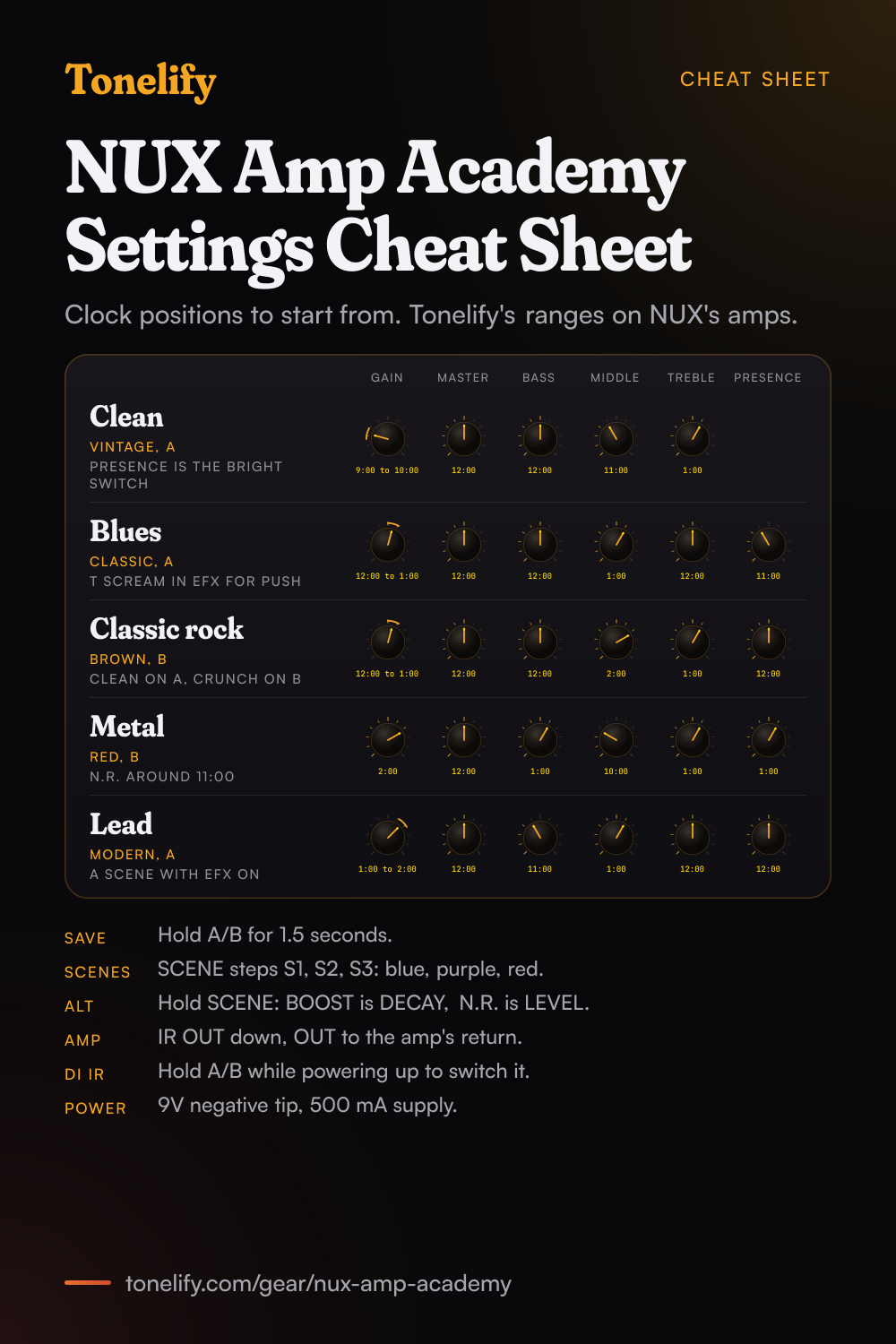
Free download
Printable cheat sheet: PDF and PNG
The clean, blues, classic rock, metal and lead settings from this page, together on one sheet with short tips. The PDF prints on white; the PNG is the dark version for your phone.
Starting settings on the NUX Amp Academy
Positions as clock times, since the knobs carry no numbers: 12:00 is the middle of the travel. They are where to begin, not NUX's numbers: pick the amp model first, then move one control at a time from here.
Clean
Vintage, on the A toggle switch, which NUX bases on the Fender Twin Reverb; the A light shows green. Gain 9:00 to 10:00, Master 12:00, Bass 12:00, Middle 11:00, Treble 1:00. On Vintage the PRESENCE knob is not a presence control: NUX's manual says it works as the Twin's BRIGHT switch, so leave it where the sound is clearest rather than reading it as a level. Keep Gain low and set the volume with Master. For a little sparkle, add ROOM or SPRING in the RVB block: hold the SCENE footswitch for 1.5 seconds for Alt mode, where BOOST becomes the reverb's DECAY and N.R. its LEVEL. These are starting points, not NUX's numbers.
- Gain 9:00 to 10:00
- Master 12:00
- Bass 12:00
- Middle 11:00
- Treble 1:00
PRESENCE is the BRIGHT switch on Vintage. Starting points, not NUX's.
Edge of breakup and blues
Classic, on the A toggle switch, based on the Fender Vibro King; the A light shows yellow. Gain 12:00 to 1:00, Master 12:00, Bass 12:00, Middle 1:00, Treble 12:00, Presence 11:00. Set Gain where hard picking just starts to break up, then ride the guitar's volume: lower for rhythm, full up for a solo. For more push, pick T SCREAM in the EFX block from the editor: in regular mode the BOOST knob sets its Level, so it lifts the amp's input without a pedal of your own. These are starting points, not NUX's numbers.
- Gain 12:00 to 1:00
- Master 12:00
- Bass 12:00
- Middle 1:00
- Treble 12:00
- Presence 11:00
Ride the guitar's volume for rhythm and solo. Starting points, not NUX's.
Classic rock
Brown, on the B toggle switch, which NUX bases on the Friedman HBE; the B light shows deep red. Gain 12:00 to 1:00, Master 12:00, Bass 12:00, Middle 2:00, Treble 1:00, Presence 12:00. Middle above the other tone controls keeps chords and riffs forward in a band. With Classic or Vintage saved on A, the A/B footswitch then switches from the clean side to this crunch side, which is how NUX describes using it live. These are starting points, not NUX's numbers.
- Gain 12:00 to 1:00
- Master 12:00
- Bass 12:00
- Middle 2:00
- Treble 1:00
- Presence 12:00
A/B footswitch: clean on A, this on B. Starting points, not NUX's.
Metal
Red, on the B toggle switch, based on the Mesa Boogie Dual Rectifier; the B light shows light red. Gain 2:00, Master 12:00, Bass 1:00, Middle 10:00, Treble 1:00, Presence 1:00, and N.R. around 11:00. In regular mode N.R. sets the SENS of the noise reduction block, its gate: raise it until the hiss stops between riffs, and no further, or it cuts off held notes. For a tighter low end, put T SCREAM in EFX with its Drive low in the editor and BOOST up for level. Iridium, NUX's model of the Bogner Uberschall, is the other high-gain choice on the same switch. These are starting points, not NUX's numbers.
- Gain 2:00
- Master 12:00
- Bass 1:00
- Middle 10:00
- Treble 1:00
- Presence 1:00
N.R. around 11:00 for the gate. Starting points, not NUX's.
Lead
Modern, on the A toggle switch, which NUX's overview bases on the Mesa Boogie Mark I and its switch notes call Cali Crunch; the A light shows red. Gain 1:00 to 2:00, Master 12:00, Bass 11:00, Middle 1:00, Treble 12:00, Presence 12:00. Save a second scene with the EFX block on and BOOST up for solos: the SCENE footswitch steps through SCENE1, SCENE2 and SCENE3, and its light shows blue, purple and red. Add HALL or PLATE in RVB for space, using Alt mode on the SCENE footswitch to set DECAY and LEVEL. These are starting points, not NUX's numbers.
- Gain 1:00 to 2:00
- Master 12:00
- Bass 11:00
- Middle 1:00
- Treble 12:00
- Presence 12:00
A scene with EFX on for solos. Starting points, not NUX's.
Presets, scenes and Alt mode
The Amp Academy has six presets, one for each amp model, and each preset has three scenes. A scene stores which blocks are on, so one amp can hold a dry rhythm sound, the same with a boost, and a lead with reverb. Pick the amp with the A or B toggle switch and the A/B footswitch, pick the scene with the SCENE toggle switch or the SCENE footswitch, set the knobs, then hold the A/B footswitch for 1.5 seconds to save them into that preset. Holding the SCENE footswitch for 1.5 seconds enters Alt mode, shown by the SCENE light flashing: BOOST becomes the reverb's DECAY and N.R. its LEVEL, and pressing SCENE again goes back. Block order, the effect in each block, IRs and the power amp BIAS control live in NUX's Amp Academy editor for Mac and Windows.
Chasing one song? Name it and the matcher writes that song's settings for the NUX Amp Academy.
NUX Amp Academy amp list
Six amp models on the pedal: three on the A toggle switch and three on the B toggle switch, with the A/B footswitch choosing between the two sides. The A and B lights show which model is on by colour. NUX's product page adds that with firmware V4 the editor offers 18 amps, three options for each of the six slots.
| Model | Side | Based on | Light |
|---|---|---|---|
| Vintage | A | Fender Twin Reverb | Green |
| Classic | A | Fender Vibro King | Yellow |
| Modern | A | Mesa Boogie Mark I (the manual's switch notes call it Cali Crunch) | Red |
| Brown | B | Friedman HBE (Fireman in the switch notes) | Deep red |
| Red | B | Mesa Boogie Dual Rectifier | Light red |
| Iridium | B | Bogner Uberschall | Orange |
NUX Amp Academy effects list
The signal chain has seven blocks, NR, EFX, AMP, IR, S/R, EQ and RVB, and the editor can put them in any order. EFX holds one of nine effects, RVB one of five reverbs, and S/R is the INSERT jack's send and return for your own pedals.
- EFX (9)
- ROSE COMP, K COMP, KATANA, RC BOOST, AC BOOST, T SCREAM, MORNING DRV, RED DIRT, CRUNCH
- RVB (5)
- ROOM, HALL, PLATE, SPRING, DAMP
- Other blocks
- NR: noise reduction, its SENS on the N.R. knob, EQ: a 6-band EQ for guitar, S/R: send and return on the INSERT jack, IR: 12 built-in IRs and 16 user slots
What the BOOST knob does with each effect
In regular mode the BOOST knob sets one parameter of the EFX block, and which one depends on the effect. The other parameters are set in the editor. In Alt mode, held on the SCENE footswitch, BOOST becomes DECAY for the reverb.
| EFX | BOOST sets | Other parameters |
|---|---|---|
| ROSE COMP | Level | Sustain |
| K COMP | Level | Sustain, Clip |
| KATANA | Volume | None |
| RC BOOST | Volume | Gain, Bass, Treble |
| AC BOOST | Volume | Gain, Bass, Treble |
| T SCREAM | Level | Drive, Tone |
| MORNING DRV | Volume | Drive, Tone |
| RED DIRT | Level | Drive, Tone |
| CRUNCH | Volume | Tone, Gain |
NUX Amp Academy questions
What amps are in the NUX Amp Academy?
Six on the pedal itself. The A toggle switch picks Vintage (Fender Twin Reverb), Classic (Fender Vibro King) or Modern (Mesa Boogie Mark I), and the B toggle switch picks Brown (Friedman HBE), Red (Mesa Boogie Dual Rectifier) or Iridium (Bogner Uberschall). NUX's product page adds that with firmware V4 the editor offers 18 amps, three options for each of the six slots.
How do you save a preset on the NUX Amp Academy?
Hold the A/B footswitch for 1.5 seconds: it saves the current settings into the preset of the amp model that is on. There are six presets, one per amp model, each with three scenes. For deeper changes, such as the block order or the effect in the EFX block, use NUX's Amp Academy editor, which can also export and import presets.
How do scenes work on the NUX Amp Academy?
Each preset has three scenes, and a scene stores which blocks are on. Press the SCENE footswitch to step through SCENE1, SCENE2 and SCENE3, or pick one with the SCENE toggle switch. The SCENE light shows blue for S1, purple for S2 and red for S3.
What does the BOOST knob do on the NUX Amp Academy?
In regular mode it sets one parameter of the EFX block: Level on ROSE COMP, K COMP, T SCREAM and RED DIRT, Volume on KATANA, RC BOOST, AC BOOST, MORNING DRV and CRUNCH. The other parameters are set in the editor. In Alt mode BOOST becomes DECAY for the reverb, and N.R., which normally sets the noise reduction's SENS, becomes the reverb's LEVEL.
Can you load IRs into the NUX Amp Academy?
Yes, through the Amp Academy editor, which converts WAV files for you, so the sampling rate does not matter. IRs run at 1024 samples. The manual gives 12 built-in IRs and 16 slots for third-party ones; NUX's product page describes the built-in set as 6 IR slots with the amp slots and 12 ChopTones custom IRs, and says the user slots are 32-bit, 48 kHz. In the editor each IR has Level, Low Cut and High Cut.
Can you use the NUX Amp Academy with a guitar amp?
NUX says it is not desirable to put it in front of a guitar amp, because it makes amp and cab tones itself. If one pedalboard goes to both an amp and a PA, set the IR OUT switch down so the 1/4in OUT has no IR, and NUX suggests running that OUT into the amp's power amp in or return. Keep the IR on the DI OUT for a powered FRFR speaker or a PA.
How do you turn the IR on or off on the DI OUT?
Hold the A/B footswitch while you power the pedal. If the A and B lights flash 3 times, the IR is on for the XLR DI OUT; if they do not flash, it is off. The 1/4in OUT has its own IR OUT switch on the top: up puts the IR on that output.
Does the NUX Amp Academy have an effects loop?
Yes. The INSERT jack is a send and return on one TRS jack, tip for send and ring for return, and NUX includes a Y cable to split it. Time-based effects such as modulation and delay go in the loop, and boosts and drives in front of the pedal, in NUX's own diagrams. The editor sets where the S/R block sits in the chain.
Can you record with the NUX Amp Academy?
Yes, over USB, at 48 kHz and 32 bits. The editor sets the USB routing to Normal, Dry Out, Reamp or Loopback, so there is no need to set up the USB output in your recording software, and Loopback plays the computer's audio back for live streams. NUX says it offers 4 tracks for dry recording and reamping. On Windows, NUX's ASIO driver V5.30.0 is for Windows 10 and above. You can also record from the XLR DI OUT into an interface.
Can you use headphones with the NUX Amp Academy?
Yes: the 1/8in PHONE jack drives headphones and carries the same signal as the DI OUT, which NUX recommends for silent practice and home recording. The 1/8in AUX IN plays backing tracks from a phone or MP3 player.
Is there an app for the NUX Amp Academy?
Two. The Amp Academy editor, version 2.4.2.3 for Mac and Windows, edits every block, loads IRs, sets the power amp BIAS and handles the USB routing and MIDI assignments. For changes on stage, NUX points to its EFX Mobile app for iOS and Android.
What is the latest firmware for the NUX Amp Academy?
V4.0.2, for Mac and Windows, on NUX's product page. To update, install the NUX Device Updater, then hold both footswitches while plugging in the 9V power to enter DFU mode, shown by the SCENE light blinking, and connect over USB-C. NUX says the update takes roughly 3 to 5 minutes and you must not unplug anything during it.
What power supply does the NUX Amp Academy need?
9V DC, negative tip, from a supply rated at 500 mA; the pedal draws less than 300 mA. NUX's matching adapter, the ACD-006A, is sold separately. The pedal is 105 mm long, 115 mm wide and 58 mm high and weighs 440 g.
What is the latency of the NUX Amp Academy?
NUX gives 1.2 ms of system latency and 110 dB of dynamic range, with a 1 MΩ input impedance and a 1 kΩ output impedance. It runs at 48 kHz and 32 bits on an NXP RT processor at 1 GHz.
How do you build a patch on the NUX Amp Academy?
Pick the amp model first, then set its controls, then add the blocks in signal-chain order: drive before the amp, time and modulation after it. A patch built the other way around ends up compensating for the wrong stage. Tonelify returns the model, the order and the parameters together.
Does Tonelify support the NUX Amp Academy?
Yes. Name it in the tone matcher along with the song you are chasing and the settings come back adapted to it. Gear does not need to be in the catalog for a match to run.
Sources
Panel, specifications and dates checked against these on .
- NUX: Amp Academy (NGS-6) owner's manual (PDF)
- NUX: Amp Academy product page, features, specifications and downloads
- NUX: Amp Academy firmware update guide (PDF)
The manual and the update guide are the files NUX links from the Amp Academy product page, served from the download server of Cherub Technology, NUX's parent company.
More NUX gear
Similar multi-effects units from other makers
Settings for the song you are chasing
Name a song and Tonelify reads the documented rig behind the recording, then writes the settings for a rig with the NUX Amp Academy in it. A first plan starts with 7 days free, $0 today.