
Fractal Audio Axe-Fx III presets and settings
Rack processor. It is driven from the front panel or an FC foot controller rather than from footswitches of its own.
⚡ Match a tone on this unitHow do you dial in a specific tone on a Fractal Audio Axe-Fx III?
A multi-effects unit gives you the whole chain in one box, which means the order of the blocks is as much of the answer as the values inside them. Settings for the Fractal Audio Axe-Fx III name the amp model, the block order and the parameters together, rather than handing you numbers with no chain to put them in.
Name the song you are chasing in the tone matcher and Tonelify returns the settings for this exact multi-effects unit, not the settings the original artist used. Those are two different things: the recording was made on gear most players do not own.
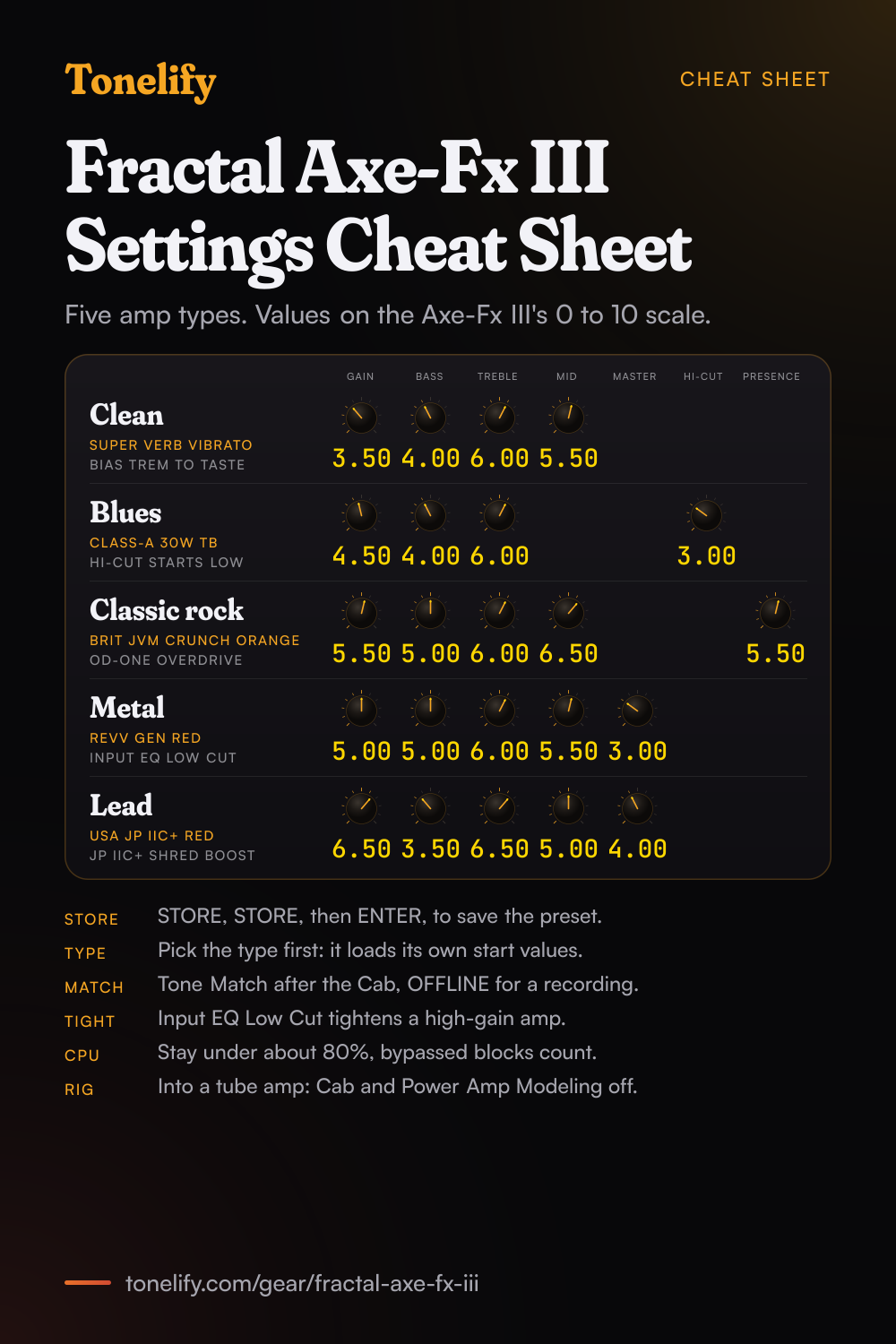
Free download
Printable cheat sheet: PDF and PNG
The clean, blues, classic rock, metal and lead settings from this page, together on one sheet with short tips. The PDF prints on white; the PNG is the dark version for your phone.
Starting settings on the Fractal Audio Axe-Fx III
Values as the unit's screen shows them, on its own scale; each drawn knob shows that value's share of the range. They are where to begin, not Fractal Audio's numbers: pick the amp model first, then move one control at a time from here.
Clean
Super Verb Vibrato amp type, one of the Blackface Vibrato models Fractal's release notes list with the Deluxe Verb, Double Verb and Vibroverb; the manual's tempo example starts from factory preset #022 Super Verb. Gain 3.50, Bass 4.00, Mid 5.50, Treble 6.00, on the Axe-Fx III's 0 to 10 scale. Set the type before these four, since choosing a type moves the other controls to starting values picked for that amp. For a pulse inside the amp itself, use Bias Trem Frequency and Bias Trem Depth, which the Blocks Guide lists for the Axe-Fx III and FM9 only: they create true bias tremolo by varying the bias of the virtual power tubes, and the effect is self-ducking, so it eases off as you play harder. Start Depth low, since the guide warns that extreme depth can cause excessive crossover distortion on some types. A Reverb block after the Cab gives it space.
- Gain 3.50
- Bass 4.00
- Mid 5.50
- Treble 6.00
Bias Trem Depth low, for a pulse that eases off as you dig in.
Edge of breakup and blues
Class-A 30W TB amp type, which Fractal's release notes say had its tone stack tapers changed to vintage specs. Gain 4.50, Bass 4.00, Treble 6.00, Hi-Cut 3.00. Hi-Cut works the other way round from a treble control: the Blocks Guide says certain types, Class-A among them, have a high cut control that darkens the tone as you turn it up, so start it low and raise it only if the top end turns sharp. The guide also suggests raising Negative Feedback on a Top Boost type to give it a more American sound while it keeps its preamp voicing. Set Gain by ear for the point where hard picking breaks up and soft picking stays nearly clean, then bring the volume up with the Amp block's Level rather than more Gain.
- Gain 4.50
- Bass 4.00
- Treble 6.00
- Hi-Cut 3.00
Hi-Cut darkens as it goes up: start low.
Classic rock
Brit JVM Crunch Orange amp type, one of three that firmware 32.06 added, Green, Orange and Red, based on the Crunch channel of a Marshall JVM410. Gain 5.50, Bass 5.00, Mid 6.50, Treble 6.00, Presence 5.50. Keep Mid above halfway so rhythm parts hold their place in a band mix. Presence, the Blocks Guide says, adjusts the high end of the virtual power amp by varying the negative feedback frequency response, so it brightens the top differently from Treble: use it for bite, Treble for brightness. For heavier riffs, put OD-One Overdrive, which the release notes base on a Boss OD-1, before the Amp with Drive low and Level up, or compare it with the Green and Red types.
- Gain 5.50
- Bass 5.00
- Mid 6.50
- Treble 6.00
- Presence 5.50
OD-One Overdrive before the Amp, Drive low and Level up.
Metal
Revv Gen Red amp types, from the Revv Gen models Fractal's release notes base on a Revv Generator 120: three for each of its Purple and Red channels, matching the three levels of its Aggression switch. Start with the middle level and move up or down for more or less bite. Gain 5.00, Bass 5.00, Mid 5.50, Treble 6.00, Master 3.00. The Blocks Guide calls Master the control that sets how the virtual power amp distorts; kept low here, the distortion comes from the preamp and the low end stays firm. To tighten palm mutes, raise Low Cut on the Amp block's Input EQ page, which the guide says removes bass frequencies at the input for a classic way to tighten an amp. High Cut on the same page sits between the preamp and the power amp, the guide adds, so it has a more dramatic effect than an EQ placed before the preamp distortion: a little tames fizz.
- Gain 5.00
- Bass 5.00
- Mid 5.50
- Treble 6.00
- Master 3.00
Low Cut on the Input EQ page tightens palm mutes.
Lead
USA JP IIC+ Red amp type, which Fractal's release notes describe as channel 3 of the model. Gain 6.50, Bass 3.50, Mid 5.00, Treble 6.50, Master 4.00. For the Shred mode, the notes give two routes: turn the High Treble control to approximately 3-4 dB, or, since firmware 21.02, pick the JP IIC+ Shred Input Boost type, which replicates the Shred switch on the Mesa/Boogie JP2C. For a Mesa style five-band curve, set the Amp block's Output EQ to the 5-Band Mark type; the Blocks Guide describes the Mark type as based on the EQ found in some MESA/Boogie amps. Firmware 22.00 also added a Treble Shift control to the Tone page of USA IIC+ models, an alias of the Fat control on the Preamp page. A Delay block after the Cab, mix kept modest, keeps the notes clear.
- Gain 6.50
- Bass 3.50
- Mid 5.00
- Treble 6.50
- Master 4.00
JP IIC+ Shred Input Boost for the Shred mode.
Matching a recorded tone
The Tone Match block is on the Axe-Fx III only, by the Blocks Guide, not the FM9 or FM3. It changes the sound of a preset to match a reference signal: a recording, another modeler or the mic feed from a live amp. Start from the setting above that is closest, with no effects; Fractal's Tone Match manual says to add effects after the match. Put the Tone Match block after the Cab and set Reference Source: Input 3 on the rear is the default, and USB 1/2 is the easy way to play a recording from a computer. On the Config page choose OFFLINE for a recording or LIVE for an amp or modeler. On the Capture page, START REF (knob A) captures the reference, knob B the local sound, START BOTH (knob C) both at once, and MATCH (knob D) builds the match. Use an isolated guitar track in a lossless format such as WAV or FLAC, not MP3 or YouTube, and about ten seconds of chords up the neck plus some chugs rather than a solo in one key. Tone matching is mono, nothing in the path should clip, and the manual warns that a small level difference can sound like a tone difference. STORE saves the match in the preset; EXPORT turns it into a User Cab for other presets.
Chasing one song? Name it and the matcher writes that song's settings for the Fractal Audio Axe-Fx III.
Fractal Audio Axe-Fx III specifications
- Released
- 2018
Fractal Audio Axe-Fx III questions
What amps are in the Fractal Axe-Fx III?
309+ amp types by the comparison table in Fractal's Blocks Guide, all in the Amp block, and a preset can run two Amp blocks with four channels each. The guide says they are based on real amps plus a few original creations, in an alphabetical list, and for what each type is based on it points to the community-run Fractal Audio wiki and its Yek's Guide to the Fractal Audio Amp Models. The release notes name the source of newer types: firmware 32.06 added Brit JVM Crunch Green, Orange and Red from the Crunch channel of a Marshall JVM410, and earlier versions added the Revv Gen types from a Revv Generator 120 and 59 Bassguy RI Jumped from a '59 Bassman LTD Reissue.
What is the difference between the Axe-Fx III, the FM9 and the FM3?
The Axe-Fx III is the rack unit, with no footswitches of its own, and it runs the most blocks per preset. In the comparison table of Fractal's Blocks Guide it takes four Drive, four Delay and four Compressor blocks, where the FM9 takes three Drives and two of the others and the FM3 two of each; two Amp, two Cab and two Reverb blocks, where the FM3 has one of each; and two Pitch blocks to the others' one. Tone Match, Vocoder, RTA, IR Player and Dynamic Distortion are on the Axe-Fx III only. Fractal's manual says its 14 by 6 grid allows larger presets than the FM3's.
What is the difference between the Axe-Fx III Standard, Turbo and Mark II?
Processing power and memory. One Fractal manual covers the original, Mark II, Standard and Turbo versions: a Turbo has two 1.25 GHz Keystone DSPs and a Standard two 1.0 GHz, and Fractal says the Turbo benchmarks at up to 3x the power of the Axe-Fx II. A Mark II has 1024 preset memories to the original's 512, an improved display, a logo that can colour cycle and the Full-Res IR format. Fractal lists firmware 32.06 as compatible with all Axe-Fx III models and versions.
How do you save a preset on the Axe-Fx III?
Press STORE, then STORE again or ENTER, then ENTER to confirm; the screen shows SAVED! when it is done. To rename it or save it somewhere else, NAV down to the PRESET line on the STORE page first: a name can have up to 31 characters, and scene names are edited the same way. The Mark II has 1024 preset locations and the original 512. Fractal counts changing the scene as a change to the preset, as well as editing parameters.
How do you install the factory presets or update the Axe-Fx III's firmware?
With Fractal-Bot, in the Tools menu of Axe-Edit III: Fractal says to update Axe-Edit first. Firmware 32.06, dated 25 June 2026, is the latest Fractal lists. The factory preset banks, dated 2 June 2025, are for firmware 28.06 or newer. Installing them overwrites the first 384 presets, so back up first with the RECEIVE tab of Fractal-Bot; newer presets sent to older firmware can appear as blank and will not work.
How do you use the Axe-Fx III with a tube amp?
Fractal's manual has a setup for each case. Into a power amp and guitar cab, or an amp's FX return, set Cabinet Modeling to BYPASSED in SETUP: Global Settings: Config. With a non-neutral power amp, typically a tube one, also set Power Amp Modeling to OFF there: the manual says you will be stuck with the tone and dynamics of that amp anyway. A neutral power amp, mostly solid-state, lets you keep Power Amp Modeling, and the Amp block's Output Mode can be set to SS PA + Cab. For the four-cable method, Fractal designed Outputs 3 and 4 for unity gain.
Can the Axe-Fx III be used as an audio interface?
Yes, as a 24-bit, 48 kHz interface with eight USB channels each way. In the computer, USB inputs 1 and 2 record Output 1, 3 and 4 record Output 2, 5 and 6 record Input 1 as a DI for re-amping and 7 and 8 record Input 2; USB outputs 1 and 2 and 3 and 4 play back at Outputs 1 and 2, for backing tracks. A Mac needs no driver. On Windows, install Fractal's USB driver, version 6.16 of 10 June 2026, which requires Windows 10 or newer.
Does the Axe-Fx III have footswitches?
No. It is a rack unit, driven from its front panel, from Axe-Edit III or from a foot controller. Its FASLINK II port connects up to four FC-6 or FC-12 controllers over a standard XLR cable, which also carries phantom power, and two Pedal jacks take expression pedals such as Fractal's EV-1 and EV-2. MIDI In, Out and Thru ports work with other controllers, but the FASLINK II port is not compatible with the FASLINK port on Fractal's older MFC-101.
Why does the Axe-Fx III say INSUFFICIENT CPU?
Every block in a preset adds to its CPU load, engaged or bypassed. Fractal puts the maximum at about 80%, above which audio performance may be compromised, so the Axe-Fx III refuses a new block that would overload it and shows INSUFFICIENT CPU, assuming the new block will be used to its limit. Remove a block you do not use, or lower a setting that costs CPU, then insert the block; the manual warns against raising those settings again afterwards.
How many cabs does the Axe-Fx III have?
2,048 factory cabs, 189 Legacy cabs from the Axe-Fx II and 2,048 User Cab slots, plus 16 scratchpads, by Fractal's manual, and the Cab block can mix up to four IRs at once. Firmware 22.00 added Dyna-Cab mode, which lets you place the microphone freely, with four mics: Condenser, Ribbon, Dynamic 1 and Dynamic 2. A built-in IR Capture utility makes IRs of your own speaker cab, and Tone Match can export a match as a User Cab.
Can the Axe-Fx III copy the tone of a song?
It can match the frequency response of an isolated guitar recording with its Tone Match block, which the FM9 and FM3 do not have. Fractal says that used well it can make a dead match, virtually impossible to tell from the source, but differences stay if the gain or distortion of the starting preset is off or the levels are wrong, and full mixes with vocals and other instruments mislead it. Set the amp's gain by ear first, with a setting from this page, then let Tone Match close the gap.
What are the best Axe-Fx III settings for metal?
Start with a Revv Gen Red type at Gain 5.00, Bass 5.00, Mid 5.50, Treble 6.00 and Master 3.00, with Low Cut raised on the Amp block's Input EQ page to tighten palm mutes. These are starting points rather than Fractal's numbers. With two Amp blocks, a second high-gain type panned the other way gives a doubled rhythm from one preset.
How big is the Axe-Fx III, and what power does it need?
A 3U rack unit, 482.6 mm wide, 131.1 mm high and 292.87 mm deep (19.00 by 5.16 by 11.53 inches) with its handles and rear jacks, weighing 6.87 kg (15 lb 2.4 oz). It runs from the mains through a universal input, 90 to 264 VAC at 47 to 63 Hz, and draws under 40 W.
When did the Fractal Axe-Fx III come out?
Fractal announced it in a press release that Premier Guitar published on 31 January 2018, at an introductory $2,499.99 in the USA, with availability anticipated in early March 2018. The Declaration of Conformity in Fractal's manual is dated 22 January 2018.
How do you build a patch on the Fractal Audio Axe-Fx III?
Pick the amp model first, then set its controls, then add the blocks in signal-chain order: drive before the amp, time and modulation after it. A patch built the other way around ends up compensating for the wrong stage. Tonelify returns the model, the order and the parameters together.
Does Tonelify support the Fractal Audio Axe-Fx III?
Yes. Name it in the tone matcher along with the song you are chasing and the settings come back adapted to it. Gear does not need to be in the catalog for a match to run.
Sources
Panel, specifications and dates checked against these on .
- Fractal Audio: Axe-Fx III Owner's Manual, July 2022, Original, Mark II, Standard and Turbo (PDF)
- Fractal Audio: Blocks Guide (PDF)
- Fractal Audio: Axe-Fx III Tone Match Mini Manual (PDF)
- Fractal Audio: Axe-Fx III downloads, with the firmware 32.06 release notes and factory preset banks
- Fractal Audio: Axe-Fx III
- Premier Guitar: Fractal Audio Launches the Axe-Fx III, 31 January 2018
More Fractal Audio gear
Similar multi-effects units from other makers
Settings for the song you are chasing
Name a song and Tonelify reads the documented rig behind the recording, then writes the settings for a rig with the Fractal Audio Axe-Fx III in it. A first plan starts with 7 days free, $0 today.