
Line 6 POD HD500X presets and settings
Floor unit from 2013 with eight assignable footswitches, an expression pedal with a toe switch, and up to two HD amps and eight FX blocks a preset. 512 presets in eight Set Lists, a 48 second looper, USB audio, XLR and S/PDIF outputs.
⚡ Match a tone on this unitHow do you dial in a specific tone on a Line 6 POD HD500X?
A multi-effects unit gives you the whole chain in one box, which means the order of the blocks is as much of the answer as the values inside them. Settings for the Line 6 POD HD500X name the amp model, the block order and the parameters together, rather than handing you numbers with no chain to put them in.
Name the song you are chasing in the tone matcher and Tonelify returns the settings for this exact multi-effects unit, not the settings the original artist used. Those are two different things: the recording was made on gear most players do not own.
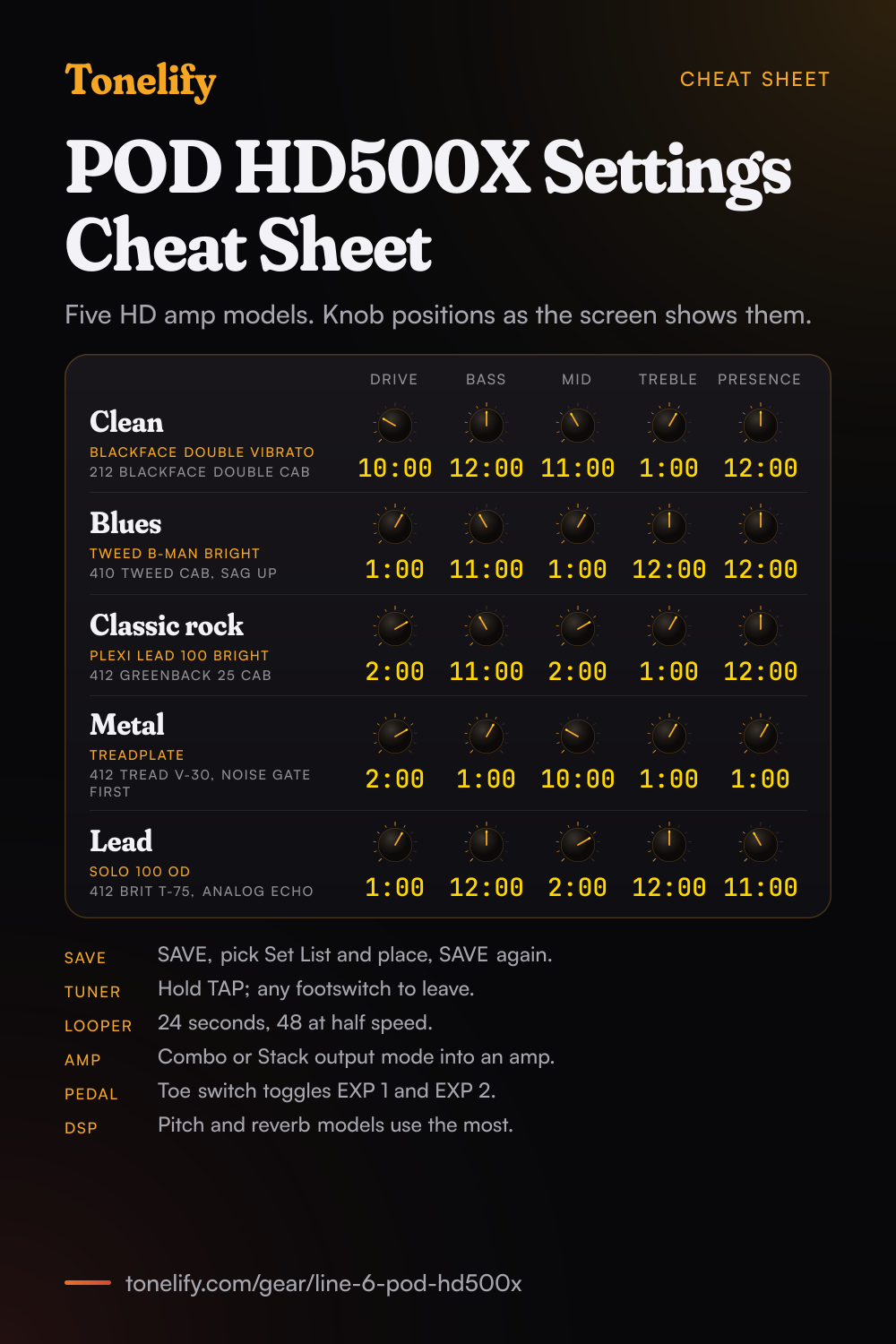
Free download
Printable cheat sheet: PDF and PNG
The clean, blues, classic rock, metal and lead settings from this page, together on one sheet with short tips. The PDF prints on white; the PNG is the dark version for your phone.
Starting settings on the Line 6 POD HD500X
Positions as clock times, since the knobs carry no numbers: 12:00 is the middle of the travel. They are where to begin, not Line 6's numbers: pick the amp model first, then move one control at a time from here.
Clean
Blackface Double Vibrato, Line 6's model of the Vibrato channel of a '65 Fender Twin Reverb, with the 212 Blackface Double cab. Drive 10:00, Bass 12:00, Mid 11:00, Treble 1:00, Presence 12:00. Line 6's Model Gallery says the Twin never gets very dirty, mostly just louder, and that its Vibrato channel has an extra 12AX7 stage over the Normal one. For width, add Analog Chorus, which Line 6 based on the Boss CE-1. These are Tonelify's starting points: Line 6 does not publish values for its factory presets.
- Drive 10:00
- Bass 12:00
- Mid 11:00
- Treble 1:00
- Presence 12:00
Edge of breakup and blues
Tweed B-Man Bright, the Bright input channel of a '59 Fender Tweed Bassman, with the 410 Tweed cab. Drive 1:00, Bass 11:00, Mid 1:00, Treble 12:00, Presence 12:00. The Model Gallery says the Bright channel adds high frequencies over the Normal one, and that the real Bassman has no master volume, so its dirt came from turning it up. On page 2 of the AMP:EDIT screen, turning up Sag gives more touch dynamics and sustain. For a solo, put Screamer, based on an Ibanez Tube Screamer, in front of the amp with its Drive low.
- Drive 1:00
- Bass 11:00
- Mid 1:00
- Treble 12:00
- Presence 12:00
Classic rock
Plexi Lead 100 Bright, the Bright input of a '59 Marshall Plexi Super Lead 100, with the 412 Greenback 25 cab, Line 6's model of a Marshall 4x12 with Celestion G12M Greenbacks. Drive 2:00, Bass 11:00, Mid 2:00, Treble 1:00, Presence 12:00. Line 6 says the Bright channel is the cutting lead tone and the Normal channel, flatter and with a bit less gain, suits rhythm. Brit J-800, its model of the JCM-800, is the 1980s step up in gain.
- Drive 2:00
- Bass 11:00
- Mid 2:00
- Treble 1:00
- Presence 12:00
Metal
Treadplate, Line 6's model of the Mesa/Boogie Dual Rectifier (the Model Gallery calls it Cali Tread), with the 412 Tread V-30 cab and its Celestion Vintage 30s. Drive 2:00, Bass 1:00, Mid 10:00, Treble 1:00, Presence 1:00. Put Noise Gate in the first FX block; Line 6 says it removes hiss from noisy pickups. For tighter palm mutes, add Screamer before the amp with its Drive low and take the amp's Drive down a step. Bomber Uber, based on a Bogner Uberschall, and Angel F-Ball, based on an Engl Fireball 100, are the other high-gain choices.
- Drive 2:00
- Bass 1:00
- Mid 10:00
- Treble 1:00
- Presence 1:00
Noise Gate and Screamer use two of the eight FX blocks.
Lead
Solo 100 OD, Line 6's model of the Overdrive channel of a '93 Soldano SLO 100, with the 412 Brit T-75 cab. Drive 1:00, Bass 12:00, Mid 2:00, Treble 12:00, Presence 11:00. The Model Gallery describes this channel as running from tight bottom chunk to liquid, screaming lead. Add Analog Echo after the amp, based on the Boss DM2, and set its time to a note value so it follows the TAP tempo. Solo 100 Clean and Solo 100 Crunch are the same amp's Normal channel, if you want the rhythm sound from one amp.
- Drive 1:00
- Bass 12:00
- Mid 2:00
- Treble 12:00
- Presence 11:00
Two amps in one preset
Move the amp block into Paths A and B and the unit creates a second amp, Amp B, in Path B. Each can be a different Amp or Preamp model. The Mixer block at the end of the two paths sets each path's level and pan, and Knob 4 on the amp screen picks which amp the DRIVE, VOLUME and tone knobs control. Two amps use a lot of processing: if DSP LIMIT REACHED appears, Line 6 suggests a different amp model, one amp instead of two, or setting unused blocks to None, which frees more than switching them off.
Chasing one song? Name it and the matcher writes that song's settings for the Line 6 POD HD500X.
Line 6 POD HD500X amp list
The Advanced Guide lists 30 HD amp models, counting each input channel Line 6 modelled as its own model, and the unit also has a Preamp version of each, with no power amp stage, for running into a real amp. A preset can run one amp or two, on Paths A and B. Flip Top is a bass amp.
| Amp model | Based on |
|---|---|
| Blackface Double Normal | '65 "Blackface" Fender Twin Reverb, Normal input channel |
| Blackface Double Vibrato | '65 "Blackface" Fender Twin Reverb, Vibrato input channel |
| Hiway 100 | Hiwatt Custom 100 |
| Super O | '60s Supro S6616 |
| Gibtone 185 | Gibson EH-185 |
| Tweed B-Man Normal | '59 Fender Tweed Bassman, Normal input channel |
| Tweed B-Man Bright | '59 Fender Tweed Bassman, Bright input channel |
| Blackface 'Lux Normal | Fender "Blackface" Deluxe Reverb, Normal input channel |
| Blackface 'Lux Vibrato | Fender "Blackface" Deluxe Reverb, Vibrato input channel |
| Divide 9/15 | Divided By 13 9/15 |
| PhD Motorway | Dr. Z Route 66 |
| Class A-15 | '61 "Fawn" Vox AC-15 |
| Class A-30 TB | Vox AC-30 "Top Boost" |
| Brit J-45 Normal | '65 Marshall JTM-45 MkII, Normal input channel |
| Brit J-45 Bright | '65 Marshall JTM-45 MkII, Bright input channel |
| Plexi Lead 100 Normal | '59 Marshall "Plexi" Super Lead 100, Normal input channel |
| Plexi Lead 100 Bright | '59 Marshall "Plexi" Super Lead 100, Bright input channel |
| Brit P-75 Normal | Park 75, Normal input channel |
| Brit P-75 Bright | Park 75, Bright input channel |
| Brit J-800 | Marshall JCM-800 |
| Bomber Uber | 2002 Bogner Uberschall |
| Treadplate | Mesa/Boogie Dual Rectifier |
| Angel F-Ball | Engl Fireball 100 |
| Line 6 Elektrik | A Line 6 original |
| Solo 100 Clean | '93 Soldano SLO 100, Normal channel, Clean mode |
| Solo 100 Crunch | '93 Soldano SLO 100, Normal channel, Crunch mode |
| Solo 100 OD | '93 Soldano SLO 100, Overdrive channel |
| Line 6 Doom | A Line 6 merging of a modded JCM800 preamp and a Hiwatt power amp |
| Line 6 Epic | A Line 6 original for sustain and distortion at nearly all playing levels |
| Flip Top | Ampeg B-15NF Portaflex bass amp |
Line 6 POD HD500X cab and mic list
16 guitar cabs and one bass cab. Choosing an amp loads a cab and mic to match, and you can change both. Every guitar cab offers the same eight mics, and the Flip Top bass cab has its own eight.
| Cab model | Based on |
|---|---|
| 212 Blackface Double | Fender "Blackface" Twin Reverb combo, 2x12in Jensen speakers |
| 412 Hiway | Hiwatt cabinet, 4x12in Fane 12287 50 watt speakers |
| 6x9 Super O | Supro S6616 combo, one 6x9 speaker |
| 112 Field Coil | Gibson EH-185 combo, 1x12 field coil speaker |
| 410 Tweed | '59 Fender Tweed Bassman combo, 4x10in Jensen alnico speakers |
| 112 BF 'Lux | Fender "Blackface" Deluxe Reverb combo, one 12in Oxford 12K5-6 |
| 112 Celest 12-H | Divided By 13 9/15 combo, one 12in Celestion G12H Heritage |
| 212 PhD Ported | Dr. Z Z Best cabinet, 2x12in Celestion (one G12H Heritage, one Vintage 30) |
| 112 Blue Bell | '61 "Fawn" Vox AC-15 combo, one 12in Celestion Alnico Blue |
| 212 Silver Bell | Vox AC-30 "Top Boost", 2x12in Celestion Alnico Silver Bell |
| 412 Greenback 25 | Marshall cabinet, 4x12in Celestion G12M "Greenback" |
| 412 Blackback 30 | Marshall cabinet, 4x12in Celestion Rola G12H30W "Blackback" |
| 412 Brit T-75 | Marshall cabinet, 4x12in Celestion G12T75 |
| 412 Uber | Bogner Uberschall cabinet, 2 G12T75 and 2 Vintage 30 |
| 412 Tread V-30 | Mesa/Boogie cabinet, 4x12in Celestion Vintage 30 |
| 412 XXL V-30 | Engl Pro cabinet, 4x12in Celestion Vintage 30 |
| 115 Flip Top | Ampeg Custom Design, CTS 15in speaker (bass cab) |
Line 6 POD HD500X mic models
Pick the mic on page 1 of the AMP:EDIT screen with Knob 3. Mic models are left out of the signal in the four Combo and Stack output modes, which are meant for a real amp.
- Guitar cab mics (8)
- 57 On Xs (Shure SM57, on axis), 57 Off Xs (Shure SM57, off axis), 409 Dyn (Sennheiser MD 409), 421 Dyn (Sennheiser MD 421), 4038 Rbn (Coles 4038 ribbon), 121 Rbn (Royer 121 ribbon), 67 Cond (Neumann U67), 87 Cond (Neumann U87)
- Bass cab mics (8)
- 57 On Xs (Shure SM57, on axis), 421 Dyn (Sennheiser MD 421), 12 Dyn (AKG D12), 112 Dyn (AKG D112), 20 Dyn (EV RE20), 7 Dyn (Shure SM7B), 40 Dyn (Heil PR40), 47 Cond (Neumann U47)
Line 6 POD HD500X effects list
The Advanced Guide's parameter tables list 113 FX models in ten categories, most of them from Line 6's M13 Stompbox Modeler. Each preset has eight FX blocks, and any of them can hold an effect or the FX Loop. How many effects fit depends on Dynamic DSP: pitch shifters and reverbs take the most.
- Dynamics (9)
- Noise Gate, Hard Gate, Tube Comp, Red Comp, Blue Comp, Blue Comp Treb, Vetta Comp, Vetta Juice, Boost Comp
- Distortion (15)
- Tube Drive, Screamer, Overdrive, Classic Dist, Heavy Dist, Color Drive, Buzz Saw, Facial Fuzz, Jumbo Fuzz, Fuzz Pi, Jet Fuzz, Line 6 Drive, Line 6 Distortion, Sub Octave Fuzz, Octave Fuzz
- Modulation (22)
- Pattern Tremolo, Panner, Bias Tremolo, Opto Tremolo, Script Phase, Panned Phaser, Barberpole Phaser, Dual Phaser, U-Vibe, Phaser, Pitch Vibrato, Dimension, Analog Chorus, Tri Chorus, Analog Flanger, Jet Flanger, AC Flanger, 80A Flanger, Frequency Shifter, Ring Modulator, Rotary Drum, Rotary Drm/Hrn
- Filter (17)
- Voice Box, V-Tron, Q Filter, Vocoder, Seeker, Obi Wah, Tron Up, Tron Down, Throbber, Slow Filter, Spin Cycle, Comet Trails, Octisynth, Synth O Matic, Attack Synth, Synth String, Growler
- Pitch (3)
- Bass Octaver, Pitch Glide, Smart Harmony
- EQ and preamp (6)
- Graphic EQ, Parametric EQ, Studio EQ, 4 Band Shift EQ, Mid Focus EQ, Vintage Pre
- Delay (19)
- Ping Pong, Dynamic Dly, Stereo Delay, Digital Delay, Dig Dly W/Mod, Reverse, Lo Res Delay, Tube Echo, Tube Echo Dry, Tape Echo, Tape Echo Dry, Sweep Echo, Sweep Echo Dry, Echo Platter, Echo Platter Dry, Analog W/Mod, Analog Echo, Auto-Volume Echo, Multi-Head
- Reverb (12)
- Plate, Room, Chamber, Hall, Echo, Tile, Cave, Ducking, Octo, Spring, '63 Spring, Particle Verb
- Volume and pan (2)
- Volume, Pan
- Wah (8)
- Fassel, Conductor, Throaty, Colorful, Vetta Wah, Chrome, Chrome Custom, Weeper
Line 6 POD HD500X specifications
- Released
- 2013
Line 6 POD HD500X questions
What amps are in the Line 6 POD HD500X?
Line 6's Advanced Guide lists 30 HD amp models, counting separate input channels: Fender Twin, Bassman and Deluxe models with Normal and Vibrato or Bright channels, Hiwatt Custom 100, Supro S6616, Gibson EH-185, Divided By 13 9/15, Dr. Z Route 66, Vox AC-15 and AC-30 Top Boost, Marshall JTM-45, Plexi and JCM-800, Park 75, Bogner Uberschall, Mesa/Boogie Dual Rectifier, Engl Fireball 100, three Soldano SLO 100 models, the Line 6 Elektrik, Doom and Epic, and the Flip Top bass amp. Each also comes as a Preamp model. The full list is below.
What is the difference between the POD HD500X and the POD HD500?
Line 6 launched the HD500X in July 2013 as the successor to the HD500, with more processing power, so you can add more effects to a signal chain, professional-grade footswitches with backlit LED rings, and a higher contrast display. Like the HD500, it has Line 6's HD amps and more than 100 studio and stomp effects. The 2.6 firmware of 2015 covered both units.
How many effects can the POD HD500X run at once?
Each preset has eight FX blocks and one or two amps. Any FX block can hold an effect from the ten categories or the FX Loop. Whether they all run depends on Dynamic DSP: pitch shifters and reverbs take a lot of processing, most other effects much less. If a change goes over the limit, DSP LIMIT REACHED appears and the model is bypassed. A bypassed model keeps its share, so set unused blocks to none to free it.
How many presets does the POD HD500X hold?
512: eight Set Lists of 64 presets each. Within a Set List the presets sit in 16 banks of four, A to D. A preset stores the amps and effects with their settings and positions, footswitch and pedal assignments, the Mixer and the input options. Every factory preset can be overwritten.
How do you save a preset on the POD HD500X?
Press SAVE. Knob 1 picks the Set List, Knob 2 the bank and channel, and Knobs 3 and 4 rename it, one character at a time. Press SAVE again to save, or the PRESETS knob or VIEW to cancel. Saving overwrites whatever was in that place, so choose an empty one to keep the old preset.
How do you switch between presets and stomp mode on the POD HD500X?
In System Setup, hold VIEW, and on the first Utilities page set Knob 1. ABCD makes FS5 to FS8 the A, B, C and D preset switches of the current bank. FS 5-8 is Line 6's Pedalboard Mode, where those switches turn FX blocks 5 to 8 on and off; the bank switches still bring up A to D. FS1 to FS4 always turn the blocks assigned to them on and off.
How long is the looper on the POD HD500X?
24 seconds at normal speed, or 48 seconds with 1/2 Speed on, which also plays back an octave lower. The looper records in mono. PRE records your dry guitar so you can change the sound under the loop, POST records the processed sound. There are also Undo for the last overdub, Reverse and a play-once switch, all on the footswitches in Looper Mode.
How do you use the tuner on the POD HD500X?
Press and hold the TAP switch. Knob 1 sets the reference pitch from 425 to 455 Hz, and Knob 2 chooses Mute, for silence, or Bypass, to hear your guitar dry. Press TAP or any other footswitch to leave the tuner.
How does the expression pedal on the POD HD500X work?
The pedal has a toe switch that toggles it between EXP 1 and EXP 2, and a second pedal, such as the Line 6 EX-1, in the PEDAL 2 jack runs EXP 2 at the same time. Volume and wah models assign themselves to the pedal. To calibrate it, hold the right arrow on the 4 Way Nav Pad while switching on, choose Pedal Cal in the Test Mode screen and follow the A, B, C and D footswitch steps.
How do you use the POD HD500X with a guitar amp?
Set the Output Mode in System Setup. Studio/Direct is for a desk or recorder. Combo Front and Stack Front are for the front input of a combo or a head and cab, and Combo Power Amp and Stack Power Amp for an amp's power amp. These four use Line 6's Live cab models with no mic model. Set the 1/4 inch out switch to AMP, and try the Preamp version of the amp model, which leaves out the power amp.
Can the POD HD500X be used as an audio interface?
Yes, over USB. Its native rate is 48 kHz, it also runs at 44.1, 88.2 and 96 kHz, and the bit depth is fixed at 24 bit. Windows uses ASIO or DirectSound, Mac uses Core Audio. Your recording software sees one stereo Record Send. In the Line 6 Audio-MIDI Devices panel, Hardware Monitor sets how loud you hear the unit while recording, without changing the recorded level.
What outputs does the POD HD500X have?
Two 1/4 inch outputs with an AMP or LINE switch, balanced XLR outputs with a ground LIFT switch, headphones, and a 24-bit S/PDIF output at 44.1 to 96 kHz. There is a stereo FX loop with a LINE or STOMP level switch, MIDI in and out, and L6 LINK, which feeds up to four Line 6 DT amps. Inputs include a guitar input with a PAD switch, an Aux In, a mic input and a Variax input.
What software works with the POD HD500X?
POD HD500X Edit, Line 6's free editor and librarian for Mac and Windows, to build, back up and restore presets over USB. Line 6 Monkey, its free updater, checks for and installs firmware updates, and the first Utilities page in System Setup shows the Flash Memory and USB firmware versions on the unit.
What did the 2.6 firmware add to the POD HD500X?
Line 6 announced it at Winter NAMM 2015 as a free update for the HD500, HD500X and the other POD HD units. It added a global EQ and the option to buy model packs: Metal ($49) with models based on the Peavey 5150 and a remastered JCM800, Vintage ($49) with the Vox AC30 Fawn and Orange OR80, Bass ($29) with the Ampeg SVT and Gallien-Kruger 800RB, or all three for $99. Those prices are from MusicRadar's 2015 report; the pack models are not in the list on this page.
What are the best POD HD500X settings for metal?
Treadplate with the 412 Tread V-30 cab, Drive 2:00, Bass 1:00, Mid 10:00, Treble 1:00 and Presence 1:00, with Noise Gate first and Screamer before the amp. These are starting points, not Line 6's numbers. If it fizzes, lower Drive first and Presence second.
When did the POD HD500X come out?
Line 6 announced it on 10 July 2013 as the successor to the POD HD500, and MusicRadar reported it the next day.
How do you build a patch on the Line 6 POD HD500X?
Pick the amp model first, then set its controls, then add the blocks in signal-chain order: drive before the amp, time and modulation after it. A patch built the other way around ends up compensating for the wrong stage. Tonelify returns the model, the order and the parameters together.
Does Tonelify support the Line 6 POD HD500X?
Yes. Name it in the tone matcher along with the song you are chasing and the settings come back adapted to it. Gear does not need to be in the catalog for a match to run.
Sources
Panel, specifications and dates checked against these on .
- Line 6: POD HD500X Pilot's Guide, Rev C (PDF)
- Line 6: POD HD500X Advanced Guide, Rev A (PDF)
- Line 6: POD HD Series Model Gallery, Rev E (PDF)
- Line 6: POD HD500X manuals page
- Premier Guitar: Line 6 Announces POD HD500X, 10 July 2013
- MusicRadar: Line 6 introduces POD HD500X, 11 July 2013
- MusicRadar: NAMM 2015, Line 6 releases POD HDX firmware update
More Line 6 gear
Similar multi-effects units from other makers
Settings for the song you are chasing
Name a song and Tonelify reads the documented rig behind the recording, then writes the settings for a rig with the Line 6 POD HD500X in it. A first plan starts with 7 days free, $0 today.