
MXR Dyna Comp settings
⚡ Match a tone on this pedal- Output
- Sensitivity
How do you dial in a specific tone on a MXR Dyna Comp?
The MXR Dyna Comp works on the note as the guitar plays it, so it usually goes at the front of the chain, before any drive. Fed a signal a drive pedal has already squashed, a compressor has little dynamic range left to even out. Settings here come with that position as well as the knob values.
Name the song you are chasing in the tone matcher and Tonelify returns the settings for this exact pedal, not the settings the original artist used. Those are two different things: the recording was made on gear most players do not own.
Settings for this unit only ever use controls it actually has, because its front panel is stored in our gear database. You will not be told to set a knob that is not on the unit.
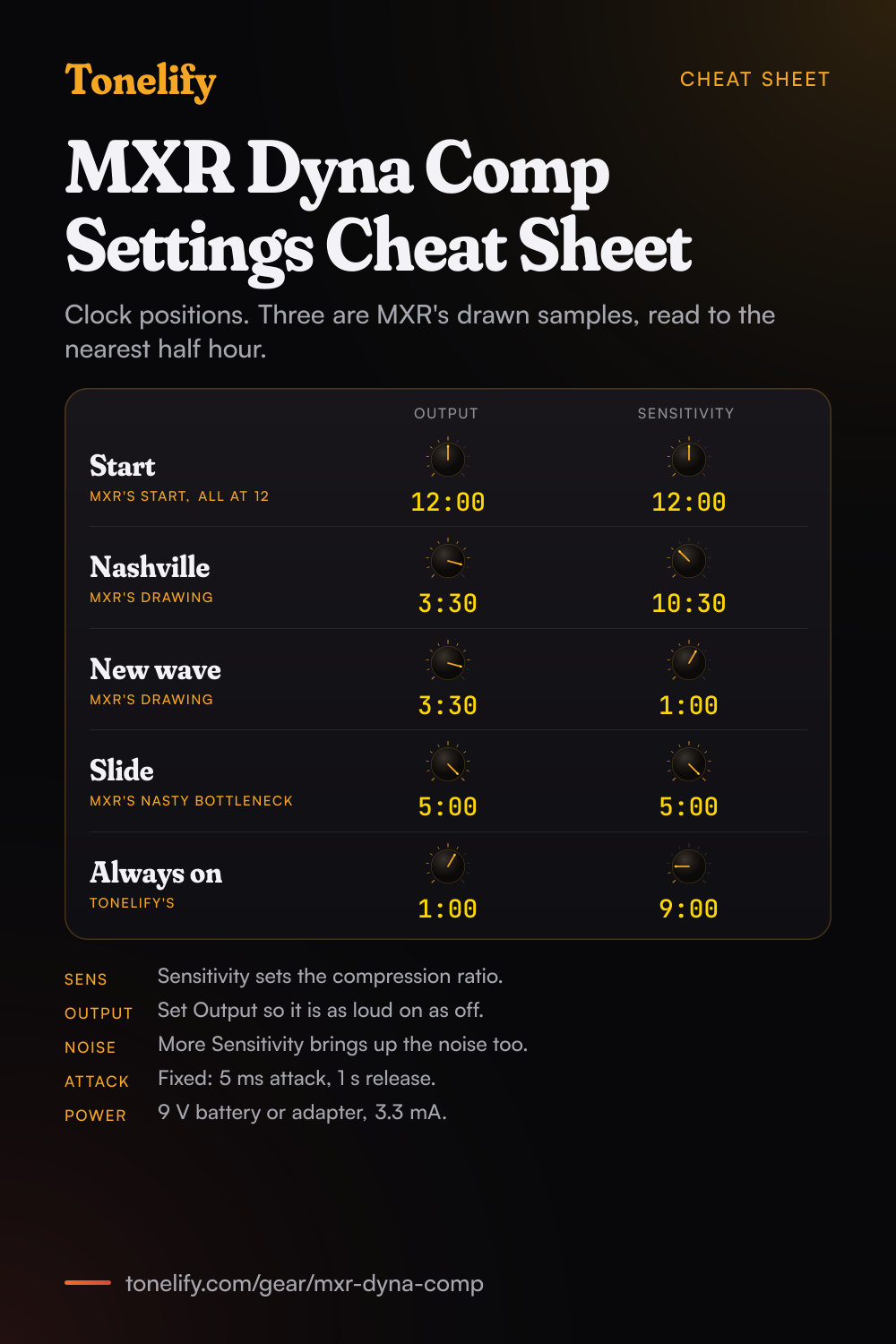
Free download
Printable cheat sheet: PDF and PNG
The start, nashville, new wave, slide and always on settings from this page, together on one sheet with short tips. The PDF prints on white; the PNG is the dark version for your phone.
Starting settings on the MXR Dyna Comp
Positions as clock times, since the knobs carry no numbers: 12:00 is the middle of the travel. They are where to begin, not MXR's numbers: move one control at a time from here.
Starting point
Output 12:00, Sensitivity 12:00. MXR's manual says to start with all controls at 12 o'clock, then switch the effect on. Sensitivity sets the compression ratio: clockwise gives more compression, counterclockwise less. Output sets the overall volume of the effect, so match it to the bypassed sound by switching the pedal on and off as you turn it.
- Output 12:00
- Sensitivity 12:00
MXR: start with all controls at 12 o'clock.
Nashville
Output 3:30, Sensitivity 10:30. This is the first of MXR's three sample settings, read from MXR's drawing to the nearest half hour. Light compression for clean country picking: the notes even out and ring a little longer without the squash taking over. MXR's manual calls the Dyna Comp a Nashville studio standard, and Dunlop's history article says countless Nashville pickers insist on its signature squash. Output sits high because the compressed signal needs it to come back up to the level of the dry guitar.
- Output 3:30
- Sensitivity 10:30
Read from MXR's drawing, to the nearest half hour.
New Wave Squash
Output 3:30, Sensitivity 1:00, read from MXR's drawing to the nearest half hour. More compression than Nashville: the attack of each note gets the percussive, clicky snap that MXR's product page says was heard on numerous hit records, and clean chords pop and ring. Dunlop's history article names Andy Summers, whose popping, ringing clean chords it calls a perfect illustration of the pedal's sound.
- Output 3:30
- Sensitivity 1:00
Read from MXR's drawing, to the nearest half hour.
Nasty Bottleneck for slide
Output 5:00, Sensitivity 5:00, both close to full, read from MXR's drawing to the nearest half hour. MXR calls it Nasty Bottleneck, a slide setting with the most compression and sustain the pedal gives. Dunlop's history article says Lowell George and Bonnie Raitt favored the Dyna Comp for the sweet sustain it lent to their slide work. With this much compression the noise comes up too, so turn the guitar's volume down between phrases.
- Output 5:00
- Sensitivity 5:00
Slide. Read from MXR's drawing, to the nearest half hour.
Light always-on
Output 1:00, Sensitivity 9:00. Tonelify's setting, not MXR's: a light touch of compression to leave on all the time, so the quiet notes come up a little and the hard ones are held back, without the obvious squash. If you can hear the pedal working on every note, turn Sensitivity down before you change Output, then set Output so the pedal is as loud on as off.
- Output 1:00
- Sensitivity 9:00
Tonelify's positions, not MXR's.
Chasing one song? Name it and the matcher writes that song's settings for the MXR Dyna Comp.
What controls does the MXR Dyna Comp have?
The MXR Dyna Comp has 2 controls on its front panel: Output and Sensitivity.
MXR Dyna Comp specifications
- Front panel
- Output, Sensitivity
- Released
- 1972
What the MXR Dyna Comp panel means when you dial it in
Its controls are Output and Sensitivity, and settings for this pedal are written against those names rather than a generic level, tone and gain.
MXR Dyna Comp questions
What does the Sensitivity knob on the MXR Dyna Comp do?
It sets how much the pedal compresses. MXR's manual says the Sensitivity knob sets the compression ratio: turn it clockwise to increase sensitivity, which means more compression, or counterclockwise for less.
What does the Output knob on the Dyna Comp do?
MXR's manual says the Output knob controls the overall effect volume: clockwise to increase it, counterclockwise to decrease it. Set it so the pedal is as loud on as off, then go higher if you want a lift.
Where should I start with the Dyna Comp knobs?
At 12 o'clock. MXR's manual says to start with all controls at 12 o'clock and turn the effect on, then move Sensitivity for the amount of compression and Output for the level.
What are MXR's sample settings for the Dyna Comp?
MXR's manual draws three: Nashville, New Wave Squash and Nasty Bottleneck. Read from the drawing to the nearest half hour, Nashville is Output 3:30 and Sensitivity 10:30, New Wave Squash is Output 3:30 and Sensitivity 1:00, and Nasty Bottleneck has both knobs at about 5:00, close to full.
What are the attack and release times of the Dyna Comp?
MXR's manual gives an attack time of 5 ms and a release time of 1 s, with a maximum compression of 36 dB. Neither can be changed on the M102: it has only Output and Sensitivity.
Is the MXR Dyna Comp true bypass?
Yes. MXR's manual lists the bypass as True Hardwire, and Dunlop's history article says the M102 is now updated with true-bypass switching. The footswitch turns the effect on and off, with a red LED when it is on.
How is the Dyna Comp powered?
With one 9-volt battery, a 9-volt adapter such as the Dunlop ECB003, or a DC Brick power supply, per MXR. MXR's manual says the battery goes in after you remove the bottom plate, and gives a current draw of 3.3 mA.
Is the Dyna Comp a transparent compressor?
No, and it is not meant to be. Dunlop's history article says that while some compressors pride themselves on being transparent, that has never been the Dyna Comp's thing: it imparts a musical color to the sound, and that color is what draws players to it.
When did the MXR Dyna Comp come out?
In 1972, per Dunlop's history article, with the same two controls, Output and Sensitivity. The article says the original contained the CA3080 metal can integrated circuit, which remains a key part of its sound.
Who used the MXR Dyna Comp?
Dunlop's history article names Lowell George and Bonnie Raitt, who used it for sustain on slide, David Gilmour, who liked how it made his single-note lines bloom and soar, and Andy Summers, for his popping, ringing clean chords. It also says countless Nashville pickers insist on its squash.
What is the difference between the M102 Dyna Comp and the Script Logo Dyna Comp?
Dunlop's history article says the CSP102SL Script Logo is modeled on the circuit of the compressor as MXR first released it, with a status LED and an AC power input added. Compared with the Script Logo, it says the M102 has a faster, more aggressive response to your attack.
What is the difference between the Dyna Comp, the Dyna Comp Mini and the Dyna Comp Deluxe?
Per Dunlop's history article, the M291 Mini puts the Dyna Comp sound in a smaller housing and adds an Attack switch for a slower classic attack or a faster, tighter one. The M228 Deluxe keeps Output and Sensitivity and adds a Clean knob to blend in the dry signal, a Tone control and Attack buttons.
What is the difference between the Dyna Comp and the MXR Super Comp?
Dunlop's history article says the M132 Super Comp takes the Dyna Comp sound and adds an Attack Level knob, which controls how the initial crack of the note is treated by the compressed signal, for anyone who wants sustain without losing an aggressive picking attack.
How much does the MXR Dyna Comp cost?
Dunlop's own store listed the M102 at $99.99 USD when Tonelify read it on 3 November 2026. Dealers' prices vary.
Where does the MXR Dyna Comp go in the signal chain?
Usually first, or close to it: straight after the guitar and before any drive pedal. It reads the note as the guitar plays it, and it does that most reliably on the plain guitar signal. The drive then shapes what this pedal has already done, rather than the other way round.
Does Tonelify support the MXR Dyna Comp?
Yes, and its front panel is stored, so settings only ever reference controls this pedal has: Output, Sensitivity. You will not be told to set a knob that is not there.
Sources
Panel, specifications and dates checked against these on .
- MXR: M102 Dyna Comp manual (PDF)
- Dunlop: MXR Dyna Comp Compressor M102 product page
- Dunlop: A Dyna Comp-rehensive History
Nashville, New Wave Squash and Nasty Bottleneck are MXR's sample settings; the clock positions are read from MXR's drawing to the nearest half hour. The 12 o'clock start is MXR's. The always-on setting is Tonelify's.
More MXR gear
Similar pedals from other makers
Settings for the song you are chasing
Name a song and Tonelify reads the documented rig behind the recording, then writes the settings for a rig with the MXR Dyna Comp in it. A first plan starts with 7 days free, $0 today.