
Strymon TimeLine settings
Type picks one of twelve delay machines, and the other knobs set that machine. Value fine-tunes the delay time and scrolls the menus.
⚡ Match a tone on this pedal- Type
- Value
- Time
- Repeats
- Mix
- Filter
- Grit
- Speed
- Depth
How do you dial in a specific tone on a Strymon TimeLine?
Time and modulation effects sit at a specific point in a chain and change character completely if they move. Settings for the Strymon TimeLine come with the position in the signal path, not just the knob values, because a delay in front of a driven amp and the same delay in a loop are two different sounds.
Name the song you are chasing in the tone matcher and Tonelify returns the settings for this exact pedal, not the settings the original artist used. Those are two different things: the recording was made on gear most players do not own.
Settings for this unit only ever use controls it actually has, because its front panel is stored in our gear database. You will not be told to set a knob that is not on the unit.
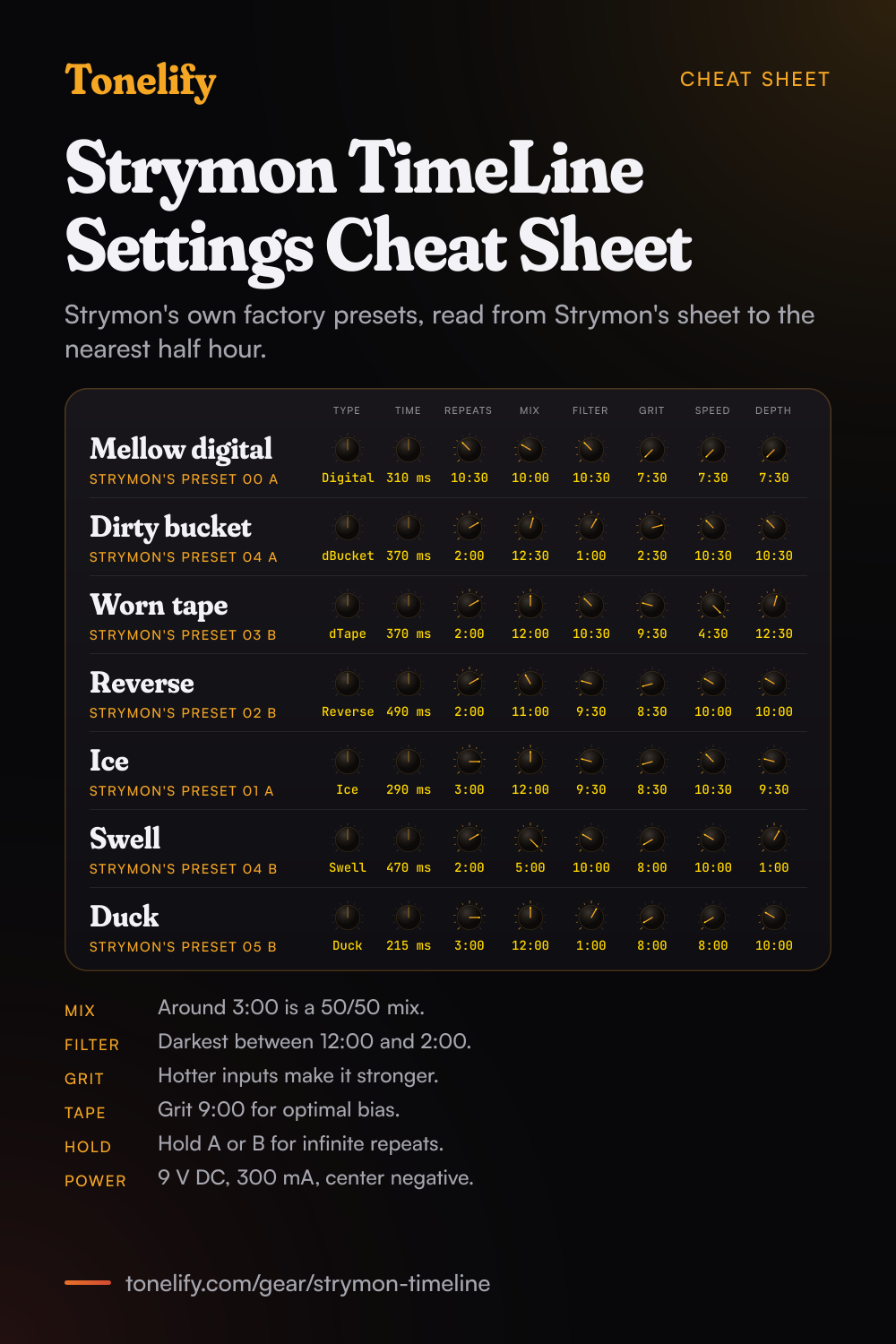
Free download
Printable cheat sheet: PDF and PNG
The mellow digital, dirty bucket, worn tape, reverse, ice, swell and duck settings from this page, together on one sheet with short tips. The PDF prints on white; the PNG is the dark version for your phone.
Starting settings on the Strymon TimeLine
Positions as clock times, since the knobs carry no numbers: 12:00 is the middle of the travel. They are where to begin, not Strymon's numbers: move one control at a time from here.
Mellow digital delay
Type Digital, Time 310 ms, Repeats 10:30, Mix 10:00, Filter 10:30, Grit 7:30, Speed 7:30, Depth 7:30. This is Mellow Digital, factory preset 00 A, read from Strymon's drawing to the nearest half hour. Strymon's manual says that at minimum the Filter is flat and full bandwidth, and that the repeats get progressively darker as you turn it up, so 10:30 takes a little top off the echoes. Grit sits close to minimum, and Speed and Depth are close to minimum too, so very little modulation is added.
- Type Digital
- Time 310 ms
- Repeats 10:30
- Mix 10:00
- Filter 10:30
- Grit 7:30
- Speed 7:30
- Depth 7:30
Read from Strymon's sheet, to the nearest half hour.
Dirty analog bucket delay
Type dBucket, Time 370 ms, Repeats 2:00, Mix 12:30, Filter 1:00, Grit 2:30, Speed 10:30, Depth 10:30. This is Dirty Bucket, factory preset 04 A, with Range on Single. Strymon's sheet prints the 370 ms but does not draw the Time knob, so turn it until the display reads 370. In dBucket the Grit knob becomes bucket loss, and the manual says 3:00 gives maximum distortion loss with just a hint of noise, so 2:30 sits just under that. The manual also says 12:00 is a neutral Filter setting and that turning it clockwise makes the repeats darker. For the warm, fuzzy sound of the earliest analog delays, it suggests the Single option with lots of Grit and the Filter between 12:00 and 5:00.
- Type dBucket
- Time 370 ms
- Repeats 2:00
- Mix 12:30
- Filter 1:00
- Grit 2:30
- Speed 10:30
- Depth 10:30
Range Single. Set Time on the display: the sheet draws no knob.
Worn tape delay
Type dTape, Time 370 ms, Repeats 2:00, Mix 12:00, Filter 10:30, Grit 9:30, Speed 4:30, Depth 12:30. This is Wowywowwowwow, factory preset 03 B, with Tape Speed on Fast and the Low End Contour far towards minus. In dTape four knobs change job: Filter is tape age, Grit is tape bias, Speed is tape crinkle and Depth is wow and flutter. The manual says 9:00 on Grit gives an optimally biased tape machine, so 9:30 sits just past it. Speed at 4:30 is close to the manual's maximum, which it describes as a tape that has been mangled and chewed for years, and that is where the wobble in this preset comes from.
- Type dTape
- Time 370 ms
- Repeats 2:00
- Mix 12:00
- Filter 10:30
- Grit 9:30
- Speed 4:30
- Depth 12:30
Tape Speed Fast, Low End Contour far towards minus.
Reverse delay
Type Reverse, Time 490 ms, Repeats 2:00, Mix 11:00, Filter 9:30, Grit 8:30, Speed 10:00, Depth 10:00. This is Reversal, factory preset 02 B, with Smear and High Pass off. The 490 ms lines up with the manual's own tip for this machine: try setting the Time knob to around 500 ms and hold a ringing chord for an interesting rhythmic effect. Mix stays under noon so the backwards notes sit behind the dry guitar.
- Type Reverse
- Time 490 ms
- Repeats 2:00
- Mix 11:00
- Filter 9:30
- Grit 8:30
- Speed 10:00
- Depth 10:00
Smear off, High Pass off.
Ice pitched delay
Type Ice, Time 290 ms, Repeats 3:00, Mix 12:00, Filter 9:30, Grit 8:30, Speed 10:30, Depth 9:30. This is Melt Away, factory preset 01 A, with Interval on a perfect fifth up, Slice on Medium, Blend low, Smear at maximum and High Pass at 20 Hz. Strymon's manual says Ice slices up the input and plays the pieces back at selectable intervals, and that huge sounds come from keeping Blend below halfway with the Repeats knob around 3 o'clock, which is exactly what this preset does. The Ice signal then appears to float in as the repeats build.
- Type Ice
- Time 290 ms
- Repeats 3:00
- Mix 12:00
- Filter 9:30
- Grit 8:30
- Speed 10:30
- Depth 9:30
Interval +P5, Slice Medium, Blend low, Smear max, High Pass 20 Hz.
Volume swell
Type Swell, Time 470 ms, Repeats 2:00, Mix 5:00, Filter 10:00, Grit 8:00, Speed 10:00, Depth 1:00. This is Smeared Swell, factory preset 04 B, with Rise at 0.40, Smear at maximum and Boost at minus 3 dB. Mix at 5:00 is fully clockwise, and the manual says to turn it fully clockwise for volume-pedal swell effects. The same tip says to set Rise to match the delay time for natural swell-meets-delay effects, so 0.40 seconds next to 470 ms is the idea here.
- Type Swell
- Time 470 ms
- Repeats 2:00
- Mix 5:00
- Filter 10:00
- Grit 8:00
- Speed 10:00
- Depth 1:00
Rise 0.40, Smear max, Boost -3 dB.
Ducking delay
Type Duck, Time 215 ms, Repeats 3:00, Mix 12:00, Filter 1:00, Grit 8:00, Speed 8:00, Depth 10:00. This is Dynamo, factory preset 05 B, with Release at 0.25, Ducking Feedback on Normal and High Pass at 100 Hz. Strymon's manual calls Duck a dynamic delay that reacts to your playing, and says the ducking becomes more pronounced as the sensitivity goes up. A low level guitar needs higher sensitivity for the same effect as a hot one, so set that parameter to suit your pickups. The Filter at 1:00 sits in the range the manual gives for the darkest repeats, 12:00 to 2:00.
- Type Duck
- Time 215 ms
- Repeats 3:00
- Mix 12:00
- Filter 1:00
- Grit 8:00
- Speed 8:00
- Depth 10:00
Release 0.25, Feedback Normal, High Pass 100 Hz.
Chasing one song? Name it and the matcher writes that song's settings for the Strymon TimeLine.
TimeLine delay time range for each machine
Strymon's manual prints the range of each delay machine. Push the Type encoder to switch the display between the bank and the time.
| Machine | Delay time |
|---|---|
| Digital, Dual, Pattern, Reverse, Ice, Duck, Swell, Trem, Filter | 60 ms to 2500 ms |
| Lo-Fi | 2 ms to 2500 ms |
| dBucket, Range Single | 40 ms to 400 ms |
| dBucket, Range Double | 80 ms to 800 ms |
| dTape, Tape Speed Normal | 60 ms to 2500 ms |
| dTape, Tape Speed Fast | 30 ms to 1250 ms |
What controls does the Strymon TimeLine have?
The Strymon TimeLine has 9 controls on its front panel: Type, Value, Time, Repeats, Mix, Filter, Grit, Speed and Depth.
Strymon TimeLine specifications
- Front panel
- Type, Value, Time, Repeats, Mix, Filter, Grit, Speed, Depth
What the Strymon TimeLine panel means when you dial it in
Its controls are Type, Value, Time, Repeats, Mix, Filter, Grit, Speed and Depth, and settings for this pedal are written against those names rather than a generic level, tone and gain.
Strymon TimeLine questions
Where is 50/50 on the TimeLine Mix knob?
Around 3 o'clock, per Strymon's manual. The Mix happens in analog, and Strymon's product page says the analog dry path gives a zero latency dry signal. Fully clockwise is all wet, which the manual suggests for volume-pedal swells.
What do the Filter and Grit knobs do on the TimeLine?
On most machines the Filter starts flat at minimum and gets darker as you turn it up. Strymon's manual says it gives an analog delay curve around 12:00, the darkest repeats between 12:00 and 2:00, and a curve similar to a tape delay at maximum. Grit adds distortion and artifacts, and hotter inputs make it stronger.
What do the knobs do in dTape and dBucket?
In dTape, Filter is tape age, Grit is tape bias, Speed is tape crinkle and Depth is wow and flutter. In dBucket, Filter is a special filter with 12:00 as neutral, and Grit is bucket loss. Set Grit to 9:00 in dTape for an optimally biased tape machine, per Strymon's manual.
How do I get a classic analog delay on the TimeLine?
Strymon's manual says to use dBucket with the Filter at minimum and Grit at 12:00, for a bright first repeat and darker repeats after it. On the Digital machine it also suggests Grit and Filter at 12:00 for an analog-voiced digital delay, and Grit at minimum with Filter at maximum for a tape-voiced one.
How do I get infinite repeats on the TimeLine?
Hold footswitch A or B: Strymon's manual says holding either one activates infinite repeats. The product page also says that with the Repeats knob at 100% you hear sustained infinite repeats, and that at zero you hear one repeat.
How do I find the knob positions of a saved preset?
Strymon's manual says to turn each knob until the LED returns to green after glowing amber. That is how you match the physical knobs to a preset, including the factory presets drawn on this page.
How many presets does the TimeLine have?
200. The manual says there are 100 banks with an A and a B preset in each, numbered 0 to 99, and that banks 0 to 49 are duplicated in banks 50 to 99 at the factory. Press A and B together for a lower bank, or B and Tap for a higher one.
How do I factory reset a TimeLine?
Power up the TimeLine while holding A and Tap, and keep holding for 5 seconds after it has powered up. Strymon's manual warns that this procedure will erase any custom presets, so back up the ones you want to keep first.
What power supply does the TimeLine need?
9 V DC, center negative, with at least 300 mA of available current. Strymon's manual says never to plug into a voltage higher than 9 V DC. The product page says the power supply is not included.
Does the TimeLine work in mono?
Yes. Strymon's manual says to use the left input for mono, and the left output for mono too. The right output can also work as an effect send when the feedback loop switch is set to its down position.
Does the TimeLine have a looper?
Yes. Strymon lists a full time 30 second looper, available before or after the delay, and calls it a built-in stereo looper. Hold Tap to enter it. A records and overdubs, B plays and Tap stops.
Can the TimeLine keep repeats going after I bypass it?
Yes, with the Persist parameter on. Strymon's manual says the delay trails then continue after bypass, and that the bypass mode automatically becomes analog bypass. Spillover between presets is a separate setting, and the current preset must be active for at least 5 seconds first.
How do I use the TimeLine in a parallel effects loop?
Set the Dry Signal parameter to Kill. Strymon's manual says the dry signal is then muted, which lets the Mix control work as an effect level.
Can I use an expression pedal with the TimeLine?
Yes. Strymon's manual says to connect a standard TRS expression pedal for continuous control over any knob. The same jack also takes a MiniSwitch for external tap, per the manual.
What are the TimeLine's specs and price?
Input impedance 1 M ohm, output 100 ohm, 24-bit at 96 kHz, and 5 inches deep by 6.75 wide by 1.87 tall, per Strymon's manual. Strymon's product page listed it at $449 when Tonelify read it on 3 November 2026.
Where does the Strymon TimeLine go in the signal chain?
After the drive stage. Running a time or modulation effect into a distorted input smears the repeats into the distortion instead of layering them over it, which is why this kind of pedal usually belongs in an effects loop where the amp has one.
Does Tonelify support the Strymon TimeLine?
Yes, and its front panel is stored, so settings only ever reference controls this pedal has: Type, Value, Time, Repeats, Mix, Filter, Grit, Speed, Depth. You will not be told to set a knob that is not there.
Sources
Panel, specifications and dates checked against these on .
- Strymon: TimeLine user manual, Rev H (PDF)
- Strymon: TimeLine factory preset sheet (PDF)
- Strymon: TimeLine quick start (PDF)
- Strymon: TimeLine product page
Every panel is a preset from Strymon's factory preset sheet. Type, Time and the parameters are printed there, and the knob positions are read from Strymon's drawing to the nearest half hour. The descriptions tie Strymon's manual to each preset and are Tonelify's.
More Strymon gear
Similar pedals from other makers
Settings for the song you are chasing
Name a song and Tonelify reads the documented rig behind the recording, then writes the settings for a rig with the Strymon TimeLine in it. A first plan starts with 7 days free, $0 today.