
Line 6 POD Express presets and settings
Compact modeller with two footswitches, seven amps on one encoder, four effects knobs, a seven-LED ring instead of a screen, 21 presets and a 30 second looper. Runs on three AA batteries.
⚡ Match a tone on this unitHow do you dial in a specific tone on a Line 6 POD Express?
A multi-effects unit gives you the whole chain in one box, which means the order of the blocks is as much of the answer as the values inside them. Settings for the Line 6 POD Express name the amp model, the block order and the parameters together, rather than handing you numbers with no chain to put them in.
Name the song you are chasing in the tone matcher and Tonelify returns the settings for this exact multi-effects unit, not the settings the original artist used. Those are two different things: the recording was made on gear most players do not own.
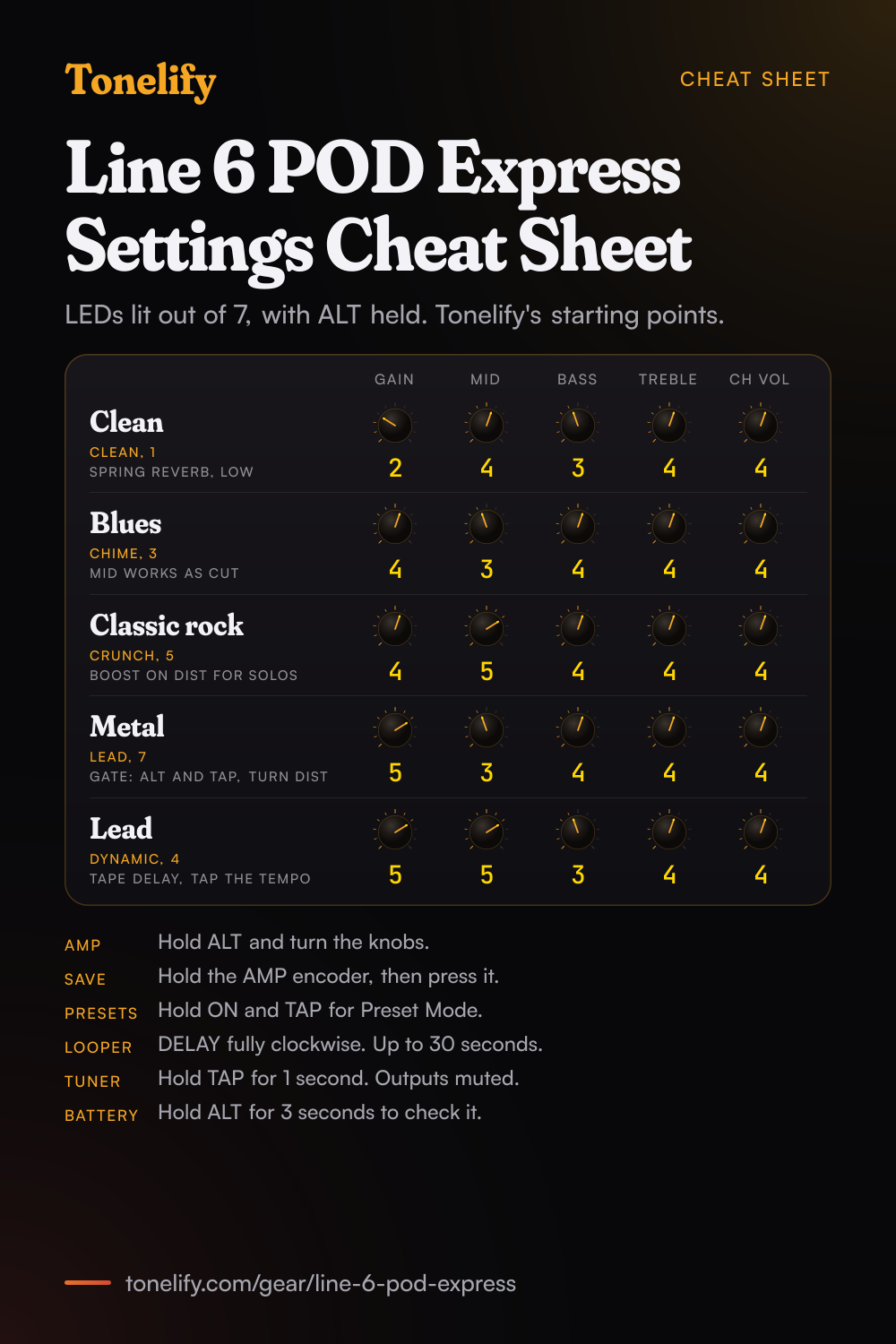
Free download
Printable cheat sheet: PDF and PNG
The clean, blues, classic rock, metal and lead settings from this page, together on one sheet with short tips. The PDF prints on white; the PNG is the dark version for your phone.
Starting settings on the Line 6 POD Express
Values as the unit's screen shows them, on its own scale; each drawn knob shows that value's share of the range. They are where to begin, not Line 6's numbers: pick the amp model first, then move one control at a time from here.
Clean
CLEAN, position 1 on the AMP encoder, which Line 6 bases on the Fender Princeton Reverb, with its 1x10in Princeton cab. Hold ALT and turn the knobs to set the amp: Gain 2 of 7 LEDs, Mid 4 of 7, Bass 3 of 7, Treble 4 of 7 and Ch Vol 4 of 7. With ALT held, the ring around the AMP encoder lights in red from none at the minimum to all seven at the maximum, so these counts are what you will see. Add SPRING on the REVERB knob, low in its segment. These are starting points, not Line 6's numbers.
- Gain 2
- Mid 4
- Bass 3
- Treble 4
- Ch Vol 4
LEDs lit on the ring with ALT held. Starting points, not Line 6's.
Edge of breakup and blues
CHIME, position 3, based on the Matchless DC30's clean channel 1, with its 2x12in Matchless cab. Gain 4 of 7 LEDs, Mid 3 of 7, Bass 4 of 7, Treble 4 of 7 and Ch Vol 4 of 7. On CHIME the MID control is not a mid: Line 6 says it adjusts the Cut parameter, following the knob design of the real DC30, so if the sound is harsh, try it higher or lower before you touch Treble. For more push, put the DIST knob in the OVERDRIVE segment, based on the Ibanez TS808 Tube Screamer, low in its range. These are starting points, not Line 6's numbers.
- Gain 4
- Mid 3
- Bass 4
- Treble 4
- Ch Vol 4
On CHIME, MID is the Matchless's Cut control. Starting points, not Line 6's.
Classic rock
CRUNCH, position 5, based on the BE/HBE channel of the Friedman BE-100, with a 4x12in Marshall Basketweave cab. Gain 4 of 7 LEDs, Mid 5 of 7, Bass 4 of 7, Treble 4 of 7 and Ch Vol 4 of 7. Mid above the other tone controls keeps chords and riffs forward. For a solo boost, set the DIST knob in the BOOST segment, based on the Klon Centaur, and give it a footswitch: in Global Settings, the TAP or an external FS3 or FS4 switch can turn the Distortion effect on and off. These are starting points, not Line 6's numbers.
- Gain 4
- Mid 5
- Bass 4
- Treble 4
- Ch Vol 4
BOOST on the DIST knob for solos. Starting points, not Line 6's.
Metal
LEAD, position 7, based on the Peavey 5150, with a 4x12in MESA/Boogie 4FB cab. Gain 5 of 7 LEDs, Mid 3 of 7, Bass 4 of 7, Treble 4 of 7 and Ch Vol 4 of 7. Set the hidden noise gate: hold ALT and TAP and turn the DIST knob for its Threshold, which Line 6 says to set just above the noise you hear when not playing, and the MOD knob for its Decay, where low values can cut off sustaining notes. OVERDRIVE on the DIST knob, at the very start of its segment, tightens the low end in front of the amp. HEAVY, position 6, is Line 6's own Oblivion if you want a different high-gain voice. These are starting points, not Line 6's numbers.
- Gain 5
- Mid 3
- Bass 4
- Treble 4
- Ch Vol 4
Gate Threshold: ALT and TAP, turn DIST. Starting points, not Line 6's.
Lead
DYNAMIC, position 4, based on the Ben Adrian Cartographer, with a 4x12in Bogner Uberkab. Gain 5 of 7 LEDs, Mid 5 of 7, Bass 3 of 7, Treble 4 of 7 and Ch Vol 4 of 7. Add TAPE on the DELAY knob, based on the Maestro Echoplex EP-3, and tap the tempo on TAP: Line 6 says turning further into a delay's segment raises its mix and its number of repeats. HALL on the REVERB knob, low in its segment, adds space behind it. These are starting points, not Line 6's numbers.
- Gain 5
- Mid 5
- Bass 3
- Treble 4
- Ch Vol 4
TAPE delay with TAP tempo. Starting points, not Line 6's.
How the knobs and the LED ring work
The POD Express has no screen: the ring of seven LEDs around the AMP encoder shows everything. Turn the AMP encoder to pick one of the seven amps, and a red LED shows which one; turn it to OFF for no amp. The four effects knobs each pick one of four models, and turning within a model's segment sets how strong it is; fully anticlockwise turns that knob's effect off. The amp's own controls are the silver labels under each knob: hold ALT while turning to change them, and the ring fills clockwise in red. Holding ALT and TAP together reaches the cab choice on the AMP encoder, Master Volume on the DELAY knob, Presence on the REVERB knob and the noise gate on DIST and MOD. If you would rather the four knobs set GAIN, MID, BASS and TREBLE directly, change Knob Function in the Global Settings, and ALT then picks the effects instead.
Chasing one song? Name it and the matcher writes that song's settings for the Line 6 POD Express.
Line 6 POD Express amp list
Each POD Express has 7 amp models on its AMP encoder, from Line 6's HX family, and turning to an amp loads its matched cab. These are the Guitar's seven, then the Black's and the Bass's. Every amp has GAIN, MID, BASS, TREBLE and CH VOL, reached by holding ALT, plus Master Volume and Presence (Hi-Mid on the Bass) with ALT and TAP held. On the Guitar's CHIME, MID works as the Matchless's Cut control.
| Amp | Unit | Based on | Matched cab |
|---|---|---|---|
| 1 CLEAN | Guitar | Fender Princeton Reverb | 1x10in Fender Princeton Reverb |
| 2 SPECIAL | Guitar | Line 6 Litigator | 1x12in Fender Deluxe, Oxford |
| 3 CHIME | Guitar | Matchless DC30, channel 1, clean | 2x12in Matchless DC-30, G12H30 |
| 4 DYNAMIC | Guitar | Ben Adrian Cartographer | 4x12in Bogner Uberkab, V30 |
| 5 CRUNCH | Guitar | Friedman BE-100, BE/HBE channel | 4x12in Marshall Basketweave, G12-M25 |
| 6 HEAVY | Guitar | Line 6 Oblivion | 4x12in ENGL XXL, V30 |
| 7 LEAD | Guitar | Peavey 5150 | 4x12in MESA/Boogie 4FB, V30 |
| 1 PURE | Black | Paul Reed Smith Archon, clean channel | 1x12in MESA/Boogie Extension, EVM12L |
| 2 DIRGE | Black | Sunn Model T, Brite channel | 4x12in Sunn, G12T-75 |
| 3 CRUX | Black | Orange Rockerverb 100 MkIII, dirty channel | 2x12in Orange, V30 |
| 4 ANVIL | Black | Line 6 Badonk | 4x12in MESA/Boogie 4FB, V30 |
| 5 SLAY | Black | Paul Reed Smith Archon, lead channel | 4x12in Marshall Basketweave G12M-25 |
| 6 MEGA | Black | Diezel VH4, Mega channel | 4x12in Bogner Uberkab, V30 |
| 7 AVANT | Black | Revv Generator 120, Red/High Gain channel | 4x12in ENGL XXL, V30 |
| 1 ROUND | Bass | Ampeg B-15NF Portaflex | 1x15in Ampeg B-15 |
| 2 GRIT | Bass | Ampeg SVT, normal channel | 8x10in Ampeg SVT |
| 3 VINTAGE | Bass | Fender Bassman Silver Panel | 2x15in Fender Bassman, D130 |
| 4 PUNCH | Bass | Gallien-Krueger GK 800RB | 4x10in Ampeg SVT 410HLF |
| 5 MODERN | Bass | Darkglass Electronics Microtubes B7K Ultra | 4x10in Eden D410XLT |
| 6 STUDIO | Bass | Aguilar Tone Hammer | 1x12in Epifani Ultralight |
| 7 DEEP | Bass | MESA/Boogie M9 Carbine | 6x10in MESA/Boogie PowerHouse |
Line 6 POD Express Guitar effects list
17 effects on four knobs, with one model per knob on at a time. Each knob is split into four segments, one per model, and turning further within a model's segment raises its intensity; fully anticlockwise bypasses the knob. The LOOPER sits at the DELAY knob's fully clockwise end. A noise gate at the input and a Volume block for an expression pedal are always there.
| Effect | Knob | Based on |
|---|---|---|
| BOOST | DIST | Klon Centaur |
| OVERDRIVE | DIST | Ibanez TS808 Tube Screamer |
| DISTORTION | DIST | BOSS DS-1 Distortion, Keeley modded |
| FUZZ | DIST | '73 Electro-Harmonix Ram's Head Big Muff Pi |
| CHORUS | MOD | Modded Arion SCH-Z chorus |
| FLANGER | MOD | MXR 117 Flanger |
| PHASER | MOD | MXR Phase 90 |
| TREMOLO | MOD | Fender optical tremolo circuit |
| ANALOG | DELAY | BOSS DM-2 with Adrian Mod |
| DIGITAL | DELAY | Line 6 Original |
| TAPE | DELAY | Maestro Echoplex EP-3 |
| PONG | DELAY | Line 6 Original, ping pong style |
| LOOPER | DELAY | Line 6 Original, 1 Switch Looper |
| SPRING | REVERB | Line 6 Original |
| HALL | REVERB | Line 6 Original |
| PLATE | REVERB | Line 6 Original |
| SPACE | REVERB | Line 6 Original |
Line 6 POD Express questions
What amps are in the Line 6 POD Express?
Seven per model, derived from Line 6's HX family. The POD Express Guitar has CLEAN (Fender Princeton Reverb), SPECIAL (Line 6 Litigator), CHIME (Matchless DC30), DYNAMIC (Ben Adrian Cartographer), CRUNCH (Friedman BE-100), HEAVY (Line 6 Oblivion) and LEAD (Peavey 5150). The POD Express Black has high-gain amps such as the PRS Archon, Diezel VH4 and Revv Generator 120, and the POD Express Bass has bass amps from Ampeg, Fender, Gallien-Krueger, Darkglass, Aguilar and MESA/Boogie. Each amp loads a matched cab, and you can pick any of the seven cabs or none.
How many presets does the POD Express have?
21 preset locations, with factory presets in 1 to 7, and all of them can be overwritten. Hold ON and TAP together for one second to enter Preset Mode, then turn the AMP encoder or press TAP and ON to step up and down. On the Guitar the LED is white for presets 1 to 7, yellow for 8 to 14 and purple for 15 to 21. POD Express Edit can store as many more presets as you like on a computer or phone.
How do you save a preset on the POD Express?
Press and hold the AMP encoder to enter Save mode; the current preset's LED flashes. Turn the encoder to choose another location if you want one, then press the AMP encoder to save, and the LED flashes quickly twice. Press ON and TAP together to leave without saving.
What effects does the POD Express Guitar have?
17, on four knobs: BOOST, OVERDRIVE, DISTORTION and FUZZ on DIST, based on the Klon Centaur, Ibanez TS808, a Keeley-modded BOSS DS-1 and a Ram's Head Big Muff Pi; CHORUS, FLANGER, PHASER and TREMOLO on MOD; ANALOG, DIGITAL, TAPE and PONG delays plus the LOOPER on DELAY; and SPRING, HALL, PLATE and SPACE reverbs, all Line 6 Originals. One model per knob runs at a time, so up to four effects at once, plus the noise gate and a Volume block for an expression pedal.
How long is the POD Express looper?
Up to 30 seconds. Turn the DELAY knob fully clockwise, then press ON to record, again to play, and again to overdub; hold ON for 1 second to undo the last overdub, double-press to stop, and hold ON while stopped to delete the loop. It is stereo and last in the chain, so it records the full sound. The loop is cleared when you leave Looper mode, change presets or power off.
Can you use the POD Express with a guitar amp?
Yes, into the front of the amp as an effects, looper and tuner pedal. Line 6 says you may want to set the cab to Off, by holding ALT and TAP and turning the AMP encoder to OFF, and also the amp, by turning the AMP encoder to OFF. For one amp use only the OUT L/MONO jack; use both OUT jacks for stereo.
Can you record with the POD Express?
Yes. Over USB-C it is a 24-bit, 48 kHz audio interface for Windows, macOS, iOS and Android. USB 1/2 carry the processed sound and USB 3/4 the dry DI signal, at a fixed level, for re-amping later through the USB 3/4 outputs. Windows needs Line 6's POD Express ASIO driver for low latency; Mac and mobile devices use the class compliant driver. A phone or tablet needs a USB adapter, such as Apple's Camera Connection Kit or a USB OTG adapter.
Can the POD Express run on batteries?
Yes, on three AA batteries, which come in the box. On batteries it powers on when a cable is plugged into IN and off when it is pulled out, so unplug the cable and the headphones when you stop. Hold ALT for 3 seconds to see the remaining battery life on the LED ring. It cannot be powered over USB; the alternative is a 9V DC adapter, centre negative, with at least 500 mA, such as Line 6's DC-1g, sold separately.
How does the POD Express tuner work?
Press and hold TAP for 1 second. The OUT and PHONES jacks are muted while you tune. Pluck a string: when all the LEDs light green, it is in tune, and LEDs lit yellow to red to the left or right mean flat or sharp. Press any footswitch to leave.
Can you add footswitches or an expression pedal to the POD Express?
Yes, on the VOLUME | FS 3/4 jack. An expression pedal on a TS cable runs the Volume block, from 0 to 100%. One footswitch works as FS3, two on a TRS cable or a Y splitter as FS3 and FS4, set by default to previous and next preset; in Global Settings they can also turn effects on and off or tap the tempo. Use momentary footswitches.
What app works with the POD Express?
POD Express Edit, free for macOS, Windows, iOS, iPadOS and Android. It is a librarian for backing up and managing presets, edits every amp, cab and effect in more depth than the knobs, sets the Global Settings and updates the firmware. Line 6 recommends installing the latest firmware with it; this page follows the manual for firmware 2.00.
POD Express vs POD Go: what is the difference?
The POD Express is a small pedal with two footswitches, no screen, 7 amps, 7 cabs, 17 effects, 21 presets and a 30 second looper, and it runs on three AA batteries. The POD Go is a floor unit with a colour LCD and six footswitches, 256 preset locations with four snapshots each, more than a hundred amp and preamp models, four freely chosen effects blocks on top of its fixed ones, IR loading and an effects loop. Both come from Line 6's HX models and both work as USB audio interfaces with a dry DI channel for re-amping.
What is the difference between POD Express Guitar, Black and Bass?
The controls and connections are the same; the models differ. The Guitar covers clean to high gain, the Black is built around amps and effects for metal and heavier styles, and the Bass has bass amps and cabs with compressor and synth effects. Line 6 says there is no rule against owning more than one.
How do you build a patch on the Line 6 POD Express?
Pick the amp model first, then set its controls, then add the blocks in signal-chain order: drive before the amp, time and modulation after it. A patch built the other way around ends up compensating for the wrong stage. Tonelify returns the model, the order and the parameters together.
Does Tonelify support the Line 6 POD Express?
Yes. Name it in the tone matcher along with the song you are chasing and the settings come back adapted to it. Gear does not need to be in the catalog for a match to run.
Sources
Panel, specifications and dates checked against these on .
More Line 6 gear
Similar multi-effects units from other makers
Settings for the song you are chasing
Name a song and Tonelify reads the documented rig behind the recording, then writes the settings for a rig with the Line 6 POD Express in it. A first plan starts with 7 days free, $0 today.